Troubleshooting/tracing rpi trixie 'outage'?

I have a couple RPI 4s running pi-hole since I’ve ‘discovered’ pi-hole couple of years ago, never any issues, just works, (one also runs ADS-B radio in addition to pi-hole)

both also run graphs1090 to log/track whatever

the RPI in question was recently ‘upgraded’ to trixie:

format new SD, new install trixie, install pi-hole, restore pi-hole setup, that was maybe 3? weeks ago

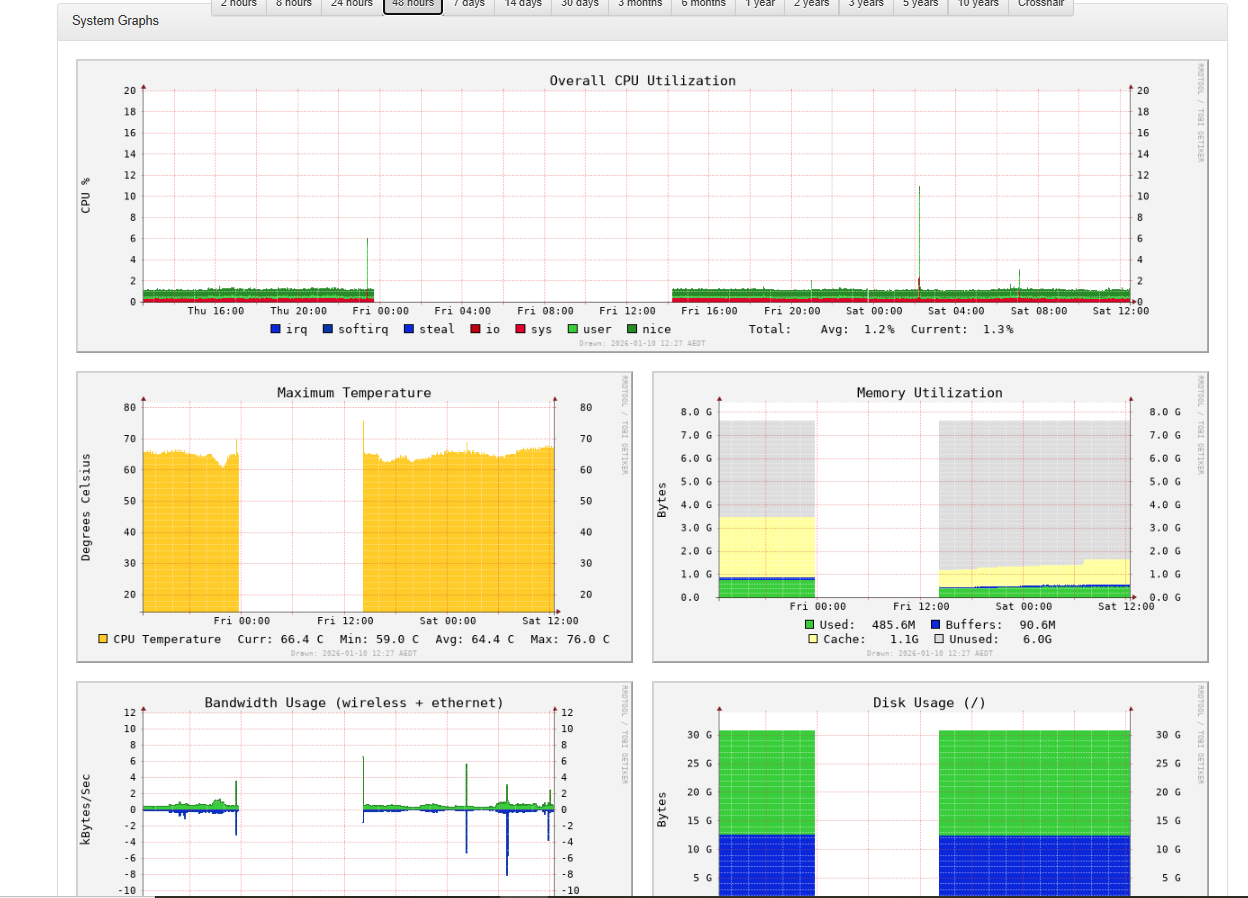
no issues, then, yesterday, looking at mygraphs1090, I’ve noticed an outage ? as though RPI powered OFF, then several hours later, came on???

what could be the issue, how to trouble shoot or investigate ?

could it be power supply? mains p/s Multicomp Pro 5.1V 3A 15.3W

red LED steady ON

last 48 hours graphs
htop

0[ 0.0%] Tasks: 51, 67 thr, 140 kthr; 1 running
1[| 0.7%] Load average: 0.00 0.02 0.00
2[|| 2.0%] Uptime: 22:43:08
3[ 0.0%]

Mem[||||||||||||| 490M/7.64G]
Swp[ 0K/2.00G]

@rpi1:~ $ df -h /boot
Filesystem Size Used Avail Use% Mounted on
/dev/mmcblk0p2 29G 11G 17G 38% /
@rpi1:~ $ journalctl -b -p 3
Jan 09 14:10:07 rpi1 systemd-modules-load[323]: Failed to find module 'tls'
Jan 09 14:10:08 rpi1 systemd-udevd[379]: /usr/lib/udev/rules.d/90-alsa-restore.rules:18 GOTO="alsa_restore_std" has no >
Jan 09 14:10:08 rpi1 systemd-udevd[379]: /usr/lib/udev/rules.d/90-alsa-restore.rules:22 GOTO="alsa_restore_std" has no >
Jan 09 14:10:09 rpi1 blkmapd[617]: open pipe file /run/rpc_pipefs/nfs/blocklayout failed: No such file or directory
Jan 09 14:10:12 rpi1 bluetoothd[644]: Failed to set mode: Failed (0x03)
@rpi1:~ $ journalctl -b -1 -p 3
Specifying boot ID or boot offset has no effect, no persistent journal was found.
@rpi1:~ $ uname -a
Linux rpi1 6.12.62+rpt-rpi-v8 #1 SMP PREEMPT Debian 1:6.12.62-1+rpt1 (2025-12-18) aarch64 GNU/Linux

@rpi1:~ $ vcgencmd get_throttled
throttled=0x0
@rpi1:/var/log $ ls -al boot*
-rw------- 1 root root 0 Jan 10 00:02 boot.log
-rw------- 1 root root 21602 Jan 10 00:02 boot.log.1
-rw------- 1 root root 21456 Dec 24 11:09 boot.log.2
-rw------- 1 root root 153144 Dec 23 00:24 boot.log.3
-rw------- 1 root root 132554 Dec 22 00:50 boot.log.4
-rw-r--r-- 1 root root 0 Dec 5 01:55 bootstrap.log

@rpi1:/var/log $ last -x
-bash: last: command not found
@rpi1:/var/log $ uptime -p
up 23 hours, 4 minutes

update:

I think the unit just reboots - but, I loose the graph data since midnight, hence big gap in graph…

nonetheless, how to try to figure out what’s causing crash/reboot..

If the unit is actually rebooting then you should see something in the boot logs.

You can list the boots with a sudo journalctl --list-boots and the most recent boots will be at the bottom. You can also use dmesg to list any messages.

This post shows a script to check on power issues, sometimes it's the supply, sometimes it's the USB cable.

You can also check the /var/log/pihole/FTL.log file to see if there are any log entries for shutting down FTL, any commanded shutdown will be logged.

2 Likes

Dan,

thanks!

this RPI has been in use for about 2 years (with earlier Debian builds), never any problems, first such issue, couple of weeks after new install of Trixie

anyhow, couple of days ago, there was a new update to Trixie, 13.3 - I guess I’ll wait and see if..

@rpi1:~ $ sudo journalctl --list-boots
IDX BOOT ID FIRST ENTRY LAST ENTRY
0 5229d36e5ee546f6987454ae0cd29c66 Tue 2026-01-13 11:45:50 AEDT Thu 2026-01-15 09:52:30 AEDT
voytek@rpi1:~ $

I guess update to 13.3 started new ?

don’t have earlier logs anymore, it was 10th or 9th Jan:

-rw-r----- 1 pihole pihole 2706 Jan 15 08:56 FTL.log
-rw-r----- 1 pihole pihole 7474 Jan 15 00:00 FTL.log.1
-rw-r----- 1 pihole pihole 3619 Jan 14 00:00 FTL.log.2.gz
-rw-r----- 1 pihole pihole 906 Jan 13 00:00 FTL.log.3.gz

hmm:

@rpi1:/var/log/pihole $ sudo dmesg | grep Under | wc
44 244 2308

@rpi1:/var/log/pihole $ sudo dmesg | grep Under
[ 19.395314] hwmon hwmon1: Undervoltage detected!
[ 2628.109242] hwmon hwmon1: Undervoltage detected!
[ 4730.832776] hwmon hwmon1: Undervoltage detected!
[ 4861.875104] hwmon hwmon1: Undervoltage detected!
[ 4873.971266] hwmon hwmon1: Undervoltage detected!
…..
[151055.403900] hwmon hwmon1: Undervoltage detected!
[151250.957701] hwmon hwmon1: Undervoltage detected!
[155571.285528] hwmon hwmon1: Undervoltage detected!
[155583.381610] hwmon hwmon1: Undervoltage detected!
@rpi1:/var/log/pihole $

so maybe my power pack has issues ?

I’ll check the link you’ve posted, thanks!

@rpi1:/usr/bin $ pistatus

Power has previously been Under Voltage
CPU has previously been Throttled

(meanwhile, last night, big electrical storm, my other RPI (on PoE) failed - seem PoE switch totally zapped, tried another, no go, though, when plugged into USB power RPI booted (with noisy buzz ? after disconnected PoE board buzz gone) unit working on mains plug pack OK.)

thanks again!

Yes.
Fix quickly or you'll run the risk of the filesystem getting corrupted and you can start over again:

https://www.raspberrypi.com/documentation/computers/raspberry-pi.html#power-supply-warnings

You can check --since yesterday for voltage messages with below:

sudo journalctl --full --no-hostname --no-pager --grep voltage --since yesterday

thanks again, guys!

been running off a different power supply, no issues… BUT… hmmm, maybe I’ve stuffed up to start with…

this RPI has a ‘Power HAT PCB’ ‘19’, just looking at instruction page: Power HAT PCB has a USB-C input socket above RPI USB-C input socket - I think power supply was plugged into RPI, the instruction page shows NOT to use RPI USB-C but to use USB-C on Power HAT PCB…?

..

(actually, I think it’s just to deal with the power switch on the case…)

Something to note that I discovered yesterday about Raspberry Pi OS ‘trixie’, which made some debugging a challenge. The default for the journal is now volatile. The journal is only keep in RAM and lost between boots (Trixie: Storage in journal is now "volatile"). Using raspi-configcan restore the persistent configuration.

1 Like

Thanks for the heads up!
Annoying though when diagnosing.

$ man journald.conf
[..]
OPTIONS
       All options are configured in the [Journal] section:

       Storage=
           Controls where to store journal data. One of "volatile",
           "persistent", "auto" and "none". If "volatile", journal log
           data will be stored only in memory, i.e. below the
           /run/log/journal hierarchy (which is created if needed). If
           "persistent", data will be stored preferably on disk, i.e.
           below the /var/log/journal hierarchy (which is created if
           needed), with a fallback to /run/log/journal (which is created
           if needed), during early boot and if the disk is not writable.
           "auto" behaves like "persistent" if the /var/log/journal
           directory exists, and "volatile" otherwise (the existence of
           the directory controls the storage mode).  "none" turns off all
           storage, all log data received will be dropped (but forwarding
           to other targets, such as the console, the kernel log buffer,
           or a syslog socket will still work). Defaults to "auto" in the
           default journal namespace, and "persistent" in all others.

           Note that journald will initially use volatile storage, until a
           call to journalctl --flush (or sending SIGUSR1 to journald)
           will cause it to switch to persistent logging (under the
           conditions mentioned above). This is done automatically on boot
           via "systemd-journal-flush.service".

           Note that when this option is changed to "volatile", existing
           persistent data is not removed. In the other direction,
           journalctl(1) with the --flush option may be used to move
           volatile data to persistent storage.

           When journal namespacing (see LogNamespace= in systemd.exec(5))
           is used, setting Storage= to "volatile" or "auto" will not have
           an effect on the creation of the per-namespace logs directory
           in /var/log/journal/, as the systemd-journald@.service service
           file by default carries LogsDirectory=. To turn that off, add a
           unit file drop-in file that sets LogsDirectory= to an empty
           string.

Seems this was changed with Bookworm already.

Buster:

$ lsb_release -d
Description:    Raspbian GNU/Linux 10 (buster)
$ systemd-analyze --no-pager cat-config systemd/journald.conf
[..]
# Entries in this file show the compile time defaults.
# You can change settings by editing this file.
# Defaults can be restored by simply deleting this file.
#
# See journald.conf(5) for details.

[Journal]
#Storage=auto

Bookworm:

$ lsb_release -d
Description:    Raspbian GNU/Linux 12 (bookworm)
$ systemd-analyze --no-pager cat-config systemd/journald.conf
[..]
[Journal]
Storage=volatile

I don’t want to be “That guy” but the more and more I think about it I am seriously considering not using any kind of Raspberry Pi anymore for stuff that needs to be available 24/7 like Pi-Hole and many other things…

Why ?!

Well…

Some time ago I started using my good old Intel NUC 2820 FYKH again and then you start to notice certain things :

  • Gosh… How to nice to simply have a Power On/Off button that just works!
  • Just inserting a simple cheap WD Green SATA SSD that’s 120/240 GB in size instead of messing around with microSDXC cards that are really not meant to be anything other than mass storage isn’t a bad improvement either!
  • And the adapter of the NUC is simply made for the whole damn thing without having to worry if you do or do not have too many things attached to it…
  • Not having to deal with that weird RaspBian/Raspberry Pi OS that gets weirder and weirder with every release and just use regular Debian instead is “THE :cherries: ON TOP!” of all of this :grimacing:

So…

Think about doing something similar if all this stuff is giving you all kinds of unnecessary issues and you want something that simply does what you want without having to care for it constantly like a little fragile baby :wink: