[RELEASE] Pi-hole HA — automatic DHCP failover, VIP, and config sync for a Pi-hole cluster
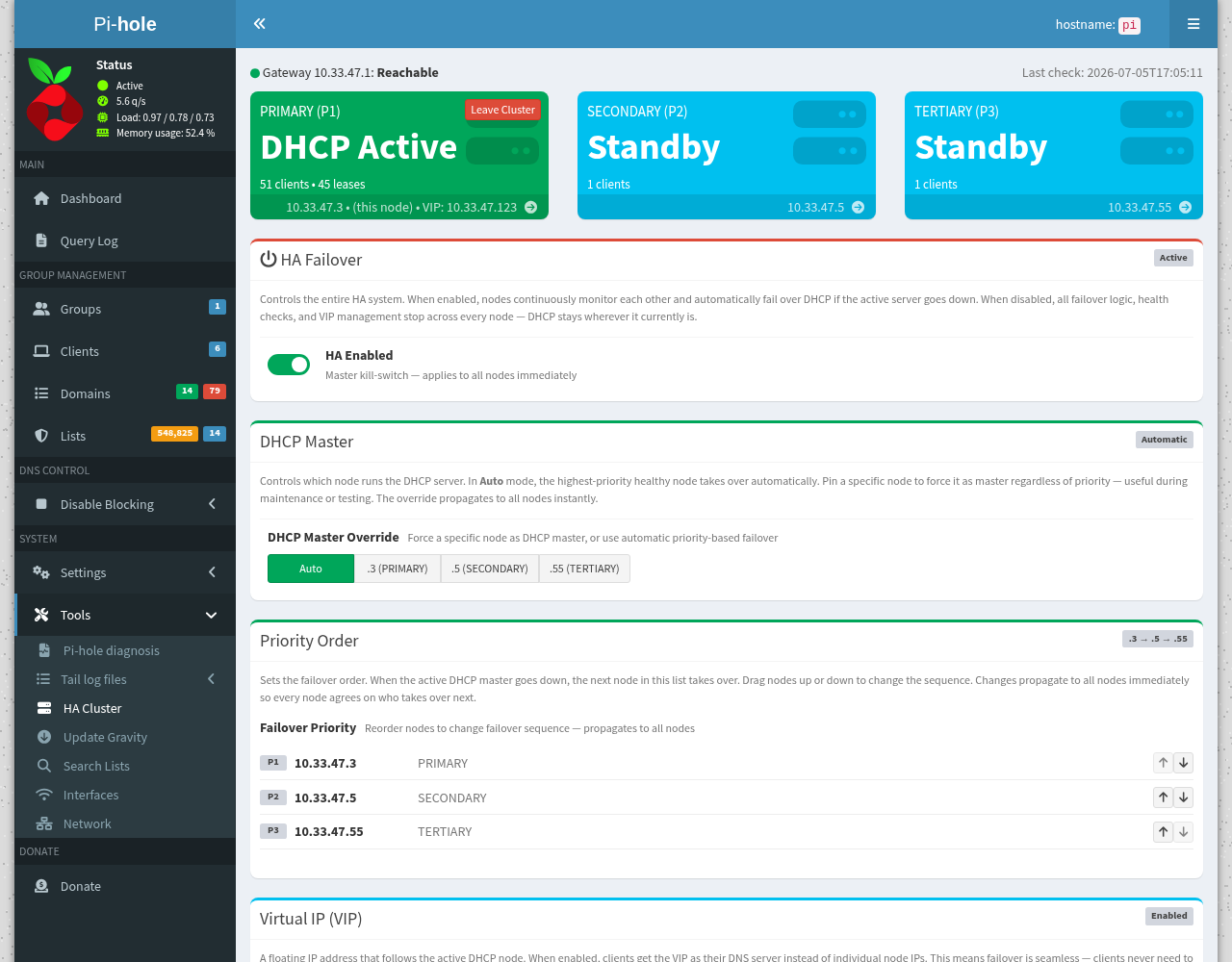
Pi-hole HA — automatic DHCP failover, VIP, and config sync for a Pi-hole cluster

If you run more than one Pi-hole for redundancy, you've probably hit the two annoying gaps: only one of them can serve DHCP at a time, and keeping their blocklists / settings in sync is a manual chore. Pi-hole HA solves both.

It turns two or more Pi-holes into a small cluster that talks to itself over HTTP (no SSH keys, no external services): if the active node dies, a standby takes over DHCP automatically, and every node's config stays in sync.

Repo: GitHub - RamSet/pihole-ha-cluster: Pi-hole DHCP high-availability cluster: automatic failover, VIP, and config sync · GitHub · Apache-2.0 · bare-metal (systemd) or Docker sidecar


"But I use my router for DHCP" — read this first

Not everyone lets Pi-hole run DHCP, so the installer auto-detects your setup and installs to match. It will never turn on Pi-hole DHCP behind your back.

  • DHCP-HA modePi-hole is your DHCP server. Full failover: a standby takes over DHCP if the primary dies, with an optional floating VIP.
  • DNS-only modeyour router or another box does DHCP. Pi-hole HA never touches DHCP; it just keeps your Pi-holes' config in sync and monitors peer health — redundant DNS without any DHCP failover.

At install it checks whether Pi-hole DHCP is active, probes the LAN for another DHCP server, inherits the mode from the cluster when joining one, and asks if it's ambiguous (defaulting to the safe DNS-only).


What it does

  • DHCP failover — if the primary goes down, a secondary takes over DHCP in ~40–80 s and yields back when the primary returns. Clients never lose their lease.
  • Virtual IP (VIP) — optional floating IP that follows the active DHCP node, so clients can use one stable DNS/DHCP address that survives failover.
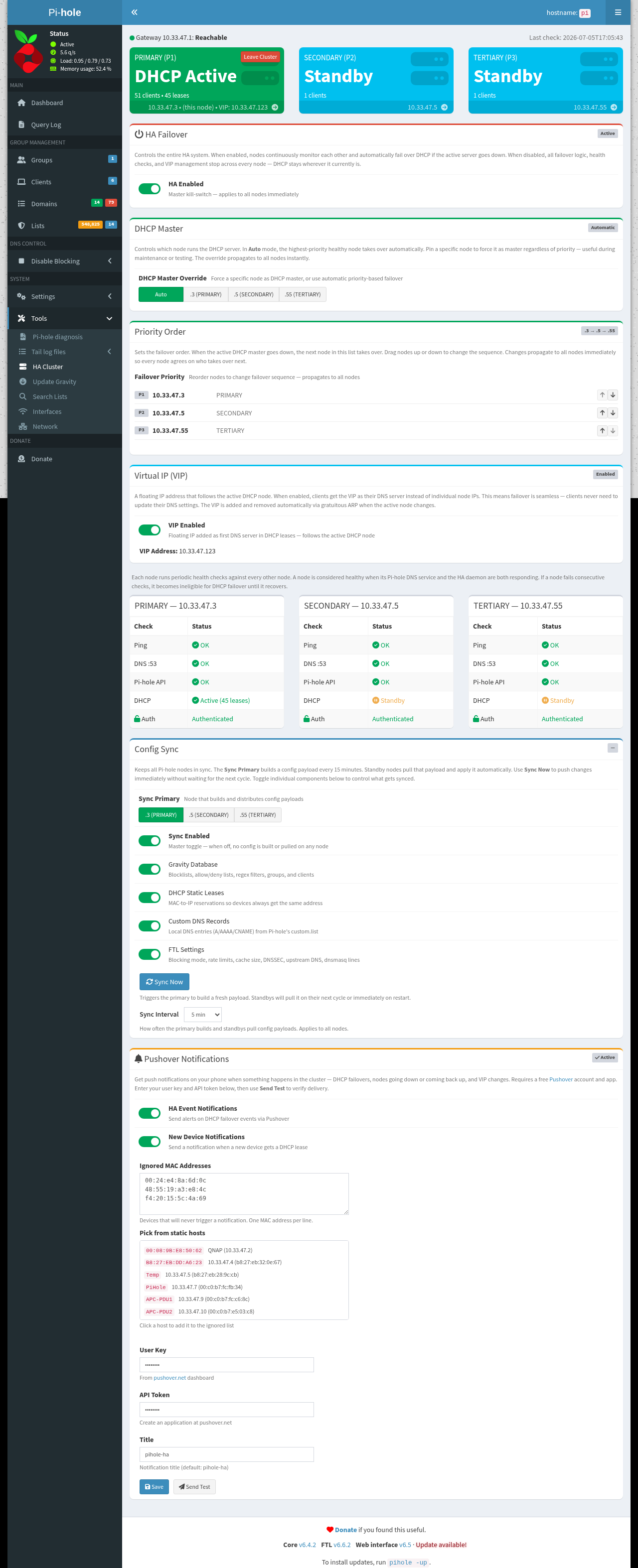
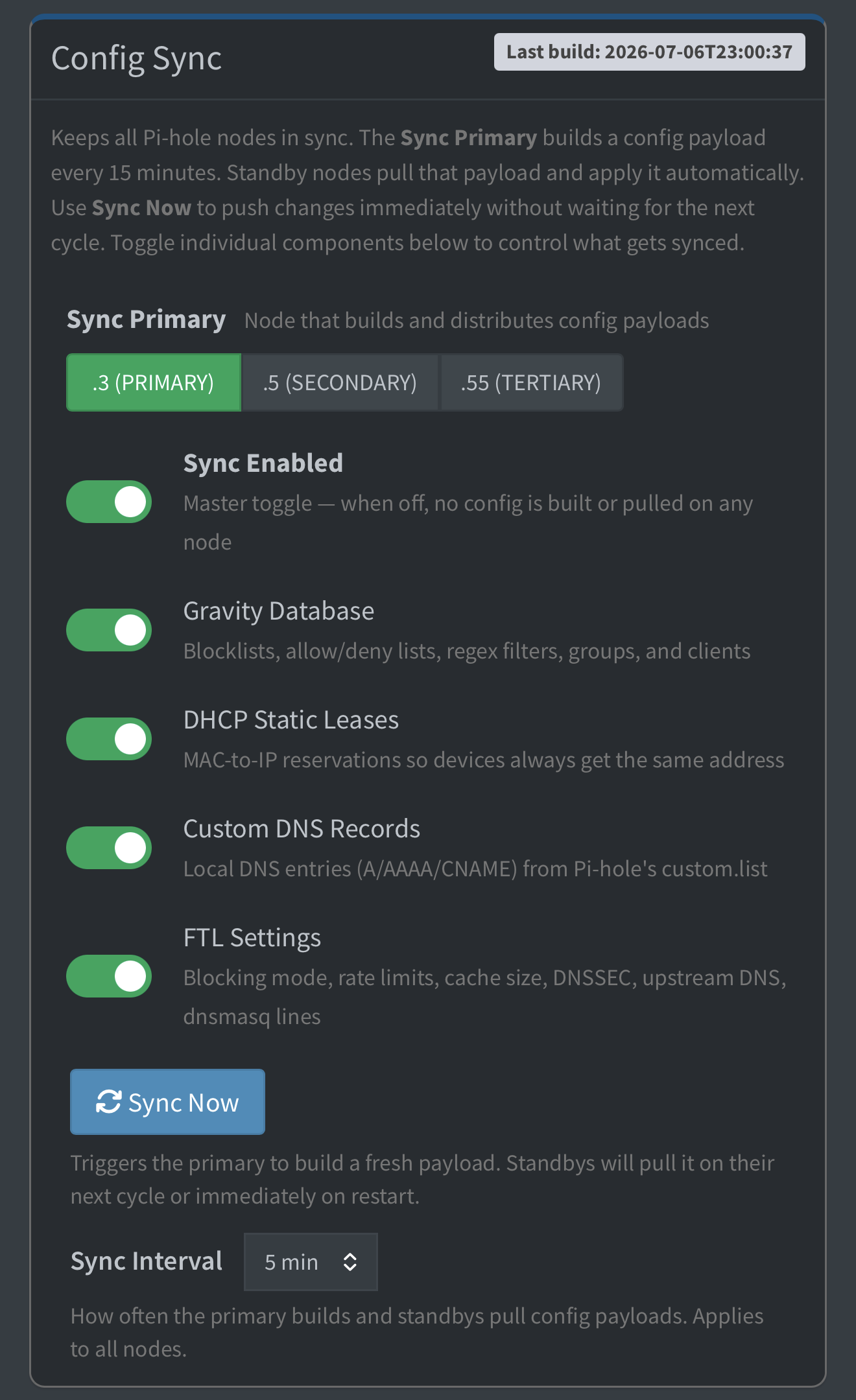
  • Config sync — the primary bundles gravity DB (blocklists/adlists), DHCP static leases, custom DNS records, and FTL settings, and only rebuilds it when something actually changes. Standbys check the primary every ~15 min and pull + apply only when the config changed (plus an on-demand “Sync Now” button) — nothing transfers or restarts on unchanged data.
  • Manual master override — force any node to be the DHCP server with one click; the others yield.
  • HA kill-switch — disable all failover/VIP management cluster-wide with one toggle.
  • Web UI — a native panel inside the Pi-hole admin interface (Tools → HA Cluster), no separate app.
  • Join/leave — nodes register themselves on install; a "Leave Cluster" button removes them from all peers.
  • Optional Pushover alerts on failover events.
  • Mixed clusters — nodes can run on different Pi-hole web ports (e.g. bare-metal on :80 next to Docker on :8081).

How it works (so you know exactly what it touches)

Each node runs a small bash daemon plus a tiny socat-based JSON API on port 8887. Nodes health-check each other (ping / DNS / API / DHCP) and elect a DHCP master by priority order.

To be transparent, it uses Pi-hole's own interfaces — nothing forked or patched:

  • pihole-FTL --config … to read/set DHCP state and DNS options
  • files under /etc/dnsmasq.d/ (09-pihole-ha.conf for DHCP options, an optional new-device hook) — only in DHCP-HA mode
  • a Lua page injected into /var/www/html/admin for the Tools → HA Cluster tab (auto-reinjected after Pi-hole updates)

Everything lives under /etc/pihole-ha/ and /usr/local/…, and there's a clean uninstaller.


Quick start

Run on each node (primary first):

git clone https://github.com/RamSet/pihole-ha-cluster.git pihole-ha
cd pihole-ha
sudo ./setup.sh

setup.sh auto-detects bare-metal vs Docker and runs the right installer. Update in place with sudo ./install.sh --update; remove cleanly with sudo ./install.sh --uninstall.

Requirements: Pi-hole v6+, and either systemd (bare metal) or Docker + Compose.


Screenshots

Notes

  • The bare-metal (systemd) path is the primary, well-tested deployment. The Docker sidecar is newer and less battle-tested (image builds and logic verified; the full two-container runtime hasn't been exercised as broadly) — feedback welcome.
  • It's a third-party tool, not affiliated with the Pi-hole project. It uses supported pihole-FTL --config interfaces rather than modifying Pi-hole itself, but as always: try it on a node you can afford to reinstall first.
  • Issues / PRs / ideas: please open them on GitHub.
A) Fix in the FIRST post — replace the "DNS-only mode" bullet with this:

  • DNS-only modeyour router or another box does DHCP. Pi-hole HA never touches DHCP. It keeps your Pi-holes' config in sync and monitors peer health — and if you set a VIP, it floats that IP to whichever node is actually answering DNS. Point your clients' DNS at the VIP and lookups keep working when a node dies, instead of the client stalling on a dead server the way two static DNS entries do. Real health-based DNS failover, no DHCP required.

B) New reply to post — "Update: v3.0.0"

Update — v3.0.0 is out

If you installed early, please update (instructions at the bottom).

Fixes

  • Peer passwords now save and stick. On password-protected Pi-holes the auth field could clear as you typed, and saved passwords weren't being accepted — both fixed. The panel also reads its own settings correctly now (Pushover, VIP, etc. no longer show "incomplete" on a password-protected box).
  • "API seats exceeded" fixed. The monitor was opening a new Pi-hole API session on every health check instead of reusing one, eventually using up all of Pi-hole's login slots and locking you out of the web UI. It now reuses a single session and cleans up after itself.
  • Installer no longer aborts on stock Pi OS when Docker is present but not running.
  • Docker menu fix. On the Docker image the "HA Cluster" menu link could silently fail to appear; it now installs reliably.

New

  • DNS failover for DNS-only setups. If you don't use Pi-hole for DHCP, you can now set a VIP and get real health-based DNS failover — the VIP follows whichever node is answering DNS. (Answers a common "two DNS servers isn't real failover" point — now it can be.)
  • System DNS is opt-out. The installer pins the host's own resolver to its local Pi-hole so a node always resolves during failover — but it now asks first, and if you decline it never touches your /etc/resolv.conf. Your choice survives updates.
  • Update indicator. The HA Cluster tab now shows the installed version and tells you when a newer release is available.

Update an existing install

cd pihole-ha
git pull
sudo ./install.sh --update

Your config and cluster membership (including the DNS-pin choice) are left untouched.

Is there an option to sync only when something has been changed in the configuration and not sync every 15 minutes to avoid unnecessary writes to the microSDXC card ?

Also : Manual 'Force Sync' button ?

The sync check happens every 15 minutes. There is no sync happening at all if the data stays the same. It only syncs when it needs to or manually, on demand when Sync Now is pressed.

(I corrected the wording - Thank you)

On the DNS not resolving after failover:

  • cd pihole-ha
  • git pull && sudo ./install.sh --update*
  • sudo pihole-ha-debug > ha.txt # then paste ha.txt here (secrets are auto-redacted)*

In the meantime, in Pi-hole → Settings → DNS → Interface settings, set it to “Listen on all interfaces” (or pihole-FTL --config dns.listeningMode ALL), then re-test failover. That’s the difference between my working setup and, I suspect, yours.

On “Could not register with any existing nodes”: that fires when the new node can’t reach the existing node’s cluster API (:8887) to register — most often because the primary has a Pi-hole admin password set, so the join needs authentication. Since your primary already shows both nodes, membership sorted itself out, so it’s likely harmless — but if the secondary’s health table shows the primary as “Locked,” enter the primary’s Pi-hole password there so the two can talk fully. The pihole-ha-debug output will show whether the peers can reach each other (/api/status -> 200).

Are you able to configure which parts of the config sync and which don't like in nebula sync?

Awesome looking project. Thanks for sharing!

I’m not familiar with nebula sync… but yes. It does allow selecting:

BUT, in a HA deployment though, the nodes should be identical …

PERFECT! :grimacing::+1::+1:

Hi RamSet,

I've been looking for a native way to replace nebula-sync for some time, and this project looks incredibly promising! I am curious if it will support my specific dual-platform layout.

My topology consists of:

  • Primary node: A Proxmox LXC container (originally deployed using community helper scripts).
  • Secondary node: A Synology NAS running inside Docker via Container Manager.

Both environments are also running Unbound. Getting everything to cooperate on the Synology side was quite complex because of Synology’s default container isolation. I ended up implementing a macvlan driver network, mapping an interface bridge, and relying on a custom startup script at NAS boot time just so the host and containers could route traffic to one another properly.

Before I begin tearing things down and unwinding my old configurations to test this out, I had a couple of quick questions:

  1. Deployment footprint: For the Synology/Docker node, does the HA component run as a sidecar container sharing the same volume paths/mounts as the official Pi-hole container?
  2. Macvlan compatibility: Does the HA cluster heartbeat mechanism or Virtual IP (VIP) configuration face any known routing issues when a node is bound to a macvlan network interface?

I appreciate your work on this; it would be amazing to finally move away from cron-based syncing scripts!

The Docker path is only tested with network_mode: host on both containers, and macvlan fights with that lol. But you're coming from nebula-sync so you want config sync, not DHCP failover — and that part's totally doable.

1. Footprint on the Synology node

It's a sidecar, doesn't touch/replace your Pi-hole container. It just rides alongside it:

  • Shares the same /etc/pihole and /etc/dnsmasq.d volumes as the official container (they're external: true in my compose, so it hooks into your existing Pi-hole volumes, doesn't make new ones).
  • Shares Pi-hole's PID namespace (pid: "service:pihole") so it can poke pihole-FTL to hot-reload config without bouncing it.
  • Everything goes through pihole-FTL --config — supported interface, no fork, no custom image.

So on the NAS you'd just have your Pi-hole container + a little pihole-ha sidecar next to it. Its own state lives in separate volumes.

2. macvlan + heartbeat/VIP

Host mode and macvlan can't coexist, so your macvlan node isn't a copy-paste. Two separate things though:

Heartbeat / sync (:8887) — that's literally just HTTP between nodes, doesn't need host mode. And the macvlan "host can't reach its own container" thing that made you do the bridge + boot-script dance? Doesn't bite here, because your two nodes are different physical boxes — a macvlan container talking to another host on the LAN is fine. You'd just run the sidecar inside Pi-hole's netns instead of host:

pihole-ha:
  network_mode: "service:pihole"   # ride Pi-hole's macvlan IP
  pid: "service:pihole"

Then the dash binds on Pi-hole’s macvlan IP:8887 and the Proxmox node reaches it normally. I haven’t actually run this exact combo, so you’d be the guinea pig lol. Sound in theory.

VIP — this is the part I’d just skip on macvlan. It floats the IP with an alias + gratuitous ARP on the interface, and on a macvlan sub-iface (on Synology especially) that’s flaky and I haven’t validated it. Just point clients at both node IPs and move on.

The actual good news

You want sync, not failover. Install DNS-only mode (router does DHCP, you’ve got Unbound already) with the VIP off. In that mode it never touches DHCP and needs no broadcast/VIP — which is the entire reason host networking is “required.”

Kill that and you’re left with config sync over :8887, which is the macvlan-friendly bit. Change-gated, HMAC-signed, no cron, no SSH keys.

So: LXC primary is a normal LAN host, just works. Synology/macvlan node should be fine for DNS-only sync with that service:pihole tweak and no VIP — untested by me, so if you try it I actually want to hear how it goes and I’ll help you debug. Just don’t count on VIP/DHCP failover on the macvlan side.

Long story short, you should be able to give this a test run, just make sure that you disable nebula-sync.

This project is additive, the sidecar rides alongside Pi-hole.

One thing to be aware of:

Once sync is on, the node you pick as primary becomes source of truth and the other node’s gravity.db / custom DNS / DHCP-hosts / FTL settings get overwritten to match on the first pull. There’s no dry-run mode.

See if it flows properly, errors out, hiccups and let me know so that we can tackle it properly. I’m a QNAP guy but i know a lot of users use Synology.

Hi there,

I just wanted to say thankyou for this amazing project. Everything has been working really well!.

Can you point me to change log updates? Or can you provide me with what was changed this update? It would be nice to know if there are functional changes / updates.

Thankyou!

This was a 6 month old project that initially was private.

I have not posted change history into the now public repo. I’ll put something together from the commit messages i have in the private repos. I’ll let you know ow when the development history is available.

Oh! Thankyou for bringing it public. You dont have to, but just nice to know what happens in updates. Thankyou so much for this project.

Here you go.

Change log now available