Pi-Hole query log / dashboard shows local network hostnames as set in /etc/hosts. This is for the host Pi-Hole is running on itself.
Actual Behaviour:
Pi-Hole host itself is shown as “pi.hole” instead of the hostname set in /etc/hosts.
That I see other client hostnames not explicitly defined in https://pi.hole/admin/settings/dnsrecords with strange hostnames like notebook.photosync instead of notebook.fritz.boxis another story and potentially (did not fully track this down) related to Pi-Hole reports wrong name for local network devices - so maybe a FRITZ!Box router thing. To be clear: this is not related to the core point here, Pi-Hole ignoring content from /etc/hosts.
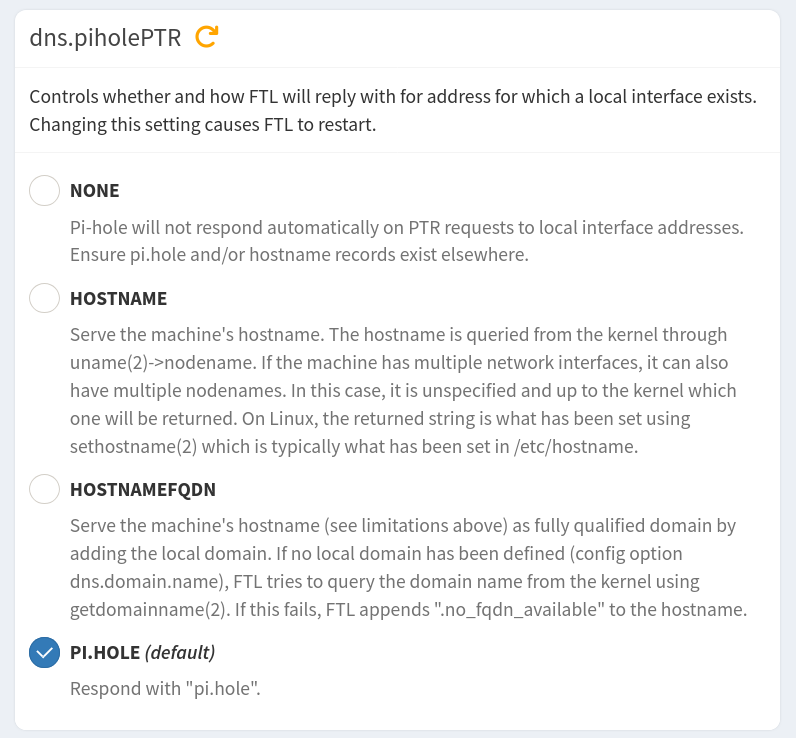
I can probably help you out for the Pi-hole identifying itself as pi.hole. The setting you are looking for is dns.pihole-PTR (under settings->expert->all settings-> DNS tab):
Given that the name for an apple-centric app is showing up like that my first suspicion if it is not the router itself causing it, would be interference somehow from from mDNS/bonjour. So if you can't figure out on the router what's happening, that may be a direction to pursue.
Great, thank you very much. Changing this to HOSTNAME indeed seems to recover my expected, v5 behavior.
Right before changing: client was „pi.hole“, right after changing two log entries with the IP from host, then nicely with the hostname.
I will monitor it for a while but tend to say: solved. Great. So many (new) config options, did not spot that one before. Seems like I should have had much more looks to default settings as the previous behavior clearly wasn’t migrated when upgrading from v5 to v6.
So the remaining part is the one for crazy client hostnames as mentioned in the OP - maybe off-topic, waiting for team member feedback.
In this specific case (1 client) it’s a Windows application running on a Windows client. I need to know how to check/sort out where those strange FQDNs/suffixes originate from.
Nice you took your time to make this point. I was assuming it must be new as this behavior changed with v6, with v5 - whatever was set or not, the hostname always was used in my case.
I wrote the note above to help other users reading this topic.
Maybe other users will remember what option they used in the old pihole-FTL.conf file and make the adjustments to use the new option if Pi-hole is shows the same symptoms.
In your case, I don't know why your previous settings were not migrated when you upgraded to v6.
This is the FTL code responsible for the migration. It reads the old config file and saves the option, if found. Maybe something failed during your migration and the option used the default value.
For that one device (did not spot the other mentioned example 372XXXXX-fXXX-4XXX-bXXX-1XXXXXXXXXXX.fritz.box instead of iPad.fritz.box recently):
Directly on Pi-hole server:
nslookup [IP-of-device] fritz.box
xx.x.xxx.xxx.in-addr.arpa       name = HostName.fritz.box.
xx.x.xxx.xxx.in-addr.arpa       name = HOSTNAME.photosync.
And just FYI:
nslookup [IP-of-device] pi.hole
xx.x.xxx.xxx.in-addr.arpa       name = HOSTNAME.photosync.
xx.x.xxx.xxx.in-addr.arpa       name = HostName.fritz.box.

Authoritative answers can be found from:
Hmm, interesting... so Fritz!Box provides 2 hostnames for that IP.
In the router web interface there's only the hostname visible.
When asked directly (from a Windows client) it serves the desired one matching the FQDN. When Pi-hole asks Fritz!Box, the wrong one is served - ähm, logic?
That never was the case in the past. Maybe one should never check Pi-holes query log or top clients sections to discover such trash in host name resolution. I don't even know anymore where to look at (who to blame) exactly.
Is it the endpoint (why does one application like PhotoSync override the hostname)
Why is the router picking up two hostnames
Why is Pi-hole using exactly the faulty / undesired one
That's been the case at least since ~2019, then prompting me to create dedicated entries for my devices in Pi-hole, as I simply disliked names as android-38967b82fa5effbe.fritz.box too much.
I even recall one or another odd report where an old name for a long-gone device would show up for an IP, just because it was once registered in the Fritzbox for that IP.
You mean to ask "Why is Windows nslookup only returning one name?"
Pi-hole is serving both names, as your output demonstrates:
When piecing together the information collected in this thread, I'd be tempted to think that your client software announces a *.photosync name via mDNS for the machine it runs on, lacking the standard .local TLD, and your router may then have picked that up as a name and registered a DNS record for it.
So then why do I only see the HOSTNAME.photosync all over the Pi-hole web interface?
Exactly. Like I mentioned with the crazy iPad hostname few posts earlier. The downside is: that way I'd need to set static IPs for (all my (sick in terms of hostname presentation is faulty in Pi-hole)) clients and manually maintain https://pi.hole/admin/settings/dnsrecords - which is a bit overkill with all that manual maintenance. I'm doing this for certain hosts (mainly server/infrastructure/IoT devices), but clients always were fine until 2025. I really don't want to teach Pi-hole manually (to override its own freaky source for hostnames ^^) what my router already knows.
nslookup [IP-of-another-client] pi.hole
Server:  pi.hole
Address:  xxx.xxx.xxx.xxx

Name:    xn--shelly-hostname-ab-room-function-ohd.fritz.box # absolutely no freaking idea where "xn--" and "-ohd" is coming from (the other parts are mainly matching the actual hostname)
Address:  xxx.xxx.x.xx


nslookup [IP-of-another-client] fritz.box
Server:  fritz.box
Address:  xxx.xxx.xxx.xxx

Name:    Shelly-Hostname-Also-Just-Fine-As-Configured-In-Router.fritz.box
Address:  xxx.xxx.x.xx
So a shelly device has pretty much nothing in common with Amazon devices. And the second example... zero idea where that creative hostname is coming from.
Edit: I think it's the FRITZ!Box router which seems to maintain some kind of history of previous hostnames.
Doing the nslookup [ip-of-devices] pi.hole|fritz.box on the Pi-hole server I get responses with partly 4 hostnames where only one is the correct, final one - while the other 3 are historic or crazy.
Interestingly (and if relevant at all), nslookup [ip-of-devices] fritz.box always has the correct (currently set, final/last) hostname in the first line, while nslookup [ip-of-devices] pi.hole has exactly NOT that line at first but chooses one of the crazy or historic ones.
So why does
a) FRITZ! not trash out those old hostnames but still serve them?
b) Pi-Hole pick the wrong responses for many hostnames?
Overall for a minority (but a very annoying one) of hostnames I simply can't trust Pi-hole's web interface.