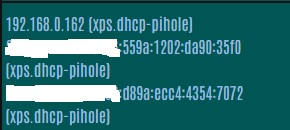
Clients with a .local domain name appear with the .dhcp-pihole value that I coded in Pi-Hole's DNS.DOMAIN.NAME

Please follow the below template, it will help us to help you!

Pi-Hole is v6 running natively on a Raspberry Pi 4.

I have clients with both IPv6 and IPv4 addresses. IPv4 addresses are allocated on Pi-Hole either statically or via Pi-Hole DHCP. IPv6 are allocated by the client and using multicast DNS. IPv4 DHCP assigns a DNS Domain name of .dhcp-pihole specified by me in Pi-Hole. IPv6 addresses are, via multicast DNS, assigned a Domain name of .local.

This topic may be related to 83995

Thankyou for reading this.

Expected Behaviour:

I would hope that the Pi-Hole dashboard client activity would show the correct Domain names.

Actual Behaviour:

Both the IPv4 and the IPv6 clients appear on the dashboard’s client activity with the IPv4 Domain name. So I see e.g. XPS.dhcp-pihole and XPS.dhcp-pihole instead of XPS.dhcp-pihole and XPS.local.

Debug Token:

https://tricorder.pi-hole.net/h59wy2F4/

Pi-hole is showing the correct domain names.
You should never see any .local DNS requests in Pi-hole's Query Log.

.local is reserved for mDNS protocol usage.
Unless .local is (mistakenly) used as local domain for DNS, clients would strictly resort to mDNS for resolving DNS names ending in .local.

IPv6 addresses may be assigned via several methods, but mDNS is not one of them.

No.
Rather, an mDNS capable client will claim a name for itself, and it does so for its machine's IPv4 as well as IPv6 addresses. Other (same link) mDNS clients can then retrieve name/IP information via mDNS multicasts.

Thanks Bucking_Horn for the education. My first sentence that you corrected would have been better written “IPv6 are allocated by the client and IPv6 is using mDNS”.

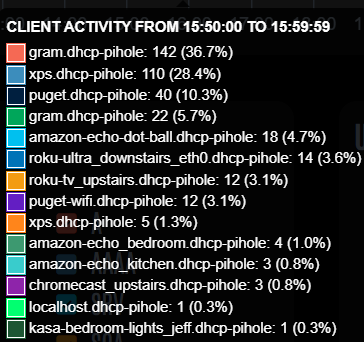
I see my IPv6 capable devices in Pi-Hole as .local (from mDNS). I’d provide an image but I don’t see how to attach one here, so here’s a text version.

CLIENT ACTIVITY FROM 15:50:00 TO 15:59:59
gram.dhcp-pihole: 142 (36.7%)
xps.dhcp-pihole: 110 (28.4%)
puget.dhcp-pihole: 40 (10.3%)
gram.dhcp-pihole: 22 (5.7%)
amazon-echo-dot-ball.dhcp-pihole: 18 (4.7%)
roku-ultra_downstairs_eth0.dhcp-pihole: 14 (3.6%)
roku-tv_upstairs.dhcp-pihole: 12 (3.1%)
puget-wifi.dhcp-pihole: 12 (3.1%)
xps.dhcp-pihole: 5(1.3%)
amazon-echo_bedroom.dhcp-pihole: 4 (1.0%)
amazon-echo_kitchen.dhcp-pihole: 3 (0.8%)
chromecast_upstairs.dhcp-pihole: 3 (0.8%)
localhost.dhcp-pihole: 1 (0.3%)
kasa-bedroom-lights_jeff.dhcp-pihole: 1 (0.3%)

You’ll see there are a couple of clients in there twice. Both clients have IPv4 and IPv6. I show the results from some pings.

ping -n 1 xps

Pinging xps.dhcp-pihole [192.168.0.162] with 32 bytes of data:
Reply from 192.168.0.162: bytes=32 time=50ms TTL=128

ping -n 1 xps.local

Pinging XPS.local [fe80::a280:4576:c5f8:103c%10] with 32 bytes of data:
Reply from fe80::a280:4576:c5f8:103c%10: time=6ms

So, both domain names exist on my network but when Pi-Hole displays them it overrides the .local with dhcp-pihole which, while hardly a major problem, seems to be a bit of a glitch.

Thanks again.

Jeff

In this forum, you can just copy and paste images into your post. :wink:

On a side note: What's the 1 for in that command? What OS's ping are you using?

ping uses several means to resolve hostnames, not just DNS (which also is why ping is not a good tool for analysing DNS issues).
As .local is reserved for mDNS usage, your above command would have used mDNS. Consequently, there wouldn't be any DNS request for xps.local registering in Pi-hole's Query Log for that command.

And as mentioned, mDNS would use IPv4 as well as IPv6, e.g. on Linux, try ping -4 xps.local.

No, Pi-hole doesn't override anything.

The .local names may exist, but they would not be tied to DNS.
As mentioned, they are reserved for mDNS usage, which is designed to allow local hostname resolution in the absence of a DNS server.
Pi-hole is not involved in mDNS.

As explained already:

Hi Bucking_Horn,

You asked what the ‘1’ was for in the ping command. It, combined with the -n, is the number of times to issue the ping. The default is three. The OS in question is Windows 11.

Given all the kind help you’ve provided I don’t want to belabour the point but how can I improve the display in Pi-Hole so that I don’t see duplicate entries. In some way I should see the IPv6 entry (.local) differently from the IPv4 entry (.dhcp-pihole). In the display below you’ll see the duplicate entries (gram & xps) that I refer to.

Thanks again.

Jeff

Thank you.
Windows ping options do indeed differ from Linux, where -n would mean numeric output only and not accept a parameter.

No, as mentioned for the third time, .local is completely unrelated to DNS. mDNS is a separate protocol, and it applies to IPv4 as well as IPv6.

It seems you are wrongly assuming Pi-hole would use mDNS names, and you are wrongly assuming that your .local names would apply to IPv6 only.

You will never see .local appearing in your Pi-hole's Query Log (assuming your network makes correct use of mDNS, and you don't deliberately send requests for such a domain).

And there will be IPv4 as well as IPv6 addresses associated with your xps.local name - check ping -4 xps.local vs. ping -6 xps.local.

But again: That resolution happens completely independent from DNS in general and Pi-hole in specific.

Now, that's different from expecting to see xps.local as client name for a DNS request originating from an IPv6 address.

A DNS request does not contain the requester's hostname, it carries only the requester's source IP (as that's where the reply should go to).
Instead of displaying the original IP in its Query Log, Pi-hole can augment readability by displaying the hostname associated with an IP.

While this would allow to associate a name to an entry in the Query Log, this may produce multiple entries of the same name in statistics that would aggregate by source IP, like the one you've observed.

The interesting question for your case is why any client would send queries to Pi-hole originating from an IPv6 address at all.

Your debug log shows that your router advertises two public IPv6 DNS server addresses:

*** [ DIAGNOSING ]: Discovering active DHCP servers (takes 6 seconds)
   Scanning all your interfaces for DHCP servers and IPv6 routers
   Timeout: 6 seconds

   * Received 96 bytes from fe80::<redacted> @ eth0
     (…)
     Recursive DNS server 1/2: 2620:119:35::123
     Recursive DNS server 2/2: 2620:119:53::123
     DNS server lifetime:900 sec
     Source link-layer address: <redacted>

While there is no sign of your Pi-hole's host machine's IPv6 address, this poses a more serious problem, as it would allow your IPv6-capable clients to by-pass Pi-hole completely.

You should reconfigure your (TP-Link?) router to not advertise IPv6 DNS server addresses.

But that still leaves the question:
How did your clients named xps and gram get to know your Pi-hole host machine's IPv6 address? Did you perhaps manually configure them to use it?

Hi Bucking_Horn,

You are a patient explainer and I'm sorry to be slow to change my thinking. I'm getting old.

(1) I issued the ping -4 XPS.local vs ping -6 XPS.local and indeed saw the expected IPv4 vs IPv6 addresses for XPS. I also issued Resolve-DNSName xps.local (Resolve-DNSName is Powershell's newer NSLookup) and got back

Name Type TTL Section IPAddress


XPS AAAA 1200 Question fe80::a280:4576:c5f8:103c
XPS AAAA 1200 Question wwww:xxxx:yyyy:zzzz:8353:3579:9b3f:7bc3
XPS AAAA 1200 Question wwww:xxxx:yyyy:zzzz:258b:c806:ce49:6d55
XPS A 1200 Question 192.168.0.162

Which also indicates that mDNS contains both IPv6 and IPv4.

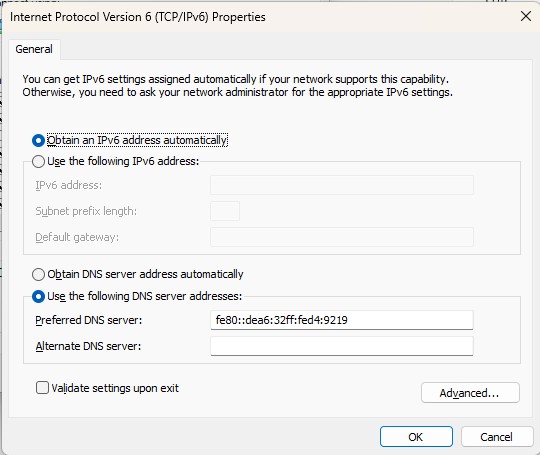
(2) You requested that I reconfigure my router to not advertise IPv6 Server DNS addresses. Well, I tried, by deleting those addresses, and received the response ‘This field is required’. Instead of coding the external, OpenDNS, servers at 2620:119:35::123 and 2620:119:53::123 should I therefore code the Link Local address of my Pi-Hole?

(3) You asked “How did your clients named xps and gram get to know your Pi-hole host machine's IPv6 address? Did you perhaps manually configure them to use it?” and the answer is yes, I coded it in the IPv6 settings.

Thankyou and best regards,

Jeff

Ok, that should allow you to address duplicate entries, at least where those manually configured machines are concerned.

Try to leave the Preferred DNS server field blank, or if input is required, use :: or ::1 as DNS server address.
Your WinOS should detect that address as inaccessible and treat IPv6 DNS server addresses as unassigned.
You should be able to verify this by running ipconfig /all or checking the connections's status details.

If that would work, your Windows client would send DNS requests to Pi-hole via IPv4 exclusively.

Similar would apply to clients configured via NDP Router Advertisement, if you would be able to configure your router to stop advertising IPV6 addresses for DNS, but it would seem that isn't supported by your router:

Only if you are not currently subscribing to Cisco/OpenDNS Umbrella services.

Hi Bucking_Horn,

I have, I belive, configured everything as well as possibe. I’m still getting duplicate entries in Pi-Hole Client Activity and in Pi-Hole Active Clients. I am of the opinion that this is because Windows generates IPv6 addresses ‘randomly’. See e.g. IPv6 addresses on Windows and Pi-Hole is at a loss to keep track of them.

The above is my opinion and, like my opinion about .local addresses, could be wrong.

Is there anything that can be done to help Pi-Hole keep track of changing IPv6 addresses on Windows clients? If not, that’s OK as Pi-Hole is working fine otherwise.

Thanks again for your excellent help.

Jeff

No, definitely not.
A host typically claims just one name for itself, and usually gets assigned that one.
It would be expected that DNS queries are associated with the hostname of the system that those queries originate from, regardless of the specific IP addresses the host has been using.
This is also how DNS works - imagine you had to use IP protocol specific domain names instead of just typing discourse.pi-hole.net and have the browser figure whether it can use IPv4 or IPv6 to connect to it.
You'd always had to be aware of the specific network's connectivity you are connected to, to use the correct domain name.

The best option to avoid multiple entries of the same hostname for host with an IPv4 and one or more IPv6 addresses is to not use IPv6 to talk to Pi-hole.

For those manually configured clients of yours, that should be possible by configuring no IPv6 address for DNS (or invalid/inaccessible ones if that's not possible).
(Note that this wouldn't spoil your client's IPv6 connectivity - Pi-hole would answer its requests for any domain's AAAA records, and the client can then talk to the domain via IPv6.)

Did you not succeed in configuring your Windows accordingly?

Hi Bucking_Horn,

I decided to remove IPv6 completely from my LAN to see if the duplicate entries problem disappeared. It did. Given that, although IPv6 was interesting to learn about, it didn’t seem to introduce any benefits - only complications, I think I’ll leave IPv6 off for awhile (until my curiosity turns it on again :slight_smile: ).

Thanks again very much.

Jeff