Maybe it is the installation, maybe it is the right(wrong?) set of circumstances.
Running in medium size office environment with average 110 devices: servers, user workstations, VoIP devices, and two email filters.
Average queries per day is 1.4 million.
Average q/s is around 20
three office networks resolve at another internal BIND DNS,
1.1.1.1 and 8.8.8.8 for external resolve.
Expected Behaviour:
Pihole WebUI to be responsive and respond to queries under load
Debian 12.12 on proxmox 9.0.3
Dell R720 2x E5-2640, 64GB RAM, average 24GB used.
no docker
100GB storage, 8GB RAM allotted
this VM provided no other services. RAM usage during business hours daily average 30%, CPU 22%
Actual Behaviour:
WebUI stops responding, or takes a minutes to load, if at all during daily peak loads.
after normal business hours- all is normal.
Last event during normal peak usage:
Queries are being responded to presently
A new primary domain or subdomain is created for a project, Pihole responds NXDOMAIN. Attempt to pihole reloaddns to flush cache and verify with google or elsewhere, the new domain is correct and manual nslookup resolves. - no change.
Attempted pihole reloaddns again, no change.
attempted pihole restartdns - command not found?
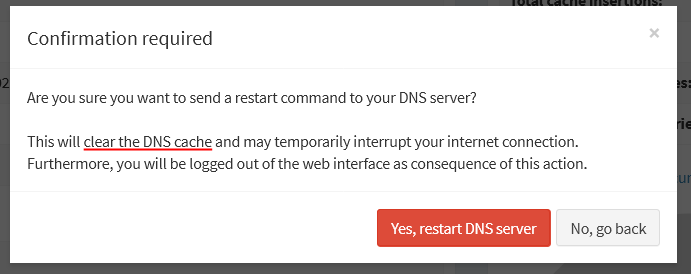
attempted systemctl restart pihole-FTL - queries no longer being responded do.
several minutes passed, after ‘successful’ restart → webUI not accessible, queries not being replied to.
tried again, dead webUI, queries not being replied to.
Restarted proxmox VM, still broken.
Rolled back to snapshot, removed networks from using pihole, and pointed email filters back to our local BIND resolver.
Email filters accounted for half of the daily queries.
→ sheer number of queries was the issue?
→ during busy usage times, pihole reloaddns to flush cache did not work.
Your report points to an issue only with the Web Interface.
Without a debug log, we can only guess which options are configured in your Pi-hole and what error messages are displayed in webserver.log and FTL.log.
This is a guess (too little information), but depending on how many clients are shown on the Dashboard, maybe your browser is not able to draw too many bars on the Clients graphic.
Did you change webserver.api.maxClients to something different than 10?
If your debug log is not correctly generated, this can indicate a completely different issue. Maybe this is a filesystem issue
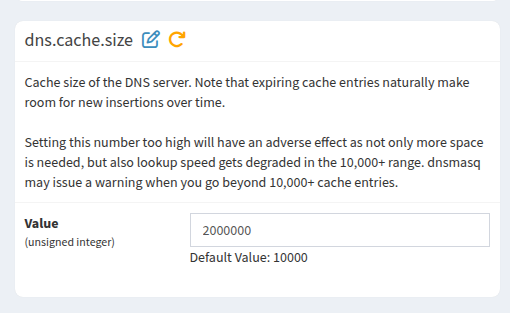
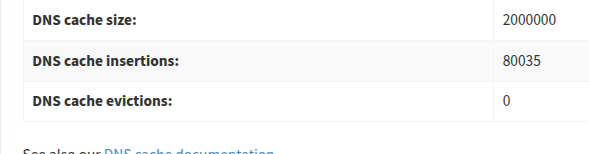
You are not helping your Pi-hole performance with a cache size of 2M.
Cache size of the DNS server. Note that expiring cache entries naturally make room
# for new insertions over time.
#
#Setting this number too high will have an adverse effect as not only more space is
# needed, but also lookup speed gets degraded in the 10,000+ range. dnsmasq may issue
# a warning when you go beyond 10,000+ cache entries.
A 2 million entry cache for Pi-hole is almost certainly overkill. While it’s tempting to think "bigger is better," DNS caching works on the principle of diminishing returns. Here is a breakdown of why a 2M cache might actually be hurting your performance rather than helping it.
There is no way to retire specific DNS records from Pi-hole's cache.
Pi-hole would only update DNS records immediately that it is authoritative for, e.g. entries you maintain via Local DNS records.
Any public domain records are cached according to DNS standards, for as long as a record's TTL indicates, i.e. Pi-hole won't request a record afresh before its TTL has expired.
The TTL "specifies the time interval that the resource record may be cached before the source of the information should again be consulted." (see RFC 1035: Domain names - implementation and specification). This has been standardised to relieve DNS servers from load.
If you maintain domains yourself, the standard procedure would be to lower TTLs before applying a planned changes of DNS records, and set them back to normal with those changed DNS records.
That way, you'd minimise chances of all DNS clients (not just Pi-hole) working with incorrect records.
Alternatively, if those domains could be expected to change frequently and on a whim, you could consider to permanently set a very low or even a zero TTL for those domains you maintain yourself.
This doesn't apply to just Pi-hole.
E.g. assuming your domain records have a TTL of 900 seconds, Pi-hole would cache that record for 900 seconds - and so would any standards compliant caching DNS client.
Now if you'd change a DNS record, it would be expected that it takes up to the TTL of the last received DNS record until that change has spread to all clients, i.e. a caching client like Windows can hold on to the previous DNS record up to 15 minutes before it would issue another DNS request for that cached record to Pi-hole.
In this context, it is particular noteworthy that e.g. an nslookup from a Windows client would always issue a DNS request for a provided domain, by-passing any cache, in contrast to the system DNS client that would consult its DNS cache instead - and the latter is what application software would use.
The correct way to address potential issues with propagating DNS changes is by controlling the TTL.
In my experience using a Windows based Client during frequent DNS and for example Apache WebServer changes is something one should really avoid as much as possible!
I even had the chance to test this side by side once when a colleague was working on his own Server and was testing various things :
The Windows Client constantly showed the wrong results.
My at the time Kubuntu Client picked everything up immediately!
I kind of knew that already at the time, but was surprised that something I experienced waaaay back in the Windows XP era was still the case when using Windows 10 which at the time was “brand spanking new” and supposed to be all new and modernized and everything…
Please keep this on Project23D's topic and don't turn it into yet another Windows rant.
Windows was just referenced as an example, as presumably the majority of customers would use that OS.
As explained, any standards compliant caching DNS client would exhibit the same behaviour, including stub resolvers employed by Linux distros.
They work as DNS is designed to.