I don’t believe my install is non-standard, but it does involve OpenWrt and I betting this is causing the issues. I starting have this issue once I upgrade the container from a 2022.x.x version.
TL;DR:
Upgraded the pihole container after 3+ years and now I’m not sure which combination of settings via Pihole UI, Pihole Compose.yml or OpenWrt might need to be changed to allow Pihole to work again.
Expected Behaviour:
Would normally see Queries blocked increase as devices are connected to the network, but it doesn’t seem to log any queries.
Pihole:
- Docker Tag 2025.11.0, Core v6.2.2, FTL v6.3.3, Web interface v6.3
OS:
- Raspberry Pi 0 (connected on eth0 only)
- Operating System: Raspbian GNU/Linux 12 (bookworm)
- Kernel: Linux 6.12.47+rpt-rpi-v6
- Architecture: arm
Router:
- OpenWrt 23.05.3
Docker:
$ docker --version
Docker version 28.5.2, build ecc6942
$ docker compose version
Docker Compose version v2.40.3
Compose.yml:
secrets:
  WEBPASSWORD:
    file: ./secrets/WEBPASSWORD.secret

services:
  pihole:
    container_name: pihole
    image: pihole/pihole:latest
    ports:
      - "53:53/tcp"
      - "53:53/udp"
      # - "67:67/udp"
      - "80:80/tcp"
      - "443:443/tcp"
    secrets:
      - WEBPASSWORD
    environment:
      - WEBPASSWORD_FILE=WEBPASSWORD
      - FTLCONF_dns_listeningMod=ALL
    volumes:
      - './etc-pihole:/etc/pihole'
      - './etc-dnsmasq.d/:/etc/dnsmasq.d/'
      - './var-log/pihole.log:/var/log/pihole.log'
    cap_add:
      - NET_ADMIN
    restart: unless-stopped
    networks:
      - pihole_network

networks:
  pihole_network:
    name: pihole_network
$ docker network ls
NETWORK ID     NAME                     DRIVER    SCOPE
a24513b94bff   bridge                   bridge    local
26bd5a98dce5   host                     host      local
890cacca66eb   none                     null      local
77e8106cf05c   pihole_network           bridge    local
Actual Behaviour:
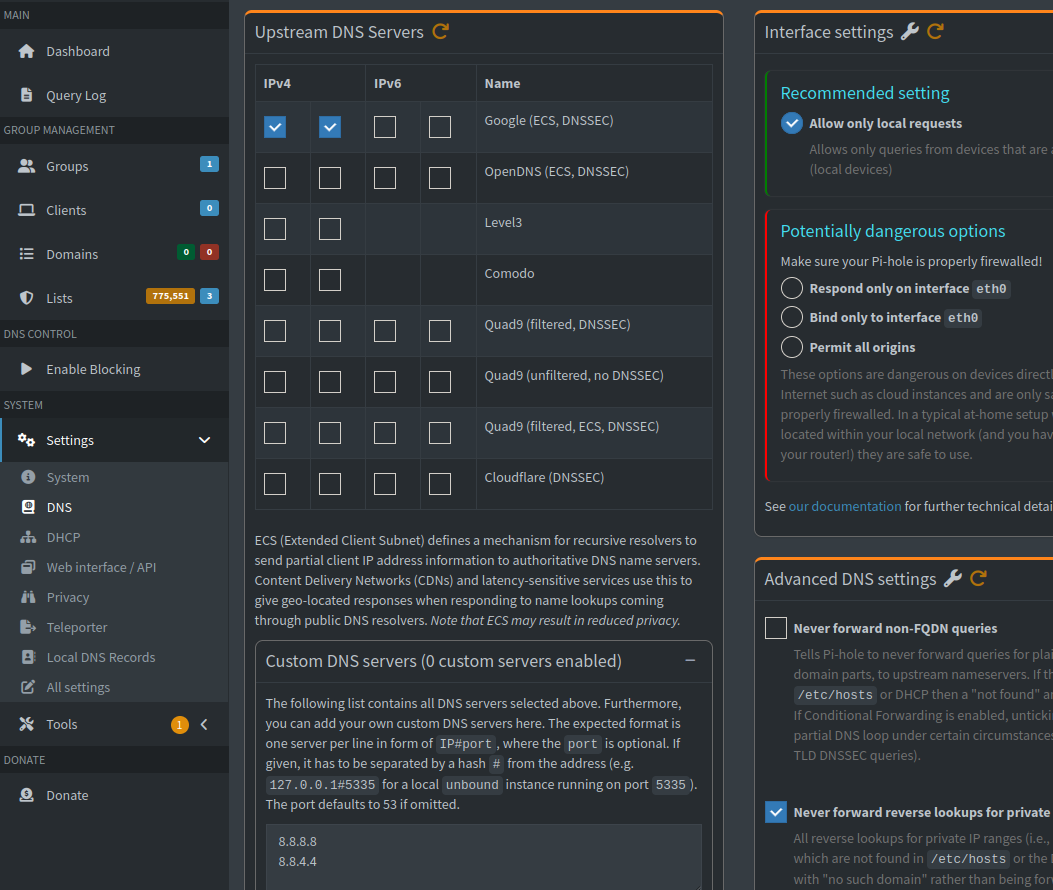
If I simply run the container, everything starts as from a Pihole container perspective just fine. However, it doesn’t seem as any queries are being blocked as normal nor are any queries being made.
However, if I change the DNS settings to one of the potentially dangerous options (Respond only… or Bind to...) it will start to log queries and log some as blocked. However, I’m not confident in this setting as I’ve never had to use this in the past.
OpenWrt Settings:
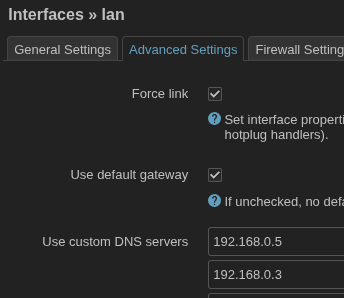
In the past, I’ve usually just added the custom Pihole IPs to the custom DNS fields under Interfaces → LAN →Advanced Settings
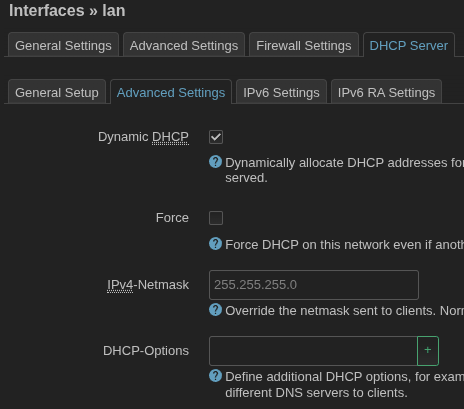
I’ve seen mention of DCHP-Options, but I’m not sure it helped, so I removed them.
Steps Tried:
I have all the different settings on the pages below, but I know some of these are really old:
- guide_to_set_pihole_with_openwrt_with_openwrt_dhcp
- dnsmasq_warn_ignoring_query_from_nonlocal_network
- How do I configure my devices to use Pi-hole as their DNS server?
- force-all-dns-queries-through-pihole-with-openwrt
TL;DR:
Upgraded the pihole container after 3+ years and now I’m not sure which combination of settings via Pihole UI, Pihole Compose.yml or OpenWrt might need to be changed to allow Pihole to work again.