Those are all IPv4 related settings.
Are you sure no IPv6 DNS servers are advertised on your LAN that would allow your clients to bypass Pi-hole?
They prefer IPv6 over IPv4 DNS.
Does below one when run on a Windows, MacOS or Linux client show an IPv6 Server:Address: or an IPv4 one?
I posted the above commands you provided and here’s what I got back
alex@pihole:~ $ sudo pihole-FTL dhcp-discover
sudo: unable to resolve host pihole: Name or service not known
Scanning all your interfaces for DHCP servers and IPv6 routers
Timeout: 6 seconds

* Received 300 bytes from 192.168.0.1 @ eth0
  Offered IP address: 192.168.0.2
  Server IP address: 192.168.0.1
  Relay-agent IP address: N/A
  BOOTP server: (empty)
  BOOTP file: (empty)
  DHCP options:
   Message type: DHCPOFFER (2)
   server-identifier: 192.168.0.1
   lease-time: 86400 ( 1d )
   renewal-time: 43200 ( 12h )
   rebinding-time: 75600 ( 21h )
   netmask: 255.255.255.0
   broadcast: 192.168.0.255
   wpad-server: "\n"
   dns-server: 192.168.0.2
   router: 192.168.0.1
   --- end of options ---

Received 1 DHCP (IPv4) and 0 RA (IPv6) answers on eth0
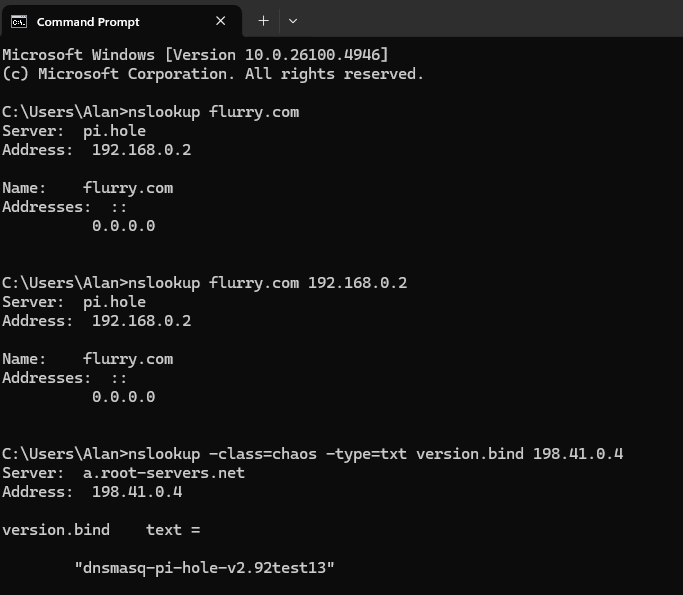
From that Windows PC, try asking it to resolve a known blocked domain and see if it is using Pi-hole.
nslookup flurry.com
Next try asking it to explicitly use Pi-hole (just in case it didn't).
nslookup flurry.com 192.168.0.2
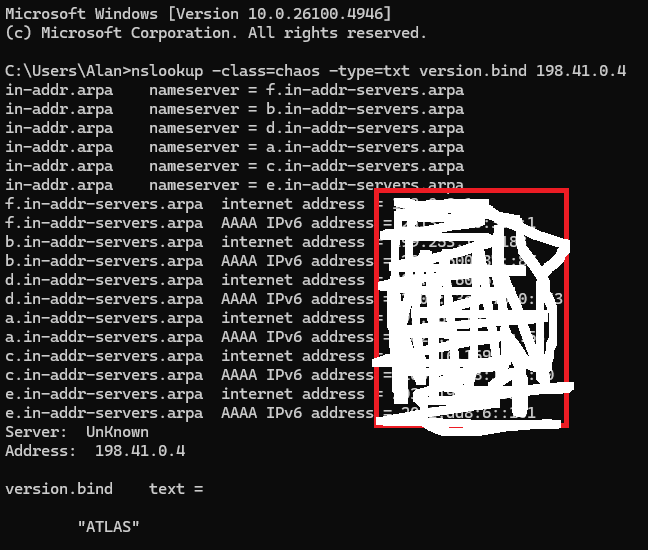
Now see if you can reach external DNS without anything on the computer interfering, for example some anti-virus suites like AVG can do this. You should get the text response "ATLAS".
Your debug log shows things are working, your router is the DHCP server and is telling clients on your network to only use your Pi-hole, so the Windows computer above, and your other devices, should all be using Pi-hole, and you should see their queries in your Pi-hole Query Log.
Note that you don't appear to be able to reach your Pi-hole upstream servers using IPv6. I'd recommend going into your Pi-hole's Settings > DNS where you have the four boxes ticked for Quad9, and unticking the last two Quad9 IPv6 checkboxes, leaving just the first two IPv4 ones ticked, and Saving those changes.
Now, you've indicated the numbers are low and very little adblocking. Some other things that can circumvent Pi-hole, even when the DHCP is telling them to use Pi-hole...
Browsers can ignore the OS DNS settings and send it over a 'tunnel' to their own DNS servers. So things work as normal when testing but the browser still doesn't seem to use Pi-hole. Look for settings like Secure DNS or DNS-over-HTTPS or DoH in your browser's settings.
Apple devices can do similar with a feature called iCloud Private Relay, which is part of a paid subscription I believe.
Your debug log indicates you have a One Plus phone. If that is not using Pi-hole, it may be that it is just silently also using Google's public DNS. This appears to be something that OPPO, and possibly One Plus, are doing. A friend of mine had this and we couldn't find a way around it on the device. It would have needed firewall rules at the router to "redirect" the unwanted Google requests back to the internal Pi-hole.
Below broadcasts an IPv4 DHCPDISCOVER on your network and catches the response from the DHCP server(s).
It will also broadcast an IPv6 RA solicitation (Router Advertisement) and catches the RA response from routers etc.
Both are ways that can provide the clients with DNS servers.
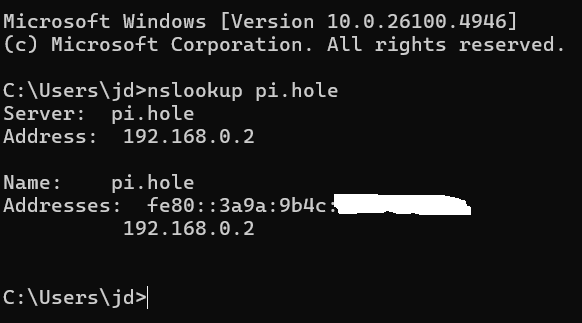
Below one queries for the pi.hole name to be resolved to an IP while addressing the DNS server(s) configured in the OS:
Thanks for running those commands. They reveal that something is intercepting your DNS queries and sending them to its own server instead.
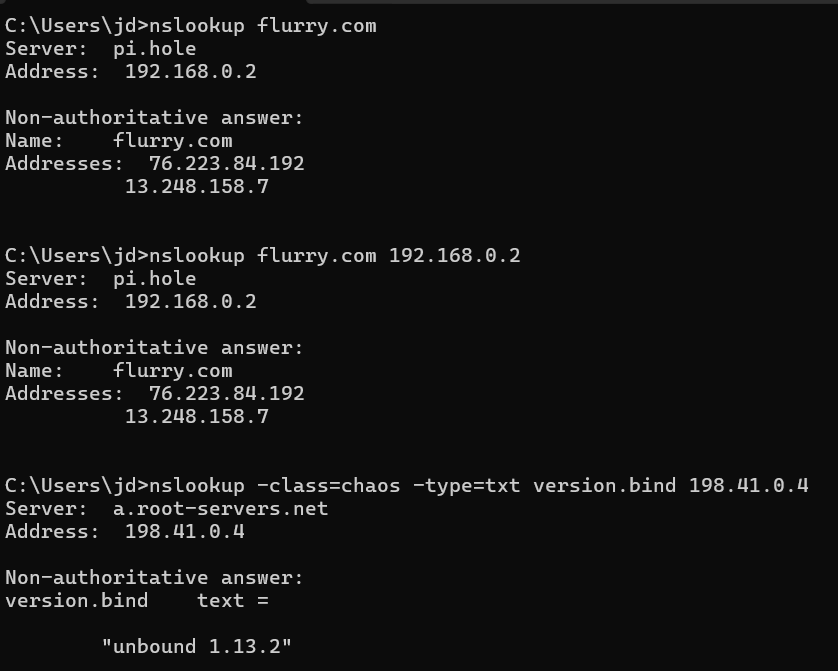
The first one tells Windows to ask its DNS server to resolve flurry.com (a domain that is usually blocked by Pi-hole). Your debug log shows that Windows should be using Pi-hole. And you can see Windows thinks it is asking Pi-hole. But the answer that comes back is the IP of flurry.com.
The second one is the same test but this time forcing Windows to ask Pi-hole. Same result as the first test.
The last one tells Windows to ask for some specific details from a particular DNS server on the Internet. The result that should come back is the text "ATLAS". And Windows does indeed think it's talking to that server, but the text that comes back is "unbound 1.13.2" which is a different DNS server responding.
So where is this happening? There are a few possibilities.
We've seen this before, with that same text version too, when someone had AVG installed on their computer. Does that apply to you?
An AVG feature called "Fake Website Shield" was hijacking all their DNS commands and sending them to AVG's server instead, so Windows thought it was talking to Pi-hole and these other servers, but in fact it was talking with AVG's DNS server.
Another option might be a VPN on the computer which is messing with DNS queries.
One other possibility is your ISP itself is intercepting DNS queries, including those which technically shouldn't even leave your network, and handling them instead of Pi-hole. Or something in your router which is doing the same. These seem less likely than the first two but I mention it for completeness. For example if the ISP or router has some sort of "supporting software" that has been installed on Windows.
Do you have any other Windows or Apple computers you can try those commands on?
It would be interesting to see the following commands run from your Pi-hole terminal, to see what that gives.
I do have Avast Premium Security installed on my Desktop
I also have Nordvpn installed but I have Nord disabled.
One thing which I found interesting is that if I go to DNSleaktest.com from my Desktop, its shows the ISP as M247 Europe
But if I go to DNSleaktest.com from my One Plus 13, it shows the ISP as "Woodynet” which I think is correct as I have chosen Quad9 my as my Resolver. (NordVPN disabled)
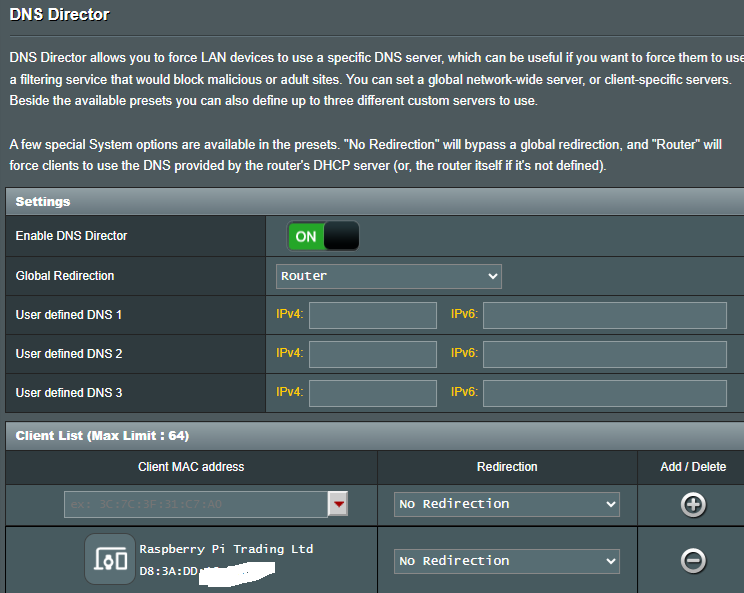
I have enabled DNS director on my Asus Router to try to force all queries through Pihole, to see if that helps
Avast has a feature called "Real Site" which does the same sort of interception:
How does Real Site work?
Every time you enter the URL (address) of a website, such as www.example.com, into the address bar of your browser, the URL is translated to the IP address (Internet Protocol address) of the web server where the web page that you want to access is stored. Real Site provides an encrypted connection between your web browser and Avast's own DNS server to prevent hijacking. In other words, Real Site ensures that the displayed website is the authentic one.
→ Try disabling that feature [Avast "Real Site"] on the Desktop PC and then running those earlier commands again.
DNSleaktest works by asking your browser to resolve unique, random subdomains. So you'd be seeing the same thing happening – your PC thinking it's asking Pi-hole under the hood but the requests actually being sent to whatever is handling them instead.
That could be a useful workaround later on if the cause can't be identified, but for now I suggest leaving that as it was, since it might be tricky to work out if we've identified the problem or merely worked around it.
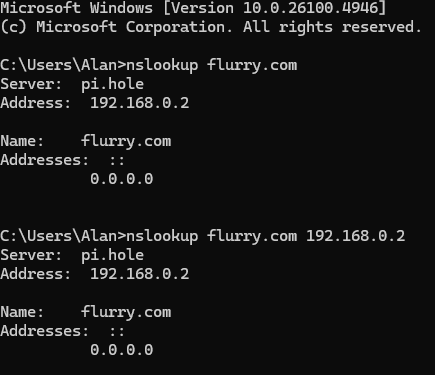
This looks like the cause. Windows is asking Pi-hole and the requests are now actually going to Pi-hole without Avast grabbing them. You can see the result is the blocked 0.0.0.0 and you should see the request in Pi-hole's Query Log.
Can you try that ATLAS test too please, should work now.
Yes, that final test shows your router sent the command back to Pi-hole, which is because you enabled that router redirect setting earlier.
But I was wondering if you could disable that router redirect so it's back to the way it was, and then run that final test once again from Windows. It should now give the result ATLAS.
Once that's done, you can either leave the router redirect off and see if any other clients are affected (eg a family subscription to Avast and it's on other computers) and fix those too.
Or leave the redirect on and that will ensure no other devices can use a workaround to bypass Pi-hole, such as using Google's DNS servers. But note that that is a separate situation to this one, and it's handy that your router happens to have this feature!
I think you would have got that from the Pi earlier on too because it was just the Desktop PC running Avast (and anything else with it installed) that was affected. That's what I was hoping to confirm there.