Please follow the below template, it will help us to help you!
Running the following Pi-Hole environment & Unbound. Everything is working great over the last several weeks and then as of 04Feb2026, in the Query Log, “log-api.newrelic.com“ is being blocked, but it has already become #2 on the “Top Blocked Domains“. Did a search and found “
Search Assist
Log-api.newrelic.com is the endpoint used by New Relic for sending log data from applications to their monitoring and analytics platform. This allows users to track and analyze logs in real-time for better performance insights.“. Additional search trying to find what software / systems use this, comes up with the following (excerpt):
Cloud Services
AWS, Azure, and Google Cloud: These platforms often have integrations that allow logs from cloud services to be sent to New Relic for analysis.
CPU:
3.5% on 4 cores running 313 processes (3.2% used by FTL)
RAM:
53.0% of 416.1 MB is used (19.1% used by FTL)
Swap:
42.6% of 416.0 MB is used
Kernel:
Linux PI-HOLE-99 6.12.62+rpt-rpi-v8 #1 SMP PREEMPT Debian 1:6.12.62-1+rpt1 (2025-12-18) aarch64
Uptime:
a month (running since Tuesday, January 6th 2026, 20:47:13)
FTL:
PID 159192, last restart was on Wednesday, February 4th 2026, 06:10:05
QUESTION(s): I have not seen this before in any Pi-Hole threads, etc. In addition, no additional software and/or “Cloud Services” items have been added to any devices on the network? Not worried that it is being blocked, but the number of entries in the Query Log is concerning…..any feedback / advise would be greatly appreciated.
However, I have Raspberry Pi / pi-hole on is own VLAN network and all entries in the Query Log only provide Host address / Gateway IP (i.e: XX.XX.XX.1).
Thank you for the great response. I am using Ubiquiti **USG 3P (**USG 3P 4.4.57) for my main router / security gateway (the ISP gateway is in Pass thru / Bridge mode) and am only using DNS (pointing to Pi-Hole) as my primary DNS server (also pointing the another Pi-Hole as my secondary DNS - which is defined as a secondary Pi-Hole sync’d with Nebula). However, under the Network settings for the DNS VLAN where both the Pi-Hole’s reside, I am using Unifi’s DHCP as the DHCP server for that VLAN starting with XX.XX.XX.6 (which is the static IP address of the 1st Pi-Hole instance.
My Network is micro-segmented, isolating my IoT devices, Guest, DNS, & Default, with FW rules between them, etc….
I am not that well versed on how to “Use Pi-hole as your network DHCP server“ in conjunction with keeping existing VLANS in place (….Mongo only know where Choo Choo Go…)….do you have step by step instructions and/or and link explaining to to implement Pi-Hole as the DHCP server and keeping my network segmented (I am not Bullwinkle aka Mr. Know-It-All and LOVE learning new things all the time.
ok I found this but I am not that advanced and need to find some specific examples maybe….
To keep your UniFi network micro-segmented while using Pi-hole for DHCP, configure each VLAN to use Pi-hole as the DNS server and ensure that DHCP is managed by UniFi. This setup allows you to maintain isolation between different segments while still benefiting from Pi-hole's ad-blocking capabilities.
Micro-segmentation enhances network security by isolating different segments, such as IoT devices, from the main network. Using Pi-hole for DHCP can help manage DNS requests effectively across these segments.
Setting Up VLANs
Create VLANs: In your UniFi controller, set up separate VLANs for different device types (e.g., IoT, guest, corporate).
Assign VLAN IDs: Each VLAN should have a unique ID. For example:
IoT VLAN: ID 80
Guest VLAN: ID 90
Corporate VLAN: ID 100
Configuring Pi-hole as DHCP Server
Enable DHCP on Pi-hole: In the Pi-hole settings, enable the DHCP server feature.
Set DHCP Ranges: Define IP address ranges for each VLAN. Ensure that the ranges do not overlap.
Point DNS to Pi-hole: In the UniFi controller, set the DNS server for each VLAN to the Pi-hole's IP address.
Firewall Rules
Create Firewall Rules: Implement rules to restrict traffic between VLANs. For example, allow only specific traffic from the IoT VLAN to the corporate VLAN if necessary.
Test Connectivity: Ensure devices in different VLANs can only communicate as intended. Use tools like ping or traceroute to verify.
Managing DNS Requests
Custom DNS Records: For better management, consider adding custom DNS records in Pi-hole for devices in each VLAN. This helps in identifying devices easily.
Monitor Traffic: Use the Pi-hole dashboard to monitor DNS queries and ensure that requests are being filtered correctly.
By following these steps, you can effectively micro-segment your UniFi network while utilizing Pi-hole for DHCP and DNS management.
What are the steps to configure VLANs with Pi-hole and UniFi?
To configure VLANs with Pi-hole and UniFi, set up your UniFi controller to manage DHCP for each VLAN, using the Pi-hole's IP address as the DNS server. Then, ensure that Pi-hole is configured to handle DNS requests from all VLANs, and consider enabling Conditional Forwarding for hostname resolution.
Create Firewall Rules: Implement rules to restrict traffic between VLANs. For example, allow only specific traffic from the IoT VLAN to the corporate VLAN if necessary.
I already have FW rules established between the VLANS in Unifi…..maybe I am over thinking this….or maybe if I don’t have some specific examples to compare against…..I just don’t start experimenting on the home network without understanding the specifics….since “THE BOSS” will have my….well lets keep this rated PG only….. LOL
In addition, making an assumption, in Pi-Hole, I should set the same DNCP ranges for each VLAN currently setup in the UniFi security gateway (router). Also, assuming then Pi-Hole to manage the DCHP ranges now and the FW rules already established in the Unifi router / gateway will still manage the traffic / restrictions between the VLANS….sorry to be so verbose, but the SAPPORO is ice cold ….
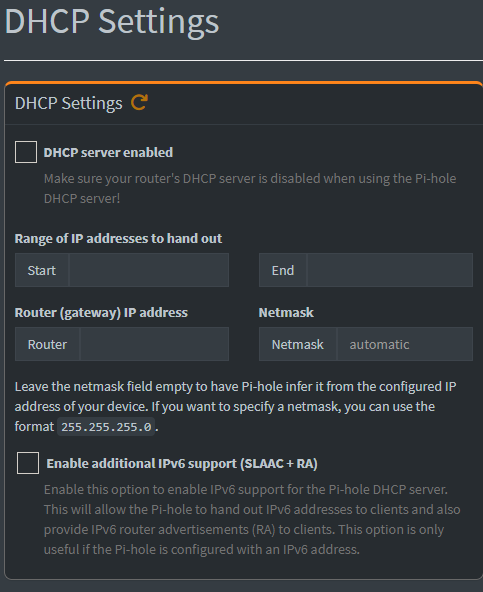
how do I enter each VLANS DHCP range based on the above screenshot….will it let me add multiple VLANS? Any advise / feedback would be greatly appreciate…..thank you in advance…
I am to assume that I do each VLAN DHCP ranges one at a time….adding the first VLAN DNCP range…. “APPLY”, then repeat the above for each VLAN and associates DHCP range(s)….I think I will wait to morning when “The Boss” is still asleep
Why would you do all this when there is absolutely no need to do so ?!
You probably had the Pi-Hole IP Address entered in the WAN configuration part of your UniFi Controller and should move it to the LAN configuration part of the VLANs you are using.
If you want Pi-Hole to be active in all your VLANs as DNS Server you can just create VLAN Interfaces in Debian via NetworkManager or SystemD and FTLDNS will automatically bind to them by default.
Another option is to have a seperate “Servers VLAN” and setup the right Firewall Rules from all your VLANs to access Pi-Hole as the DNS Server only.
 mzonline.com
 discourse.pi-hole.net
 LOL
LOL