How to provide more DNS servers via DHCP?

I would like to provide more than the default DNS server via DHCP.

I expected that adding the following to /etc/pihole/pihole.toml would do the trick:

dnsmasq_lines = [
    "dhcp-option=6,192.168.10.2,192.168.10.102"
  ] ### CHANGED, default = []

Unfortunately I still get the default (DHCP's Pi-hole) address and I see in the logs

Ignoring duplicate dhcp-option 6

Where is the "primary" DNS set up in DHCP? (I assume that the message refers to the setting from pihole.toml). I could not find it anywhere (and it is not in pihole.toml)

Works for me:

$ sudo cat /etc/pihole/pihole.toml
[..]
  dnsmasq_lines = [
    "dhcp-option=option:dns-server,0.0.0.0,10.0.0.4"
  ] ### CHANGED, default = []
$ sudo pihole-FTL --config misc.dnsmasq_lines
[ dhcp-option=option:dns-server,0.0.0.0,10.0.0.4 ]
$ sudo pihole-FTL dhcp-discover
Scanning all your interfaces for DHCP servers and IPv6 routers
[..]
   dns-server: 10.0.0.2
   dns-server: 10.0.0.4

FYI, about 0.0.0.0 above:

$ man dnsmasq
[..]
   The special address 0.0.0.0 is taken to mean
   "the address of the machine running dnsmasq".

Does that option 6 (option:dns-server) exist already if check with below?

$ sudo grep dhcp-option= /etc/pihole/dnsmasq.conf
dhcp-option=option:router,10.0.0.1
dhcp-option=option:ntp-server,0.0.0.0
dhcp-option=option:dns-server,0.0.0.0,10.0.0.4

OOTB it shouldn't if check on a freshly installed tinker VM of mine:

$ sudo grep dhcp-option= /etc/pihole/dnsmasq.conf
$
1 Like

I checked all of this before, this is why I am confused with where this "first" setting comes from. I use exclusively the /etc/pihole/pihole.toml file so there is not much place for this setting to hide

OK, I restarted from scratch, deleted the image, container, volumes, everything. Put my /etc/pihole/pihole.toml, restarted and, :musical_note: TADAM :musical_note: -- it works :slight_smile:

You did not mention before that you checked dnsmasq.conf.

Yes there is.
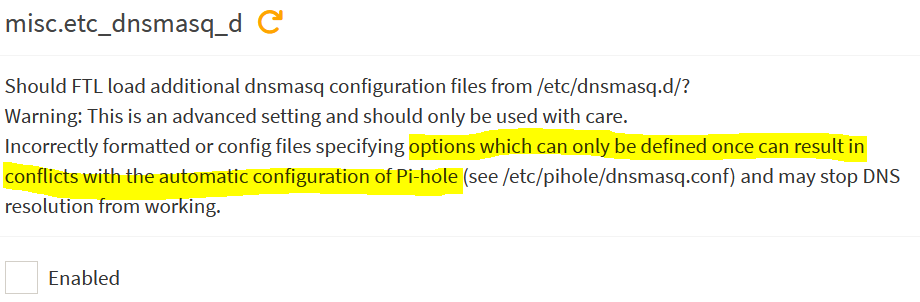
Below directives wont show in pihole.toml:

But they should appear in dnsmasq.conf.

My bad, sorry.

This is relevant only when the extra information is sourced from /etc/dnsmasq.d (which is not my case).

I just want to make sure it is clear that I am very grateful for any pointers - they always help to double-check things! Thank you!

Also see Multiple DNS announcement silently collide with extra DHCP option 6 advertisement · Issue #6360 · pi-hole/pi-hole · GitHub for the root cause.

1 Like

Good one!
I knew about that setting before I configured my Pi so I disabled that one made sure it was disabled.
And only after configured for advertised two DNS servers via DHCP.

I did not take into account that not everyone is aware of that triple DNS server setting.
But still, the grep command I supplied previously would have revealed that as you would see three DNS servers for that option:dns-server directive.

EDIT: On that freshly installed tinker VM of mine:

$ sudo pihole-FTL --config dhcp.multiDNS
false
$ sudo pihole-FTL --config dhcp.multiDNS true
true
$ sudo pihole-FTL --config dhcp.active true
true
$ sudo grep dhcp-option= /etc/pihole/dnsmasq.conf
dhcp-option=option:router,10.0.0.1
dhcp-option=option:dns-server,0.0.0.0,0.0.0.0,0.0.0.0
dhcp-option=option:ntp-server,0.0.0.0

EDIT2: This is weird:

$ sudo pihole-FTL --config misc.dnsmasq_lines '[ "dhcp-option=option:dns-server,0.0.0.0,10.0.0.4" ]'
[ dhcp-option=option:dns-server,0.0.0.0,10.0.0.4 ]
$ sudo grep dhcp-option= /etc/pihole/dnsmasq.conf
dhcp-option=option:router,10.0.0.1
dhcp-option=option:dns-server,0.0.0.0,0.0.0.0,0.0.0.0
dhcp-option=option:ntp-server,0.0.0.0
dhcp-option=option:dns-server,0.0.0.0,10.0.0.4

This is the Issue I raised, together with a PR but it was not accepted.
Basically once you use the "multiple advertisements," you cannot add DNS server to the DHCP advertisement.

All in all, it makes sense - the multiple advertisements functionality is there to "pad" the DNS servers list with the same DNS (0.0.0.0 - the issuing Pi-hole) so if you want to advertise your own, you do not need it.
My problem is that finding this out requires quite a lot of gymnastics and IMO it would be better to issue a warning early.

During the v6 beta test period, this dhcp.multiDNS was enabled OOTB.
But currently it isnt it seems.
I dont know when this change happened but in hindsight, this is maybe a better choice.
Just to prevent exactly what you've experienced.
It only exists for those pesky devices that add a "secondary" DNS server (like for example Google's 8.8.8.8) when only one DNS server is provided via DHCP.

They are "expert" settings so expected is that you know what you're doing, checking the logs and how to troubleshoot.
The "duplicate" error was pretty clear ... at least to me.

Oh if you want to advertise more options :wink:

$ pihole-FTL --list-dhcp4
Known DHCP options:
  1 netmask
  2 time-offset
  3 router
  6 dns-server
  7 log-server
  9 lpr-server
 13 boot-file-size
 15 domain-name
 16 swap-server
 17 root-path
 18 extension-path
 19 ip-forward-enable
 20 non-local-source-routing
 21 policy-filter
 22 max-datagram-reassembly
 23 default-ttl
 26 mtu
 27 all-subnets-local
 31 router-discovery
 32 router-solicitation
 33 static-route
 34 trailer-encapsulation
 35 arp-timeout
 36 ethernet-encap
 37 tcp-ttl
 38 tcp-keepalive
 40 nis-domain
 41 nis-server
 42 ntp-server
 44 netbios-ns
 45 netbios-dd
 46 netbios-nodetype
 47 netbios-scope
 48 x-windows-fs
 49 x-windows-dm
 58 T1
 59 T2
 60 vendor-class
 64 nis+-domain
 65 nis+-server
 66 tftp-server
 67 bootfile-name
 68 mobile-ip-home
 69 smtp-server
 70 pop3-server
 71 nntp-server
 74 irc-server
 77 user-class
 80 rapid-commit
 91 last-transaction
 92 associated-ip
 93 client-arch
 94 client-interface-id
 97 client-machine-id
100 posix-timezone
101 tzdb-timezone
108 ipv6-only
119 domain-search
120 sip-server
121 classless-static-route
125 vendor-id-encap
150 tftp-server-address
255 server-ip-address
1 Like

This topic was automatically closed 21 days after the last reply. New replies are no longer allowed.