The issue I am facing:
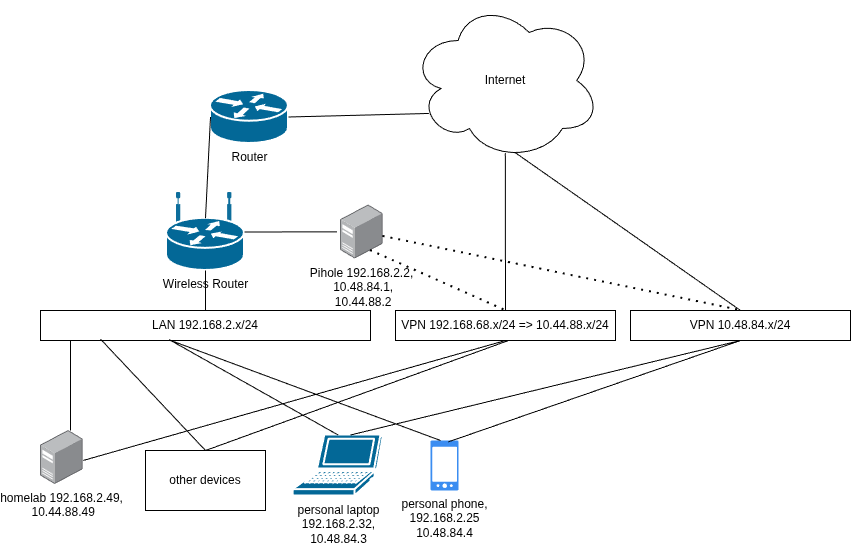
Hi, Im trying to have local urls accessible both on my local network and through a wireguard vpn when away using pihole as my dns. I have gotten everything working except for getting a dns response back on the vpn network.
When I try dig one of my own urls on the vpn I get:
dig pihole.dashboard.cerval

; <<>> DiG 9.20.26 <<>> pihole.dashboard.cerval
;; global options: +cmd
;; Got answer:
;; ->>HEADER<<- opcode: QUERY, status: NXDOMAIN, id: 30476
;; flags: qr rd ra ad; QUERY: 1, ANSWER: 0, AUTHORITY: 0, ADDITIONAL: 0

;; QUESTION SECTION:
;pihole.dashboard.cerval.	IN	A

;; Query time: 74 msec
;; SERVER: 10.174.21.110#53(10.174.21.110) (UDP)
;; WHEN: Wed Aug 05 13:55:09 CEST 2026
;; MSG SIZE  rcvd: 41
and it should be something like this:
 dig pihole.dashboard.cerval

; <<>> DiG 9.20.26 <<>> pihole.dashboard.cerval
;; global options: +cmd
;; Got answer:
;; ->>HEADER<<- opcode: QUERY, status: NOERROR, id: 32215
;; flags: qr aa rd ra; QUERY: 1, ANSWER: 1, AUTHORITY: 0, ADDITIONAL: 1

;; OPT PSEUDOSECTION:
; EDNS: version: 0, flags:; udp: 1232
;; QUESTION SECTION:
;pihole.dashboard.cerval.	IN	A

;; ANSWER SECTION:
pihole.dashboard.cerval. 0	IN	A	192.168.68.2

;; Query time: 73 msec
;; SERVER: 192.168.68.2#53(192.168.68.2) (UDP)
;; WHEN: Wed Aug 05 14:27:24 CEST 2026
;; MSG SIZE  rcvd: 68
I just never get an answer back on when i'm connecting via the vpn.
System and setup details
Im using nixos as my linux distro. So the config might look a bit weird.
Here is my wireguard config. this equivalent to using wireguard quick:
  networking.wg-quick.interfaces = {
    wg0 = {
      address = [ //addresses as in a normal configuration
        "fd88:dd88:88dd::1/64"
        "10.48.84.1/24"
      ];
      dns = [ "127.0.0.1" ];
      privateKeyFile = config.sops.secrets."wg0".path; //secrets manager
      listenPort = 50505; //listen port.

      postUp = ''
        ${pkgs.nftables}/bin/nft add table inet wg;
        ${pkgs.nftables}/bin/nft add chain inet wg wg_forward {type nat hook forward priority filter\; policy accept\;};
        ${pkgs.nftables}/bin/nft add chain inet wg wg_pre {type nat hook prerouting priority dstnat\; policy accept\;};
        ${pkgs.nftables}/bin/nft add chain inet wg wg_post {type nat hook postrouting priority srcnat\; policy accept\;};
        # forward wg0 traffic
	      ${pkgs.nftables}/bin/nft add rule inet wg wg_forward iifname wg0 accept;
        # masquerade for local ips
        ${pkgs.nftables}/bin/nft add rule inet wg wg_post counter packets 0 bytes 0 masquerade;
        # map other ip address for devices when away to avoid conflicts with other local networks and the home network.
        ${pkgs.nftables}/bin/nft add rule inet wg wg_pre iifname wg0 meta nfproto ipv4 ip daddr 10.44.88.0/24 dnat ip prefix to 192.168.2.0/24;
      '';

      postDown = ''
        ${pkgs.nftables}/bin/nft delete table inet wg;
      '';

      peers = [
	{
	  publicKey = "[pubkey]";
	  allowedIPs = [
	    "10.48.84.2/32"
      "fd88:dd88:88dd::2/128"
	  ];
	  persistentKeepalive = 25;
	}

[other peers here]
current as of now caddy config (again equivalent to a regular caddy config file):
  services.caddy = {
    enable = true;
    virtualHosts= {
      "pihole.dashboard.cerval".extraConfig = ''
        bind 0.0.0.0 [::]
        reverse_proxy http://127.0.0.1:8082
      '';
      "git.forgejo.cerval".extraConfig = ''
        bind 0.0.0.0 [::]
        reverse_proxy http://192.168.2.109:3000
      '';
    };
  };
The pihole route works on lan but not over the vpn. Currently the git server doesnt resolve in any context. Could be a slightly different issue but not sure.
I was hoping by prerouting the vpn ip to the lan ip that the single local ip would be enough for forgejo but because this doesnt work on even the lan ip that there is another issue behind it.
Relevant extra info
I have added the relevant domains to the domain list:
| gateway | 192.168.2.1 |
|----|----|----|
| git.forgejo | 192.168.2.109 |
| homelab | 192.168.2.109 |
| pihole | 192.168.2.2 |
| pihole.dashboard | 192.168.2.2 |
| pihole.dashboard | 10.48.84.1 |
I have also set the dns to accept all incoming requests. So that isnt the issue either.
All vpn clients allow 2 ip ranges 10.48.84.0/24 and 10.44.88.0/24.
The vpn clients use the pihole as their dns and that works.
ipv4 and ipv6 forwarding are enabled.
My networking knowledge is self taught so I have holes in some places. Any ideas how I could resolve this?
Thanks in advance.


 yeah ur right, I thought the tool labelled it as the ip for the root server as a but it was just showing me the url.