Please follow the below template, it will help us to help you!
If you are Experiencing issues with a Pi-hole install that has non-standard elements (e.g you are using nginx, apache2 or another reverse proxy, or there is some other aspect of your install that is customised) - please use the Community Help category.
Expected Behaviour:
Able to add block lists
Actual Behaviour:
I recently installed pihole in a docker container on my NAS. Pi-hole seems to be working with traffic being routed through but I can’t add block lists. When trying to add them I get
 DNS resolution is available

  [i] Neutrino emissions detected...

  [✓] Preparing new gravity database
  [✓] Creating new gravity databases
  [✓] Pulling blocklist source list into range
  [i] Using libz compression

  [i] Target: https://v.firebog.net/hosts/AdguardDNS.txt
  [✗] Status: Connection Refused
  [✗] List download failed: no cached list available

  [✓] Building tree
  [i] Number of gravity domains: 0 (0 unique domains)
  [i] Number of exact denied domains: 0
  [i] Number of regex denied filters: 0
  [i] Number of exact allowed domains: 0
  [i] Number of regex allowed filters: 0
  [✓] Optimizing database
  [✓] Swapping databases
  [✓] The old database remains available
  [✓] Cleaning up stray matter

  [✓] Done.
For your own privacy and security, please do not post your full, unsanitised debug log output. When providing a debug token, please post just the token that is shown once the debug finishes, preferably by copy and paste.
Please share a debug token, along with your docker compose or docker run script for starting your Pi-hole container.
I’m not getting a token. I’m getting this error when I try to upload. curl: (7) Failed to connect to tricorder.pi-hole.net port 443 after 1380 ms: Could not connect to server
########################### NETWORKS
networks:
macvlan_net:
driver: macvlan
driver_opts:
parent: eth0 # In my case is eth0 check your own parent using ifconfig.
ipam:
config:
That's neither a docker run nor a docker compose? (Though it looks similar to the latter.)
As rdwebdesign had suspected, you seem to be missing to provide a DNS server for the Pi-hole container itself.
Try adding e.g. dns: 9.9.9.9 to your pihole: section, as detailed in rdwebdesign's link above.
That didn’t work. I am a complete newbie at this. I found the compose on a site for installing pihole on a UGreen NAS. I am going to start over. Thanks for your help!
We'd need the compose that you are actually using for your container.
If that example file is indeed what you have been using, just changing the compose file wouldn't be enough.
You'd need to discard and restart your Pi-hole Docker container in order to apply configuration changes, e.g. via docker stop <container-name-or-id>, and docker remove < container-name-or-id>, then start a fresh container using your changed docker compose file.
Note that this is related to Docker, not Pi-hole.
I though you knew how to use docker compose, but maybe you need more detailed instructions.
As Bucking_Horn said, when you edit the compose file, you need to destroy the current container and start a new one.
Stop the container:
use docker stop <container-name-or-id> followed by docker remove < container-name-or-id>
Alternatively, (if you started the container using docker compose up), you need to use docker compose down to stop it.
Then edit the compose file, as explained on the posts above.
I figured it out last night. I have pihole working but now. Now my next challenge, getting my router to point to pihole for it’s DNS. Thanks so much for all your help!
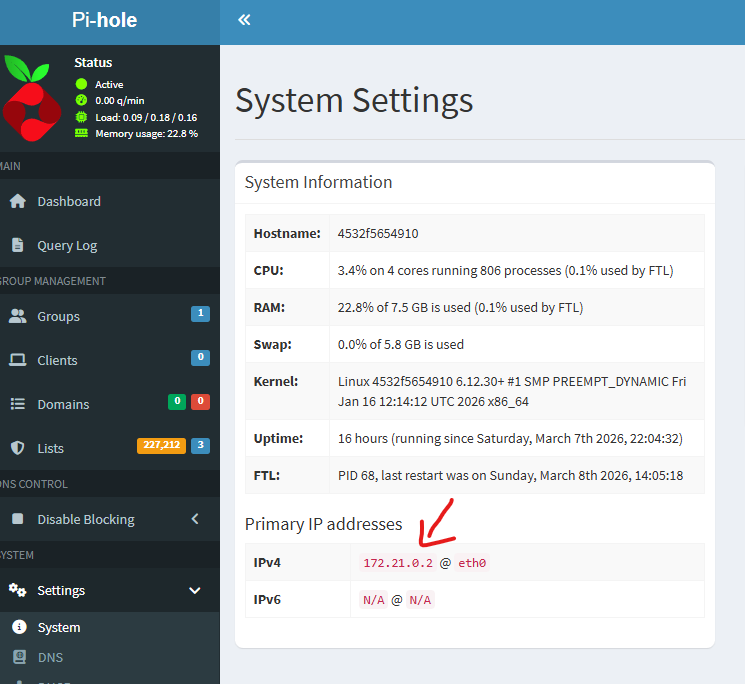
Pihole is running and working but when I use the container IP for my DNS it breaks my connection to the internet. Am I supposed to use this IP or something else?
I enetered the IP of the host machine locally on my pc and it seems to be working but if I try to enter it into my router I get the error “The IP conflicts with the LAN IP subnet. To use this DNS server, set it at DHCP server”