Webserver.session.timeout

Both sessions timed out at some point in the last 10 hours

It’s not browser cookies.
It’s not the extensions to refresh and rotate the browser tabs (i disabled them in this last scenario).
I give up.

The only thing I keep going back to is that it must have been something to do with the recent update as this only started happening after that event.

How do i know that the webserver.session.timeout value is actually being taken into account?
Is that solely by what is displayed in the Currently Active Sessions view in PiHole and by the cookie information within the browser?

My last resort will be to build new instances for both from scratch.
I’m even considering dropping PiHole and moving to another solution in Technitium.

I'm still not certain this is the case.

Particularly given the domains you posted for the cookies. (eg, one was listed as the ip, and one was listed as the domain piholevrrp). If these do not match the domain you are accessing pi-hole from, and the domain specified in Pi-hole's config then any expiry is likely to be ignored.

If this value does not match both the address bar in your browser, and the domain stored in the cookie you will likely encounter expiry problems.

If the cookie from the other pihole is still present (matched by shared ip or domain), then this will also likely cause expiry.

1 Like

I don’t understand how this could be or is the solution to the problem.
How does it explain the randomness of the interface timeout, which has been as long as 30 minutes or more, or as short as only a few minutes?

With the exception of setting the webserver.session.timeout value in v6, I’ve had these instances running in their default states for about 2-3 years originally as v5’s and then only upgraded to v6 in the last 9-12 months with other v6 releases not exhibiting this behaviour until the most recent release. That value for webserver.domain was and has always been pi.hole and i’ve never had an issue until i upgraded to the latest release.

Am/Was I just lucky in not experiencing it sooner for some reason?

Was there a change implemented in the latest release that required the value of the webserver.domain to be that of what is used in the browser to access the interface?

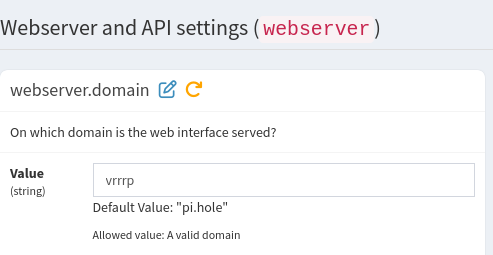
i changed that webserver.domain value to piholevrrp and now PiHole displays the notification in Tools > Pi-hole diagnosis :

Type : CERTIFICATE_DOMAIN_MISMATCH
Message : SSL/TLS certificate /etc/pihole/tls.pem does not match domain piholevrrp!

Safe to ignore or what action should i need to take?

Setting piholevrrp as the value for webserver.domain did not resolve my issue.

In the last few hours, I’ve created two completely new instances - installed PiHole, keepalived and unbound then configured everything as per the original instances.

I logged in to P-Hole from a single computer only by the vIP, then into each instance by their direct IPs.

I left the value for webserver.domain as pi.hole, then later changed it to piholevrrp.mydomainname and the sessions timed out each time.
I cleared the cookies each time.

Every time you change the domain you need to delete the SSL Certificate and Pi-Hole will generate a new correct one :wink:

It was one of the first things I did when Pi-Hole v6 was released and HTTPS access is working just fine since that time!

You know…

This is not the first time that someone had something configured what is not entirely the correct way and then experiences issues after a change was made to the software that he/she is using and then yells : “But it was always working just fine before the last update !!!” :enraged_face:

The best thing is to simply adapt to it and change whatever needs changing :wink:

I was thinking maybe the use of two different browser profiles ?
For example :

  • firefox -P VRRPmember1
  • firefox -P VRRPmember2

And have each of those display the data for one Pi-Hole instance ?

That way you will keep the Cache/History data of each of them completely seperated and should not have any time-out issues if I understand the whole issue correctly ?

It can be easily imagined how that would mess up session handling if indeed Pi-hole instance#1 is being replaced by instance#2, which would be totally unaware of sessions established by the first.

But that should not affect your observation when pointing URLs to your instance's respective IP.

In the past days, I've been trying to replicate your issue with my Pi-hole, using IPs and domains, albeit without keepalived, but so far, I've failed.

Perhaps your observation could be tied to specific pages?
You mention rotating through a set of pages - on which of Pi-hole's pages does that timeout occur?
And could you describe how you do determine that a timeout occurs?

And as you are running two instances of Pi-hole:
Would you run some third-party software that keeps them synchronised?


EDIT:

That looks like a mix of upgrading Core while downgrading FTL and Web?
Could you recheck that?

@PromoFaux: When trying to check for potential commits having an impact on session timeouts, I fail to find the Release Announcement for Pi-hole FTL v6.5, Web v6.4.1 and Core v6.4?

After i created the new instances and changed the webserver.domain value to the same value that I use to access the web UI, I deleted the existing tls certs and regenerated by restarting the pihole-ftl service, but i still experience the timeout issue at random times.

I’m not worried about using the default self-signed cert and not accessing the UI via https.

Prior to the latest Pi-Hole release, if instance #1 went offline and instance #2 became the vIP master, the UI would timeout. I accepted that because I knew it was changing to a physically different host and I knew #1 would only be down for a few minutes and I would simply login again.

Can you elaborate more on the browser profiles?

I know that when instance #2 takes the place of #1 as the vIP master that I would expect the current browser session to timeout as the vIP switches physical hosts and when #1 resumes as vIP master, that I would see a gap for the timeframe that it was not the vIP master.

I can have two different browser tabs open, each pointing to the direct IPs of each instance, or two different browsers open with each pointing a direct IP (#1 in Edge and #2 in Chrome, or vice-versa), and in each scenario, both browser tabs or browsers timeout at some point. One could last longer than the other, or they both go at the same time. Obviously, if I have two browsers open to the vIP (address or dns name), they both timeout at roughly the same time.

I always leave the Dashboard view up, as that is what I want to see at a glance.
Interestingly, I leave the UI open on any other page, say All Settings, I don’t believe the session times out and returns me to the login screen.
I use a tab rotation extension (Tab Rotation) to alternate between tabs for Pi-Hole, a Google Calendar and router dashboard.
Since the issue started occurring, I thought it might have had something to do with this extension, so I disabled and later uninstalled/removed the extension but still had the timeout issue. I have since reinstalled the extension so i can at least rotate through my other dashboard tabs.
I call it a “timeout” because the Pi-Hole UI returns to the login screen.

I run Nebula-Sync from a Docker VM against all of my Pi-Hole instances to keep the allow/block lists, groups, domains and dns entries in check. This automatically runs every 15 minutes - :00, :15, :30 & :45, but the Pi-Hole ui can and usually times out before these triggered intervals.

Yeah, sorry. I copy/pasted the Core/FTL/Web versions incorrectly, but I did upgrade to the latest releases of FTL : 6.4.1 > 6.5 and Web : 6.4 > 6.4.1.
Given that I have also since created new VMs from scratch, I am now running the latest release but still experiencing the timeout issue.
The remaining configuration of each instance remains the same - keepalived installed and the vIP process works as expected.

As suggested by other members here, I also changed the entry for webserver.domain from the default “pi.hole” to “piholevrrp.mydomain.com”, which resolves to a dns entry i have in Pi-Hole so i can enter that rather than any of the direct IPs or vIP into a browser.
When i do this though, should I still be able to ping pi.hole from another network client (after flushing the client’s dns cache)?
When I do, it resolves to the direct IP of instance #1, assuming because is the vIP master at the time.
The redirection to the Login page is the expected behavior when the session times out.

When you leave the Dashboard page open, this page should send AJAX requests every second to retrieve API information, updating the cookie and keeping the session active:

session_updated_every_second

When you leave All Settings pages open, there is an AJAX call (to check if the blocking status was changed) every 10 seconds, also resulting in an updated cookie.

In both cases, if/when the session times out you should be redirected to the login page.

Please note that these AJAX calls are only executed if the page is visible.

When the page is hidden (browser window is on the background or minimized, another tab is open, or the computer screen is locked), the page doesn't send the request to the API and the cookie is not updated. If the page is hidden (or closed) for a long time, the session expires when the cookie expiration time arrives.


Note:
In your case, it seems your specific configuration is causing an unexpected behavior.

Apparently something is destroying the cookies on the browser, or prematurely deleting the sessions on Pi-hole.

You should try to test with Nebula Sync disabled, to make sure this is not destroying or mixing the sessions between the 2 instances.

Please notice that no other user complained about a similar issue. We are trying to understand and help you, but this seems to be a combination of too many specific configurations and something unknown is causing this behavior.

1 Like

Not sure what to tell you, but it’s basically a way to make sure all the data that you have got in your current favorite browser is not mixed with the testing that you are currently doing.

Your browser (if you would use any Firefox based one anyway) now uses a Profile called something like ‘Default’ and the full name is part hash and part a name : 8787thgfghf.Default

When you create more Profiles they all get their own hashes in front of the name :

  • 3kf6wsvm.VRRPmember1
  • qsplatgnb.VRRPmember2

However the name is what you “call” with the -P command to use a certain Profile :

  • firefox -P VRRPmember1
  • firefox -P VRRPmember2

Everything is seperated :

  • Bookmarks
  • History
  • Cache

To give you an example of something very generic you could use a seperate Profile for with site specific add-ons included : YouTube :grimacing:

Just give it a try! :wink: :+1: :+1:

So, if I have the webserver.session.timeout set to 86400, I wouldn’t and shouldn’t expect the session to actually timeout as quickly as I am experiencing.

When I look at the browser’s cookie session, i can see that the expiry matches that of the session information shown in Currently Active Sessions table.

Chrome on my dashboard computer is configured to rotate between the tabs every 5 minutes, so this would make the Pi-Hole tab inactive for at least 5 minutes (based on 2 tabs). The browser is the only application running on that computer.
On my main computer, I am also viewing Pi-Hole through Chrome but working from Edge for everything else, so the Chrome browser is therefore always the inactive/background window.

Chrome on my main computer has 4 tabs to cycle through, so the time it takes to get back to Pi-Hole is 15 minutes.
Both scenarios are well within the default timeout value (1800) and the value I have configured which is for 24 hours.

I have disabled Nebula-Sync but still have the session timeout.

I agree. I don't expect a timeout in this scenario, but in your specific case, the timeout is happening.

Let me say again:
we are investigating and trying to understand your issue, but no one else reported a similar issue. Bucking_Horn couldn't replicate the issue.
In other scenarios, Pi-hole sessions are working as expected.

This probably means the issue is related to your specific combination of Pi-hole + 2 Proxmox VMs + VRRP using keepalived + Chrome browser extension and maybe other variables we don't know.

We are trying, but I'm not sure if someone will be able to reproduce or understand the issue.

Thanks.

I know everyone’s setup is different and appreciate all the assistance the Pi-Hole team and the wider Pi-Hole community have provided.

Although it’s a like-to-have, I can live without the 24/7 display of the UI.
DNS and ad-blocking works, so that’s the end-goal at the end of the day really.

I can confirm I see calls to the api/stats/summary endpoint every second on the dashboard, plus a few others in longer periods.
The session cookie as shown in developer tools doesn't get updated, but that seems to be visualisation only. If I refresh the dev tools view manually, it get's updated ok.
I'm using Vivaldi 7.8.3925.76 based on Chromium 144.0.7559.238.

But even if it wouldn't update, darrenoleary74 shouldn't see login redirects after a few minutes, given their 86400 timeout.

Since you report timeouts to occur after about 5 to 10 minutes, that could make api/history and api/history/clients calls into suspects, since those would shift Total queries and Client activity graphs every 10 minutes.

I'm really grasping at straws here - perhaps rdwebdesign can tell whether it would be possible that those calls were involved in premature timeouts?

Perhaps we can try to catch the HTTP request that clears the session (if it were a HTTP request to do so).

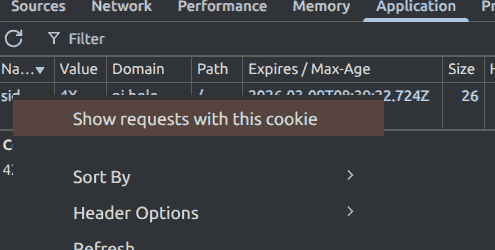
When viewing your session cookie in your Chrome browser's developer tools, does that allow you to trace related requests via context menu?

If so, could you keep that view open while waiting for a timeout to occur, with Preserve log enabled?

I don't know if it's related, but enabling or disabling DNSSEC validation via Use DNSSEC in Pi-hole reproducibly forces a re-login/timeout.

rdwebdesign, would a re-login be expected for switching DNSSEC?
Would sessions survive a pihole-FTL restart?

@darrenoleary74, would your nebula-sync include that DNSSEC option, perhaps?

No.

Changing dns.dnssec requires FTL restart, but this shouldn't cause web session termination.

Yes.
Sessions should be stored on the database and reloaded on restart.


We are currently investigating another issue that a logout happens when the user changes CNAME records.

One of the recent FTL optimizations changed the order of execution of some things on FTL restarts. This is probably delaying the load of the previous web server sessions. When the delayed is longer than expected, the page will reload before FTL loads previous sessions data. Without this information, the web server will consider the session invalid and will redirect to the Login page.

There is already a fix in development branch to change the start order and load the web sessions earlier.

Thanks for the response and sorry I didn’t respond sooner.
I didn’t realise (or know) that you had responded 5 days ago until the more recent responses from yourself and @rdwebdesign in the last few hours when I received email notifications from both updates. I didn’t receive an email notification from your response 5 days ago.

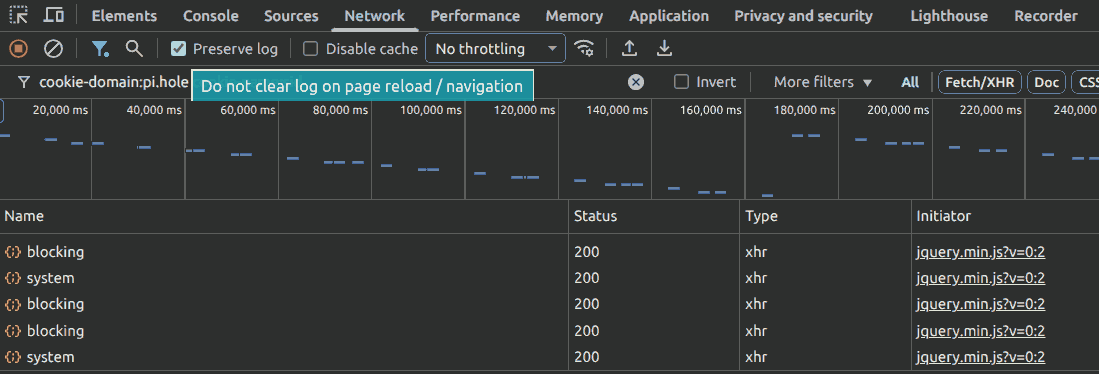
Anyway, I did as you suggested and started a new web UI session and viewed it in dev tools until the session timed out, which didn’t take that long.
This was the end result of the session timeout :

From these events, is there anything specific that you would want to dig further into?