I've got Core v6.0.6 FTL v6.1 installed (not Docker) on an Ubuntu 22.04 machine which is running fine for clients on the LAN.
I was using pi-vpn on that machine to allow VPN clients to get ad blocking, but I've now moved to using a Unifi UCG-Ultra as my router, and have configured a VPN on that instead (just easier to have everything in one place).
The LAN subnet is 192.168.1.0/24. The VPN subnet is 192.168.2.0/24 (gateways are x.x.0.1 in each case).
The machine the pi-hole is running on uses 8.8.8.8 and 8.8.4.4 as its DNS servers.
I'm not running pi-hole in DHCP mode.
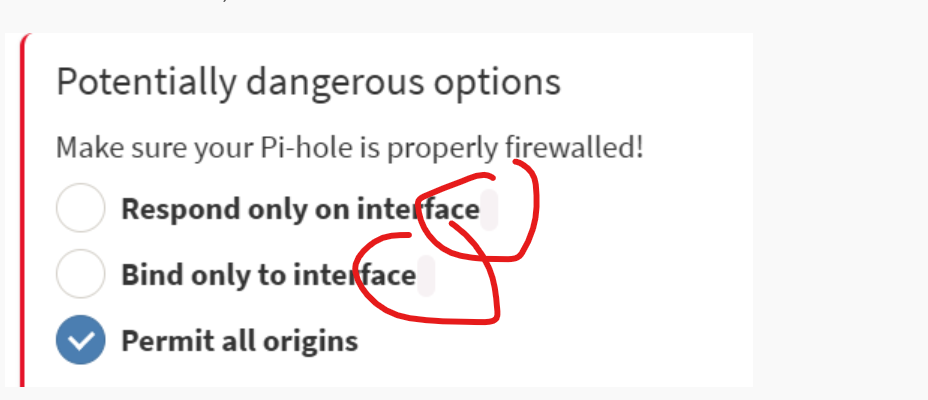
I set my pi-hole to "Permit all origins" in the DNS settings, expecting that to mean the pi-hole would accept DNS queries from the VPN clients.
But ads are not being blocked. Clients on the LAN are fine though.
If I explicitly give clients the IP of the pi-hole to use for DNS (192.168.1.5) they can't resolve anything.
When I uninstalled the pi-vpn, I didn't (as it recommends) reboot the machine as it's a remote site, but I guess I could do. Might that be implicated?
That sounds like your new VPN has not been configured to allow access to the local network. I'm not familiar with your model of router but I believe that some Unifis put the VPN traffic on a separate VLAN by default to separate it from your local network.
If it doesn't have access then even when the IPs are specified manually the traffic will not be passed through.
The missing interface name not displaying is a known bug and a fix is underway. As your local clients can reach the Pi-Hole it is unlikely to be involved.
This is a networking issue rather than a Pi-hole one.
The advantage of serving the VPN from the same machine as Pi-hole (as your PiVPN did previously) is that the machine has an IP address within your VPN, and thus, VPN clients are able to use an internal VPN IP for DNS, with Pi-hole listening on that IP by default (by virtue of its default Allow only local requests interface setting, as the VPN is local to the machine that runs Pi-hole).
As its now your router that is acting as a VPN gateway, your Pi-hole machine won't have a VPN internal IP anymore.
It would be you router's job to either allow direct DNS requests or NAT them to your Pi-hole machine. To that end, it not only needs to tell its VPN clients that they should use 192.168.1.5 for DNS, but it also needs to offer a route for that 192.168.1.0/24 network, or at least to 192.168.1.5.
You should consult your router's documentation and support for further details on properly configuring a local custom DNS server for its VPN solution.
Ah OK - thanks. Not that I quite understand - but for the benefit of anyone else hitting the same problem with a Unifi gateway (I'm using Network Application v9.1):
The client config that you download from the UCG (I put the Wireguard server's DNS setting on "Auto" and all firewall settings are defaults) sets the client's DNS server as that of the VPN gateway, like this in my case:
I had to change it so the DNS IP was that of my pi-hole, and (feels a bit odd, but hey), added the pi-hole's netmask to the AllowedIPs (I also left the pi-hole as set to "permit all origins" but not tested that on the default):
For a little more information, this also can be set in the Unifi Network GUI under Settings/VPN/VPN Server.
With the VPN settings open, scroll down to "DNS Server" and uncheck the Auto box; enter your Pihole Address in DNS Server 1. NOTE: this will only tell Unifi the parameters to use for client files created from this point. You will have to manually edit the client config files' DNS line on the client per the information you posted above for existing clients.
Also, this config works with Pihole set to "Respond only on interface..." as well as "Permit all origins". In my case, "Allowed IPs" is set only to 0.0.0.0/0, which I think is "allow everything" and may not be desired in all cases for all users.