My home LAN is connected via a Draytek Vigor 2927 router with VLANs. I’ve got a number of devices that run through NordVPN (connected at Router level). I’m UK based and I have VPNs connected via NordVPN to France, Armenia etc.
All devices go through two piholes (10.7.0.x) for DNS filtering - DHCP settings dictate the Pihole DNS IPs in which devices receive. The piholes use upstream servers pointing to Cloudflare
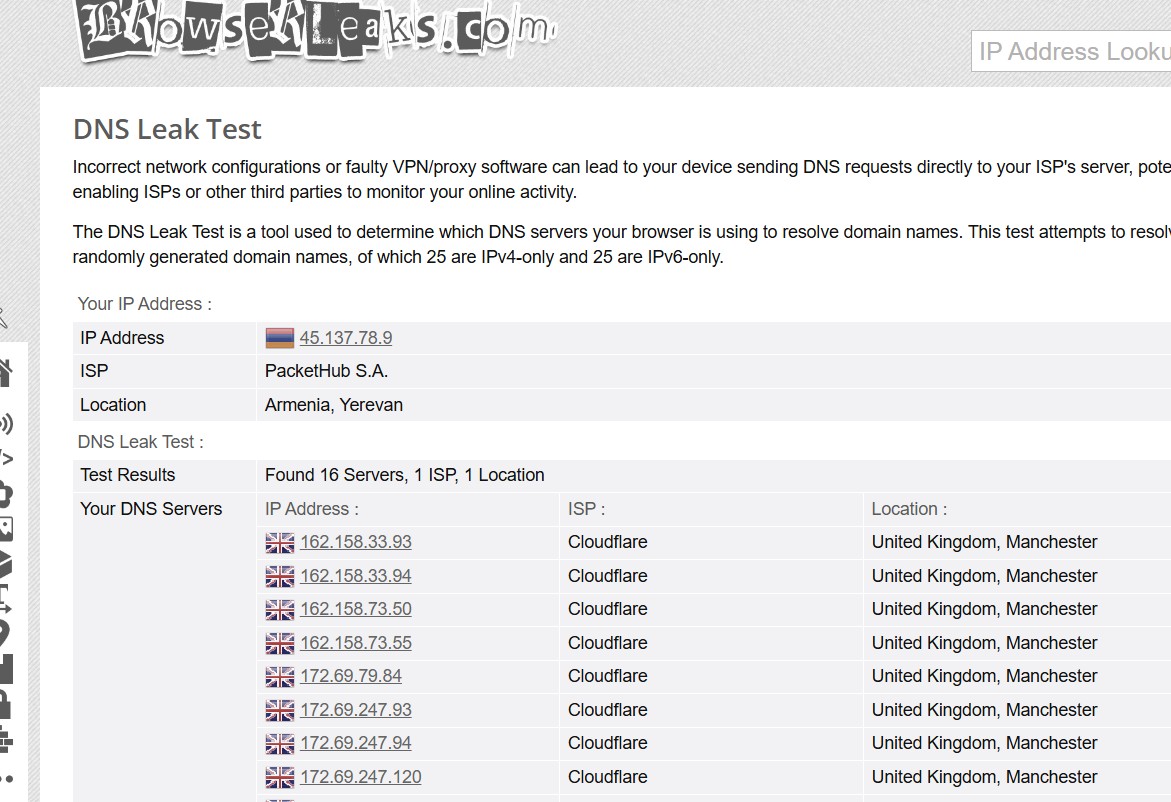
Out of curiosity I noticed that running DNSLeaks shows Cloudflare UK, Manchester servers from a device connected to NordVPN (Armenia with pihole as the DNS).
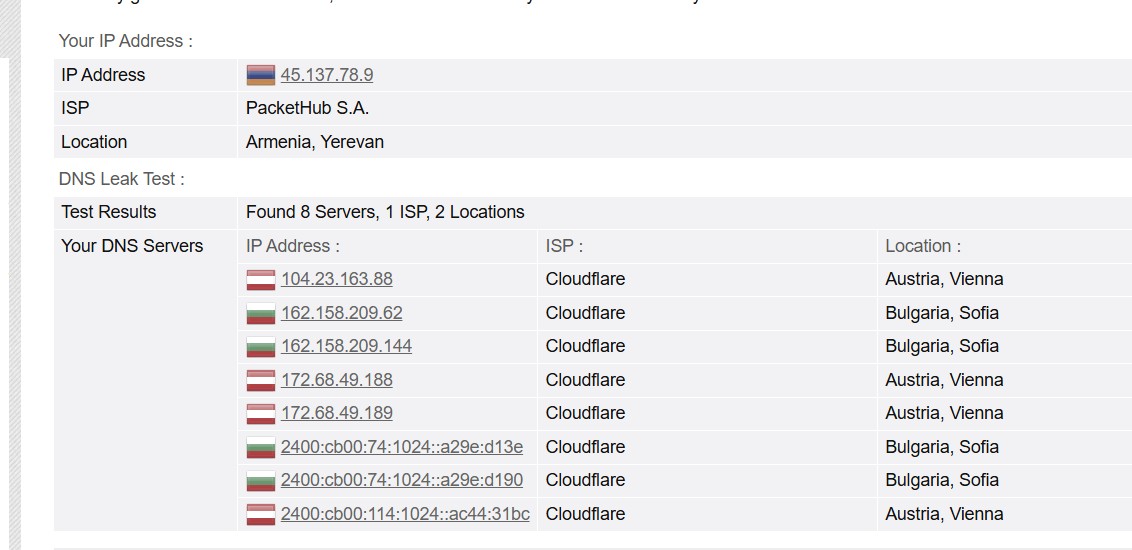
If I hardcode 1.1.1.1 and 1.0.0.1 DNS into say my iPhone or laptop running through NordVPN, the DNSleak results are as expected. DNS servers are no longer UK based:
Is there anyway that pihole can ‘play nice’ with NordVPN as a custom DNS? I know I can use Meshnet but I don’t use the NordVPN App/client at home - every device just runs through the Draytek router via a NordVPN connection using policy based routes.
Ultimately, I want to use NordVPN and DNS/ad blocking filtering from pihole but it looks like NordVPN is ignoring pihole DNS and thus Cloudflare upstreams creating a leak
Are they as expected though? Your VPN location is Yerevan in Armenia and CloudFlare is using DNS servers in a mixture of locations, non of which are Armenia.
Might this be an artifact of how CloudFlare distributes its load, and the Manchester servers just happen to have the best latency and/or capacity?
If you're able to reproduce the switch between them consistently then it looks real, in which case it sounds like the way the router handles various types of traffic, with its built-in VPN capability, or perhaps the way the router manages VLANs and the way you've got them set up, is not necessarily as expected.
Thanks Chris. But why would the pihole Cloudflare DNS be any different to hardcoded Cloudflare DNS in terms of where it pulls the name servers from? Same with Google. If I change piholes upstream to Google DNS it returns Nameservers in London. Seems like too much of a coincidence to me.
So you're routing your iPhone and laptop via NordVPN, but not your Pi-hole?
Commonly, VPN service providers would force DNS traffic to their own DNS servers, in an attempt to avoid DNS leaks.
But as you are operating NordVPN as a gateway, it can only control the traffic that goes through it.
There would be no way to control traffic your laptop sends to a local same-link machine. This means that Pi-hole would receive your laptop's DNS requests and forwards them upstream, but if the Pi-hole machine is not routed via NordVPN, you'd leak DNS requests outside your VPN tunnel.
To avoid this, you should also route your Pi-hole machine via NordVPN.
But note that may not work if Pi-hole's configured upstreams would disagree with DNS being forcefully redirected to NordVPN's servers (as e.g. validating recursive resolvers like unbound would do).
Yes, so individual devices on my home LAN route out via a route policy which uses IKEv2 to NordVPN - some devices go out via VPNs I have connected to France, Germany, Armenia etc - all via NordVPNs servers.
But all internal IPs assigned to said devices pull the Pihole custom DNS - which I guess is causing the leak when using NordVPN because like you said, pihole isn’t part of the tunnel?
I’m not really sure how do route pihole through my VPN connection. I know NordVPN have ‘meshnet’ but they are discontinuing that come December 2025. Unless installing the NordVPN client on pihole and connecting it to the service would work?
I really want the best of both worlds - VPN connection with pihole filtering but its looking unlikely right now.
Yes, and that's also what I assumed for my previous reply, so my advice would apply:
In addition, as you seem to be routing clients via different VPNs, you should be aware that your Pi-hole machine could only be routed through one of those VPNs.
While avoiding DNS leaking outside your VPN, this still could cause unwanted behaviour in rare cases where geo-location is checked by content providers, e.g. if your Pi-hole machine goes through France and a client goes through Germany, you may have difficulties to access content locked to Germany from that client.
Sounds like a common issue! When you connect to NordVPN, it's designed to take over your DNS requests to prevent leaks and make sure your traffic stays private. This is why it's bypassing your Pi-hole.
Here's the simplest way to fix it:
The Easy Fix: Add NordVPN's DNS to Pi-hole
Log in to your Pi-hole admin interface.
Go to Settings > DNS.
In the "Upstream DNS Servers" section, uncheck any other providers.
Enter the NordVPN DNS addresses in the "Custom 1 (IPv4)" and "Custom 2 (IPv4)" fields:
103.86.96.100
103.86.99.100
Click "Save" at the bottom.
Now, your Pi-hole will use NordVPN's DNS servers as its source, so all of your requests will still go through the Pi-hole for ad-blocking before being sent to NordVPN.
Hope that helps! Let me know if you run into any trouble.
OPs issue wasn't about Pi-hole being by-passed, but about Pi-hole leaking DNS requests outside their NordVPN tunnel.
Your supposed Easy Fix addresses neither of those:
It just changes Pi-hole's upstream DNS servers.
It couldn't have done anything about Pi-hole being by-passed.
To control that, you'd have needed to take action on a device that either sends or redirects the DNS request.
And in aarbron's case, devices were already talking to Pi-hole.
It wouldn't do anything about DNS leakages, as changing Pi-hole's upstreams wouldn't route DNS requests through a VPN tunnel, so they'd still be leaking through public internet straight away, exposing your real, original network's IP information as requesting source.
To control that, you'd need to either have your Pi-hole machine use a gateway that runs a VPN, or a router or firewall device that intercepts and redirects the Pi-hole machine's DNS request to a VPN gateway.
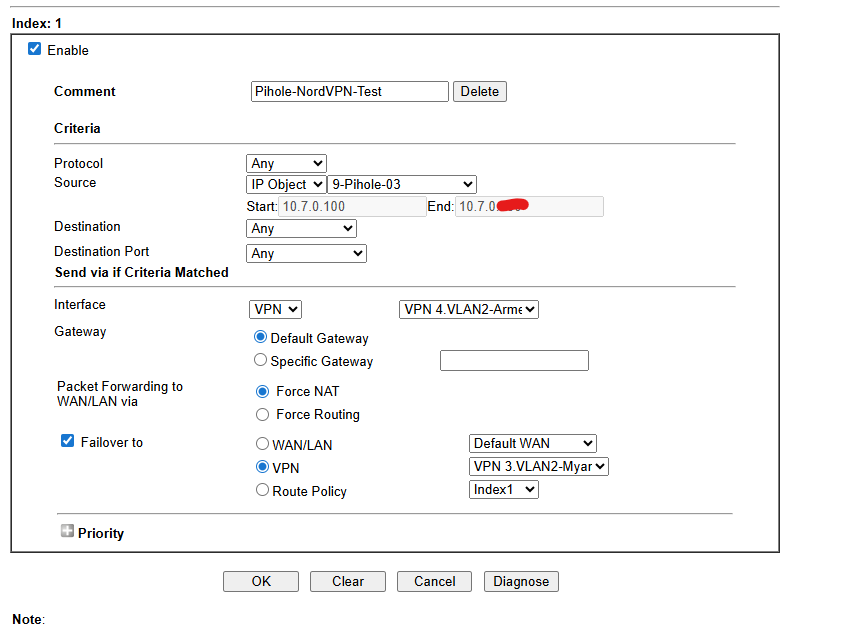
In aarbron's case, their router's policy based routing exempted Pi-hole from being forced through NordVPN, thus leaking its DNS traffic over public Internet. They have since added a route policy for their Pi-hole machine, directing it to use their NordVPN gateway with Armenia and Myanmar exit points, which would prevent DNS leakage.
@Kevin - thanks for your contribution. I did think about changing the DNS upstream servers to NordVPN’s IP addresses but as @Bucking_Horn said, I believe it would just create another DNS leak as the custom DNS still originates from Pihole and thus won’t be in the tunnel, creating a leak.
Out of interest, I changed the upstream DNS in pihole to Nords IPs and the result is as follows:
@Bucking_Horn - I tried routing pihole via a route policy to NordVPN in the Draytek router but that kills all connections to Pihole from any devices that are pointing to its DNS and the pihole becomes unreachable.
Routing your Pi-hole machine's outbound traffic to public IPs via NordVPN's interface should have no impact on inbound traffic from other client machines.
You should investigate how a client's DNS requests are routed to your Pi-hole machine.
I'm not familiar with Draytek routers, but their documentation suggests they allow you to trouble-shoot policy routes via a dedicated UI, see DrayTek - Policy Route Diagnostics.