Please follow the below template, it will help us to help you!
If you are Experiencing issues with a Pi-hole install that has non-standard elements (e.g you are using nginx, apache2 or another reverse proxy, or there is some other aspect of your install that is customised) - please use the Community Help category.
Expected Behaviour:
I have a Raspberry Pi with version 6.4 of pi-hole running very well. At the bottom of the dashboard I spotted that version 6.5 is available so I tried to install it but got an error message. There is nothing custom about my install.
Actual Behaviour:
Error: Unable to update local repository. Contact Pi-hole Support.
github is accessible by browser. The error message I get when I run "sudo pihole -up" is -
[i] Pi-hole Core:     update available
[i] Web Interface:    update available
[i] FTL:              up to date

[i] Pi-hole core files out of date, updating local repo.
[✓] Check for existing repository in /etc/.pihole
[i] Update repo in /etc/.pihole...
: Could not update local repository. Contact support.
I changed the last command by removing the -qq argument!
FYI:
$ man apt-get
[..]
       -q, --quiet
           Quiet; produces output suitable for logging, omitting progress
           indicators. More q's will produce more quiet up to a maximum of
           2. You can also use -q=# to set the quiet level, overriding the
           configuration file. Note that quiet level 2 implies -y; you
           should never use -qq without a no-action modifier such as -d,
           --print-uris or -s as APT may decide to do something you did
           not expect. Configuration Item: quiet.
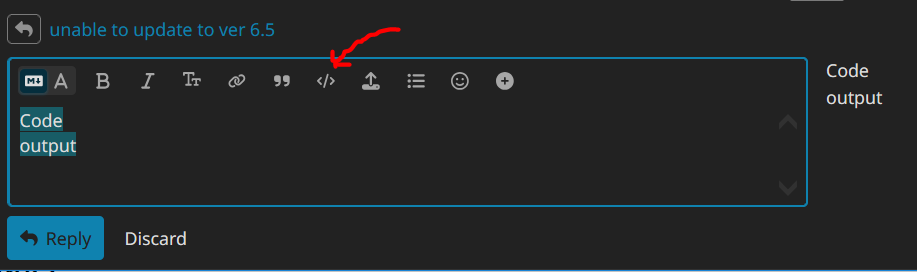
When copying/pasting the output to here, try to format the output in the reply window by selecting/highlighting it with the mouse first, and pressing the </> button before posting the reply pls?
alanb@pihole6:~ $ sudo apt update
Hit:1 http://deb.debian.org/debian bookworm InRelease
Get:2 http://deb.debian.org/debian-security bookworm-security InRelease [48.0 kB                              ]
Get:3 http://deb.debian.org/debian bookworm-updates InRelease [55.4 kB]
Get:4 https://downloads.plex.tv/repo/deb public InRelease [6,685 B]
Get:5 http://archive.raspberrypi.com/debian bookworm InRelease [55.0 kB]
Get:6 http://deb.debian.org/debian-security bookworm-security/main armhf Package                              s [293 kB]
Get:7 http://deb.debian.org/debian-security bookworm-security/main arm64 Package                              s [308 kB]
Get:8 http://deb.debian.org/debian-security bookworm-security/main Translation-e                              n [191 kB]
Get:9 http://archive.raspberrypi.com/debian bookworm/main arm64 Packages [573 kB                              ]
Get:10 http://archive.raspberrypi.com/debian bookworm/main armhf Packages [573 k                              B]
Fetched 2,102 kB in 7s (294 kB/s)
Reading package lists... Done
Building dependency tree... Done
Reading state information... Done
309 packages can be upgraded. Run 'apt list --upgradable' to see them.
alanb@pihole6:~ $ sudo apt-get -y --no-install-recommends install bash-completio                              n curl
Reading package lists... Done
Building dependency tree... Done
Reading state information... Done
bash-completion is already the newest version (1:2.11-6).
The following additional packages will be installed:
libcurl3-gnutls libcurl4
The following packages will be upgraded:
curl libcurl3-gnutls libcurl4
3 upgraded, 0 newly installed, 0 to remove and 306 not upgraded.
Need to get 0 B/1,039 kB of archives.
After this operation, 65.5 kB disk space will be freed.
apt-listchanges: Reading changelogs...
dpkg: unrecoverable fatal error, aborting:
files list file for package 'libmagickcore-6.q16-6:arm64' is missing final newl                              ine
^Calanb@pihole6:~ $ sudo apt update
Hit:1 http://deb.debian.org/debian bookworm InRelease
Get:2 http://deb.debian.org/debian-security bookworm-security InRelease [48.0 kB                              ]
Get:3 http://deb.debian.org/debian bookworm-updates InRelease [55.4 kB]
Get:4 https://downloads.plex.tv/repo/deb public InRelease [6,685 B]
Get:5 http://archive.raspberrypi.com/debian bookworm InRelease [55.0 kB]
Get:6 http://deb.debian.org/debian-security bookworm-security/main armhf Package                              s [293 kB]
Get:7 http://deb.debian.org/debian-security bookworm-security/main arm64 Package                              s [308 kB]
Get:8 http://deb.debian.org/debian-security bookworm-security/main Translation-e                              n [191 kB]
Get:9 http://archive.raspberrypi.com/debian bookworm/main arm64 Packages [573 kB                              ]
Get:10 http://archive.raspberrypi.com/debian bookworm/main armhf Packages [573 k                              B]
Fetched 2,102 kB in 7s (294 kB/s)
Reading package lists... Done
Building dependency tree... Done
Reading state information... Done
309 packages can be upgraded. Run 'apt list --upgradable' to see them.
alanb@pihole6:~ $ sudo apt-get -y --no-install-recommends install bash-completio                              n curl
Reading package lists... Done
Building dependency tree... Done
Reading state information... Done
bash-completion is already the newest version (1:2.11-6).
The following additional packages will be installed:
libcurl3-gnutls libcurl4
The following packages will be upgraded:
curl libcurl3-gnutls libcurl4
3 upgraded, 0 newly installed, 0 to remove and 306 not upgraded.
Need to get 0 B/1,039 kB of archives.
After this operation, 65.5 kB disk space will be freed.
apt-listchanges: Reading changelogs...
dpkg: unrecoverable fatal error, aborting:
files list file for package 'libmagickcore-6.q16-6:arm64' is missing final newl                              ine
Thank you for your time and patience. I only looked on here because the error message instructed me to contact Pihole support. I did not realise it was an OS issue. I will look elsewhere to see if this can be resolved.