Visiting some sites and expecting ads to be blocked. Specifically, Google Ads.
I used the “add domain as wildcard” and added all kinds of combinations of URLs that I see when I hover with the mouse over the visible ads.
Example: googleads.g.doubleclick.net I tried to block exactly this URL and I tried using regex to block it like this (\.|^)googleads\.g\.doubleclick\.net$ or (\.|^)googleads$
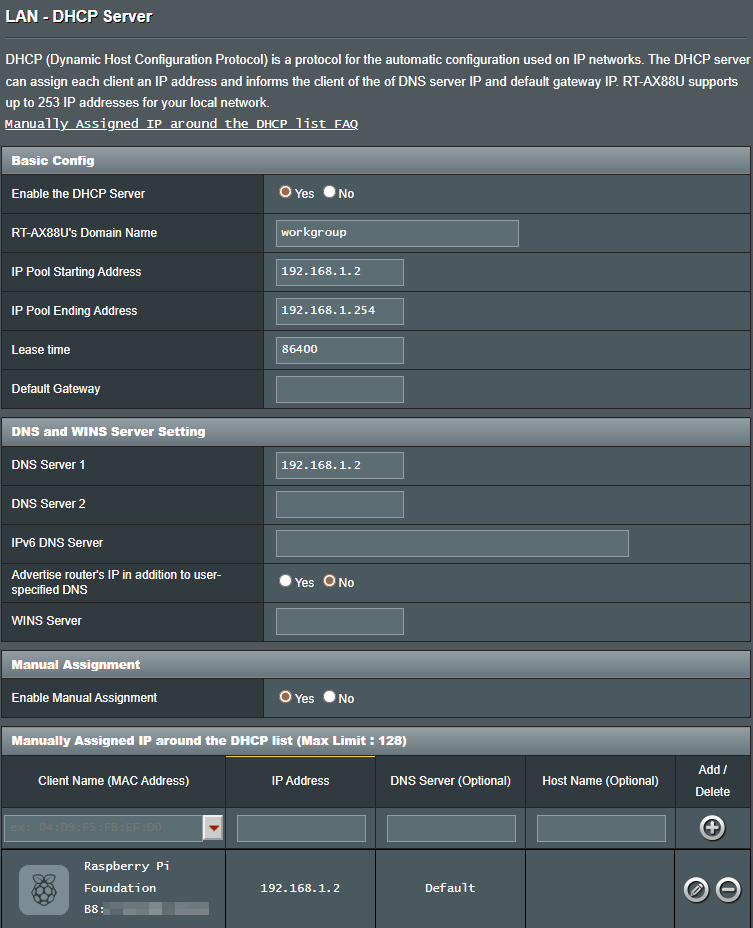
But the ads keeps reappearing. My PC is set to use 192.168.1.2 which is the PiHole’s IP Address. My Router is the PiHole as the DNS:
Router settings look good ... for the IPv4 part.
Except I would restrict the pool range from 192.168.1.50 to 192.168.1.250 instead to also allow to configure devices with a true static IP to be outside above DHCP scope (but within the same subnet).
What does below output?
sudo pihole-FTL dhcp-discover | grep 'dns-server\|Recursive DNS server'
It broadcasts an IPv4 DHCPDISCOVER plus an IPv6 RS (Router Solicitation) via multicast and catches the responses from the router(s) etc.
You can also run it without above grep for you yourself to inspect whats advertised on your LAN via IPv4 DHCP or IPv6 RA (Router Advertisement):
sudo pihole-FTL dhcp-discover
Dont post full unredacted output here for privacy!
Yes.
I have all my network critical devices configured with manual static IP details on the devices themselves just in case of the DHCP server failing for some reason.
Output looks good.
If you localized it to the browser, try find below setting and make sure its disabled:
So aside from the registry change I’ve done, I don’t know how to execute setp 5: “Select the Enter custom provider drop-down menu and choose Cloudflare (1.1.1.1).”
You might have created that “managed browser” problem when you made that registry edit above. Try removing it or changing back to its original value then restart your browser; although since it’s a policy setting, it may require a reboot to take effect as it’s in the Local Machine hive.
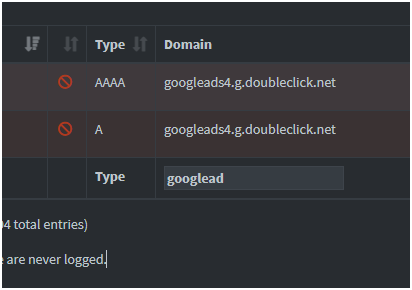
When I hover with the mouse over the ads, the domain I see is, googleads.g.doubleclick.net however, in the screenshot you can see it shows googleads4 while this appears to get blocked, I don’t see results for googleads
I also notice that the website keeps rotating the URL of the ads, as if they “figure out” that I’m blocking them, so each page refresh, the URL keeps changing and ads are showing up.
This is all very strange, because on my Pihole installation using default block lists, googleads4.g.doubleclick.net (indeed anything at doubleclick.net) is blocked; DIG returns 0.0.0.0 for an answer.
Maybe the ads are coming from a different domain? I don’t see ads on Google.
By “URL keeps rotating” do you mean the domain itself changes? Like it isn’t doubleclick.net? Pi-hole isn't concerned with URLs, it only sees the domains.
Aren’t you blocking the whole of doubleclick.net through wildcard using regex?
exactly. each time I visit, it’s a different domain. all of them appear in the list. this is 99% browser settings that I have to mess with in the windows registry.
It would seem Edge considers itself as a managed browser (i.e. to be managed by policies rather than direct user interaction) if it finds at least one Edge related policy, which it seems is just what you've introduced by adding that registry key.
In order for Edge to allow you to control its Use secure DNS option, you'd probably need to remove all Edge policies.
But then your browser seems to show Use secure DNS as off already, and that's already what deHakkelaar had suggested to verify.
I think the edge policies is because my windows account is a microsoft/outlook online account, and not a local account.
I believe if I’ll change it to a local account, then I won’t have these policies.
The registry changes are because of this “managed account”, it didn’t introduce the policies, as it seems they were there all along. Well… at least that’s what I observed, but I could be wrong.
Control the mode of the DNS-over-HTTPS resolver. Note that this policy will only set the default mode for each query. The mode can be overridden for special types of queries such as requests to resolve a DNS-over-HTTPS server hostname.
The "off" mode will disable DNS-over-HTTPS.
The "automatic" mode will send DNS-over-HTTPS queries first if a DNS-over-HTTPS server is available and may fallback to sending insecure queries on error.
The "secure" mode will only send DNS-over-HTTPS queries and will fail to resolve on error.
If this policy is not configured for managed devices, DNS-over-HTTPS queries will not be sent. Instead, the browser may send DNS requests to a resolver associated with the user's system resolver. This could lead to a less secure or private
Policy options mapping:
off (off) = Disable DNS-over-HTTPS
automatic (automatic) = Enable DNS-over-HTTPS with insecure fallback
secure (secure) = Enable DNS-over-HTTPS without insecure fallback