I know Pi-hole + Unbound is "good enough" as gold standard for a reason, and I know this looks complex. But if you've ever been curious to run Pi-hole, cloudflared, AdGuard Home (and perhaps also Unbound...) together, to compare their capability, chain them for layered filtering, or just have a fallback that doesn't force you to pick one, then this "Valve" may suit you. It lets you switch between parallel and serial DNS routing on the fly, turning a static setup into a flexible network lab.*
1. Introduction
This stack began as an experiment, motivated by the familiar anxiety of the paradox of choice. We are fortunate to have excellent DNS filtering tools like Pi-hole and AdGuard Home, but more often than not, we are pressured to just pick one and stick with it. I started wondering: what if you could run them in parallel, observe their differences firsthand, and even let them collaborate or compete as you wanted?
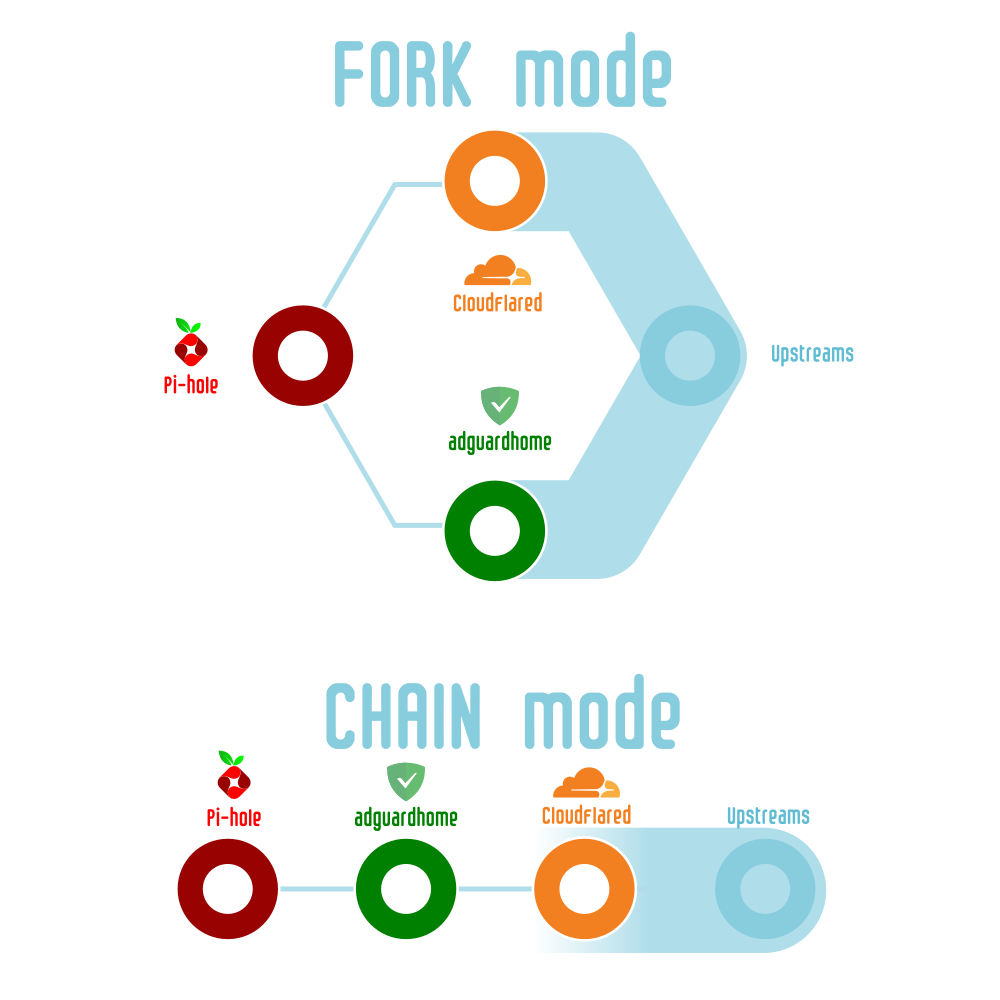
That led to a realization: the search for a single “best” tool is probably a dead end. Instead, I leaned into making them work in concert. The goal became constructing a relay that could be swapped with minimal effort between two distinct modes: Forked (multi-upstream, Pi-hole sending to AdGuard Home or Cloudflared in parallel for redundancy and debugging) and Chained (serial, Pi-hole to AdGuard Home to Cloudflared, stacking for strict auditing and multi-layer filtering). This relay sequence is entirely customizable.
The key to making this practical and low-stress is leveraging a universal feature -- using a secondary DNS as a live fallback upstream. Even if one path fails or misbehaves, queries still get through, which eliminates the pressure for immediate fixes and keeps the network stable. I can then review the logs later to decide whether to adjust the mode or tweak the rules. This transforms a rigid setup into a living, learning system that adapts to my schedule.
2. Key Concepts and Architecture
-
Pi-hole: A DNS-level adblocker and network statistics logger.
-
AdGuard Home: Advanced DNS filtering, caching, and parental controls.
-
Cloudflared: A DNS-over-HTTPS/TLS proxy offering upstream privacy.
-
Macvlan: Docker’s network driver that gives each container a real IP/MAC on your LAN, resulting in reliable multicast, zero port mapping headaches, and perfect compatibility with mDNS and IoT scenarios.
3. The Valve Mechanism: Forked vs. Chained
Forked Mode
You can think of this as “channeling your inner network engineer.” In forked mode, Pi-hole sends DNS requests in parallel to AdGuard Home and Cloudflared. This lets you compare which filters or responds better and debug both independently. You have instant redundancy, and seeing each tool’s quirks side by side is surprisingly instructive.
Chained Mode
Alternatively, “think like a security auditor.” In chained mode, queries are processed sequentially (Pi-hole → AdGuard Home → Cloudflared), so you get centralized logs and a unified policy for privacy and audit compliance. Each DNS request passes through every filter and resolver you set.
How to Switch Modes
You can switch at any time by editing your .env file and adjusting upstream settings in Pi-hole and AdGuard Home. Novices should keep a simple “How to Switch Modes” quick reference near the top of their config.
Forked Mode
Client
  |
Pi-hole (192.168.1.2)
  |         |
AdGuard   Cloudflared
Chained Mode
Client
  |
Pi-hole
  |
AdGuard Home
  |
Cloudflared
4. Network Layout and Live-Ready Config Examples
Why Choose Macvlan?
-
Assigns each container a unique IP, completely avoiding port overlaps.
-
Delivers excellent LAN performance, multicast and mDNS compliance, and reliability -- especially valuable for multi-layer DNS chains.
-
The setup and hardware support are more involved than Bridge or Host networks, but the payoff is worth it for anyone serious about versatile DNS relaying.
Sample Service Table
| Service | IP | Ports (container:host) | Role | Upstream (by mode) |
|---|---|---|---|---|
| Pi-hole | 192.168.1.2 | 53/80/443standard | Ad-blocking / logging | AdGuard & Cloudflared (forked), AdGuard (chained) |
| AdGuard Home | 192.168.1.3 | 53/4455, 80/2233 | Filtering / caching | Public DNS (forked), Cloudflared (chained) |
| Cloudflared | 192.168.1.9 | 5054:5054, 8877:8877 | DoH proxy | Public DoH |
5. docker-compose.yml Example
Three-in-One, Valve-Ready, No Port Collisions
version: "3.8"
networks:
  macvlannet:
    driver: macvlan
    driver_opts:
      parent: ${NETWORK_INTERFACE}
    ipam:
      config:
        - subnet: ${MACVLAN_SUBNET}
          gateway: ${MACVLAN_GATEWAY}
          ip_range: ${MACVLAN_IP_RANGE}

services:
  pihole:
    container_name: pihole-macvlan
    image: pihole/pihole:latest
    depends_on:
      - adguardhome
      - cloudflared
    environment:
      - TZ=${TZ}
      - WEBPASSWORD=${WEBPASSWORD}
      - PIHOLE_DNS_1=${PIHOLE_DNS_1}
      - PIHOLE_DNS_2=${PIHOLE_DNS_2}
      - DNSMASQ_LISTENING=all
    volumes:
      - ${PIHOLE_CONFIG_PATH}:/etc/pihole:rw
      - ${DNSMASQ_CONFIG_PATH}:/etc/dnsmasq.d:rw
    networks:
      macvlannet:
        ipv4_address: ${PIHOLE_MACVLAN_IP}
    ports:
      - "53:53/udp"
      - "80:80/tcp"
    restart: unless-stopped
    healthcheck:
      test: ["CMD", "curl", "-f", "http://127.0.0.1/admin/"]
      interval: 60s
      timeout: 10s
      retries: 3
      start_period: 30s

  adguardhome:
    container_name: adguardhome-macvlan
    image: adguard/adguardhome:latest
    environment:
      - TZ=${TZ}
    volumes:
      - ${ADGUARD_CONFIG_PATH}:/opt/adguardhome/conf:rw
      - /volume1/docker/adguardhome/work:/opt/adguardhome/work:rw
    networks:
      macvlannet:
        ipv4_address: ${ADGUARD_MACVLAN_IP}
    ports:
      - "4455:53/udp"
      - "2233:80/tcp"
      - "3000:3000/tcp"
    restart: unless-stopped

  cloudflared:
    container_name: cloudflared-macvlan
    image: cloudflare/cloudflared:latest
    command:
      - proxy-dns
      - --address=0.0.0.0
      - --port=8877
      - --upstream=https://8.8.8.8/dns-query
      - --upstream=https://1.1.1.1/dns-query
      - --upstream=https://dns.quad9.net/dns-query
    environment:
      - TZ=${TZ}
    volumes:
      - ${CF_CONFIG_PATH}:/etc/cloudflared:ro
    networks:
      macvlannet:
        ipv4_address: ${CF_MACVLAN_IP}
    ports:
      - "8877:8877/udp"
    restart: unless-stopped
6. .env Environment File Template
TZ=Asia/Tokyo # Your actual time zone
WEBPASSWORD=yourpassword
PIHOLE_MACVLAN_IP=192.168.1.2
ADGUARD_MACVLAN_IP=192.168.1.3
CF_MACVLAN_IP=192.168.1.9
PIHOLE_DNS_1=192.168.1.3#4455
PIHOLE_DNS_2=192.168.1.9#8877
PIHOLE_CONFIG_PATH=/volume1/docker/pihole/etc-pihole
DNSMASQ_CONFIG_PATH=/volume1/docker/pihole/etc-dnsmasq.d
ADGUARD_CONFIG_PATH=/volume1/docker/adguardhome/conf
CF_CONFIG_PATH=/volume1/docker/cloudflared
MACVLAN_SUBNET=192.168.1.0/24
MACVLAN_GATEWAY=192.168.1.1
MACVLAN_IP_RANGE=192.168.1.2/30
NETWORK_INTERFACE=eth0
For chained mode, leave PIHOLE_DNS_2 blank and set AdGuard Home’s upstream to 192.168.1.9:5054.
7. Macvlan Patch Script
Set this to run at every reboot (e.g., /etc/rc.local):
# Assign a free LAN IP to the bridge interface (e.g., 192.168.1.250, but any unused IP works)
ip link add dockerrouteif link eth0 type macvlan mode bridge
ip addr add 192.168.1.250/24 dev dockerrouteif
ip link set dockerrouteif up
ip route add 192.168.1.2/32 dev dockerrouteif
ip route add 192.168.1.3/32 dev dockerrouteif
ip route add 192.168.1.9/32 dev dockerrouteif

# For Tailscale setups
# /usr/local/bin/tailscale up --advertise-routes=192.168.1.0/24 --accept-dns=false --reset
Note: Macvlan’s clean isolation also means that, by default, the host cannot natively talk to its own containers. This script creates a virtual “backdoor,” allowing the NAS to reach the containers. If eventually switched to IPVLAN (L2 mode), this specific patch script may be unnecessary due to IPVLAN’s different model.
8. Initial Setup, Maintenance, and Backup
-
If the Pi-hole web password does not work, you can set it using:
pihole -a -p 'yourpassword'orpihole setpassword 'yourpassword' -
For AdGuard Home, visit the setup wizard at port
3000when starting for the first time, then access the admin UI at2233. -
Set your router or DHCP server to use Pi-hole’s IP (192.168.1.2) as the primary DNS for clients.
-
Never use your NAS’s physical IP address as DNS for clients, and disable the Synology DSM DNS Server package to prevent conflicts.
-
Secure all web UIs with strong LAN-only passwords and firewall rules; never expose them to WAN.
-
After changes or upgrades, back up not just YAML and
.env, but also all custom scripts and config volumes. -
Keep containers updated for security and reliability.
-
Note that Pi-hole’s DNS port cannot be changed; admin HTTP can be remapped.
9. Security and Privacy Considerations
Because this stack will see essentially all LAN (and possibly WAN) DNS traffic—including internal addresses and browsing behavior—it is essential to restrict access to trusted LAN clients only. Always firewall your NAS and router, and use encrypted upstreams (DNS-over-HTTPS via Cloudflared) to maximize privacy. Never expose any DNS or admin UI directly to the internet.
10. Troubleshooting
-
In forked mode, Pi-hole’s upstream queries are split between AdGuard and Cloudflared. Always check both their logs for issues and latency.
-
In chained mode, queries flow Pi-hole → AdGuard → Cloudflared, so log and healthcheck focus should be on the latter two.
-
If the Pi-hole healthcheck fails, try
dig @192.168.1.2 pi.holeor use the curl check:curl -f ``http://127.0.0.1/admin/. -
The Macvlan patch script must auto-run at reboot to avoid containers disappearing from the LAN.
-
If Macvlan traffic appears broken, test with
tcpdumpand consider trying IPVLAN for larger or more complex setups. -
Regularly check logs for “connection refused” errors or kernel buffer warnings to catch escalating failures early.
11. Fault Tolerance, Fallback Logic, and Risk Mitigation
Before diving in, remember that most network issues are recoverable with a single router or NAS reboot. Still, understanding these risks in advance lets you build a setup that rarely needs such drastic action.
Fallback Logic Table
| Mode | Query Logic | Fallback Behavior |
|---|---|---|
| Forked | Parallel queries: Pi-hole sends DNS to both AdGuard and Cloudflared at once | Pi-hole takes the first valid response. If one fails, the other is used instantly. |
| Chained | Sequential: Pi-hole → AdGuard → Cloudflared | Each layer processes in order. If AdGuard fails, Pi-hole needs a secondary DNS fallback. If Cloudflared fails, AdGuard needs its own backup. |
Risk Scenarios
DNS Query Storms
A misconfigured container or failed upstream may cause an endless retry loop. Heavy or malformed mDNS traffic can also lead to flooding, filling kernel buffers and exhausting available network resources. Omitting a secondary DNS makes this much more likely.
Router/NAS Bottleneck
Most consumer routers and NAS hardware cannot handle DNS floods. You may lose access to admin UIs (even if ping succeeds) if Docker overwhelms the system with queries.
Upstream Deadlock
In chained mode with no proper fallbacks, a single upstream failure (e.g., Cloudflared going down) can take out DNS across every client—and even on the NAS itself.
Resource Locking
Too many Macvlan/IPVLAN interfaces, or excessive L2 broadcast traffic, can overflow a router’s ARP/MAC table or kernel buffers, sometimes requiring a physical reboot.
Best Practices Checklist
-
Always set reliable external fallback DNS (e.g., 8.8.8.8) for all containers, NAS, and critical devices.
-
Use Docker resource limits (
CPU,mem) for DNS containers to contain query storms. -
Keep a direct admin path to your NAS and router UI—use a dedicated VLAN, port, or static IP out-of-band.
-
Specify a direct DNS for key admin/monitoring endpoints so you can maintain access if the Docker DNS chain fails.
-
Monitor system logs for timeout and refused errors or process deaths.
-
When scaling, ensure your network hardware (router/switch) can support extra MAC addresses and multicast.
12. FAQ and Advanced Thoughts
Why not just use Pi-hole? Pi-hole is fantastic at what it does, but with this stack, I can answer questions Pi-hole never asked, like running DoH natively or instant upstream fallback. More than that, it is fun and deeply educational—live-tweaking my upstream strategy and observing performance rather than defaulting to a single “approved” choice.
Why even bother with a multi-tool “Valve”? Choosing one tool is fine. For me, though, the valve makes my setup a dynamic lab, so I can A/B test upstreams in Forked mode or enforce a strict filtering chain in Chained mode, all without reshuffling containers. It moves the focus from “Which tool is best?” to “How do they work together, and what can I learn from their collaboration or rivalry?”
Is IPVLAN better than Macvlan for this? IPVLAN provides similar separation and performance. For most homes, Macvlan is easier and more widely compatible. For complex or VLAN-driven enterprises, IPVLAN may scale better—this is worth experimenting with and your hardware may dictate the best choice.
Can switching be automated? Yes. In the appendix, I share methods for both CLI scripts and one-click browser bookmarks for toggling between modes.
13. Open Questions & Final Words
-
Can the Forked/Chained switch be orchestrated automatically?
-
Is adding Unbound as a third upstream practical for home use?
-
What are the lived differences between Macvlan and IPVLAN in long-term reliability?
-
How much does chaining increase DNS latency?
-
Any best practices for keeping Pi-hole and AdGuard Home blocklists in harmony?
I hope this write-up helps others build resilient, customizable, and insightful DNS setups… always learning, never finished. I am happy to discuss, correct, or extend anything here. If you have an improvement or a troubleshooting story to share, please do.