Until x time ago, all queries were showing up in the device list, query log, etc.
There are four internal networks that use pi-hole.
We’ll call the networks: office, server, vpn, and voip.
All networks, except office, show up in the query logs, on the dashboard, etc.
THERE HAVE BEEN NO CHANGES TO ANYTHING RELATED.
→ DNS, DHCP, routing, etc.
→ I’m the only one with access.
Wireshark packet capture shows my machine on the office network is talking to and is being responded appropriately by pi-hole.
But my office network IP and queries are not showing up in pi-hole.. Nor are any other host on the office network.
Expected Behaviour:
all DNS queries, from all networks are resolved and show up in logs
Debian 12
proxmox 8.1.x
no docker
server RFC 1918 network IP, no NAT
Actual Behaviour:
office network IPs are not being reported or logged.
For the sake of re-iteration, both DNS servers on my box that is on the office network are set to the same IP of pihole. _dns.resolver.arpa has been set so browsers are not using their own DoH
as far as the debug token, maybe okay for a home network. Not for a website host.
NOTE: All log files auto-delete after 48 hours and ONLY the Pi-hole developers can access your data via the given token. We have taken these extra steps to secure your data and will work to further reduce any personal information gathered.
Our ability to help you depends on your ability to trust us and to provide us with access to the information we need. If you do not want to provide us with the information then your help will be limited.
So you’re trusting this code to run on your box, but you’re not trusting the people who wrote that code to debug your setup? If they were trying to do something untoward, they’d just embed it in the application code and not wait on you to send a debug log.
Plus the log that is generated is fully viewable by you; you’ll see exactly what these (very small number of) people are seeing.
You can check what information is on the log in /var/log/pihole/pihole_debug.log.
If you think it is fine to upload your log, then generate a new one and upload it when asked. Only team members (less than 10 people) will have access to it and probably just one or two will actually open it.
If after reading the log you still think there is information you don't want to share, then you can wait for the community to help you.
Please post the token URL. The logs live for 48 hours before autodelete and I can guaranty that someone from the support team will help you before that window closes.
And you've done a live tail of the query log (via CLI and not via the web interface query log) to see if there's any record of the query activity?
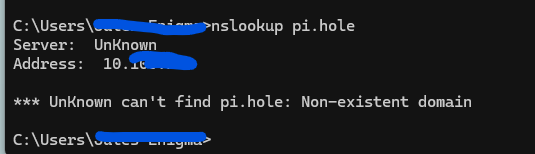
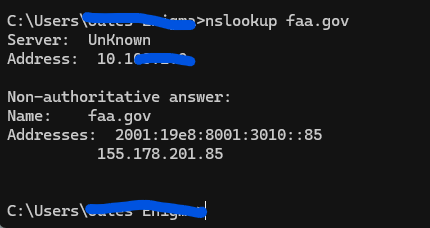
Are you sure that the Office subnet is truly using Pi-hole and not another DNS server? Do any of the missing clients show as green in the Network page on the web interface? Can you dig pi.hole from the Office clients and get a proper response and not an NXDOMAIN?
That tells me that the office network is not using Pi-hole. That would explain why none of those clients are showing up in the Pi-hole logs yet the are still resolving.
Is the Address: of the DNS server the same as the Pi-hole IP address? Do you have any firewalls with rules set to NAT the DNS traffic from the office network to the Pi-hole?
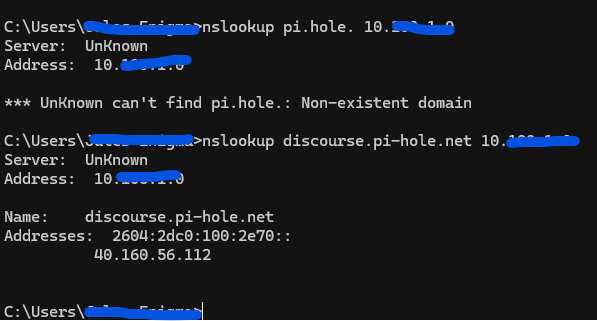
Does a nslookup pi.hole <pi-hole_IP_address> show a proper IP response?
PS C:\Users\Dan> nslookup pi.hole. 192.168.1.5
Edit: If you are using nslookup on Windows then make sure the query is for pi.hole. with the trailing anchor dot, otherwise Windows will tag on the local search domain to the query.
More interestingly, I seem to recall there were some device updates in the last week in which there were some oddities.
I”m looking at iptraf and see my office network IP, and those of the other networks, but none other office network IPs show up.
My box in the office network is static IP, and it too does not show up in the pi-hole webUI client list, or Query log…. but it does on iptraf on the pi-hole box.
Kind of at a loss at to what changed, as stated before, I’m the only one with access, and changes to pi-hole are Teleported after successful implementation. Major changes are proxmox snapshot prior to change.. and there has not been any.
the DHCP server is serving only one IP address for DNS and it is our pihole.
I just tried my Android, same result.
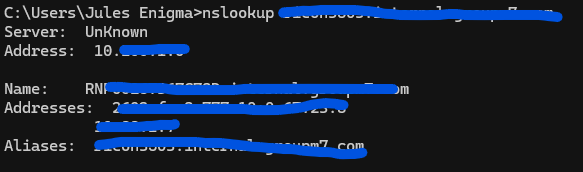
from my computer on the office network, I just tried nslookup on a host that is only in the local DNS entries of pihole.
There IP does not show up in the query list.
I do not have any type of AV/AM on this machine, all DNS is set to pihole.
The image below:
nslookup somedevice.internalnetwork
server is UnKnown
address: that of pi-hole
name and address info is being provided by pi-hole.
Ps. you dont have to redact IPv4 addresses from the private range.
Everyone is using those exact same ranges.
But you should redact all IPv6 addresses that could localize you and sometimes exposes the MAC address.
I redact IP address as we do not use the common RFC1918 default ranges.
so, this morning, pihole quit repsonding slowly, then just died.
there have been ZERO changes to the network, firewalls routes.
I got complaints this morning about everything being slow.
went to a few of their machine, could ping the pihole fine <1ms) but failed to resolve.
So, I updated it. Or attempted to. That failed.
Now it’s broke.
What the hell windows infected shit is going on here. https://tricorder.pi-hole.net/8kP6yL7d/