Expected Behaviour:
When connecting to the access point, the dns resolution is none existent and does not respond, or have internet connection for a lot of devices connecting to main SSID for the AP.
- iPhone 16 Pro Max
- USW Pro HD 24 PoE
- Ubiquiti E7 (Access Point)
- Lenovo ThinkCentre M720q Tiny
- Proxmox Virtual Environment 9.1.9
- pihole installed as a cluster with VLAN aware for all the VLANs in my Ubiquiti ecosphere
Actual Behaviour:
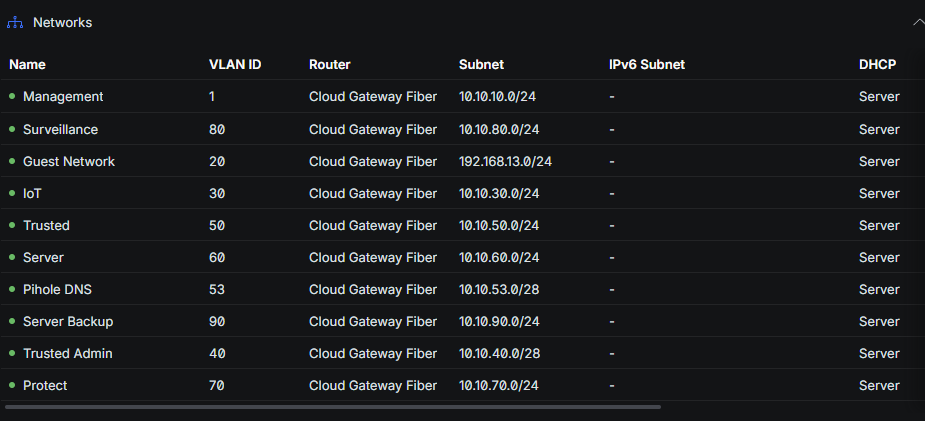
When I connect to the dedicated SSID which uses the VLAN 50 (Trusted).
The DNS resolution is very slow or does not load anything at all. For example, when I click Youtube video, nothing in the apps load or when I search for something in Safari.
All the network are segregated so none of the subnets are linked.
The fix is to turn off Wi-Fi and reconnect, but after a while, the same thing happens.
When I disconnect from the Wifi and use 5G, everything works.
When I change the DNS on the iPhone to point to another DNS such as 1.1.1.1, it is back to full speed. When I revert it back to pihole IP 10.10.53.4, everything is at snail pace.
Within pihole, I have set the interface setting to “Permit all origin” to talk to all the subnets.
I can see all the mobile / tablet device are appearing correctly in the main pihole portal.
The block list I am using are:
Multi pro - Big broom: Extended protection (Recommended) - Full
Threat Intelligence Feeds - Increases security significantly! (Recommended) - Full
GitHub - hagezi/dns-blocklists: DNS-Blocklists: For a better internet - keep the internet clean! · GitHub
Thanks!
Debug Token:
https://tricorder.pi-hole.net/CLlNCD0X/
I don't have any experience with U gear, I'm Cisco, but I can point to a few things that might help.
The query log /var/log/pihole/pihole.log is showing that queries are coming in from clients on multiple VLAN subnets so connectivity to Pi-hole looks okay. I'm wondering if there's maybe some issues with the lan routing. I see that you have the Pi-hole server with interfaces on each VLAN so there shouldn't be any need for iptables tricks and SNAT/DNAT, which is very helpful.
Your pihole.toml has a few entries that might be slowing things down:
You have both a localhost:port upstream and a remote WAN accessed upstream. That can cause issues as dnsmasq and thus FTL will use any of the upstreams, there is not primary/secondary or failover pattern. FTL will query all the listed servers and use an algorithm to determine the best upstream to use. That check happens frequently so the preferred upstream will change often.
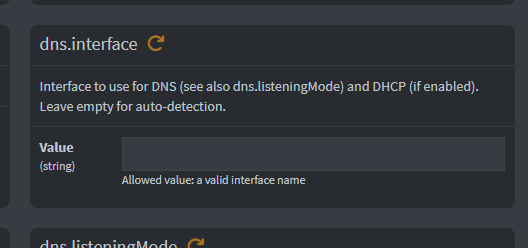
You have dns.interface set to only eth0 but your interfaces are named VLANXX. Try un-setting that interface to empty, which is the default. I'm wondering if the DNS packets are being forced through the eth0 from the VLANs coming in and going out.
Your dns.listeningMode can be LOCAL instead of ALL since LOCAL will check the subnets of each interface and allow each subnet to have access.
I see a failure on the remote IPv6 resolver test, check your IPv6 lan config and adjust or disable as you see necessary.
[✗] Failed to resolve doubleclick.com via a remote, public DNS server (2001:4860:4860::8888)
Other than that, there's been a point release for Core and FTL so you'll want to run pihole -up to get those updated components.
Is this the specs what of you have?
Lenovo ThinkCentre M720q Tiny Intel i5 9600T 2.30GHz 8GB RAM 512GB SSD Wi-Fi
What are the system settings/specs Swap Size etc for the pihole cluster?
Hi Dan,
Thanks for the insight.
I checked the Custom DNS servers section within pihole and it should be default?
You have both a localhost:port upstream and a remote WAN accessed upstream. That can cause issues as dnsmasq and thus FTL will use any of the upstreams, there is not primary/secondary or failover pattern. FTL will query all the listed servers and use an algorithm to determine the best upstream to use. That check happens frequently so the preferred upstream will change often.
Am I looking in the right place?
Can you elaborate on the this part?
You have dns.interface set to only eth0 but your interfaces are named VLANXX. Try un-setting that interface to empty, which is the default. I'm wondering if the DNS packets are being forced through the eth0 from the VLANs coming in and going out.
Are we talking about removing the VLAN name I have within the pihole cluster of proxmox?
Currently my whole setup, I have everything segmented with network / firewalls on Ubiquiti.
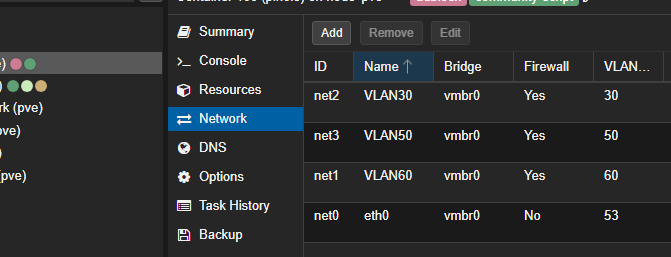
The Proxmox lives in VLAN 60 (Server) and I have VLAN aware enabled to have pihole on VLAN 53.
The other VLANS I wish to have pihole blocking ads are added into pihole proxmox network section.
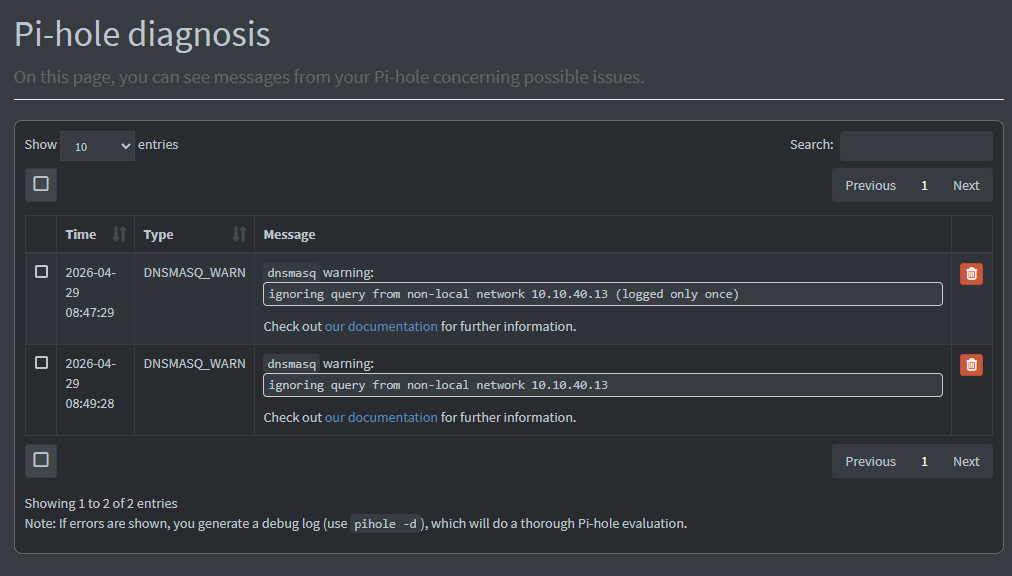
I can see the error you mentioned earlier:
I'll try updating the pihole from version and see where we stand.
Thanks
No, its an 6 x Intel(R) Core(TM) i5-8400T CPU @ 1.70GHz (1 Socket) with 64GB ram with a m.2 1TB and a 2.5 SSD 256GB.
The pihole is default configuration.
@JimmyBrown
Thanks for the info.
Summary:
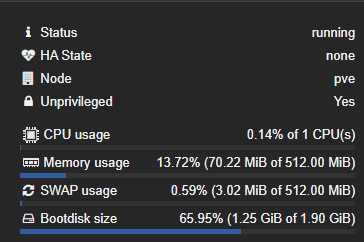
The Pi-hole container has a very small root disk (1.9 GB, ~66% used). While it’s not completely full yet, it’s already constrained and at risk of failure under normal operation.
Details:
Key issue:
The pihole-FTL.db database has very limited room to grow.
My own database is over 600 mb.
This becomes a problem because:
-
Gravity/blocklist updates increase database size
-
Query logging grows the FTL database over time
-
When space runs out, errors like:
database or disk is full (13)
can occur
Impact:
 Recommendation
- Increase container disk size (e.g. 8–16 GB)
Hey Smoking,
Thank you, I will attempt the increase storage and monitor and see if my DNS issue is better or it persists.
@DanSchaper - I think you solved it.
I did a quick google and found an article that is talked about dns.interface DNSMASQ_WARN warning notification in Pi-Hole v6 - Help - Pi-hole Userspace
The dns.interface is a whole separate page within pihole. its located in system > settings > all settings.
I removed eth0 from dns.interfaceand rebooted proxmox and can confirm the wifi works now and I can watch stuff on youtube without any problem nor have "No internet" warning message.
I will continue to monitor it and see how it plans out
Great! And if things are stable for a few days then you can click the Solutions checkbox to mark the post with the solution and close out the ticket. No rush though, let's see if it is just the interfaces and not an external transient issue.
I have been using the WiFi and its still a hit and miss for YouTube. Sometime it loads the video and sometime I have to wait for connection to be established.
The iPhone 16 Pro Max is an example. The IP address is 10.10.50.67
Your debug token is: https://tricorder.pi-hole.net/MEanuyzo/
But does it eventually load or not ??
YouTube is horrible to test with these days because they are basically "discriminating" adblocking users and show all sorts of false notification/errors that eventually have ZERO EFFECT on your experience 
Nope, nothing loads. Even when I use safari to search up something.
I have reverted it back and stopped Pihole on VLAN 50 and everything works again.
Okay, can you do a quick update with what is configured and what the results or lack of results you see with that configuration?