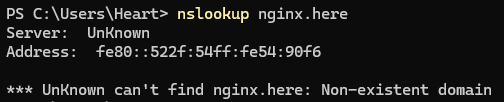
if you flipped the whole lan from 192.168.0 to 192.168.1, leftover clients still using the old dhcp/dns is usually why ads only sometimes die in my experience. that "no address range available for DHCP request via ABC123" on docker networks is probably pi-hole dhcp hearing docker bridges it cant serve, which can make dhcp look sick even when the lan is fine. might want to bind pi-hole dhcp to the real lan interface only (not docker0/br-*). also check a client with nslookup nginx.here and see which server answers. if its the new modem those requests never hit pi-hole at all. shrug
Unknown with a capital K! That's not particularly helpful, huh?
Regarding leftover clients, I would expect them to have all expired by now. I did try kicking my PC off the network and then rejoining. I assigned it a different, static IP as well via PiHole DHCP just to make sure things were coming down the pipe. The IP changed as expected, and the DNS server for my PC Ethernet connection is listed as the Pi's IP address, but things remain spotty.
Thanks for the input!! Alas, I'll keep working at it.
Yes most client implementations prefer IPv6 over IPv4 for DNS transport.
Above IPv6 DNS Server address from the nslookup comes most likely from your router via IPv6 RA:
You can verify by running below one, which will initiate an IPv6 Router Solicitation (IPv6 RS), and look for a line that says "Recursive DNS server" (RDNSS):
sudo pihole-FTL dhcp-discover
It will also show the source of the IPv6 RA (IPv6 & MAC addresses of the host).
Dont post unredacted output for above one here for privacy!
Some IPv6 RA examples in the docs --> "Router setup":
I ran the sudo pihole-FTL dhcp-discover command from the PiHoles Docker Container, and interestingly I see no sign of a "Recursive DNS Server" line or any IPv6 addresses. I'll look at what you've linked to see if I see anything that gives me an idea.
Yeah I realised too late you are running it in a container.
That dhcp-discover can only work if you run the container with the "host" or "macvlan" Docker network driver?
Else you could try run nmap again on the Pi host itself:
sudo nmap -6 --script broadcast-dhcp6-discover
EDIT: On the Windows machine you can run below one to reveal configured IPv6 DNS servers:
You could install ndisc6 on the Pi host instead (or any other Linux host):
$ apt show ndisc6
[..]
Description: IPv6 diagnostic tools
 ndisc6 gathers a few diagnostic tools for IPv6 networks including:
  - ndisc6, which performs ICMPv6 Neighbor Discovery in userland,
  - rdisc6, which performs ICMPv6 Router Discovery in userland,
  - rltraceroute6, a UDP/ICMP IPv6 implementation of traceroute,
  - tcptraceroute6, a TCP/IPv6-based traceroute implementation,
  - tcpspray6, a TCP/IP Discard/Echo bandwidth meter,
  - addrinfo, easy script interface for hostname and address resolution,
  - dnssort, DNS sorting script.
And run below one with the correct interface name:
sudo rdisc6 <INTERFACE_NAME>
FYI:
$ man rdisc6
[..]
DESCRIPTON
       RDisc6 is an Unix program which implements the ICMPv6  Router  Dis‐
       covery  in userland (it is normally done by the kernel). It is used
       to lookup the list of on-link routers and IPv6 prefixes.

       It can also be used to force the kernel to update the  state  of  a
       given IPv6-autoconfigured network interface.

       The  name  of  the  network  interface to probe routers for must be
       specified.
@deHakkelaar The pihole container itself is running in host mode. That's part of the deal with having it run as DHCP in a container, it needs to be set that way.
Running both of those netsh commands from your first post only listed the IPv4 and v6 IP's for the PiHole.
After an embarrassing amount of time trying to install "ndisk6", I've got the results! The one reply I seem to be getting is indeed from my ISP router. That's frustrating. They're going to need to physically come back to disable that, assuming it can be done. They're willing to do stuff like that but won't just flat out unlock the settings.
Time to invest in my own router and switch theirs to gateway mode.
A long string of ifs.
If its possible to turn off RDNSS advertisement via IPv6 RA, thats preferred.
If not, preferred is to advertise the ULA IP of the Pi-hole host via IPv6 RA for DNS: ip -br -6 address | grep ' f[cd]'
If thats not possible bc the router cant advertise an IPv6 ULA prefix, preferred is to advertise the LLA IP of the Pi-hole host via IPv6 RA: ip -br -6 address show scope link
If thats not possible, preferred is to turn off IPv6 support on the router for the LAN side entirely.
As a last resort you'd have to configure DNS settings manually on each and every device.
Try explaining that