Pihole not working as expected

Expected Behaviour:

Setup Pihole on an older Pi1 Model B
Assigned static IP for Pihole via router and set DHCP DNS to point to Pihole also on router.
IPV6 disabled on router, I’ve had to set secondary DNS on router as 1.1.1.1 as when i leave it blank it seems to default to IPV4 IP for some reason?

Whilst I know it won’t block ALL ads I would expect it to block blatant ones - msn.com, cnn.com, speedtest.net etc

processor : 0
model name : ARMv6-compatible processor rev 7 (v6l)
BogoMIPS : 697.95
Features : half thumb fastmult vfp edsp java tls
CPU implementer : 0x41
CPU architecture: 7
CPU variant : 0x0
CPU part : 0xb76
CPU revision : 7

Hardware : BCM2835
Revision : 000e
Serial : 00000000d5c2e92c
Model : Raspberry Pi Model B Rev 2

Core version is v6.1.4 (Latest: v6.1.4)
Web version is v6.2.1 (Latest: v6.2.1)
FTL version is v6.2.3 (Latest: v6.2.3)

Actual Behaviour:

Devices connected to Pihole but I believe there is a misconfiguration somewhere as my block hits are relatively low and when checking Client queries I’m not getting hits for websites I’m actually visiting or testing.

It’s probably something blatantly obvious but I can’t see it so any help would be greatly appreciated.

Debug Token:

https://tricorder.pi-hole.net/dMKglFB9/

You did indeed:

*** [ DIAGNOSING ]: Discovering active DHCP servers (takes 6 seconds)
   Scanning all your interfaces for DHCP servers and IPv6 routers
   
   * Received 300 bytes from 192.168.0.1 @ eth0
     Offered IP address: 192.168.0.240
     DHCP options:
      Message type: DHCPOFFER (2)
      router: 192.168.0.1
      dns-server: 192.168.0.240
      dns-server: 1.1.1.1

As your DHCP offers a set of DNS servers, your DHCP clients may prefer to use 1.1.1.1 at their own discretion, and doing so would completely by-pass Pi-hole.

Pi-hole has to be the sole DNS server for your network.

You could try to enter Pi-hole's IP twice in your router's DHCP screen, or enter a non-existing IP from your home network range.

Hi thanks for the tip, I wasn’t sure if i could put the same DNS in twice.

This did seem to temporarily resolve the issue for me but now my devices are back to not blocking ads on test sites - cnn.com, speedtest.net. So i believe i have it misconfigured someplace?
Confirmed on my PC that I am connected to pihole DNS, I have DHCP still configured to my Router and not Pihole.

updated log file: https://tricorder.pi-hole.net/vXpo92MG/
Although I couldnt see much out of place

This is what i see via Tail log files - pihole.log when accessing speedtest.net and i can still see all the ads on page which i believe should be blocked

2025-10-06 12:54:41.673 query[HTTPS] _8080._https.speedtest-wellington.spark.co.nz.prod.hosts.ooklaserver.net from 192.168.0.210

2025-10-06 12:54:42.960 cached-stale _8080._https.speedtest-wellington.spark.co.nz.prod.hosts.ooklaserver.net is NXDOMAIN

2025-10-06 12:54:42.969 forwarded _8080._https.speedtest-wellington.spark.co.nz.prod.hosts.ooklaserver.net to 127.0.0.1#5335

2025-10-06 12:54:42.971 reply _8080._https.ooklanow-wgn.as55850.net.prod.hosts.ooklaserver.net is NXDOMAIN

2025-10-06 12:54:42.973 query[HTTPS] _8080._https.speedtest.xtreme.net.nz.prod.hosts.ooklaserver.net from 192.168.0.210

2025-10-06 12:54:44.214 cached-stale _8080._https.speedtest.xtreme.net.nz.prod.hosts.ooklaserver.net is NXDOMAIN

2025-10-06 12:54:44.217 forwarded _8080._https.speedtest.xtreme.net.nz.prod.hosts.ooklaserver.net to 127.0.0.1#5335

2025-10-06 12:54:44.218 reply _8080._https.speedtest-wellington.spark.co.nz.prod.hosts.ooklaserver.net is NXDOMAIN

2025-10-06 12:54:44.230 query[HTTPS] _8080._https.fast-dog.wlg.acsdata.net.nz.prod.hosts.ooklaserver.net from 192.168.0.210

2025-10-06 12:54:45.581 cached-stale _8080._https.fast-dog.wlg.acsdata.net.nz.prod.hosts.ooklaserver.net is NXDOMAIN

2025-10-06 12:54:45.583 forwarded _8080._https.fast-dog.wlg.acsdata.net.nz.prod.hosts.ooklaserver.net to 127.0.0.1#5335

2025-10-06 12:54:45.585 reply _8080._https.speedtest.xtreme.net.nz.prod.hosts.ooklaserver.net is NXDOMAIN

2025-10-06 12:54:45.586 query[HTTPS] _8080._https.wellington.speedtest.vodafone.co.nz.prod.hosts.ooklaserver.net from 192.168.0.210

2025-10-06 12:54:46.952 cached-stale _8080._https.wellington.speedtest.vodafone.co.nz.prod.hosts.ooklaserver.net is NXDOMAIN

2025-10-06 12:54:46.959 forwarded _8080._https.wellington.speedtest.vodafone.co.nz.prod.hosts.ooklaserver.net to 127.0.0.1#5335

2025-10-06 12:54:46.961 reply _8080._https.fast-dog.wlg.acsdata.net.nz.prod.hosts.ooklaserver.net is NXDOMAIN

2025-10-06 12:54:46.963 query[HTTPS] _8080._https.speedtest1-xdc.vygr.net.prod.hosts.ooklaserver.net from 192.168.0.210

2025-10-06 12:54:48.100 cached-stale _8080._https.speedtest1-xdc.vygr.net.prod.hosts.ooklaserver.net is NXDOMAIN

2025-10-06 12:54:48.108 forwarded _8080._https.speedtest1-xdc.vygr.net.prod.hosts.ooklaserver.net to 127.0.0.1#5335

2025-10-06 12:54:48.111 reply _8080._https.wellington.speedtest.vodafone.co.nz.prod.hosts.ooklaserver.net is NXDOMAIN

2025-10-06 12:54:48.112 query[HTTPS] _8080._https.speed.primo.nz.prod.hosts.ooklaserver.net from 192.168.0.210

2025-10-06 12:54:48.114 exactly denied _8080._https.speed.primo.nz.prod.hosts.ooklaserver.net is NODATA

2025-10-06 12:54:48.116 query[HTTPS] _8080._https.ooklanow-nap.as55850.net.prod.hosts.ooklaserver.net from 192.168.0.210

2025-10-06 12:54:48.132 exactly denied _8080._https.ooklanow-nap.as55850.net.prod.hosts.ooklaserver.net is NODATA

2025-10-06 12:54:48.134 query[HTTPS] _8080._https.speedtest4.inspire.net.nz from 192.168.0.210

2025-10-06 12:54:48.944 cached-stale _8080._https.speedtest4.inspire.net.nz is NXDOMAIN

2025-10-06 12:54:48.946 forwarded _8080._https.speedtest4.inspire.net.nz to 127.0.0.1#5335

2025-10-06 12:54:48.948 reply _8080._https.speedtest1-xdc.vygr.net.prod.hosts.ooklaserver.net is NXDOMAIN

2025-10-06 12:54:48.950 query[HTTPS] _8080._https.speedtest.btit.nz from 192.168.0.210

2025-10-06 12:54:49.700 cached _8080._https.speedtest.btit.nz is NXDOMAIN

2025-10-06 12:54:49.702 reply _8080._https.speedtest4.inspire.net.nz is NXDOMAIN

2025-10-06 12:54:49.703 query[A] s.amazon-adsystem.com from 192.168.0.88

2025-10-06 12:54:49.705 gravity blocked s.amazon-adsystem.com is 0.0.0.0

2025-10-06 12:54:49.706 query[A] ep2.adtrafficquality.google from 192.168.0.210

2025-10-06 12:54:50.173 gravity blocked ep2.adtrafficquality.google is 0.0.0.0

2025-10-06 12:54:50.175 query[HTTPS] ep2.adtrafficquality.google from 192.168.0.210

2025-10-06 12:54:50.639 gravity blocked ep2.adtrafficquality.google is NODATA

2025-10-06 12:54:50.641 query[HTTPS] www.googleadservices.com from 192.168.0.210

2025-10-06 12:54:51.112 gravity blocked www.googleadservices.com is NODATA

2025-10-06 12:54:51.114 query[A] ftv-smp.ntp-fireos.com from 192.168.0.88

2025-10-06 12:54:51.116 cached ftv-smp.ntp-fireos.com is

2025-10-06 12:54:51.117 cached time.aws.com is 13.218.199.213

2025-10-06 12:54:51.571 cached time.aws.com is 54.81.127.33

2025-10-06 12:54:52.010 cached time.aws.com is 54.90.191.9

2025-10-06 12:54:52.459 cached time.aws.com is 52.207.222.50

2025-10-06 12:54:52.896 cached time.aws.com is 3.94.91.31

2025-10-06 12:55:05.148 query[HTTPS] rtb.bid.com from 192.168.0.210

2025-10-06 12:55:05.152 exactly denied rtb.bid.com is NODATA

2025-10-06 12:55:05.155 query[A] rtb.bid.com from 192.168.0.210

2025-10-06 12:55:05.158 exactly denied rtb.bid.com is 0.0.0.0

2025-10-06 12:55:05.605 query[A] audienceexposure.com from 192.168.0.210

2025-10-06 12:55:05.607 exactly denied audienceexposure.com is 0.0.0.0

2025-10-06 12:55:05.609 query[A] audienceexposure.com from 192.168.0.210

2025-10-06 12:55:05.611 exactly denied audienceexposure.com is 0.0.0.0

2025-10-06 12:55:05.612 query[HTTPS] audienceexposure.com from 192.168.0.210

2025-10-06 12:55:05.615 exactly denied audienceexposure.com is NODATA

2025-10-06 12:55:06.814 query[HTTPS] audienceexposure.com from 192.168.0.210

2025-10-06 12:55:06.816 exactly denied audienceexposure.com is NODATA

2025-10-06 12:55:06.818 query[A] audienceexposure.com from 192.168.0.210

2025-10-06 12:55:06.820 exactly denied audienceexposure.com is 0.0.0.0

2025-10-06 12:55:06.821 query[A] audienceexposure.com from 192.168.0.210

2025-10-06 12:55:06.823 exactly denied audienceexposure.com is 0.0.0.0
In your above output , the only domain that gets resolved to an IP is time.aws.com, and it's unlikely that domain would be serving ads on speedtest.net.

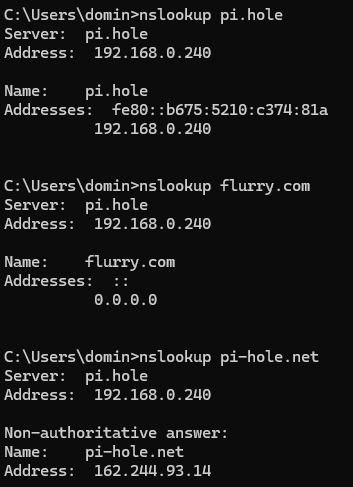
From the PC that runs your speedtest, please share the results of:

nslookup pi.hole
nslookup flurry.com
nslookup pi-hole.net

How do those last two register in your Pi-hole's Query Log?

Hi,

Thanks for coming back to me, ran those commands as asked

Pihole.log hits are:

2025-10-07 09:34:07.852 query[A] pi.hole from 192.168.0.210
2025-10-07 09:34:07.854 Pi-hole hostname pi.hole is 192.168.0.240
2025-10-07 09:34:07.858 query[AAAA] pi.hole from 192.168.0.210
2025-10-07 09:34:07.860 Pi-hole hostname pi.hole is fe80::<redacted>1a
2025-10-07 09:34:12.182 query[A] flurry.com from 192.168.0.210
2025-10-07 09:34:12.183 gravity blocked flurry.com is 0.0.0.0
2025-10-07 09:34:12.188 query[AAAA] flurry.com from 192.168.0.210
2025-10-07 09:34:12.190 gravity blocked flurry.com is ::
2025-10-07 09:34:17.728 query[A] pi-hole.net from 192.168.0.210
2025-10-07 09:34:17.729 cached pi-hole.net is 162.244.93.14
2025-10-07 09:34:17.736 query[AAAA] pi-hole.net from 192.168.0.210
2025-10-07 09:34:17.738 cached pi-hole.net is NODATA-IPv6

I also have AVG Internet Security installed, but from what I’ve found I just needed to turn off the Fake Website Shield function as it clashes with Pihole’s DNS functionality.

I ran above commands again with AVG turned off, just to test:

2025-10-07 09:41:13.771 query[A] pi.hole from 192.168.0.210

2025-10-07 09:41:13.772 Pi-hole hostname pi.hole is 192.168.0.240

2025-10-07 09:41:13.776 query[AAAA] pi.hole from 192.168.0.210

2025-10-07 09:41:13.777 Pi-hole hostname pi.hole is fe80::b675:5210:c374:81a

2025-10-07 09:41:20.881 query[PTR] 240.0.168.192.in-addr.arpa from 192.168.0.210

2025-10-07 09:41:20.882 config 240.0.168.192.in-addr.arpa is

2025-10-07 09:41:20.886 query[A] flurry.com from 192.168.0.210

2025-10-07 09:41:20.888 gravity blocked flurry.com is 0.0.0.0

2025-10-07 09:41:20.892 query[AAAA] flurry.com from 192.168.0.210

2025-10-07 09:41:20.893 gravity blocked flurry.com is ::

2025-10-07 09:41:23.689 query[PTR] 240.0.168.192.in-addr.arpa from 192.168.0.210

2025-10-07 09:41:23.690 config 240.0.168.192.in-addr.arpa is

2025-10-07 09:41:23.695 query[A] pi-hole.net from 192.168.0.210

2025-10-07 09:41:23.696 cached pi-hole.net is 162.244.93.14

2025-10-07 09:41:23.701 query[AAAA] pi-hole.net from 192.168.0.210

2025-10-07 09:41:23.703 cached pi-hole.net is NODATA-IPv6

(I have edited your post's log excerpts for better readability, marking them as 'Preformatted text' and removing unrelated entries from your log lines.)

Your nslookup results look ok.
They demonstrate that Pi-hole is correctly blocking and resolving DNS requests when queried, and they also show that your client was using Pi-hole for DNS, at least for those requests.

Let's check what DNS servers your PC is aware of.
Run from your PC, check the DNS server section from the output of ipconfig /all.
That should list only your Pi-hole machine's 192.168.0.210.
Does it?

IPConfig /all:

Wireless LAN adapter Wi-Fi:

Connection-specific DNS Suffix  . :
Description . . . . . . . . . . . : Intel(R) Dual Band Wireless-AC 7265
DHCP Enabled. . . . . . . . . . . : Yes
Autoconfiguration Enabled . . . . : Yes
IPv4 Address. . . . . . . . . . . : 192.168.0.210(Preferred)
Subnet Mask . . . . . . . . . . . : 255.255.255.0
Lease Obtained. . . . . . . . . . : Thursday, 9 October 2025 1:33:20 pm
Lease Expires . . . . . . . . . . : Sunday, 15 November 2161 8:12:24 pm
Default Gateway . . . . . . . . . : 192.168.0.1
DHCP Server . . . . . . . . . . . : 192.168.0.1
DNS Servers . . . . . . . . . . . : 192.168.0.240
                                    192.168.0.240
NetBIOS over Tcpip. . . . . . . . : Disabled

I have to put pihole as DNS in primary & secondary on my TPLink router otherwise it auto adds the default gateway

When i go to a random site to check for ads - yahoo.com
I’m still seeing targetted ads down right hand side

That's looking ok - no IPv6 addresses in your ipconfig's DNS Servers section.

Your browser may by-pass Pi-hole if it would use DNS-over-HTTPS (DoH).
You should verify that DoH is disabled in your browser.

Thank you for all your help, i ended up wiping the SD card and starting again from scratch which seems to have everything working at this stage.

The only thing which I did different was to not populate /etc/dhcpcd.conf file and left it solely to my router to assign IP.
Not sure if it potentially was causing a conflict or I did something else dumb along the way.
But thank you for your help and patience

Edit -
Secure DNS Turned off in Edge Browser
I use a licensed version of AVG Internet Security and need to turn off ‘Fake Website Shield’ via Settings > Full Protection as this uses AVG’s secure DNS servers by default so bypassing Pihole.

Cheers
Dom