Your debug log shows that you have query logging disabled so we can't check to see if Pi-hole is receiving queries.
How have you configured your client(s) to use Pi-hole? Remember, in order for Pi-hole to fully work, it needs to be the only DNS server configured for the client(s), there is no such thing as a secondary or backup DNS server. Clients will use any DNS server listed in their configurations and not in any specific order.
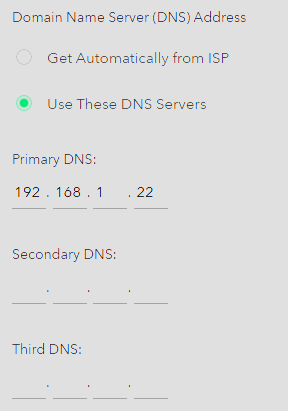
I had it set up as my only DNS on my router. I also tried using the IP address to be the only DNS on my Windows PC’s. If you'd like I can see about turning on logging. Use it for a little bit. Generate another debug? What is odd is it seems like it was resolving names. It just in places like Google search ads are fully there. And it seemed like most websites it wasn't fully blocking ads.
The google search results page will probably show the ads because they are served as part of the page content, coming from the same domain, but if you click on these ads, they won't load (Pi-hole will block the target domains).
I let the PiHole run for a little while after logging was enabled to get a good sense of how it is working, Here is the debug log with what should be logging enabled: https://tricorder.pi-hole.net/GzBU4ju9/ .
The debug log confirms JFB's statement that queries are coming from 192.168.1.1 which appears to be the router, and your example nslookup queries also show that your DNS is set to the router. If the router is set to use more than just Pi-hole as the DNS server then you will have queries leak to the other DNS server(s).
As a test, set your Windows workstation to manually use the single DNS server IP of the Pi-hole server, 192.168.1.22 and see how the performance is.
Plus thats only for the IPv4 part.
If the router has IPv6 DNS servers configured for the WAN/Internet end, that would also cause queries to leak.
It might help if you post make/model of the router doing DHCP for your LAN?
Below is preferred via DHCP instead of configuring the WAN DNS IP on the router:
Reply For everyone, first. I have set a windows PC on my network to directly connect to the PiHole as its DNS, I will see how it performs. Second, my Router model is: AX1800 WiFi Router RAX10 which as can be seen on the attached screen shots only has one DNS server set and iP6 is disabled. Also third, I thought per documentation it was preferred to let my router handle the DHCP?
It's not a problem to let your router do DHCP, but it needs to tell devices to use the Pihole addresses (IPv4 and IPv6) for DNS queries. It appears that your router cannot do this.
So, I think you will have to use the Pihole as the DHCP server, if you want your devices to use the Pihole (directly) for DNS queries.
Maybe I am confused, but the settings I posted above I thought are telling clients to use the router’s assigned DNS, or maybe I am missing something. Also does not have any fall back, just the PiHole DNS listed.
No. I checked your Netgear AX1800 WiFi Router RAX10 router's manual, and that confirms that the router will tell all clients to use it (the router) as the DNS server, and with your DNS servers setting, the router will send all the DNS queries that it receives, to the Pihole.
While this will work, all queries will be from the router, and you will not be able to tell which device made which query, and more importantly, which devices are using the Pihole for DNS queries.
So, for troubleshooting, it's better to use the Pihole as the DHCP server. It's also more efficient to have devices send it's DNS queries directly to the Pihole.
I have gone ahead and set up the PiHole as my DHCP, I will run it for a little while and post another debug, it seems like it works from the windows PC I set to statically use it as its DNS it just seems to block way less ads than I thought it would. I will keep everyone posted, thank you everyone for the help.