Hi there, for some reason my Docker install now wants to listen on 0.0.0.0 instead of the IP it should be using, 192.168.4.XXX (last 3 digits omitted) on host networking mode.
The system that is being used is an iMac mini M4 running on the latest version of macOS with the latest Docker Desktop, I have tried many possibilities including:
Recreating the Ethernet interface in macOS system settings.
Using environment variables FTLCONF_dns_reply_host_IPV4 and FLTCONF_LOCAL_IPV4.
Enabling and disabling kernel networking mode on Docker Desktop.
Changing the docker subnet.
Repulling docker images.
Running without host networking using default ports - only results in Error response from daemon: ports are not available: exposing port TCP 0.0.0.0:80 -> 127.0.0.1:0: listen tcp 0.0.0.0:80: bind: address already in use.
Good old restarting everything.
Ensuring Docker has the appropriate permissions on macOS.
If possible I would like to use host networking instead of having to use bridging. Below is the last used docker compose file:
# More info at https://github.com/pi-hole/docker-pi-hole/ and https://docs.pi-hole.net/
services:
  pihole:
    container_name: pihole
    image: pihole/pihole:latest
    network_mode: host
    environment:
      # Set the appropriate timezone for your location (https://en.wikipedia.org/wiki/List_of_tz_database_time_zones), e.g:
      TZ: 'Europe/London'
      FTLCONF_dns_reply_host_IPV4: '192.168.4.XXX'
      FTLCONF_dns_reply_host_force4: true
      # BLOCKLISTS_URL: "https://v.firebog.net/hosts/lists.php?type=tick"
      # REGEX_BLACKLIST_URL: "https://raw.githubusercontent.com/mmotti/pihole-regex/master/regex.list"
      # UPDATE_GRAVITY: false
      FTLCONF_dns_upstreams: "1.1.1.2;1.0.0.2"
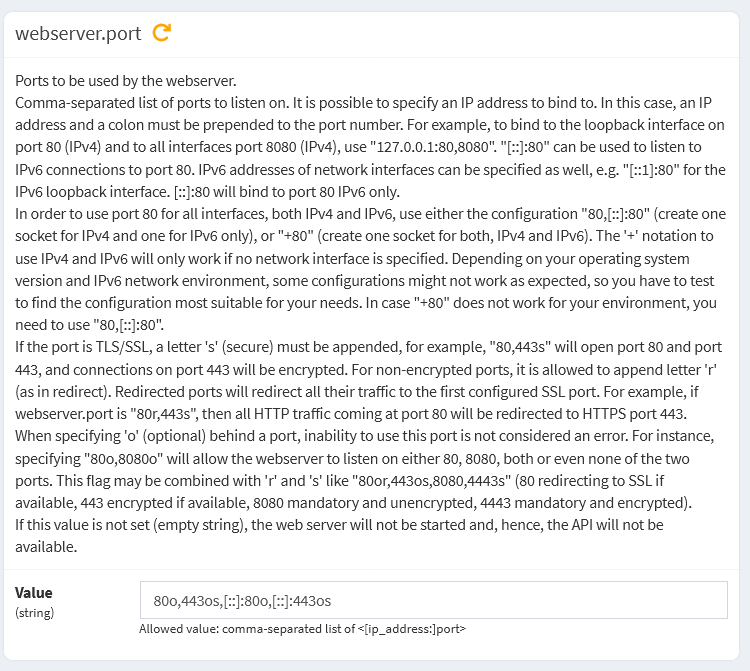
      FTLCONF_webserver_port: '8080o,[::]:8080o,8443os,[::]:8443os'


    # Volumes store your data between container upgrades
    volumes:
      # For persisting Pi-hole's databases and common configuration file
      - './etc-pihole:/etc/pihole'
      # Uncomment the below if you have custom dnsmasq config files that you want to persist. Not needed for most starting fresh with Pi-hole v6. If you're upgrading from v5 you and have used this directory before, you should keep it enabled for the first v6 container start to allow for a complete migration. It can be removed afterwards
      #- './etc-dnsmasq.d:/etc/dnsmasq.d'
    cap_add:
      # See https://github.com/pi-hole/docker-pi-hole#note-on-capabilities
      # Required if you are using Pi-hole as your DHCP server, else not needed
      - NET_ADMIN
      - SYS_NICE
    restart: unless-stopped
Thanks for the reply, but I'm still not able to even get into the web interface or ping into it even after completely reinstalling Docker. Here is the latest log with the updated environment variable on a completely new instance (and I did make sure to replace the Xs):
[i] Setting up user & group for the pihole user
  [i] PIHOLE_UID not set in environment, using default (1000)
  [i] PIHOLE_GID not set in environment, using default (1000)

  [i] Starting FTL configuration
  [i] No password set in environment or config file, assigning random password: -IFx3rKi
  [i] Starting crond for scheduled scripts. Randomizing times for gravity and update checker

  [i] Ensuring logrotate script exists in /etc/pihole

  [i] Gravity migration checks
  [i] No adlist file found, creating one with a default blocklist
  [i] /etc/pihole/gravity.db does not exist (Likely due to a fresh volume). This is a required file for Pi-hole to operate.
  [i] Gravity will now be run to create the database
  [✓] DNS resolution is available

  [✗] Migrating the list's cache directory to new location
  [i] Creating new gravity database
  [i] Migrating content of /etc/pihole/adlists.list into new database
  [i] Neutrino emissions detected...

  [✓] Preparing new gravity database
  [✓] Creating new gravity databases
  [✓] Pulling blocklist source list into range
  [i] Using libz compression

  [i] Target: https://raw.githubusercontent.com/StevenBlack/hosts/master/hosts
  [✓] Status: Retrieval successful
  [✓] Parsed 80102 exact domains and 0 ABP-style domains (blocking, ignored 1 non-domain entries)
      Sample of non-domain entries:
        - fe80::1%lo0

  [✓] Building tree
  [i] Number of gravity domains: 80102 (80102 unique domains)
  [i] Number of exact denied domains: 0
  [i] Number of regex denied filters: 0
  [i] Number of exact allowed domains: 0
  [i] Number of regex allowed filters: 0
  [✓] Optimizing database
  [✓] Swapping databases
  [✓] The old database remains available
  [✓] Cleaning up stray matter

  [✓] Done.

  [i] pihole-FTL pre-start checks
  [i] Setting capabilities on pihole-FTL where possible
  [i] Applying the following caps to pihole-FTL:
        * CAP_CHOWN
        * CAP_NET_BIND_SERVICE
        * CAP_NET_RAW
        * CAP_NET_ADMIN
        * CAP_SYS_NICE

chmod: cannot access '/etc/pihole/versions': No such file or directory
  [i] Starting pihole-FTL (no-daemon) as pihole

  [i] Version info:
      Core version is v6.1.4 (Latest: v6.1.4)
      Web version is v6.2.1 (Latest: v6.2.1)
      FTL version is v6.2.3 (Latest: v6.2.3)

2025-10-21 01:16:46.275 BST [174M] INFO: ########## FTL started on docker-desktop! ##########
2025-10-21 01:16:46.275 BST [174M] INFO: FTL branch: master
2025-10-21 01:16:46.275 BST [174M] INFO: FTL version: v6.2.3
2025-10-21 01:16:46.275 BST [174M] INFO: FTL commit: 88737f62
2025-10-21 01:16:46.275 BST [174M] INFO: FTL date: 2025-06-10 20:44:58 +0200
2025-10-21 01:16:46.275 BST [174M] INFO: FTL user: pihole
2025-10-21 01:16:46.275 BST [174M] INFO: Compiled for linux/arm64/v8 (compiled on CI) using cc (Alpine 14.2.0) 14.2.0
2025-10-21 01:16:46.275 BST [174M] INFO: 2 FTLCONF environment variables found (2 used, 0 invalid, 0 ignored)
2025-10-21 01:16:46.275 BST [174M] INFO:    [✓] FTLCONF_webserver_port is used
2025-10-21 01:16:46.275 BST [174M] INFO:    [✓] FTLCONF_dns_upstreams is used
2025-10-21 01:16:46.277 BST [174M] INFO: Wrote config file:
2025-10-21 01:16:46.277 BST [174M] INFO:  - 155 total entries
2025-10-21 01:16:46.277 BST [174M] INFO:  - 151 entries are default
2025-10-21 01:16:46.277 BST [174M] INFO:  - 4 entries are modified
2025-10-21 01:16:46.277 BST [174M] INFO:  - 2 entries are forced through environment
2025-10-21 01:16:46.279 BST [174M] INFO: Parsed config file /etc/pihole/pihole.toml successfully
2025-10-21 01:16:46.279 BST [174M] INFO: PID file does not exist or not readable
2025-10-21 01:16:46.279 BST [174M] INFO: No other running FTL process found.
2025-10-21 01:16:46.279 BST [174M] INFO: PID of FTL process: 174
2025-10-21 01:16:46.279 BST [174M] INFO: listening on 0.0.0.0 port 53
2025-10-21 01:16:46.279 BST [174M] INFO: listening on :: port 53
2025-10-21 01:16:46.280 BST [174M] INFO: PID of FTL process: 174
2025-10-21 01:16:46.280 BST [174M] WARNING: No database file found, creating new (empty) database
2025-10-21 01:16:46.283 BST [174M] INFO: Database version is 1
2025-10-21 01:16:46.283 BST [174M] INFO: Updating long-term database to version 2
2025-10-21 01:16:46.284 BST [174M] INFO: Updating long-term database to version 3
2025-10-21 01:16:46.285 BST [174M] INFO: Updating long-term database to version 4
2025-10-21 01:16:46.285 BST [174M] INFO: Updating long-term database to version 5
2025-10-21 01:16:46.287 BST [174M] INFO: Updating long-term database to version 6
2025-10-21 01:16:46.287 BST [174M] INFO: Updating long-term database to version 7
2025-10-21 01:16:46.288 BST [174M] INFO: Updating long-term database to version 8
2025-10-21 01:16:46.289 BST [174M] INFO: Updating long-term database to version 9
2025-10-21 01:16:46.290 BST [174M] INFO: Updating long-term database to version 10
2025-10-21 01:16:46.292 BST [174M] INFO: Updating long-term database to version 11
2025-10-21 01:16:46.293 BST [174M] INFO: Updating long-term database to version 12
2025-10-21 01:16:46.294 BST [174M] INFO: Updating long-term database to version 13
2025-10-21 01:16:46.294 BST [174M] INFO: Updating long-term database to version 14
2025-10-21 01:16:46.295 BST [174M] INFO: Updating long-term database to version 15
2025-10-21 01:16:46.296 BST [174M] INFO: Updating long-term database to version 16
2025-10-21 01:16:46.296 BST [174M] INFO: Updating long-term database to version 17
2025-10-21 01:16:46.297 BST [174M] INFO: Updating long-term database to version 18
2025-10-21 01:16:46.298 BST [174M] INFO: Updating long-term database to version 19
2025-10-21 01:16:46.299 BST [174M] INFO: Updating long-term database to version 20
2025-10-21 01:16:46.300 BST [174M] INFO: Updating long-term database to version 21
2025-10-21 01:16:46.301 BST [174M] INFO: Database successfully initialized
2025-10-21 01:16:46.302 BST [174M] INFO: Imported 0 queries from the on-disk database (it has 0 rows)
2025-10-21 01:16:46.302 BST [174M] INFO: Parsing queries in database
2025-10-21 01:16:46.302 BST [174M] INFO: Imported 0 queries from the long-term database
2025-10-21 01:16:46.302 BST [174M] INFO:  -> Total DNS queries: 0
2025-10-21 01:16:46.302 BST [174M] INFO:  -> Cached DNS queries: 0
2025-10-21 01:16:46.302 BST [174M] INFO:  -> Forwarded DNS queries: 0
2025-10-21 01:16:46.302 BST [174M] INFO:  -> Blocked DNS queries: 0
2025-10-21 01:16:46.302 BST [174M] INFO:  -> Unknown DNS queries: 0
2025-10-21 01:16:46.302 BST [174M] INFO:  -> Unique domains: 0
2025-10-21 01:16:46.302 BST [174M] INFO:  -> Unique clients: 0
2025-10-21 01:16:46.302 BST [174M] INFO:  -> DNS cache records: 0
2025-10-21 01:16:46.302 BST [174M] INFO:  -> Known forward destinations: 0
2025-10-21 01:16:46.347 BST [174M] WARNING: Insufficient permissions to set system time (CAP_SYS_TIME required), NTP client not available
2025-10-21 01:16:46.347 BST [174/T175] INFO: NTP server listening on 0.0.0.0:123 (IPv4)
2025-10-21 01:16:46.347 BST [174/T176] INFO: NTP server listening on :::123 (IPv6)
2025-10-21 01:16:46.347 BST [174M] INFO: FTL is running as user pihole (UID 1000)
2025-10-21 01:16:46.349 BST [174M] INFO: Created SSL/TLS certificate for pi.hole at /etc/pihole/tls.pem
2025-10-21 01:16:46.349 BST [174M] INFO: Reading certificate from /etc/pihole/tls.pem ...
2025-10-21 01:16:46.349 BST [174M] INFO: Using SSL/TLS certificate file /etc/pihole/tls.pem
2025-10-21 01:16:46.349 BST [174M] INFO: Web server ports:
2025-10-21 01:16:46.349 BST [174M] INFO:   - [::]:8080 (HTTP, IPv6, optional, OK)
2025-10-21 01:16:46.349 BST [174M] INFO:   - [::]:8443 (HTTPS, IPv6, optional, OK)
2025-10-21 01:16:46.349 BST [174M] INFO: Restored 0 API sessions from the database
2025-10-21 01:16:46.350 BST [174M] INFO: Blocking status is enabled
2025-10-21 01:16:46.454 BST [174/T177] INFO: Compiled 0 allow and 0 deny regex for 0 client in 0.1 msec
Compose file used:
# More info at https://github.com/pi-hole/docker-pi-hole/ and https://docs.pi-hole.net/
services:
  pihole:
    container_name: pihole
    image: pihole/pihole:latest
    network_mode: host
    environment:
      # Set the appropriate timezone for your location (https://en.wikipedia.org/wiki/List_of_tz_database_time_zones), e.g:
      TZ: 'Europe/London'
      FTLCONF_webserver_port: '192.168.4.XXX:8080o,[::]:8080o,192.168.4.XXX:8443os,[::]:8443os'
      # BLOCKLISTS_URL: "https://v.firebog.net/hosts/lists.php?type=tick"
      # REGEX_BLACKLIST_URL: "https://raw.githubusercontent.com/mmotti/pihole-regex/master/regex.list"
      # UPDATE_GRAVITY: false
      FTLCONF_dns_upstreams: "1.1.1.2;1.0.0.2"

    # Volumes store your data between container upgrades
    volumes:
      # For persisting Pi-hole's databases and common configuration file
      - './etc-pihole:/etc/pihole'
      # Uncomment the below if you have custom dnsmasq config files that you want to persist. Not needed for most starting fresh with Pi-hole v6. If you're upgrading from v5 you and have used this directory before, you should keep it enabled for the first v6 container start to allow for a complete migration. It can be removed afterwards
      #- './etc-dnsmasq.d:/etc/dnsmasq.d'
    cap_add:
      # See https://github.com/pi-hole/docker-pi-hole#note-on-capabilities
      # Required if you are using Pi-hole as your DHCP server, else not needed
      - NET_ADMIN
      - SYS_NICE
    restart: unless-stopped
This is an indication that something on the host is already using ports 8080 and 8443 for IPv4.
Can you please check if there are any web servers running on the host?
Also, you should generate a Debug Log to help us finding any missing details.
Please upload a debug log and post just the token URL that is generated after the log is uploaded by running the following command from the Pi-hole host terminal:
I have checked for any running webservers on the ports but it doesn't seem to find anything (using sudo lsof -i), the only webserver I can see that's actually running is the included apache server.
By Apache server I mean the one running on the macOS host (I think), ss doesn't exist but I did use similar commands but I didn't get any output, I ended up using sudo lsof -nP -iTCP -sTCP:LISTEN to see all the ports being used but nothing with IPv6 nor IPv4 used 8080 and 8443.
Seems like using those ports in bridge mode actually got the web server to work, and of course I have the host mode enabled in Docker Desktop although I'm still not sure why it's decided not to work in that mode.
UPDATE: web server would only work when the mac was on and not in sleep mode and was only blocking after a few seconds in bridge mode.
But after completely reinstalling docker (again) and redoing the entire network settings in macOS, it seems the entire issue was using SYS_NICE in the compose file (yay I am very tired). Seems to be blocking things now in host network mode and I’m able to access it on other local devices.