This is unwise. A misconfigured scraper or bot (or a malicious attack) could easily absorb significant system resources.
It would be much better to have the admin interface secured behind a VPN the same as the DNS server.
This is unwise. A misconfigured scraper or bot (or a malicious attack) could easily absorb significant system resources.
It would be much better to have the admin interface secured behind a VPN the same as the DNS server.
Makes sense. I was actually planning to do this. Will just do it sooner (i.e. now) than later.
The web interface accessible over the Internet wasn’t a long-term plan.
That's puzzling, as pihole-FTL showed it as enabled,e.g.:
Perhaps your weekly sync would overwrite those settings?
Please verify that NTP server and client options are consistently disabled on each of your Pi-holes, and after disabling them, monitor your system for nanosleeps, to confirm whether RTC access would contribute to your observation.
Would load still be high after disabling Pi-hole's NTP options and/or disabling public web access?
I would be surprised. NTP is disabled on both the local and the cloud Pi-holes.
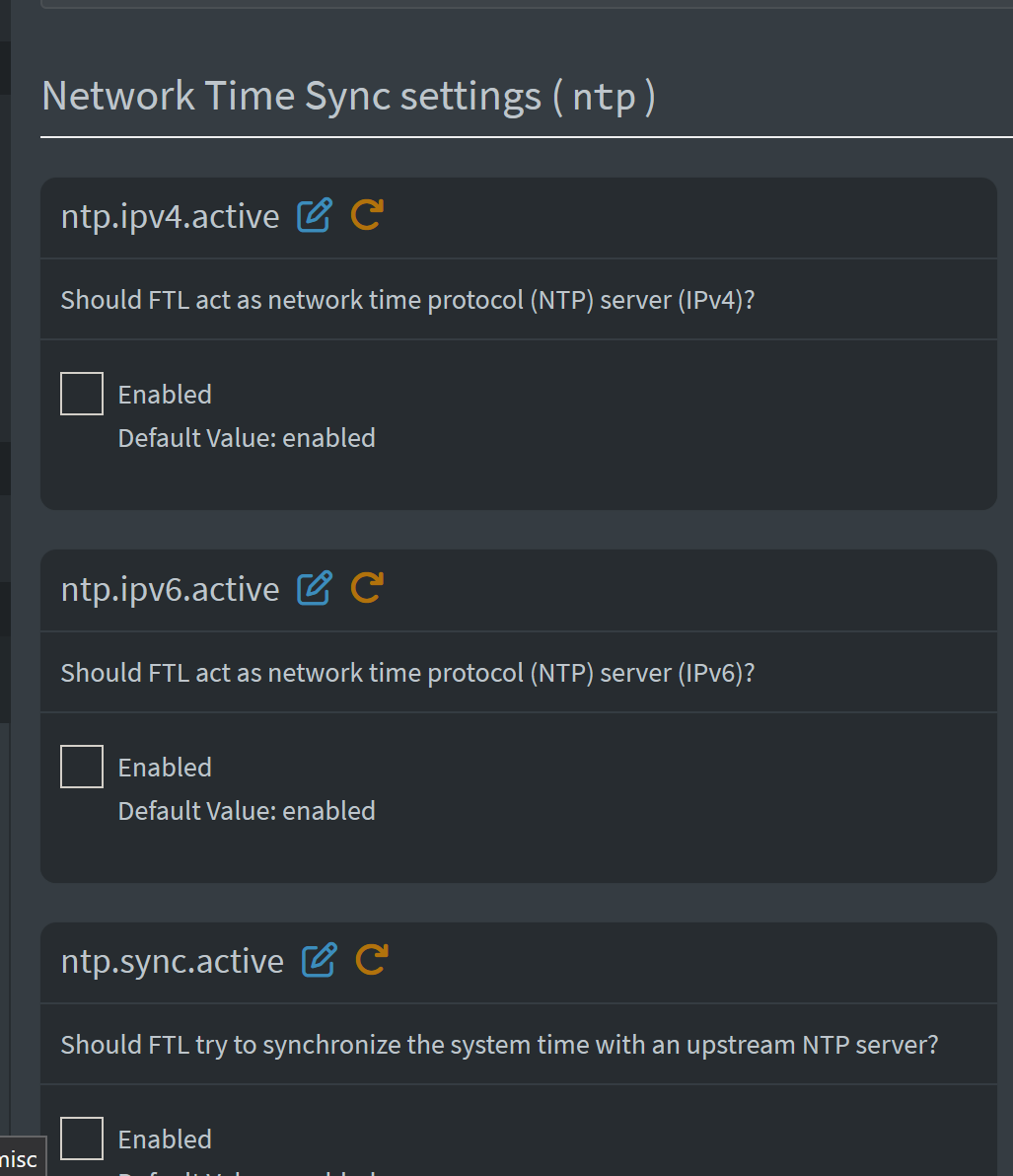
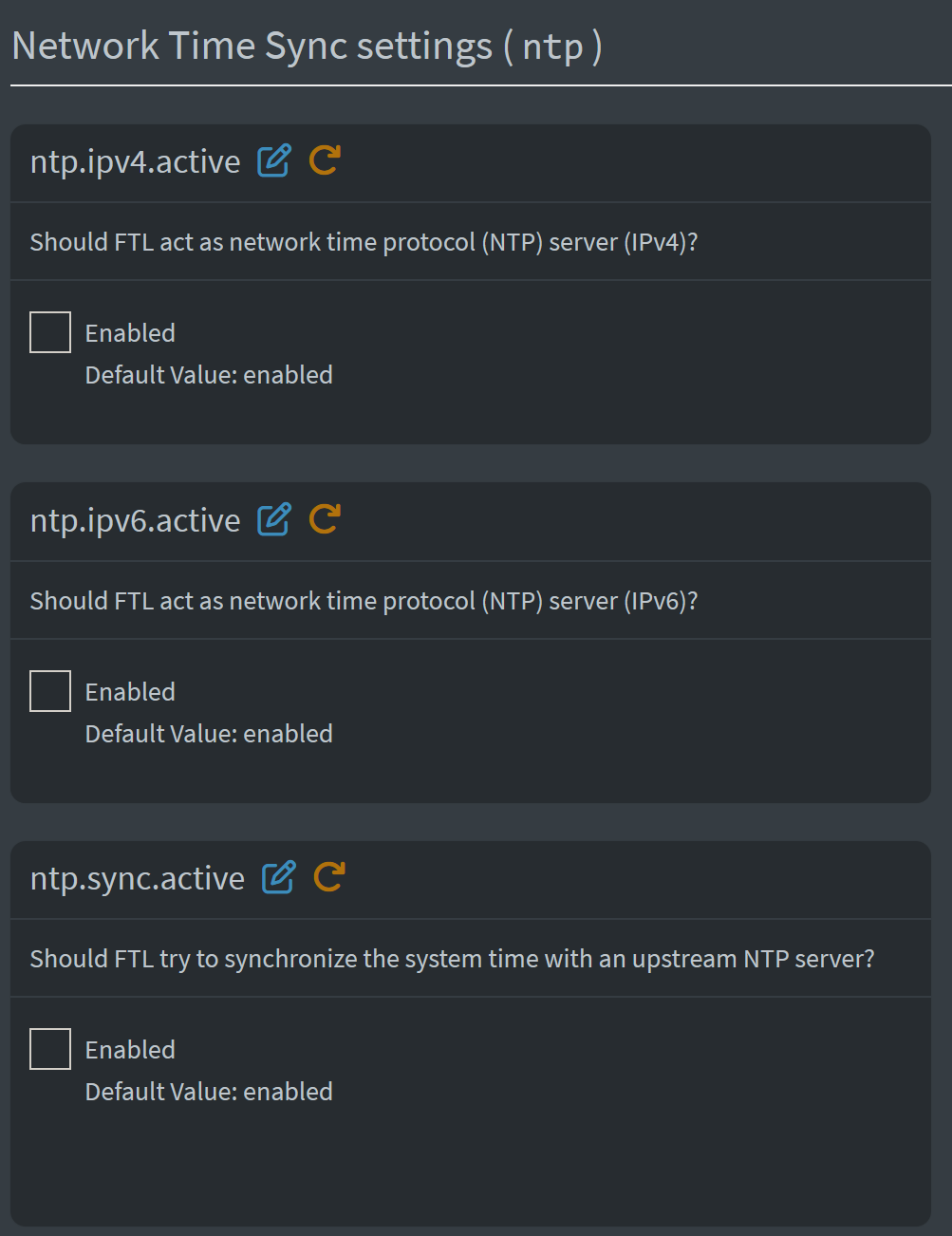
Without changing any pihole settings, the web-interface right now shows the following:
Local (RPi):
OCI (Cloud):
So basically, the nanosleep measurement that I pasted earlier was with both NTP syncs disabled.
Yes, that’s what happened when I pasted the htop output above
I have disabled ALL public access to the server (using OCI’s ingress and nft firewall rules) (amongst other config changes)
Now the web admin is only accessible over the VPN.
I’ll continue to monitor. The current system stats:
Ps. I pasted Top output earlier and not htop. Mea culpa
Then how come those --config ntp.{ipv4|ipv6|ntp}].active all returned true?
Did you toggle them true and false just before creating your debug log?
And what do they return now?
I have no idea why the settings conflict, but I haven’t toggled or changed ANY NTP setting, especially before or after creating the debug log tokens for this thread.
I ran those commands again just now:
ubuntu@pihole-vpn:~$ pihole-FTL --config ntp.ipv4.active
true
ubuntu@pihole-vpn:~$ pihole-FTL --config ntp.ipv6.active
true
ubuntu@pihole-vpn:~$ pihole-FTL --config ntp.sync.active
true
ubuntu@pihole-vpn:~$
I don’t know how to explain this.
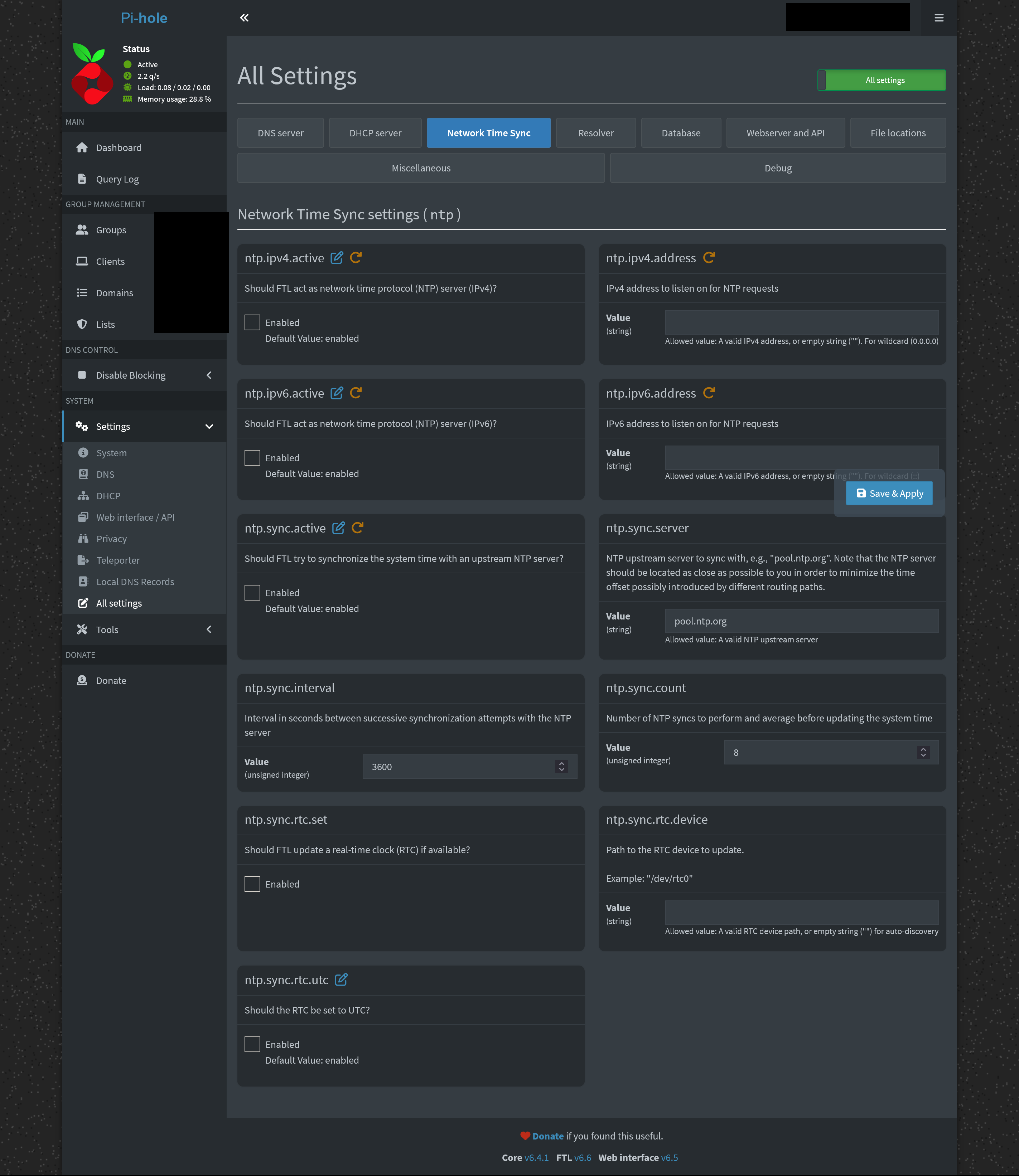
I’ve taken a screenshot of the whole NTP settings page in my pihole admin interface. None of the settings is modified for the screenshot.
Updated debug token:
[✓] Your debug token is: https://tricorder.pi-hole.net/fSHAKTPh/
What would the commands return if you'd run them with elevated rights, e.g.
sudo pihole-FTL --config ntp.ipv6.active
ubuntu@pihole-vpn:~$ sudo pihole-FTL --config ntp.ipv6.active
false
ubuntu@pihole-vpn:~$
It shows false with sudo
This looks like a bug in pihole-FTL.
I can recreate that observation on an RPi Zero 2 running RPi OS Trixie/13.
While puzzling, this would seem like a display issue - internally, your pihole-FTL is using the values as configured.
I don't think it would be related to your random DNS resolution failures.
And I'm beginning to suspect that those nanosleep traces may be a red herring, as it would be normal for straceing pihole-FTL for nanosleep to output a constant stream of nanosleeps from one of the timer threads - it's just that usually you would not see a tv_nsec value of 10,000,000.
Could you check which pihole-FTL thread would call nanosleep?
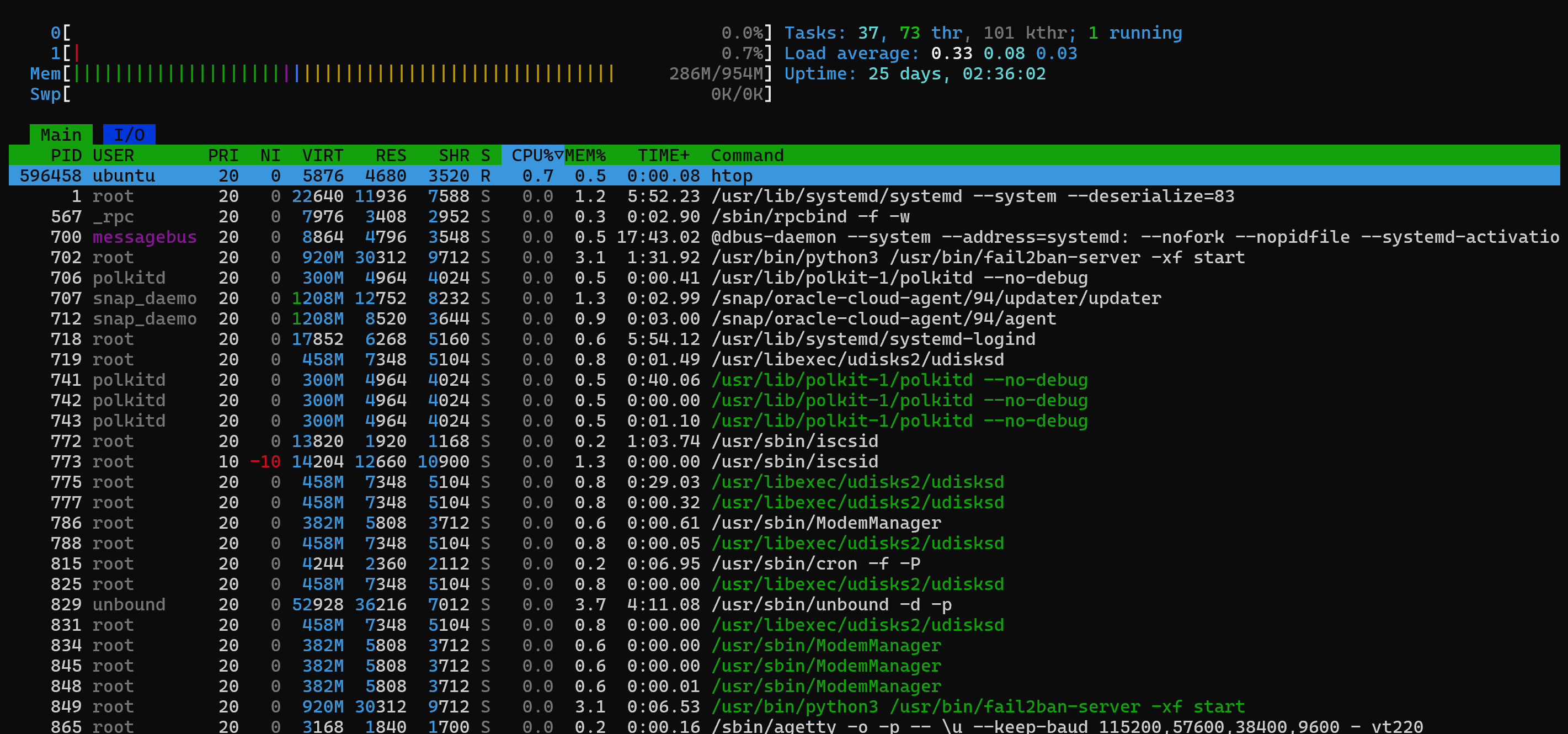
You could use htop for that, with Show custom thread names enabled (F2), then search for the pid from strace in its Tree view (F5).
For your most current strace, pid would have been 517351, but you should use the pid of a freshly run strace.
I believe below will also reveal which thread:
$ pstree -pst $(pidof -s pihole-FTL)
systemd(1)───pihole-FTL(465)─┬─{civetweb-master}(83880)
                             ├─{civetweb-timer}(83879)
                             ├─{civetweb-worker}(84101)
                             ├─{civetweb-worker}(84102)
                             ├─{civetweb-worker}(84103)
                             ├─{civetweb-worker}(84104)
                             ├─{civetweb-worker}(84105)
                             ├─{civetweb-worker}(84106)
                             ├─{civetweb-worker}(84107)
                             ├─{database}(83874)
                             ├─{dns-client}(83876)
                             ├─{housekeeper}(83875)
                             ├─{ntp-client}(83873)
                             ├─{ntp-server4}(83933)
                             ├─{ntp-server6}(83934)
                             ├─{timer}(83877)
                             └─{webserver}(83878)
Strace
ubuntu@pihole-vpn:\~$ pstree -pst $(pidof -s pihole-FTL)
systemd(1)───pihole-FTL(596337)─┬─{civetweb-master}(596345)
├─{civetweb-timer}(596344)
├─{civetweb-worker}(596346)
├─{civetweb-worker}(596347)
├─{civetweb-worker}(596348)
├─{civetweb-worker}(596349)
├─{civetweb-worker}(596350)
├─{civetweb-worker}(596351)
├─{civetweb-worker}(596352)
├─{database}(596338)
├─{dns-client}(596340)
├─{housekeeper}(596339)
├─{timer}(596341)
└─{webserver}(596342)
ubuntu@pihole-vpn:\~$ sudo strace -fp $(pidof pihole-FTL) -e nanosleep
strace: Process 596337 attached with 15 threads
[pid 596344] nanosleep({tv_sec=1, tv_nsec=0}, 0x7de41a60e980) = 0
[pid 596344] nanosleep({tv_sec=1, tv_nsec=0}, 0x7de41a60e980) = 0
[pid 596344] nanosleep({tv_sec=1, tv_nsec=0}, 0x7de41a60e980) = 0
[pid 596344] nanosleep({tv_sec=1, tv_nsec=0}, 0x7de41a60e980) = 0
[pid 596344] nanosleep({tv_sec=1, tv_nsec=0}, 0x7de41a60e980) = 0
[pid 596344] nanosleep({tv_sec=1, tv_nsec=0}, 0x7de41a60e980) = 0
[pid 596344] nanosleep({tv_sec=1, tv_nsec=0}, 0x7de41a60e980) = 0
[pid 596344] nanosleep({tv_sec=1, tv_nsec=0}, 0x7de41a60e980) = 0
[pid 596344] nanosleep({tv_sec=1, tv_nsec=0}, ^[0x7de41a60e980) = 0
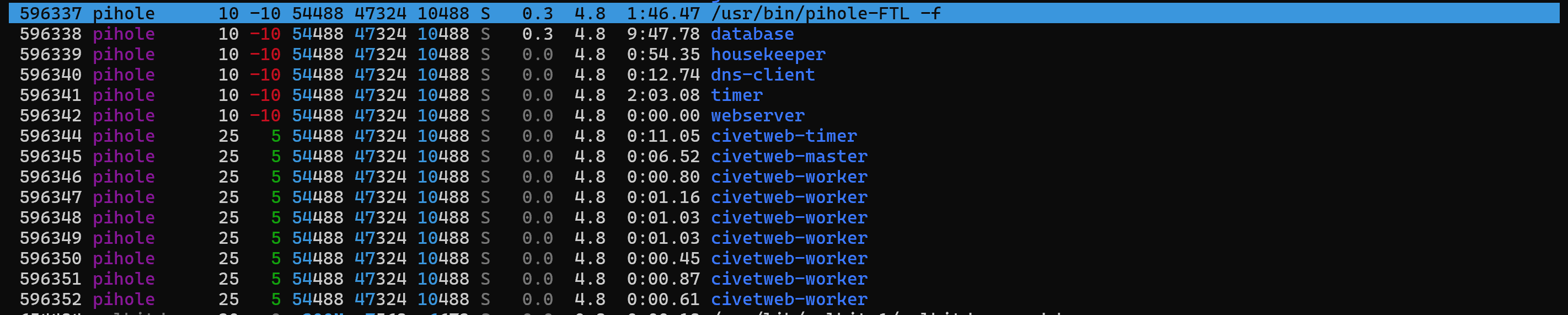
The highlighted row is the pid of Pihole-FTL. I enabled the “show custom thread names” option in htop before I took the screenshot above.
This might not necessarily be related, but following the thread - Pihole (FTL 6.5) randomly crashing
I checked Pihole-FTL logs and got this:
ubuntu@pihole-vpn:~$ sudo journalctl -u pihole-FTL --since "1 month ago" | grep -iE "error|fail|critical|panic"
Mar 17 08:33:28 pihole-vpn systemd[1]: pihole-FTL.service: Failed with result 'timeout'.
Mar 20 12:01:57 pihole-vpn systemd[1]: pihole-FTL.service: Failed with result 'timeout'.
Apr 04 19:15:29 pihole-vpn systemd[1]: pihole-FTL.service: Failed with result 'timeout'.
Apr 08 15:01:26 pihole-vpn systemd[1]: pihole-FTL.service: Main process exited, code=exited, status=1/FAILURE
Apr 08 15:01:26 pihole-vpn systemd[1]: pihole-FTL.service: Failed with result 'exit-code'.
Apr 10 07:00:34 pihole-vpn systemd[1]: pihole-FTL.service: Failed with result 'timeout'.
Apr 11 09:28:50 pihole-vpn systemd[1]: pihole-FTL.service: Failed with result 'timeout'.
Apr 11 11:05:35 pihole-vpn systemd[1]: pihole-FTL.service: Main process exited, code=exited, status=1/FAILURE
Apr 11 11:05:35 pihole-vpn systemd[1]: pihole-FTL.service: Failed with result 'exit-code'.
ubuntu@pihole-vpn:~$
I suspect the segfault issue might have struck me too but the Pihole–FTL logs don’t show any segfaults
ubuntu@pihole-vpn:~$ sudo zgrep -B 50 "Segmentation fault" /var/log/pihole/FTL.log*
ubuntu@pihole-vpn:~$
I don't think that's likely.
That other topic had multiple crash events due to seg faults per log file, while yours don't show even one crash over all FTL log files.
(To identify the thread by its pid, sharing pstree output as suggested by deHakkelaar would have been sufficient.  )
)
So as expected, civetweb-timer issues the nanosleeps.
However, your latest strace results do not contain the 10,000,000 nanosecs anymore.
Would that suggest that your Pi-hole has been operational since about 11th of April?
If so, you should rerun your tests once you observe DNS outages again, including searching logs for seg faults.
I don’t know, but it’s possible. The only way I find out is when I try to use my phone or laptop with Wireguard active.
I’ll rerun the tests when/if this issue reappears.
Below output can show:
$ sudo pihole api info/ftl | jq .ftl.uptime
4518264324.00853
EDIT: I believe they are milliseconds ... not sure?
EDIT2: Yeah seems so if I sleep for five seconds:
$ sudo systemctl restart pihole-FTL.service; sleep 5; sudo pihole api info/ftl | jq .ftl.uptime
5308.78809
And totally forgot below one
$ ps -C pihole-FTL -o start_time
START
Jan11
That would show uptime since the system was last rebooted, not since pihole-FTL was last restarted.
The latter could be retrieved via info/ftl | jq .ftl.uptime,
EDIT: But I don't think it would answer my question reliably, as the service may be restarted on various UI interactions.
Yeah I picked the wrong uptime.
Corrected it
Wouldnt that mean a new PID?
Neither seeing any number of pids nor knowing the time of the last service restart would answer whether Pi-hole's DNS service has been working as expected.
Let's just wait on fresh info once Anant's issue reoccurs.