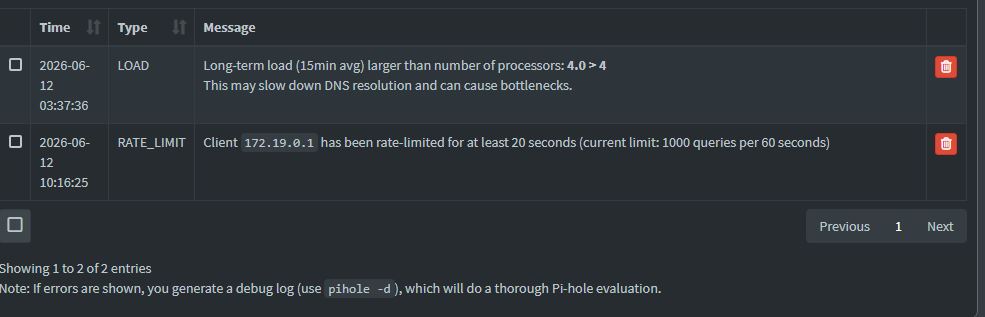
Been running Pihole n my Synology nas and have been receiving the issues below. Was wondering if It's something to worry about. TIA
Expected Behaviour
Synology 7.3.2-86009 Update 3
Synology DS920+
container Manager 24.0.2-1604
=================================================================+
# More info at GitHub - pi-hole/docker-pi-hole: The official Pi-hole Docker image from pi-hole.net · GitHub and https://docs.pi-hole.net/
services:

  pihole:
    container_name: pihole
    image: pihole/pihole:latest
    ports:
      # DNS Ports
      - "53:53/tcp"
      - "53:53/udp"

      # Default HTTP Port
      - "8080:443/tcp"

      # Default HTTPs Port. FTL will generate a self-signed certificate
      - "8443:443/tcp"

      # Uncomment the line below if you are using Pi-hole as your DHCP server
      #- "67:67/udp"
      # Uncomment the line below if you are using Pi-hole as your NTP server
      #- "123:123/udp"

    environment:
      # Set the appropriate timezone for your location ( https://en.wikipedia.org/wiki/List_of_tz_database_time_zones ), e.g:
      TZ: 'US/Eastern'

      # Set a password to access the web interface. Not setting one will result in a random password being assigned
      FTLCONF_webserver_api_password: 'cloner'

      # If using Docker's default `bridge` network setting the dns listening mode should be set to 'ALL'
      FTLCONF_dns_listeningMode: 'ALL'

    # Volumes store your data between container upgrades
    volumes:
      # For persisting Pi-hole's databases and common configuration file
      - './etc-pihole:/etc/pihole'

      # Uncomment the below if you have custom dnsmasq config files that you want to persist. Not needed for most starting fresh with Pi-hole v6. If you're upgrading from v5 you and have used this directory before, you should keep it enabled for the first v6 container start to allow for a complete migration. It can be removed afterwards. Needs environment variable FTLCONF_misc_etc_dnsmasq_d: 'true'
      #- './etc-dnsmasq.d:/etc/dnsmasq.d'

    cap_add:
      # See https://github.com/pi-hole/docker-pi-hole#note-on-capabilities
      # Required if you are using Pi-hole as your DHCP server, else not needed
      - NET_ADMIN
      # Required if you are using Pi-hole as your NTP client to be able to set the host's system time
      - SYS_TIME
      # Optional, if Pi-hole should get some more processing time
      - SYS_NICE

    restart: unless-stopped
=================================================================
container manager 24.0.2-1606