Hello,
iam faced by the problem that my pi-hole instance only shows ip addresses instead of the hostnames.
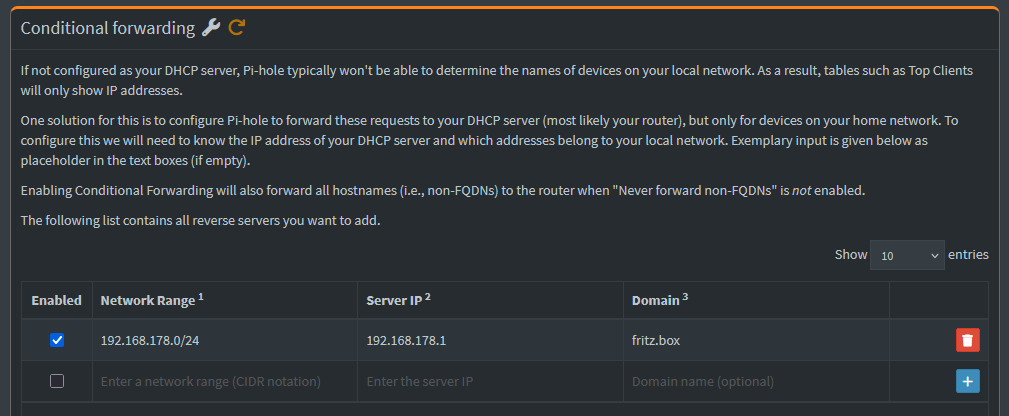
All informations i found here pointed to the [conditional forward] setting, which is set in my case. For now iam clueless and hope that somebody can point to the right settings.
Some pre-information (before pi-hole)
- iam using a FritzBox 6690 Cable for my internet connection
- all devices in my local network (Mobilephones, tablets, pcs, laptops, NAS,... ) have static IPs and names. Configured only via the FritzBox itself.
- i've disabled IPv6 in my local network completly via FritzBox
- The assignment of ip addresses and name should always be handeld by the FritzBox
- FritzBox is DHCP, NTP and DNS Server for my network
Now i wanted to include pi-hole into this, acting as my "DNS filter"
I've made a absolute fresh installation of pi-hole on my raspberry pi 4B.
With with raspberry pi imager i put the Raspberry OS Lite 64Bit onto the SD-Card and updated the os completly.
I disabled wifi and bluetooth completly, because iam not going to use it and the raspberry itself is connected via cable directly to the router:
- nano /boot/firmaware/config.txt
- added "dtoverlay=disable-wifi" and "dtoverlay=disable-bt" to the [all] section
- reboot
Installed pi-hole via:
- sudo curl -sSL https://install.pi-hole.net | bash
and run through the installation process. Lastly i added my user to the pihole group
- sudo usermod -aG pihole $USER
pihole version: Core (v6.4.3), Web (v6.6), FTL (v6.7)
Now for the settings i made:
- FritzBox:
- Like described here: Fritz!Box (EN) - Pi-hole documentation is set my pi-hole 192.168.178.2 as my local DNS Server
- Pi-hole
- System settings -> Expert -> All settings
- Upstream DNS Servers (dns.upstream)
- 9.9.9.9
- 149.112.112.112
- dns.domainNeeded
- enabled
- dns-dnssec
- enabled
- dns.revServers
- true,192.168.178.0/24,192.168.178.1,fritz.box
- dns.domain.name
- fritz.box
- dhcp.router
- 192.168.178.1 (ip of FirtzBox)
- webserver.domain
- magicbox.fritz.box
- ntp.sync.server
- fritz.box
- ntp.ipv4.active
- disabled
- ntp.ipv6.active
- disabled
- resolver.resolveIPv6
- disabled
- Upstream DNS Servers (dns.upstream)
- System settings -> Expert -> All settings
Expected Behaviour:
My expectation is that:
- after i make a new dhcp lease / make a new connection with my devices to the networt, the traffic is blocked / allowed like configured.
- i see hostnames in the [Top Client] view
- i see hostnames, as well as MAC, IP adresses in the [Client Group Management] page
Actual Behaviour:
Traffic is blocked and checked against the configured Blocking/Allow Lists
The [Top Client] view only shows IP addresses.
The [Client Group Management] page also shows under [Select client...] only the MAC and IP address.
Debug Token:
Debug token: https://tricorder.pi-hole.net/fIxQ8hT7/
P.S.: Iam pretty sure that i missunderstood something completly but i dont see my mistake.
If someone can clarify or point me to my mistake, i would be happy.