Pi-hole v6.6 in LXC β€” FTL processes queries but never writes to database

The issue I am facing:

FTL processes DNS queries correctly (confirmed via dig and debug.queries logging) but never writes them to the database. The dashboard shows 0 queries, the query log is empty, and SELECT COUNT(*) FROM queries in pihole-FTL.db always returns 0. Queries only appear in the database after restarting FTL (service pihole-FTL restart), suggesting they accumulate in memory but the periodic flush (controlled by database.DBinterval) never fires.

This issue persists across two completely separate installations β€” I destroyed the first container and recreated it from scratch using the same community script, and the behavior is identical.

Details about my system:

Pi-hole v6.6 (fresh install via community-scripts/ProxmoxVE)

Unprivileged LXC container, Debian 13, 512MB RAM, 1 core

Proxmox VE 9.1.7 (Kernel 6.17.13-2-pve)

Container storage: LVM-thin (local-lvm)

Upstream DNS: router at 10.0.0.1 (encrypted DNS to Cloudflare/Google)

Interface setting: Permit all origins

File permissions on /etc/pihole/ are correct (owned by pihole user)

queryLogging = true, privacylevel = 0

What I have changed since installing Pi-hole:

  • Set database.forceDisk = true β€” no effect
  • Set database.useWAL = false β€” no effect
  • Set database.DBinterval = 30 β€” no effect
  • Deleted pihole-FTL.db and let FTL recreate it β€” no effect
  • Enabled debug.queries = true β€” confirmed FTL sees and processes queries (forwarding, caching, replying all logged in FTL.log), but nothing is written to the database until FTL is restarted

Please upload a debug log and post just the token URL that is generated after the log is uploaded by running the following command from the Pi-hole host terminal:

sudo pihole -d

or if you run your Pi-hole as a Docker container:

docker exec -it <pihole-container-name-or-id> pihole -d

where you substitute <pihole-container-name-or-id> as required.

Please find link below.

https://tricorder.pi-hole.net/OvuG5OUE/

Let's try to reduce the unknown variables:

I'm not sure if this is causing some permission issues.
As a test, can you please try to start a container with more privileges?

Also, revert these 3 values.


Note:

This script is not created by Pi-hole.
This is just a guess, but maybe the script needs to be updated to work with the new release.

Note:

Related Github issue:

@Szimstack

Inside the container could you run

df -h
df -ih
journalctl -u pihole-FTL -n 200 --no-pager
grep -iE "database|sqlite|error|readonly|disk|no space|permission" /var/log/pihole/FTL.log

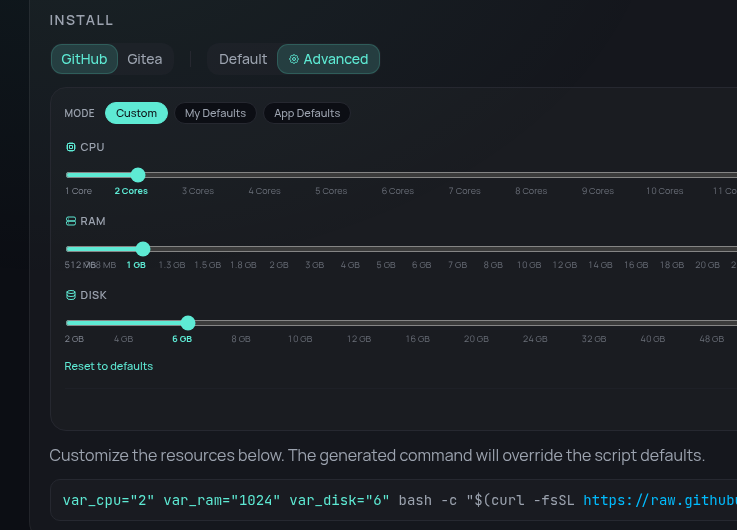
The Scripts default disk size is 2 GB. About 1 GB Free space in container, Pihole min is 2 GB Freespace https://docs.pi-hole.net/main/prerequisites/

Not really big enough for large lists

This script makes a 32 GB disk. Just my personal choice.

var_disk="32" bash -c "$(curl -fsSL https://raw.githubusercontent.com/community-scripts/ProxmoxVE/main/ct/pihole.sh)"

Hope that helps.

Why use scripts for this in the first place ?!

IMHO it’s not that hard to create a Proxmox LXC or VM + Install Debian + Install Pi-Hole :slight_smile:

You can just dial up the settings.

Thanks for the suggestion! Ran all the diagnostics β€” doesn't look like disk space is the issue here.

df -h:

Filesystem                        Size  Used Avail Use% Mounted on
/dev/mapper/pve-vm--101--disk--0  2.0G  929M  899M  51% /
none                              492K  4.0K  488K   1% /dev
udev                              7.7G     0  7.7G   0% /dev/tty
tmpfs                             7.8G  2.9M  7.8G   1% /dev/shm
tmpfs                             3.1G   72K  3.1G   1% /run
tmpfs                             5.0M     0  5.0M   0% /run/lock
tmpfs                             7.8G     0  7.8G   0% /tmp

df -ih:

Filesystem                       Inodes IUsed IFree IUse% Mounted on
/dev/mapper/pve-vm--101--disk--0   128K   27K  102K   21% /
none                               2.0M    25  2.0M    1% /dev
udev                               2.0M   582  2.0M    1% /dev/tty
tmpfs                              2.0M    17  2.0M    1% /dev/shm
tmpfs                              800K   133  800K    1% /run
tmpfs                              2.0M     2  2.0M    1% /run/lock
tmpfs                              1.0M     7  1.0M    1% /tmp

grep --text for database/sqlite/error/disk/permission in FTL.log:

INFO: Database version is 21
INFO: Database successfully initialized
WARNING: Using on-disk history database. This will reduce performance.
INFO: Imported 10125 queries from the on-disk database (it has 13548 rows)
WARNING: Insufficient permissions to set process priority to -10 (CAP_SYS_NICE required)
ERROR: SQLite3: recovered 5 pages from /etc/pihole/pihole-FTL.db-journal (539)

No disk/space/readonly errors. Database is initializing fine and actively importing queries. The SQLite journal recoveries are from me restarting the container a lot while troubleshooting, and the CAP_SYS_NICE warning is expected in an unprivileged LXC.

The issue is specifically that cross-subnet DNS queries get resolved by FTL but never appear in the query log/dashboard. Same-subnet queries log normally. I've filed this as pi-hole/FTL #2869 on GitHub.

Will still resize the disk for headroom, but the root cause seems to be an FTL bug rather than a resource constraint. Appreciate the help!

Dial up ?! Like my 28K8 Modem use to do ? :grimacing:

What do you mean exactly ?

My 300 baud Commodore modem snorts derisively.

https://community-scripts.org/scripts/pihole#install