Pi-hole ignores own DNS rebinds.

Hello

I’m getting multiple issues with pi-hole.
DNS simply stopping to work.
Neither google.com or manually configured local resources are not opening.

Expected Behaviour:

Opens gui for Router(first line in config), gui for pihole(second line), nas IPMI or google.com is opened.

  • Ubuntu 24.04, Windows 11
  • Pi-hole is installed on RPi4 with
  • Installed with official docker documentation
  • Docker latest for official Raspberry OS

Actual Behaviour:

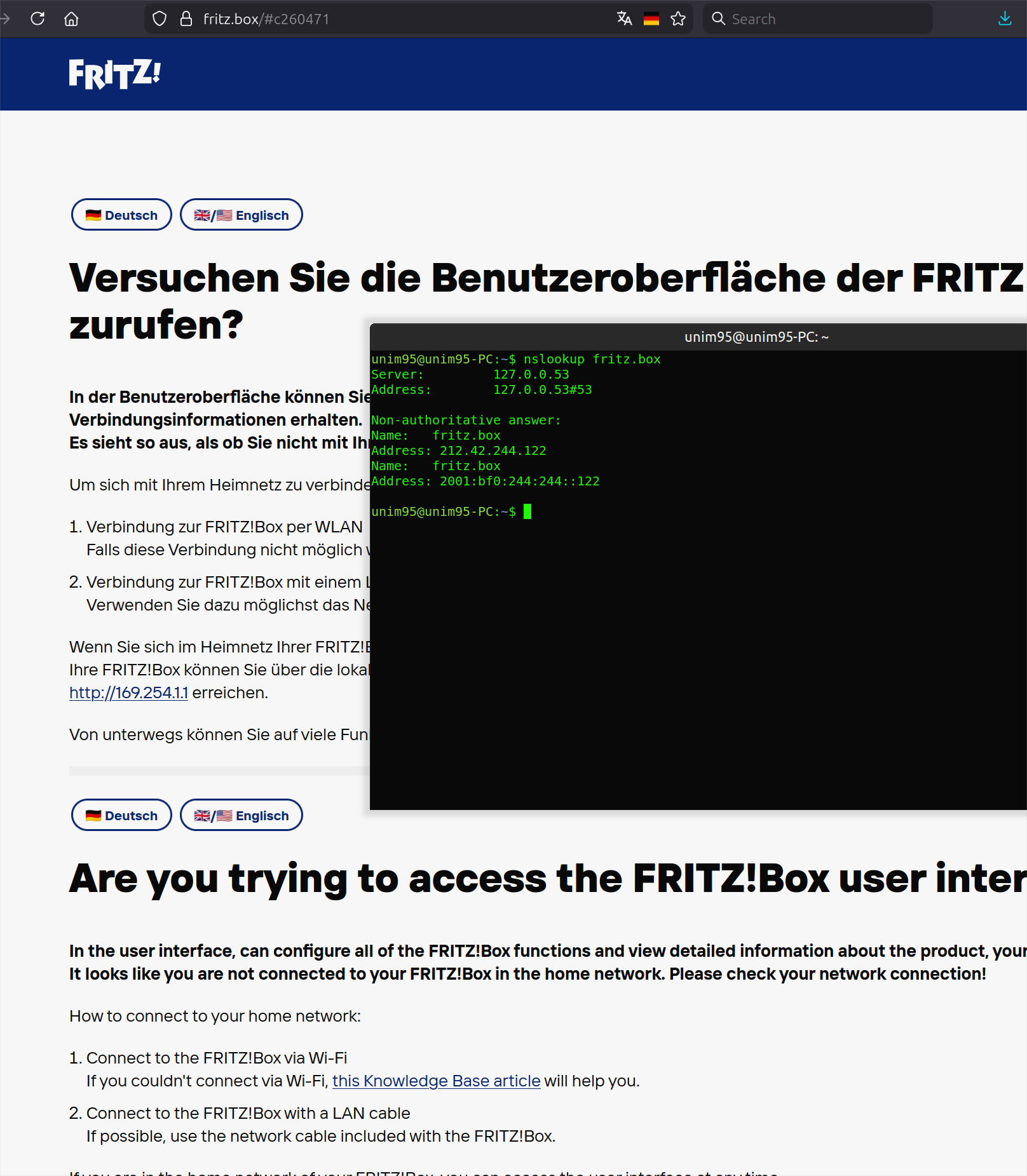
Browser open’s fritz.box dummy site.

Pi-hole is not resolved

google.com is not resolved.

Restart of docker container + DNS flushing are not helping.

Pi-hole isn't ignoring anything - rather, your examplary client is not using Pi-hole.

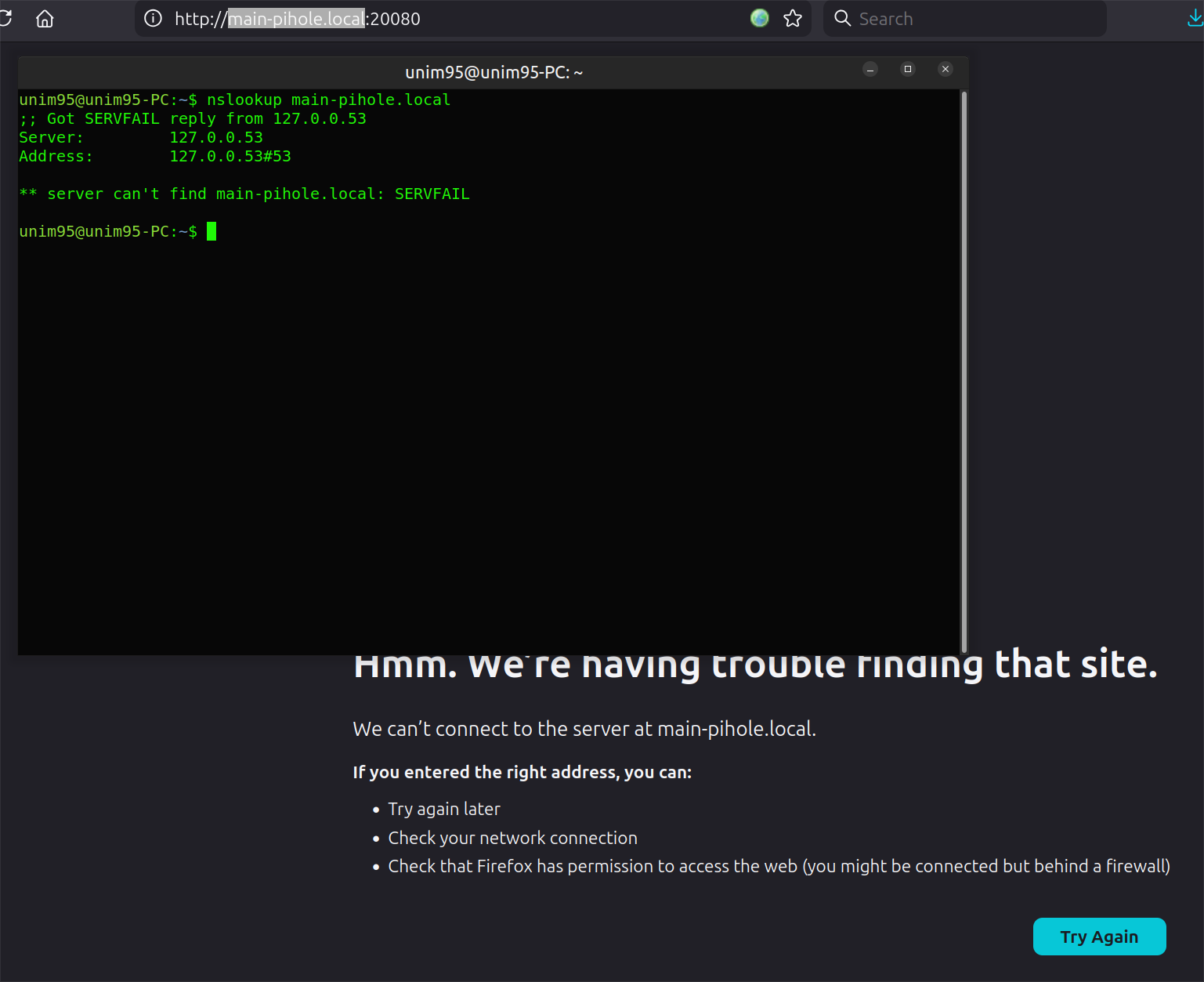
Your screenshots show that your unim95-PC client is using a local stub resolver at 127.0.0.53 for DNS, and that resolver returned the public DNS reply for fritz.box.

Is that unim95-PC the machine that runs Pi-hole?
If so, you should also inspect and share nslookup results from a client machine in your network.

In addition, note that the .local TLD is reserved for mDNS protocol usage and should not be mixed with plain DNS.

You should never see any .local DNS requests in Pi-hole's Query Log.
Unless .local is (mistakenly) used as local/search domain for DNS, clients would strictly resort to mDNS for resolving DNS names ending in .local.

For Fritzbox routers, the local/search domain is always fritz.box.

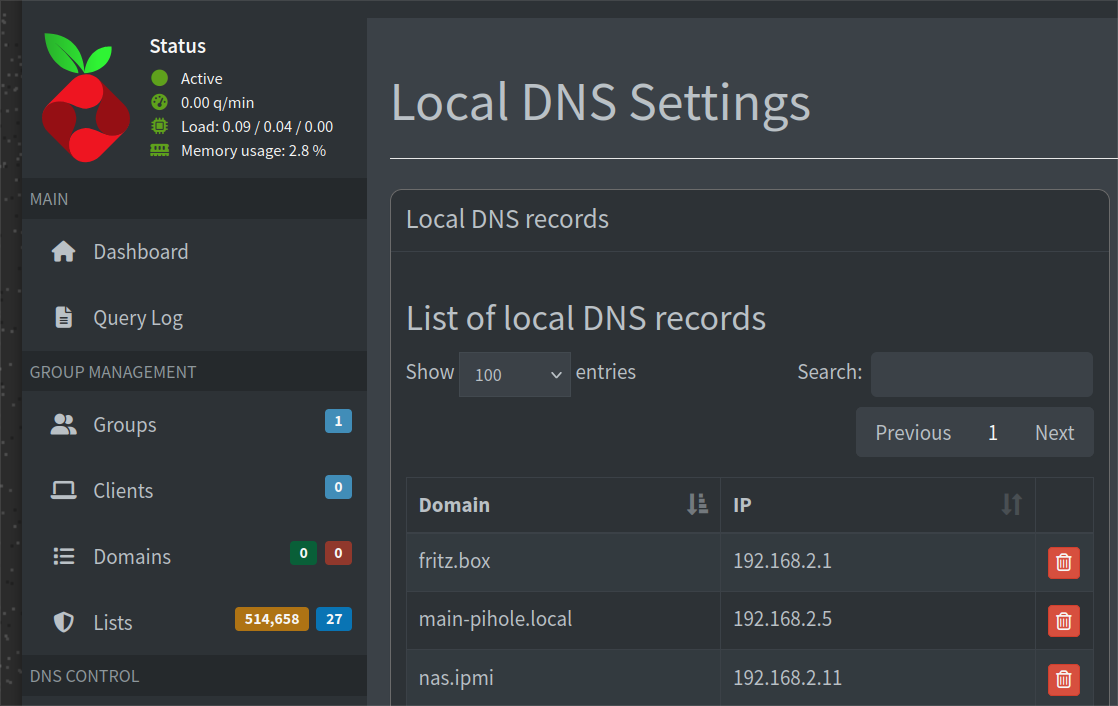
In the local DNS Settings your fritz.box is on 192.168.2.1
In your nslookup your fritz.box is on 212.42.244.122.

It seems to be no the same.

That's the expected reply from a public DNS resolver, try e.g. nslookup fritz.box 9.9.9.9.

UNIm95's example nslookup doesn't use Pi-hole, so that reply demonstrates their local stub resolver is forwarding to public DNS servers, not to Pi-hole.

You are not knowing how Ubuntu Linux works.
127.0.0.53 - it is systemd-resolved
Internal daemon(service) that provides DNS for all system components.
If we check real config for connection:

unim95@unim95-PC:~$ cat /run/systemd/resolve/resolv.conf 
# This is /run/systemd/resolve/resolv.conf managed by man:systemd-resolved(8).
# Do not edit.
#
# This file might be symlinked as /etc/resolv.conf. If you're looking at
# /etc/resolv.conf and seeing this text, you have followed the symlink.
#
# This is a dynamic resolv.conf file for connecting local clients directly to
# all known uplink DNS servers. This file lists all configured search domains.
#
# Third party programs should typically not access this file directly, but only
# through the symlink at /etc/resolv.conf. To manage man:resolv.conf(5) in a
# different way, replace this symlink by a static file or a different symlink.
#
# See man:systemd-resolved.service(8) for details about the supported modes of
# operation for /etc/resolv.conf.

nameserver 192.168.2.5
nameserver <Redacted IPv6 NS that also points to pi-hole>
search .


We see that name server points to pi-hole.
pi-hole IP is 192.168.2.5
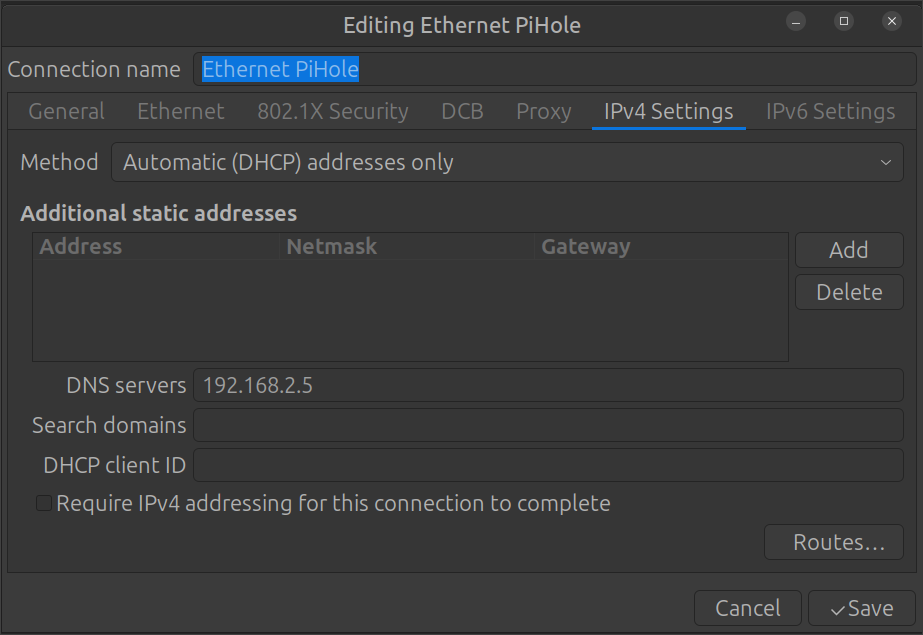
Here are settings for my local network connection:

And with this settings nslookup is not able to locate local fritz.box router GUI and points to fritz.box dummy site.
So I’m sure in local settings of for my Linux.

You should never see any .local DNS requests in Pi-hole's Query Log.

I have tried also not *.local settings.
nas.ipmi is also not resolvable.

Are you sure he doesnt know?

From the systemd-resolved man page:

It implements a caching and validating DNS/DNSSEC stub resolver ...

What does below one output on that unim95-PC host?

resolvectl status

Redact the latter part of IPv6 addresses if any are shown for privacy!

If you tail the Pi-hole logs live in the webGUI, do any of your nslookup's register and how?

Tools > Tail log files > pihole.log

Are you sure he doesnt know?

Looks like.
Cause with systemd changed Linux behavior in last 15 years pretty hard.
systemd grabbed almost all functionality, that previously was in separated daemons.
Localhost’s IP 127.0.0.53 is directly used by systemd-resolved and not an extra DNS cache/service.

What does below one output on that unim95-PC host?

resolvectl status

unim95@unim95-PC:~$ resolvectl status
Global
         Protocols: -LLMNR -mDNS -DNSOverTLS DNSSEC=no/unsupported
  resolv.conf mode: stub

Link 2 (enp42s0)
    Current Scopes: DNS
         Protocols: +DefaultRoute -LLMNR -mDNS -DNSOverTLS DNSSEC=no/unsupported
Current DNS Server: 192.168.2.5
       DNS Servers: 192.168.2.5 <Redacted IPv6 NS that also points to pi-hole>

Now I’m really confused.
nslookup started to work.

2026-03-07 02:51:54.649 query[A] fritz.box from 192.168.2.10
2026-03-07 02:51:54.650 /etc/pihole/hosts/custom.list fritz.box is 192.168.2.1

In older log in container i see following:

Mar 6 04:56:47 dnsmasq[52]: query[A] fritz.box from 192.168.2.10
Mar 6 04:56:47 dnsmasq[52]: /etc/pihole/hosts/custom.list fritz.box is 192.168.2.1
Mar 6 04:56:47 dnsmasq[52]: query[AAAA] fritz.box from 192.168.2.10
Mar 6 04:56:47 dnsmasq[52]: cached-stale fritz.box is 2001:bf0:244:244::122
Mar 6 04:56:47 dnsmasq[52]: forwarded fritz.box to 8.8.8.8

Looks like Browser goes over IPv6 and lands on fritz.box dummy site.

Even it got local IP for router GUI.

What does below output on the unim95-PC host?

nslookup -class=chaos -type=txt version.ftl <Redacted_IPv6_NS_that_also_points_to_pi-hole>%<INTERFACE_NAME>

Eg:

$ ip -br -6 address
lo               UNKNOWN        ::1/128
eth0             UP             fe80::XXXX/64
$ nslookup -class=chaos -type=txt version.ftl fe80::XXXX%eth0
Server:         fe80::XXXX%eth0
Address:        fe80::XXXX%2#53

version.ftl     text = "v6.2.3"

Most DNS client implementations prefer IPv6 over IPv4 for transport.

EDIT: Oh and output for below on that unim95-PC host?

nslookup flurry.com <Redacted_IPv6_NS_that_also_points_to_pi-hole>%<INTERFACE_NAME>

Thats a domain on the default list:

$ pihole query flurry.com
Found 0 domains exactly matching 'flurry.com'.

Found 1 lists exactly matching 'flurry.com'.

  - https://raw.githubusercontent.com/StevenBlack/hosts/master/hosts (block)

    - flurry.com

Yeah, like I said, 127.0.0.53 is a stub resolver, as employed by Ubuntu.
Naturally, I cannot know where that stub resolver forwards its queries, but your nslookup result clearly indicates that fritz.box was resolved by a public DNS server.

It would be interesting to know whether the redacted IPv6 really matches your Pi-hole. If so, that would preclude IPv6 by-passes, and would suggest that you instead may have missed to create an AAAA record for fritz.box.

You didn't answer my question:

Also, please upload a debug log and post just the token URL that is generated after the log is uploaded by running the following command from the Pi-hole host terminal:

sudo pihole -d

or if you run your Pi-hole as a Docker container:

docker exec -it <pihole-container-name-or-id> pihole -d

where you substitute <pihole-container-name-or-id> as required.

Is that unim95-PC the machine that runs Pi-hole?
If so, you should also inspect and share nslookup results from a client machine in your network.

unim95-PC is my home PC running Ubuntu and Win11.
It is working as client for pi-hole.
Router gives IP and gateway, dns provided by pi-hole.
Router does not uses pi-hole as DNS yet.
Cause I’m getting on my home PC with Ubuntu(and also Win11) with DNS resolution.
All nslookup’s that i showed in this topic are from pi-hole client systems.

After unplanned reboot of Raspberry PI4 ( USB-C without any physicals latches sucks) with pi-hole container everything works.
I would like to bit wait for 1-2 weeks now.
Cause in first weeks after pi-hole installation everything was working fine.

Also, please upload a debug log and post just the token URL

What is this token URL?
What shows it?
Debug log i will provide after i will again get issues.

The token is showed after you generate and upload a log.

Execute sudo pihole -d and wait for the log to be generated. At the end of the process, answer "Y" when asked to upload the log. A token URL will be shown. Copy and paste here only the token URL.

And it began again.
Name resolutions stopped to work properly.
Router GUI is working again only with IP.
Even nslookup shows local IP’s.

I have generated logs.
Here is token URL: https://tricorder.pi-hole.net/VdwtKY2S/

Sounds like you dont need me anymore.

Your log shows you are running Pi-hole docker image 2025.08.0, from 7 months ago.
The current image is 2026.02.0. You should try to run the latest version.

Also, you never posted your compose file (or docker run command), used to start the container.

Can you please post the full compose file?

I’m used default docker file from pi-hole
I changed only timezone, UI Pass and port for UI.

Here is docker file:

More info at https://github.com/pi-hole/docker-pi-hole/ and https://docs.pi-hole.net/

services:
pihole:
container_name: pihole
image: pihole/pihole:latest
ports:
# DNS Ports
- "53:53/tcp"
- "53:53/udp"
# Default HTTP Port
- "20080:80/tcp"
# Default HTTPs Port. FTL will generate a self-signed certificate
- "20443:443/tcp"
# Uncomment the below if using Pi-hole as your DHCP Server
#- "67:67/udp"
# Uncomment the line below if you are using Pi-hole as your NTP server
#- "123:123/udp"
environment:
# Set the appropriate timezone for your location from
# https://en.wikipedia.org/wiki/List_of_tz_database_time_zones, e.g:
TZ: 'Europe/Berlin'
# Set a password to access the web interface. Not setting one will result in a random password being assigned
FTLCONF_webserver_api_password: 'Super secure pass =)'
# If using Docker's default bridge network setting the dns listening mode should be set to 'all'
FTLCONF_dns_listeningMode: 'all'
# Volumes store your data between container upgrades
volumes:
# For persisting Pi-hole's databases and common configuration file
- './etc-pihole:/etc/pihole'
# Uncomment the below if you have custom dnsmasq config files that you want to persist. Not needed for most starting fresh with Pi-hole v6. If you're upgrading from v5 you and have used this directory before, you should keep it enabled for the first v6 container start to allow for a complete migration. It can be removed afterwards. Needs environment variable FTLCONF_misc_etc_dnsmasq_d: 'true'
#- './etc-dnsmasq.d:/etc/dnsmasq.d'
cap_add:
# See https://github.com/pi-hole/docker-pi-hole#note-on-capabilities
# Required if you are using Pi-hole as your DHCP server, else not needed
- NET_ADMIN
# Required if you are using Pi-hole as your NTP client to be able to set the host's system time
- SYS_TIME
# Optional, if Pi-hole should get some more processing time
- SYS_NICE
restart: unless-stopped

I also pulled new image.
I hope it will help.

Stop/destroy the current container and add the dns option to your compose file, like this:

services:
  pihole:
    container_name: pihole
    dns: 8.8.8.8    # use a public DNS server here, not your local Pi-hole
    image: pihole/pihole:latest

Then start a new container.

This should fix the external DNS issues, assuming your router settings are correct.

After that, execute the commands below to check if Pi-hole is working and post here the output:

nslookup google.com 192.168.2.5
nslookup flurry.com 192.168.2.5

I have added it also in compose file now.
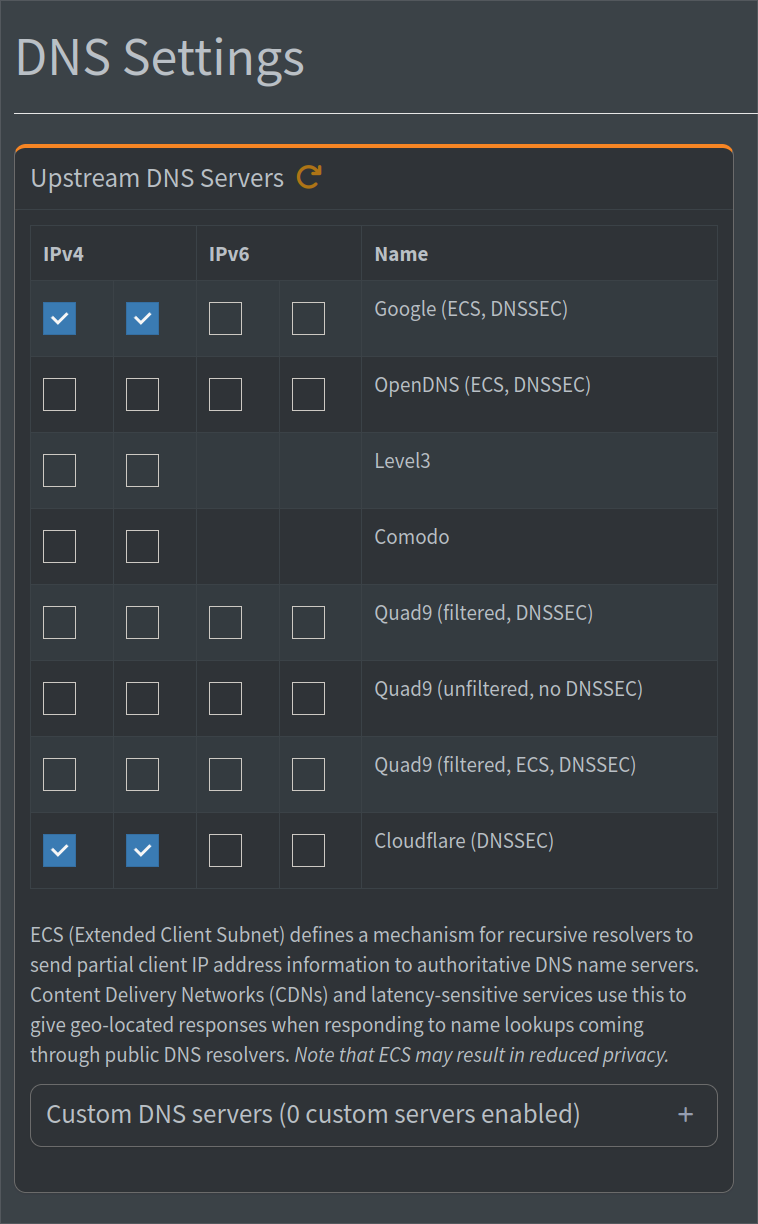
Before I setted up in Web UI google and cloudflare dns.

So it should work.
Especially, when I have not selected IPv6

Your debug log shows that you've created A records for IPv4 records exclusively:

   [dns]
     (…)
     hosts = [
       "192.168.2.1 fritz.box",
       "192.168.2.11 nas.ipmi",
       "192.168.2.15 unim95.ddns.net",
       "192.168.2.6 test-pihole.unim95.ddns.net",
       "192.168.2.2 speedport.ip",
       "192.168.2.5 main-pihole.local"
     ] ### CHANGED, default = []
     (…)
     domain = "lan"

In addition, your Pi-hole is not aware that it should treat fritz.box as your local/search domain, using lan instead.

Consequently, Pi-hole would forward AAAA requests for fritz.box to its configured public upstreams, resulting in the public DNS reply showing in your nslookups.
You should note that this would also happen with any other public DNS records you are shadowing with your Pi-hole's local DNS records.

To address your fritz.box issue, you could either create the missing AAAA records or set dns.domain to fritz.box.

You could also consider to remove fritz.box from your local DNS records altogether and enable Pi-hole's Conditional Forwarding instead.
That way, Pi-hole would pass resolution of requests for anything ending in fritz.box to be answered by your Fritzbox router.

You should probably prefer this latter way of resolving local names, unless you'd want to see a specific name for a client in Pi-hole's UI.
Fritzboxes may keep multiple names for clients, and Pi-hole would then choose an arbitrary one for the client's associated IPs, which may not always be your preferred name.
Creating Local DNS records for those specific clients while using Conditional Forwarding for all other fritz.box domains would allow you to take advantage of Fritzbox's local name knowledge, manually only creating relevant entries.

EDIT:
Unrelated to your issue, you could also consider to configure your router to NOT advertise any DNS server IPv6 address at all, see Unresolved ipv6 adress in my top list - #4 by Bucking_Horn.
This will have your clients send DNS requests to Pi-hole via their IPv4 address exclusively, which would allow you to reliably associate friendly names to client IPs (which isn't possible with every IPv6).
My suggestion has nothing to do with Pi-hole DNS uptream servers. You still need to select which server Pi-hole will use.

Apparently you are no familiar with how docker DNS works.
The dns: option is configuring which DNS servers will be used by the container itself.

Now I’m really confused.

@rdwebdesign
If i remember correctly, docker uses default network settings for DNS.
I have configured Raspberry Pi network settings to use Google/Cloudflare DNS.
Here are network settings.

root@raspberrypi-4b:/etc/NetworkManager/system-connections# cat Wired\ connection\ 1.nmconnection
[connection]
id=Wired connection 1
uuid=9ce11098-3a31-3dbc-aaa8-09eff037b3e0
type=ethernet
autoconnect-priority=-999
interface-name=eth0
timestamp=1747096292

[ethernet]

[ipv4]
address1=192.168.2.5/24,192.168.2.1
dns=8.8.8.8;1.1.1.1;
may-fail=false
method=manual

[ipv6]
addr-gen-mode=default
method=auto

[proxy]

Raspberry Pi has static IP and uses Google and Cloudflare DNS.
For IPv6 it is using default.
So it uses DNS that provides router.
And router also uses Google and Cloudflare.

So even if I have not checked in GUI IPv6 DNS, pihole will provide DNS records for clients thought docker/Paspberry OS/router?
An so my client PC goes to IPv6 and lands on dummy site instead of router UI?

@Bucking_Horn

Can you please elaborate more about:

In addition, your Pi-hole is not aware that it should treat fritz.box as your local/search domain, using lan instead.

Is it only Conditional Forwarding topic?
Or more?