i followed the instructions on installing pi hole and getting it up and running. as far as i can tell pi hole is detecting the queries on all my devices connected to the wifi. without manually setting the dns of any of my devices, no ads are blocked. when i manually set them on apple devices it starts blocking ads, but trying to manually set the dns on my windows hasnt worked.
my router allows me to set three custom dns addresses, enable/disable dhcp, and i dont know if this is important but i can enable/disable ipv6 as well. i entered the dns of my pi-hole as the primary dns server ip and left the secondary and tertiary dns slots blank.

i later found out that comcast sets two...secret?? dns ips??? that (as far as i know) i cant change from my router page.

i figure these two extra servers are why no ads were being blocked. i can delete them both from my iphone, and it seems like my mac automatically overrides them when i manually set the dns.
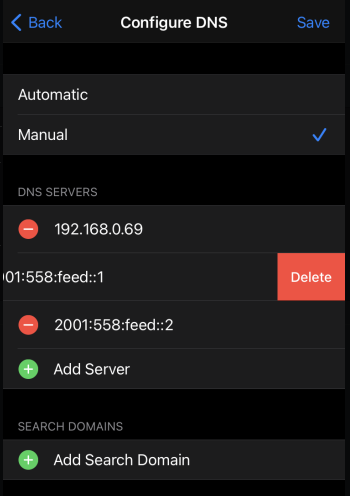
my windows gives me no such options, and ultimately i want to avoid manual setup altogether because the main reason im doing this is to block ads on my roku.
i tried setting up the pi-hole dhcp thing but it seemed to knock my internet out on random devices (and sometimes specifically random websites). i dont really know whats up with that.
extra info: my isp is comcast and i have an arris router. i have pi hole set to the cloudflare server for ipv4. ive got limited experience with networking.
(as an aside does pi hole even block ads on youtube and streaming services?)
Expected Behaviour:
pi hole blocking ads on all devices connected to the wifi
Actual Behaviour:
ads only get blocked on manually configured apple devices