Need assistance to check my configuration in Pihole

Expected Behaviour:

I installed Pihole 1 time and i thought I got it to work. Then I looked more into the DNS part of setting it up, and found that the traffic didn't go through my Pihole, but my router instead, like normal. I then re-imaged the SDcard with PiOS Lite 64-bit headless. I have installed Pihole using the official curl command curl -sSL ... through SSH on my windows 11 laptop

I do not use docker. I use SSH to handle the Pihole from my laptop, and My Raspberry pi is physically connected to my home router with ethernet cabel. I just reset my Wi-Fi so that I can try again. I need help please.

I need to make sure traffic goes through the Pihole, and that its configured correctly

  • Windows 11 Home Edition
  • Raspberry Pi 5 8GB
  • Docker compose file or Docker run command
  • Docker engine version

Actual Behaviour:

I think its installed, but that's pretty much it(?) I'm unsure of the rest.

Debug Token:

https://tricorder.pi-hole.net/9hgHFb8f/

Pi-hole is installed correctly, but you are using 2 DHCP servers: the route and Pi-hole.

This configuration will cause issues (you don't need 2 DHCP servers on the same network range - they will conflict with each other).

Also, the router is advertising 2 DNS servers (Pi-hole and itself):

      dns-server: 192.168.1.141
      dns-server: 192.168.1.1
      router: 192.168.1.1

The device will bypass Pi-hole and use the router as DNS.

Why did you enable Pi-hole DHCP server? Also, what router model/brand are you using?

Thank you so much for confirming this.

I read somewhere that it was recommended to use Pihole DHCP if my router could not set static IP, or something in this manner(?)

I'm using Mercusys AX1800 WiFi Router.

My ISP do not let me set Static IP, due to 4G modem.

If you want to use Pi-hole as DNS server you need:

  1. Configure a static IP for Pi-hole machine on the OS (currently your Pi-hole machine is using the IP assigned by the router.

  2. Disable the router DHCP server.

But this is not not necessary.

If your router is similar to this one, I think it would be better to use the router as DHCP server.

You should use the Advanced settings.

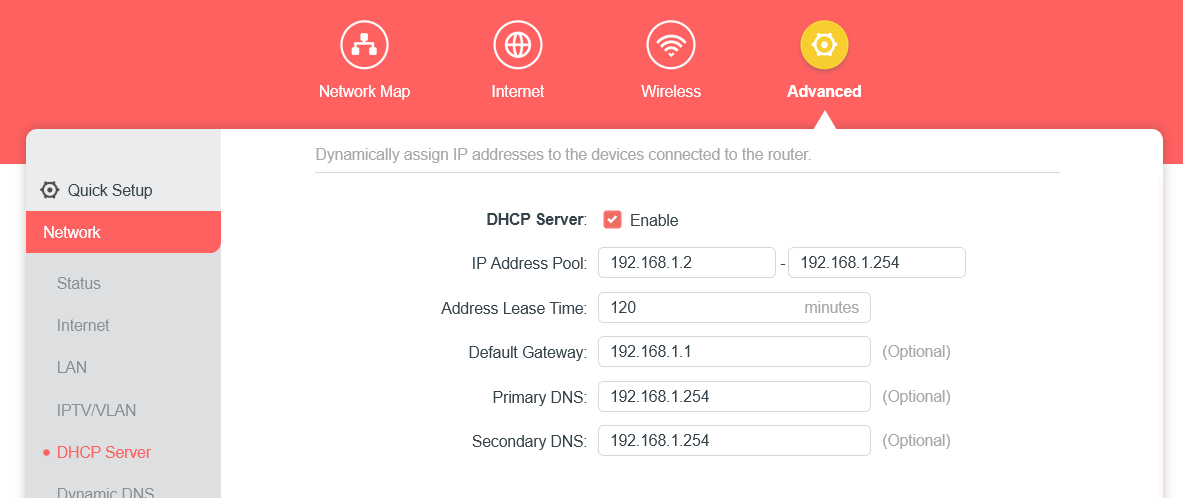
  • "Internet" page, use the default values set by the ISP, or use Dynamic.

  • "LAN" page, leave as it is (your router is using 192.168.1.1).

  • "DHCP" page, keep the DHCP on and use values like this :

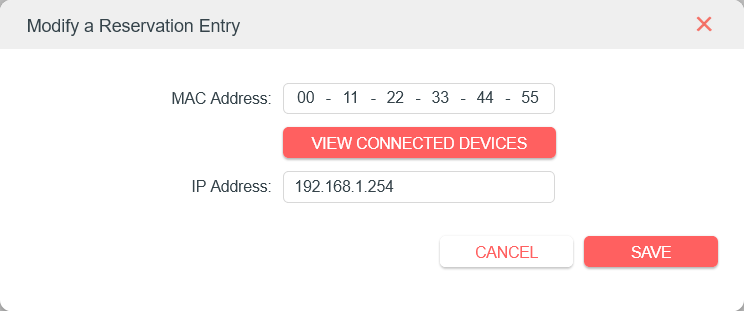
    Then set a reservation for Pi-hole like this (using the correct MAC address):

Note:
Your admin page may look different.

Thank again for the reply and giving me the way on how to solve this!

I do have a question about your choice of the IP pool. Is this random selected, or is there a logic behind the specific 1.2 - 1.254?

Can I change my Pi's IP to for example 192.168.1.55 If my router has 192.168.1.1?

When I type hostname -I it shows the IP set from my router, is this correct? And this IP I can change in nmtui to a static IP of for example 192.168.1.120?

You can use any range you want. It was an example.

Yes.

We usually recommend to reserve IP addresses from outside the pool range, but when I used the router simulator, apparently this router works differently and the reserved addresses must belong to the address pool, so any IP between start and end address will work.

If the router is the DHCP server, than this is correct.

You don't need to do that if you follow my recommendation to set a DHCP reservation for Pi-hole, on the router.

If you decide to set a static IP using nmtui, then you need to use an IP outside the DHCP range (to avoid conflicts) and you don't set a DHCP reservation on the router.

It is one or the other. Or a static IP set via nmtui, or a DHCP reservation. Also, the machine needs only one IP: or 192.168.1.55, or 192.168.1.120.

Thank you very much! This helped me a lot! I will use your example and fix it :smiley:

From what I have understood it works as following :

  • The now EOL declared ISC DHCP Server likes it's Static DHCP IP Address Reservations to be OUTSIDE the DHCP Pool Range.
  • It's replacement KEA DHCP Server likes the same.
  • DNSmasqd likes it's Static DHCP IP Address Reservations to be INSIDE the DHCP Pool Range.

Source : https://docs.opnsense.org :slight_smile:

Today I cannot ssh into pi, but it's active and i can access the Webinterface.

I followed redwebdesign's recommendations above.

Should I click restart DNS Resolver from the Webinterface, or what could the issue be here?

I set up port 22 only to be allowed access from my yesterdays IP adress for my laptop. Changed my IP back to that and now I'm in. Thank you for your help and guidance!