Please upload a debug log and post just the token URL that is generated after the log is uploaded by running the following command from the Pi-hole host terminal:
The client is being rate limited by Pi-hole. It is saturating itself out of DNS service.
   2025-11-29 02:30:28.312 CET [753M] INFO: Rate-limiting 192.168.1.80 for at least 5 seconds
   2025-11-29 02:30:33.228 CET [753/T783] INFO: Ending rate-limitation of 192.168.1.80
   2025-11-29 02:45:05.537 CET [753/T781] INFO: Received 8/8 valid NTP replies from fr.pool.ntp.org
   2025-11-29 02:45:05.538 CET [753/T781] INFO: Time offset: -2.511399e+01 ms (excluded 1 outliers)
   2025-11-29 02:45:05.539 CET [753/T781] INFO: Round-trip delay: 2.274418e+01 ms (excluded 1 outliers)
   2025-11-29 03:00:37.905 CET [753M] INFO: Rate-limiting 192.168.1.80 for at least 6 seconds
   2025-11-29 03:00:43.767 CET [753/T783] INFO: Ending rate-limitation of 192.168.1.80
   2025-11-29 03:04:37.915 CET [753M] INFO: Rate-limiting 192.168.1.80 for at least 6 seconds
   2025-11-29 03:04:43.842 CET [753/T783] INFO: Ending rate-limitation of 192.168.1.80
   2025-11-29 03:38:02.730 CET [753M] INFO: Rate-limiting 192.168.1.80 for at least 1 second
   2025-11-29 03:38:03.446 CET [753/T783] INFO: Ending rate-limitation of 192.168.1.80
   2025-11-29 03:44:17.418 CET [753M] INFO: Rate-limiting 192.168.1.80 for at least 6 seconds
   2025-11-29 03:44:23.565 CET [753/T783] INFO: Ending rate-limitation of 192.168.1.80
   2025-11-29 03:45:05.764 CET [753/T781] INFO: Received 8/8 valid NTP replies from fr.pool.ntp.org
   2025-11-29 03:45:05.765 CET [753/T781] INFO: Time offset: -2.516347e+01 ms (excluded 0 outliers)
   2025-11-29 03:45:05.765 CET [753/T781] INFO: Round-trip delay: 1.907504e+01 ms (excluded 0 outliers)
   2025-11-29 03:58:11.975 CET [753M] INFO: Rate-limiting 192.168.1.80 for at least 2 seconds
Yes if Pi-hole were doing DHCP services for your LAN.
Then you can tag a MAC address and have a customized DNS server (1.1.1.1) pushed to that MAC via the embedded dnsmasq DHCP option below (MAC 0C:2F:B0:XX:XX:XX as an example):
That's what I tried too (if I understand well your comment), I've created a "no filter" group and assigned the filter to it, but not working.
Even when I disable blocking it's not working.
Pi-Hole is blocking my IoT filter for a reason I still don't understand.
Queries would still register in Pi-hole and mangling the stats displayed on the GUI.
Plus it doesnt stop the device from being rate-limited.
TTL (Time To Live) for those records seem to be 130 seconds (how long it should stay cached on the client):
$ dig +noall +answer pool.ntp.org
pool.ntp.org.           130     IN      A       191.96.11.19
pool.ntp.org.           130     IN      A       5.200.6.34
pool.ntp.org.           130     IN      A       94.198.159.15
pool.ntp.org.           130     IN      A       172.233.38.176
If the device doesnt obey/honor the TTL, the device manufacturer should be contacted to report a bug.
EDIT: Oh for the correct absolute TTL, you have to ask the authoritative server(s):
$ dig +norecurse +noall +answer @d.ntpns.org. pool.ntp.org
pool.ntp.org.           130     IN      A       45.138.55.60
pool.ntp.org.           130     IN      A       149.143.87.22
pool.ntp.org.           130     IN      A       185.51.192.61
pool.ntp.org.           130     IN      A       185.51.192.62
Queries would still register in Pi-hole and mangling the stats displayed on the GUI.
Plus it doesnt stop the device from being rate-limited.
I'm fairly certain that NTP isn't queried hundreds of times when a request receives a response, as many other services do.
And the fact that the requests are included in the statistics is actually harmless and not the core of the problem, which is that NTP isn't responding or can't be reached.
$ dig +noall +answer pool.ntp.org
pool.ntp.org. 128 IN A 162.159.200.123
pool.ntp.org. 128 IN A 45.13.105.44
pool.ntp.org. 128 IN A 82.67.62.62
pool.ntp.org. 128 IN A 5.196.76.84
$ dig +norecurse +noall +answer @d.ntpns.org. pool.ntp.org
pool.ntp.org. 130 IN A 77.197.121.128
pool.ntp.org. 130 IN A 54.38.114.34
pool.ntp.org. 130 IN A 129.151.225.244
pool.ntp.org. 130 IN A 82.64.230.205
From the data available, I cant determine with 100% certainty if they are all from an NTP client.
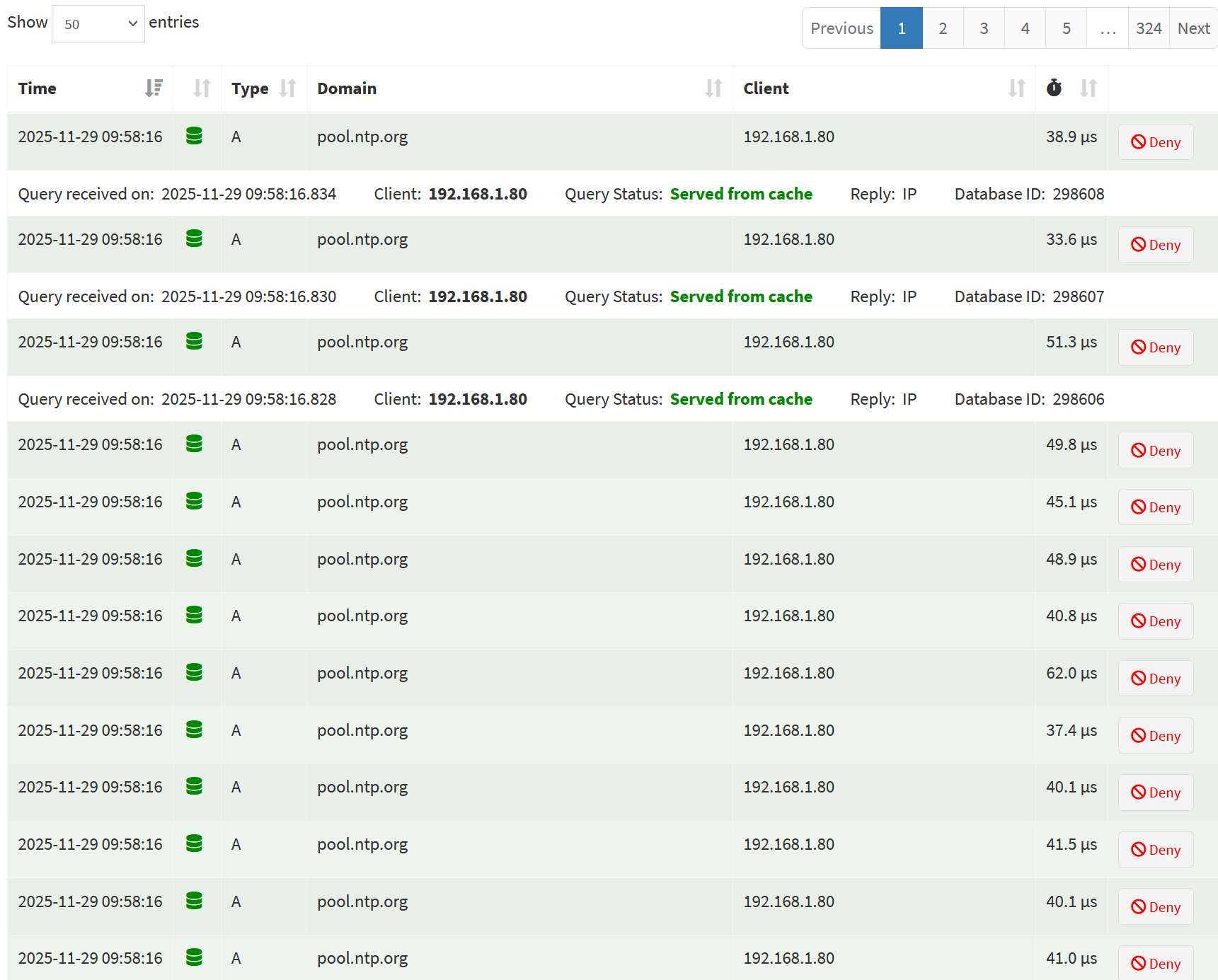
But in the first screenshot, they are all green meaning they arn't blocked.
And even if one or all four of the NTP server IP's cant be reached, those DNS records should still stay cached on the client for another sync attempt instead of querying DNS again.
13 queries in one second from the screenshot isnt normal and most certainly wont look good on the GUI pie charts etc.
EDIT: Oh and the queries database file will grow huge.
;; ANSWER SECTION:
pool.ntp.org. 0 IN A 37.59.63.125
pool.ntp.org. 0 IN A 129.250.35.251
pool.ntp.org. 0 IN A 129.250.35.250
pool.ntp.org. 0 IN A 82.67.41.119
$ pihole-FTL ntp 94.198.159.11
Using NTP server: 94.198.159.11
........
Received 8/8 valid NTP replies from 94.198.159.11
Time offset: -3.446136e+00 ms (excluded 1 outliers)
Round-trip delay: 2.132177e+01 ms (excluded 1 outliers)
Above it says the TTL is zero (0) seconds.
That would explain no caching of the DNS records on the device occurring.
If restart Pi-hole with below to clear its cache:
sudo systemctl restart pihole-FTL.service
And tail/follow the logs live with below:
sudo pihole tail
What log lines appear if query again with below in another shell session?
dig @localhost pool.ntp.org
Also output for below pls?
pihole query pool.ntp.org
EDIT: Also did you make any alterations to Pi-hole concerning TTL's?
Like some custom configuration of some sort?
Could you post output for below pls (might want to redact some)?