The issue I am facing:
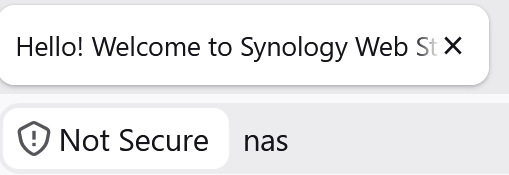
I would like to use local DNS records so that when I type "NAS" into my browser, it automatically refers to local IP address 192.168.88.199
Details about my system:
PiHole & Unbound as a docker (in my router)
What I have changed since installing Pi-hole:
Tried to:
add local DNS records into the "dns.hosts" setting -> didnt work
used also the " dns.expandHosts" -> didnt work
Please help me I have trying to find a solution for several hrs...
Hi I have Pihole & unbound running in a docker on my router.
I would like to use some local DNS records so when i type in NAS into by browser is refers to the correct lan IP address. (If I understood correctly I should use local DNS records for this.)
I have added both names and ip addresses in the pihole setting "dns.hosts" but somehow it is not working...
Can someone pls help me I have been on this for several hours..
I merged the two topics as they are basically the same.
With the browser, first make sure you can access the Pi-hole webGUI with below one:
http://pi.hole
And below one should produce an error bc flurry.com is on the default block list:
https://flurry.com
If not, your PC/client isnt using Pi-hole for DNS.DoT might be configured in the OS which bypasses Pi-hole.DoH to bypass Pi-hole.
Eg I have below DNS record:
$ sudo pihole-FTL --config dns.hosts
[ 10.0.0.3 nas.home.dehakkelaar.nl ]
When tested on the Pi-hole host (10.0.0.2 is my Pi-hole host):
$ dig +short @10.0.0.2 nas.home.dehakkelaar.nl
10.0.0.3
On a Windows client:
C:\>ipconfig

Windows IP Configuration


Ethernet adapter Ethernet:

   Connection-specific DNS Suffix  . : home.dehakkelaar.nl
[..]
C:\>nslookup nas
Server:  ph6a.home.dehakkelaar.nl
Address:  10.0.0.2

Name:    nas.home.dehakkelaar.nl
Address:  10.0.0.3
Or:
C:\>ssh dehakkelaar@nas
dehakkelaar@nas's password:
EDIT: Or from a Linux client:
$ cat /etc/resolv.conf
search home.dehakkelaar.nl
nameserver 10.0.0.2
$ nc -vzw5 nas 445
nas.home.dehakkelaar.nl [10.0.0.3] 445 (microsoft-ds) open
Hi Thanks for merging the two topics...
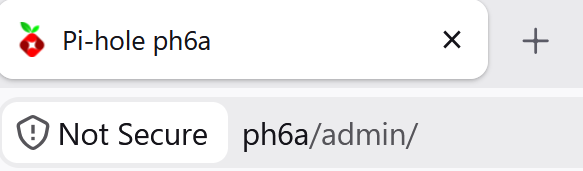
pi.hole works as expected
nslookup pi.hole
Name: pi.hole
flurry.com works as expected
nslookup flurry.com
Name: flurry.com
nas is not working as expected (as nas is mentioned in the local DNS record)
nslookup nas
** server can't find nas: NXDOMAIN
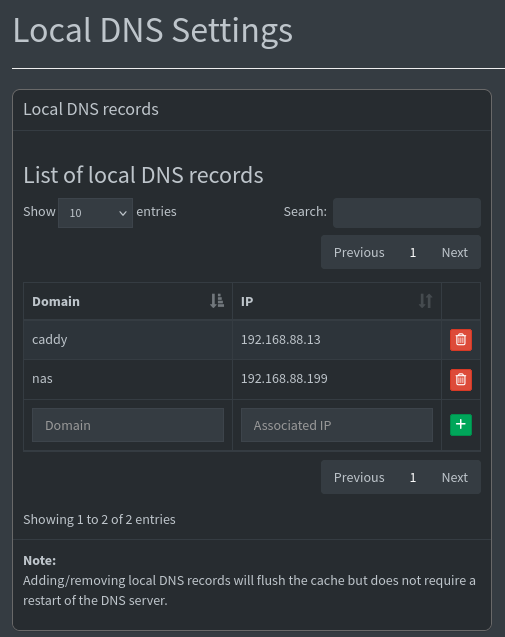
see screenshot below of DNS record
I have also added the output of the dig command. (192.168.88.1 & 192.168.34.2 are both ip addresses of my pihole)
dig @192.168.88.1192.168.88.1192.168.88.1192.168.88.1 nas
; <<>> DiG 9@192.168.88.1192.168.88.120.29 <<>> @192.168.88.1 nas
;; QUESTION SECTION:
;; Query time: 0 msec
Hope this helps & thanks for you help
First figure out the DNS search/suffix domain name thats advertised by the DHCP service/router.
Or look it up in the DHCP/router settings.
And append that suffix name to the DNS record so it becomes a FQDN:
I suspect the dns.expandHosts setting in Pi-hole can also be used to expand into a FQDN but I haven't tinkered with that one yet.
Please post the output of this command (executed from Pi-hole machine):
sudo pihole api config/dns
Its running in Docker on the router so that would be a bit difficult
EDIT: @Bloemetjesgordijn , if you have access to the router shell (SSH or Telnet) as the root user:
docker exec -it <PIHOLE_CONTAINER_NAME> pihole api config/dns
You have to keep in mind that the first query going out the door when addressing a short hostname is one with the DNS search/suffix domain name appended!
Eg:
C:\>nslookup nas
Server:  ph6a.home.dehakkelaar.nl
Address:  10.0.0.2

Name:    nas.home.dehakkelaar.nl
Address:  10.0.0.3
Tailing the Pi-hole logs (can be done in the webGUI too):
$ sudo pihole tail
[..]
20:29:32: query[A] nas.home.dehakkelaar.nl from 10.0.0.179
20:29:32: /etc/pihole/hosts/custom.list nas.home.dehakkelaar.nl is 10.0.0.3
20:29:32: query[AAAA] nas.home.dehakkelaar.nl from 10.0.0.179
20:29:32: config nas.home.dehakkelaar.nl is NODATA-IPv6
nero355
September 25, 2026, 9:14pm
9
I am not even sure if browsers allow that these days since they have removed stuff like SAMBA a.k.a. smb:// access for example ?!
Just typing in a short name is more mDNS behaviour IMHO and should be avoided.
Consider simply using nas.lan or nas.internal/nas.arpa or any of the other officially approved domains
Since you are Dutch or Belgian according to your username : nas.thuis.lan is what I use
$ curl -kIL https://nas
HTTP/2 200
EDIT: Short names wont work properly with TLS though bc it requires a FQDN
nero355
September 26, 2026, 12:09pm
11
LOL! Good to know!
Sorry for my late reaction. I was out for a few days.
output of pihole api config/dns
pihole api config/dns
Hope this helps
am Dutch
I used nas.lan and caddy.lan but both aren't working.
Is "lan " the domain configured in the router settings and also reported on a DHCP client like below?
Did you check the Pi-hole logs like I explained below?
deHakkelaar:
You have to keep in mind that the first query going out the door when addressing a short hostname is one with the DNS search/suffix domain name appended!
Eg:
C:\>nslookup nas
Server:  ph6a.home.dehakkelaar.nl
Address:  10.0.0.2

Name:    nas.home.dehakkelaar.nl
Address:  10.0.0.3
Tailing the Pi-hole logs (can be done in the webGUI too):
$ sudo pihole tail
[..]
20:29:32: query[A] nas.home.dehakkelaar.nl from 10.0.0.179
20:29:32: /etc/pihole/hosts/custom.list nas.home.dehakkelaar.nl is 10.0.0.3
20:29:32: query[AAAA] nas.home.dehakkelaar.nl from 10.0.0.179
20:29:32: config nas.home.dehakkelaar.nl is NODATA-IPv6


 Thanks for testing!