Please follow the below template, it will help us to help you!
Expected Behaviour:
I would like to use Pi-hole as my DHCP server so that I can see individual clients in the admin logs. Currently all queries are coming from the router IP. I am running Pi-hole on a Zero 2 W.
I followed this post's instructions for setting up DHCP in the Pi-hole settings. My understanding is that the IP range, router IP, and subnet should all match the settings that are currently set up in my router. When I turn on Pi-hole DHCP and turn it off in my router, I would expect that all of my devices start getting new IPs from Pi-hole, and that the raspberry pi IP continues to be the static one set in the dhcpcd.conf file.
Actual Behaviour:
When I turn off the DHCP server in my router, I lose all network connectivity and the raspberry pi loses its IP address despite having a static address set in /etc/dhcpcd.conf.
I had to turn the DHCP server back on in my router so that the Pi got it's IP back, and therefore I got connectivity back. With both DHCP servers on, I am starting to see leases in the DHCP settings in the admin dashboard, but my router IP is still the only active client.
static routers is set to the IP address of my router.
Maybe also of note, I have the static ip_address set to an IP just outside of the IP range configured in the DHCP settings so that the Pi does not get issued a different IP address. Wondering if that could be my issue as well.
This is a network/configuration issue rather than a Pi-hole one.
Your debug log shows your Pi-hole machine's OS to be of a Debian 12 variety - as it runs on a Zero 2, that's likely Raspberry Pi OS 64bit.
Since RPi OS 12/Bookworm, NetworkManager has replaced dhcpcd as network management tool.
Unless you disabled or uninstalled NetworkManager and manually installed dhcpcd5, there won't be any process reading dhcpcd.conf.
In that case, you probably should set a fixed IP via NetworkManager. NM offers several ways of setting a static IP.
Its CLI tool nmtui probably is the most accessible one.
Thanks! I set up the static IP with nmtui and rebooted the Pi. With my router DHCP server turned off, I seem to have connectivity.
Now though, I'm not seeing any queries getting logged in Pi-hole. Any thoughts on why they stopped? It seems like Pi-hole is still working though, as I'm not seeing ads in my browser. I also have dnsmasq warning: ignoring query from non-local network 192.168.1.1 (logged only once) in the Pi-hole diagnosis page.
Grab a device, disconnect it from network for a second or so, and check if it appears in the logs when reconnected.
If so, it should now have Pi-hole configured for DNS.
The clients would first need to renew their DHCP lease which can take a while before they adopt Pi-hole for DNS (usually 12 to 24 hours).
If you want them to renew their leases immediately, power cycle router, switches and Wifi AP's.
As soon as the devices detect networking is restored, they'll request a DHCP lease.
If above one only occurred once, I wouldn't worry to much.
I can do that and see the device connect. And other devices already have DHCP leases issued by Pi-hole. I think DHCP is working as intended.
I went back to my nmtui settings and changed the DNS IP there. I had it set to 1.1.1.1, but changed it to my router IP – this configuration matches what I was seeing recommended for dhcpcd.conf configs. I think that's what the dnsmasq warning was coming from.
I'm seeing queries in the query log again, but they all still say they're from the router's IP, even when they're actually coming from a device where Pi-hole has issued its IP address. Do I need to do anything specific to make the query log show device IPs instead of the router IP?
No.
If setup properly, you would see names for the clients instead of IP's
Did you change any settings in the router that could point to the Pi-hole IP?
If you run below instead to tail the logs:
sudo pihole tail
And on a Windows, MacOS or Linux system client, you run below one in a CMD/terminal window (post full command and output here pls?):
nslookup pi.hole
Do you see the queries appear in the logs?
Eg:
$ sudo pihole tail
[..]
Aug  2 23:34:05: query[A] pi.hole from 10.0.0.145
Aug  2 23:34:06: Pi-hole hostname pi.hole is 10.0.0.2
Aug  2 23:34:06: query[AAAA] pi.hole from 10.0.0.145
Aug  2 23:34:06: Pi-hole hostname pi.hole is fe80::XXXX
If so, that part is working and should be reflected on the webGUI.
If not, check if no other DNS server IP's besides the one for the Pi0 are advertised on your network with below one:
sudo pihole-FTL dhcp-discover
Dont post output for above one here for privacy!
IPv4: Look for dns-server
IPv6: Look for Recursive DNS server
If any of them is not that of the Pi0, this would allow the clients to bypass Pi-hole.
Nothing related to that shows up in the pihole log. Though there are other queries coming in.
When I had the router DHCP server enabled, I had the raspberry pi's IP in there as a static DNS address. When I turned the DHCP server off, that option went away. Not sure what that means regarding pointing to the Pi anymore or not.
When I run sudo pihole-FTL dhcp-discover there are bytes received from 2 places. One is an IPv6 address that does not belong to the Pi, the other is the Pi's IPv4 address. Sounds like this could be the issue?
Above DNS server IP comes from your router (most likely via IPv6 RA) and allows your clients to bypass Pi-hole.
They prefer IPv6 over IPv4 DNS.
Need to get rid of above one somehow.
Check router settings if you have DNS options for IPv6.
And if not, you could try disabling IPv6 support entirely on the router ... if it allows.
Preferably for the LAN side only!
You most likely can do without IPv6 like I do.
Okay, turning off IPv6 on the router seems to have done it. I now have the names that Pihole has assigned to DCHP leases in the query logs.
Doing nslookup pi.hole now shows the raspberry pi's IP address, and a log appears in the sudo pihole tail logs for that request.
sudo pihole-FTL dhcp-discover still returns 2 results, but this seems to be working now... I'll monitor it over the next couple days and see how it goes.
I really appreciate the help on this! One (hopefully) final question. Pihole is assigning super generic names to my devices, e.g. iPhone. Is there a way to customize these?
Edit the names on the devices themselves.
Most advertise a name or their own hostname via DHCP (the first tail).
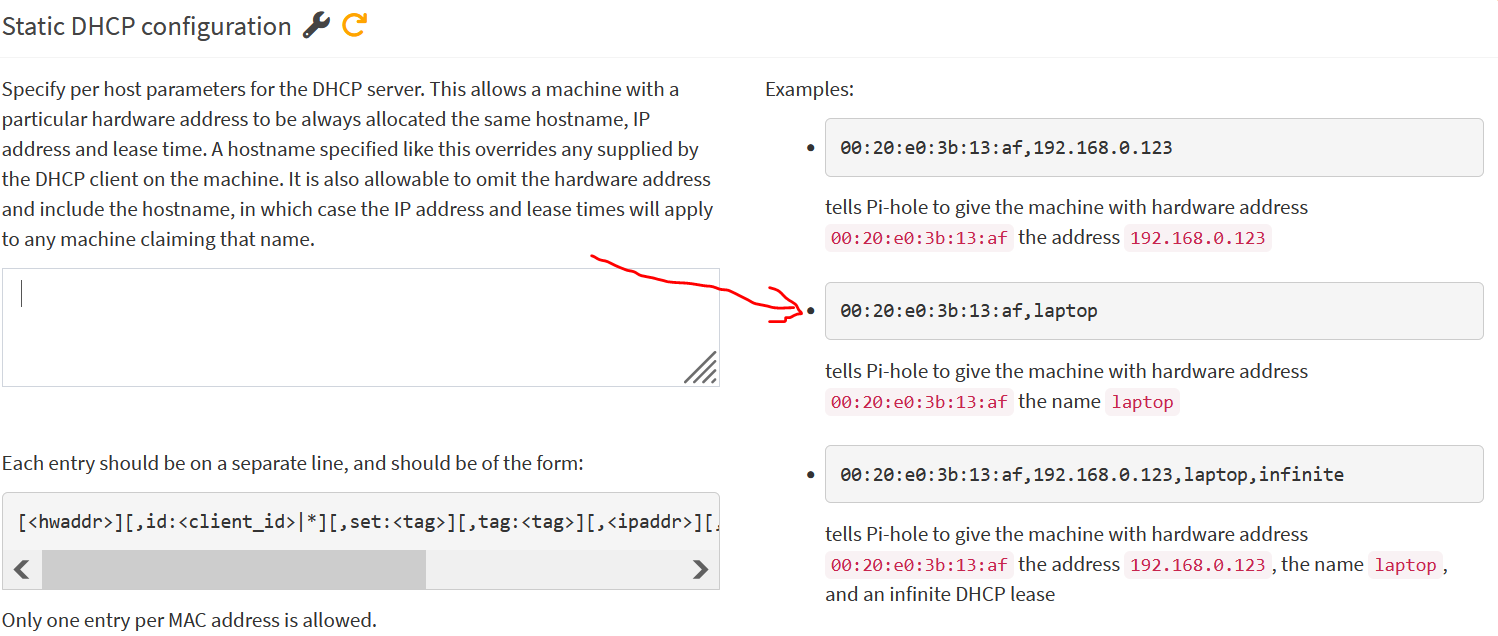
If nothing else, you could fiddle with below setting if the MAC of the device is not changing:
Incredible. Thank you so much, @deHakkelaar! I super appreciate all your help! You've really helped me clear up a lot of my questions about getting all of this set up.
And you as well, @Bucking_Horn! Without you I'd still be fighting with deprecated config files.
If working as intended, could you post a small summary here including make/model of the router and mark that one as a "solution" pls?
So others with a similar setup can find it.