grep nameserver /etc/resolv.conf
nameserver      192... #my pihole
nameserver      8.8.8.8
I need IPv6 enabled on my network for other reasons (smart home, matter devices).
My “normal” devices don’t really need IPv6 enabled.
In comments above I linked other threads which said Ipv6 though docker is not recommended. Thats why I thought I want to disable DNSv6 and give my pihole only an ipv4 address. Which does not for, for now.
Thats exactly the setup I aim for at the moment 
My initial post linked other threads with fritzbox settings which I set. But my client (desktop pc) somehow still bypasses my pihole which is set as my upstream DNS server in my fritzbox and also as my advertised DNSv4 server 
Try the link I posted above ^
If that doesn work, I have no clue where that windows machine is getting those IPv6 DNS addresses from.
EDIT: Aha I see, yeah my link is similar as the ones you posted in the OP.
Errh... Maxterious has done that already, as described in their initial post, and their debug logs have already confirmed that:
@Maxterious, did you have a chance to try that manual override on your PC I suggested yet?
And on a side note:
No.
They rather related to Docker (then) being IPv4 only by default, and they sought to clarify that it doesn't matter, as DNS is indifferent to the transfer protocol, i.e you can ask for IPv4 as well as IPv6 addresses of a domain and receive an answer, regardless whether the query was transported via IPv4 or IPv6.
It was also explained that "the real issue with IPv6 is usually something else, namely router configuration: Most routers propagate their own IPv6 address via NDP/RA/RDNSS as a local DNS server".
So far, debug logs from this topic did not contain any RDNSS RAs, i.e. Maxterious's router is configured correctly in that regard.
Had to switch to German 
Hey, I did not so far. But by taking a look at it, my pihole does not have an ULA (Ipv6) address I could assign to my network adapter.
I do have IPv6 enabled on my network, but I have not configured docker to use IPv6 aswell.
I do run the pihole container in the host network mode tho. But pihole does not show me an ipv6 address in the web ui:
Primary IP addresses
IPv4	192... @ ovs_eth0
IPv6	::1 @ lo
Run below on the NAS to list its addresses:
ifconfig
And select the one that starts with fd30: which is a ULA prefix.
It doesnt matter if it works or not.
Its the switching of the IPv6 DNS address to manual and back to automatic that should force the MS box to forget about the router IPv6 DNS address(es).
Ps. @Buck, FYI, Synology DSM7 doesnt have the ip command which is a bit sad.
EDIT: Oh another thing I noticed with the dhcp-discover is that no IPv4 DHCP reply is received which is a bit weird in host mode:
Okay thanks, I tried that out.
- I set the IPv6 of my ethernet adapter to the ULA of my Pihole/NAS.
- ipconfig /all instantly showed the new ULA as my DNS server.
- Restarted my PC.
- Set it back to automatically.
- Restarted again.
- ipconfig /all shows the ipv6 of my fritzbox again.
DNS-Server  . . . . . . . . . . . : fd30:...:3cdd #my fritzbox
                                    2a02:...:3cdd
                                    192... #my pihole
But, it “kind of” works again.
nslookup googleadservices.com
Server:  fritz.box
Address: fd30:....:3cdd #my fritzbox (pihole is also set as upstream dnsv4)

*** Keine internal type for both IPv4 and IPv6 Addresses (A+AAAA)-Einträge für googleadservices.com verfügbar.
(This request also shows in the pihole query log, as mentioned in a comment above)
But like @deHakkelaar already said:
Edit:
I also tried steps 1-7 again, but also set the ULA of my pihole/NAS as the ipv6 DNS-Server for my ethernet adapter. And then switched both back to automatic. The result stayed the same.
You are running your Pi-hole with Docker's host network driver, so it should share your host's IP addresses, even if the container itself is only aware of IPv4.
In case we don't find why your Win11 PC sticks with your router's IPv6 addresses, you could also consider to keep that manually configured ULA.
Could you please share a screenshot of your Fritzbox screens with your IPv6 configuration for DNSv6-Servers/DHCPv6-Servers?
Good to know! Seems weird to me, that the WebUI does not show the IPv6 
I figured something out. My NAS has a firewall, which was configured with IPv4 in mind. So I can’t reach it via IPv6:
nslookup googleadservices.com fd30:...:c94a #my pihole/NAS
DNS request timed out.
    timeout was 2 seconds.
Server:  UnKnown
Address:  fd30:...:c94a

DNS request timed out.
    timeout was 2 seconds.
DNS request timed out.
    timeout was 2 seconds.
DNS request timed out.
    timeout was 2 seconds.
DNS request timed out.
    timeout was 2 seconds.
*** Zeitüberschreitung bei Anforderung an UnKnown.
But IPv4 works:
nslookup googleadservices.com 192... #my pihole/NAS
Server:  pi.hole
Address:  192...

Name:    googleadservices.com
Addresses:  ::
          0.0.0.0
Maybe I should also mention, that it would be no problem to disable IPv6 on my NAS. But I don’t see how that would help my Desktop PC from stopping to use IPv6?
The options I currently see:
- Keep IPv6 enabled on my NAS, and adjust the firewall settings to allow local IPv6 traffic to port 53.
- I could now also set it as a custom DNSv6 sever in my fritzbox settings.
- Has the advantage, that I could manually configure it on my desktops ethernet adapter. (Maybe not needed after the step above)
- Disable IPv6 on my NAS.
- My PC would still use the IPv6 of my fritzbox..
- Disable IPv6 on my PC too? (Any disadvantages?)
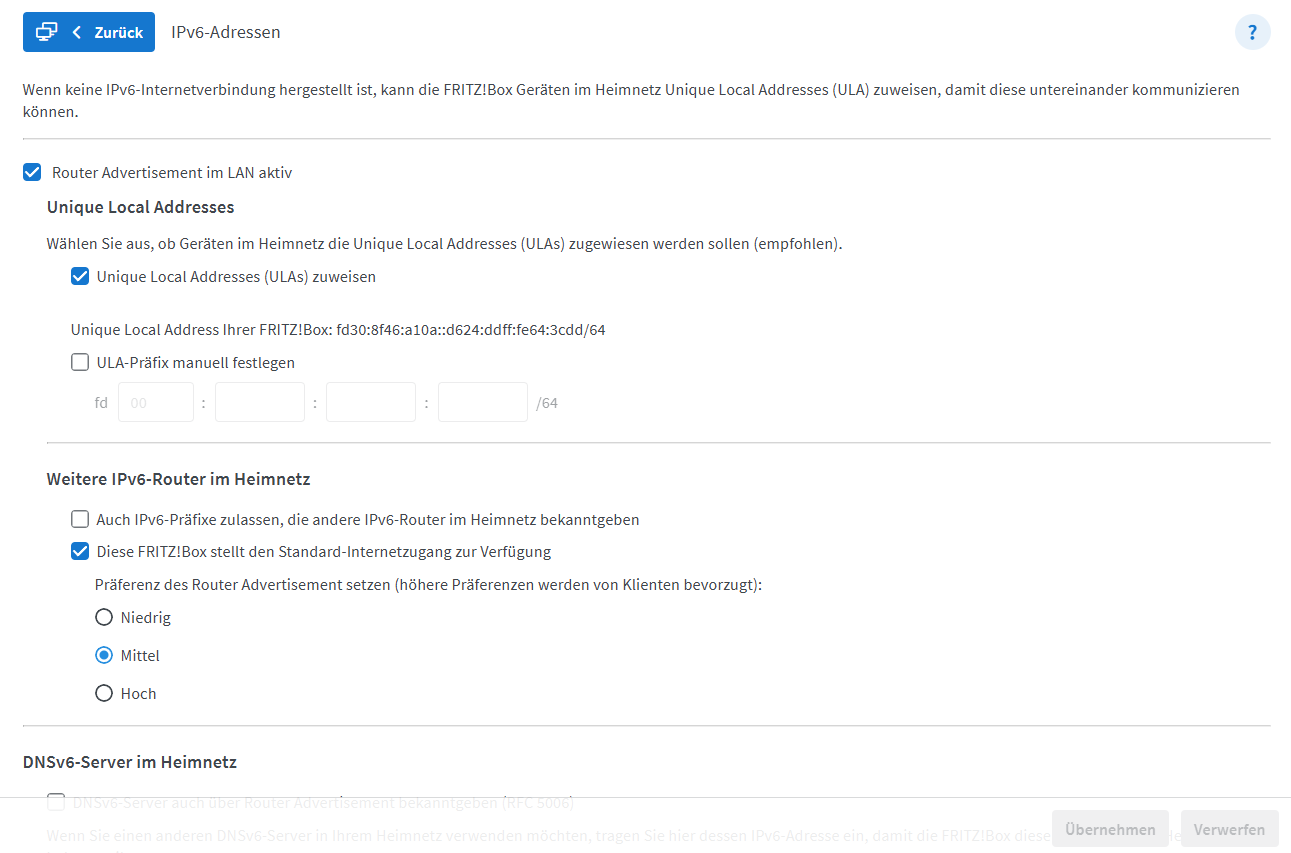

I might have found a working setup
I adjusted my firewall rule to accept local IPv6 traffic via TCP and UDP to port 53.
I re-enabled DNSv6-Server auch über Router Advertisement bekanntgeben (RFC 5006) and set the IPv6 of my pihole/NAS as the Local DNSv6-Server.
(This settings only, resulted in addiotionally showing the pihole IPv6 as DNS servers. My PC still defaulted to the fritzboxs IPv6.)
So I also set:
- DHCPv6-Server in der FRITZ!Box für das Heimnetz aktivieren:
- Nur DNS-Server zuweisen
(After ipconfig /release… /renew … /flushdns… /all, I only got the piholes/NAS IPv6 and Ipv4 shown as DNS servers  .
.
DNS-Server  . . . . . . . . . . . : fd30:...:c94a #pihole/NAS ip
                                    192.... #pihole/NAS ip
                                    fd30:...:c94a
(For what ever reason the IPv6 is shown twice.)
This (obviously?) also resulted in fritz.box not working anymore (I guess that was preconfigured inside the fritzbox own dns.) But kind of was a hint, that fritzbox own dns is not used anymore.
nslookup now returns the desired result:
nslookup googleadservices.com
Server:  pi.hole
Address:  fd30:...:c94a

Name:    googleadservices.com
Addresses:  ::
          0.0.0.0
I also set the upstream DNSv4 and DNSv6 servers of the fritzbox to the piholes IPv4 and IPv6 address. But I guess this was not necessary to get this working. (Might be a nice redirect for clients asking the fritzbox directly?).
Edit:
The only disadvantage I found of this setup (maybe better placed in another thread?), is that my pihole querylog now shows IPv6 addresses for clients using IPv6, and no friendly names like my-pc.fritz.box anymore.
What we can deduct from your output showing two IPv6 addresses (your Fritzbox's ULA and GUA) is that your Windows PC has learned them from your Fritzbox when you didn't configure a custom Local DNSv6 server.
As soon as you do that, your Fritzbox would only advertise that custom address.
Your screenshots show that you've correctly disabled your router's DHCPv6 server as well as its RAs.
This would preclude that your Windows PC could have received an answer for its DHCPv6 requests for DNS information - unless your Fritzbox unexpectedly and wrongly would have answered those.
To confirm or reject this, you could consider to install Wireshark on your Windows PC and capture ipv6 traffic of its network adapter to analyse it when filtering for dhcpv6.
I can confirm that at least my own router (running FritzOS 8.00) would not answer DHPCv6 requests if configured as in your screenshots above.
This would support my suspicion of Windows incorrectly sticking to IPv6 DNS server addresses as learned previously.
Obviously, turning manual IPv6 DNS configuration on your Windows PC on and off didn't make Windows forget the previously learned IPv6 addresses.
I'm glad that you've found a somewhat working configuration, even if it's not ideal:
And that's the exact reason why I prefer to not propagate any IPv6 DNS server addresses at all, which is what your Fritzbox configuration from your initial post did.
But obviously, your Windows PC doesn't comply with the information as offered -or rather: not offered- by your Fritzbox, potentially holding on to older previous information.
For another attempt:
Try to configure your Pi-hole machine's ULA as Local DNSv6 server in your Fritzbox and enable RDNSS RAs via Also announce DNSv6 server via router advertisement (RFC 5006) as well as DHCPv6.
Would your Windows machine pick up that ULA address?
What happens if you then disable RDNSS RAs and DHCPv6 again?
I'd hope for Windows to overwrite its old IPv6 DNS servers with the new one, so at least it would no longer use your Fritzbox router for DNS.
Yes, that’s my current setup which kind of works.
ipconfig /all
DNS-Server  . . . . . . . . . . . : fd30:...:c94a #pihole/NAS ip
                                    192... #pihole/NAS ip
                                    fd30:...:c94a
- I disabled it again
- ipconfig /release… /renew… /flushdns /all
Weirdly still shows the IPv6 which was previously configured. But only once, not twice anymore(like above).
DNS-Server  . . . . . . . . . . . : fd30:...:c94a #pihole/NAS ip
                                    192.....10 #pihole/NAS ip
Ethernet adapter settings were on automatic the whole time:
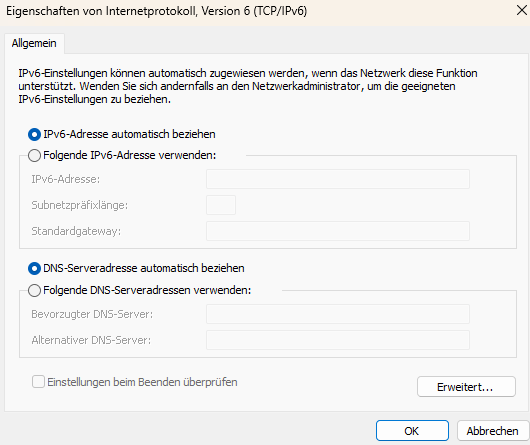
So that is the problem? Somehow one DNSv6 server keeps showing up.
Yeah, that would be my preferred setup 
Edit:
And it also keeps using DNSv6:
nslookup google.com
Server:  pi.hole
Address:  fd30:...:c94a #pihole/NAS IP
Likely, it's this:
Your configuration changes demonstrate that once your router stops propagating an IPv6 DNS server address, your Windows PC falls back to use the IPv6 DNS servers it has last learned from your router.
There is a chance that it would have learned IPv6 details via Stateless DHCPv6 rather than router advertisements (Windows has long used DHCPv6 only, with SLAAC/NDP/RA IPv6 starting to be supported with Win10 and late releases of Win8).
If your Windows would have done so, it may hold on to its DHCPv6 DNS information for as long as your router's leasetime would indicate.
Its not clear from Fritzbox UI what that leasetime would be for DHCPv6, but it would use a rather long default of 10 days for DHCP.
So if the same leasetime would be used for DHCPv6, and if your Windows PC would learn its IPv6 DNS addresses via DHCPv6, then perhaps it would forget those IPv6 DNS servers after 10 days.
As explained earlier, to confirm or reject that theory, you'd have to analyse and capture DHCP traffic on your Windows PC, e.g. via Wireshark.
If you'd see DHCPv6 DNS information requested and supplied, that would support my theory, making this more of an unexpected behaviour than a bug.
If there is no DHCPv6 exchange, then it's a bug in Windows.
It could also be a bug in FritzOS, if your FritzOS would reply to Stateless DHCPv6 requests even when its DHCPv6 server is disabled (but at least my own Fritzbox does not do that).