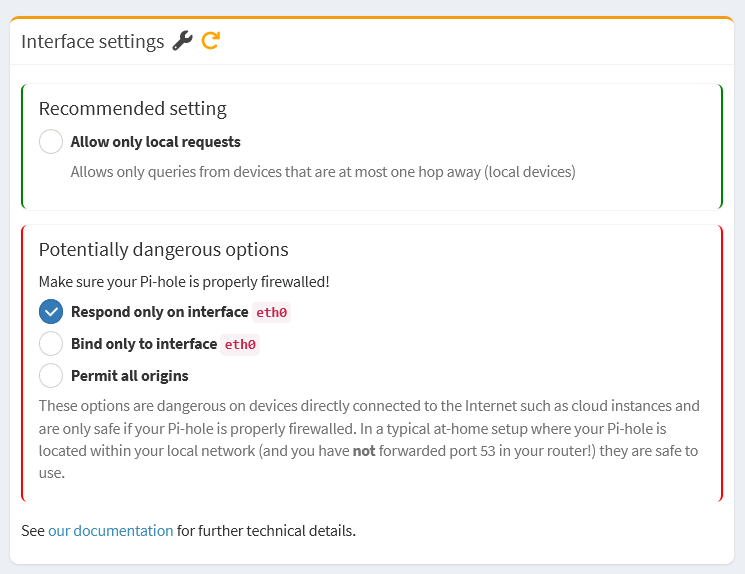
Hi all, I am having issues with DNS queries timing out while running pihole in a docker container using the official docker-compose file. DNS queries simply time out but am able to access the web UI without any issues.
System details:
Here is my docker-compose.yml. The only thing that should be different to the official one is the timezone and password.
# More info at https://github.com/pi-hole/docker-pi-hole/ and https://docs.pi-hole.net/
services:
  pihole:
    container_name: pihole
    image: pihole/pihole:latest
    ports:
      # DNS Ports
      - "53:53/tcp"
      - "53:53/udp"
      # Default HTTP Port
      - "80:80/tcp"
      # Default HTTPs Port. FTL will generate a self-signed certificate
      - "443:443/tcp"
      # Uncomment the below if using Pi-hole as your DHCP Server
      #- "67:67/udp"
    environment:
      # Set the appropriate timezone for your location (https://en.wikipedia.org/wiki/List_of_tz_database_time_zones), e.g:
      TZ: 'Australia/Sydney'
      # Set a password to access the web interface. Not setting one will result in a random password being assigned
      FTLCONF_webserver_api_password: 'secretpassword'
    # Volumes store your data between container upgrades
    volumes:
      # For persisting Pi-hole's databases and common configuration file
      - './etc-pihole:/etc/pihole'
      # Uncomment the below if you have custom dnsmasq config files that you want to persist. Not needed for most starting fresh with Pi-hole v6. If you're upgrading from v5 you and have used this directory before, you should keep it enabled for the first v6 container start to allow for a complete migration. It can be removed afterwards
      #- './etc-dnsmasq.d:/etc/dnsmasq.d'
    cap_add:
      # See https://github.com/pi-hole/docker-pi-hole#note-on-capabilities
      # Required if you are using Pi-hole as your DHCP server, else not needed
      - NET_ADMIN
    restart: unless-stopped
My OS is Debian 13 running as a server with no UI. I have not configured any firewall on this machine.
The issue:
When I attempt a DNS query from another machine I simply get a timeout.
user@clientmachine:~$ dig @192.168.68.64 google.com
;; communications error to 192.168.68.64#53: timed out
;; communications error to 192.168.68.64#53: timed out
However I am able to successfully access the web UI from the same machine.
When I try doing a query from the server I observe the following:
user@server:~$ dig @127.0.0.1 google.com

; <<>> DiG 9.20.11-4-Debian <<>> @127.0.0.1 google.com
; (1 server found)
;; global options: +cmd
;; Got answer:
;; ->>HEADER<<- opcode: QUERY, status: NOERROR, id: 16141
;; flags: qr rd ra; QUERY: 1, ANSWER: 1, AUTHORITY: 0, ADDITIONAL: 1

;; OPT PSEUDOSECTION:
; EDNS: version: 0, flags:; udp: 1232
; EDE: 3 (Stale Answer)
;; QUESTION SECTION:
;google.com.                    IN      A

;; ANSWER SECTION:
google.com.             0       IN      A       142.250.67.14

;; Query time: 0 msec
;; SERVER: 127.0.0.1#53(127.0.0.1) (UDP)
;; WHEN: Mon Oct 13 11:58:47 AEDT 2025
;; MSG SIZE  rcvd: 61
user@server:~$ dig @192.168.68.64 google.com
;; communications error to 192.168.68.64#53: timed out
So pihole is running properly but not reachable using the servers LAN IP.
Output from netstat shows that docker is listening on port 53
netstat -tulpn | grep :53
tcp        0      0 0.0.0.0:53              0.0.0.0:*               LISTEN      1734/docker-proxy
tcp6       0      0 :::53                   :::*                    LISTEN      1741/docker-proxy
udp        0      0 0.0.0.0:53              0.0.0.0:*                           1750/docker-proxy
udp6       0      0 :::53                   :::*                                1758/docker-proxy
Using nmap from a client machine I can also see port 53 is open.
nmap -p 53 192.168.68.64
Starting Nmap 7.95 ( https://nmap.org ) at 2025-10-13 12:02 AEDT
Nmap scan report for p520 (192.168.68.64)
Host is up (0.00038s latency).

PORT   STATE SERVICE
53/tcp open  domain

Nmap done: 1 IP address (1 host up) scanned in 0.03 seconds
Finally here is the output from tcpdump on the server when I try to run a dns query.
tcpdump -i any port 53 -n
tcpdump: WARNING: any: That device doesn't support promiscuous mode
(Promiscuous mode not supported on the "any" device)
tcpdump: verbose output suppressed, use -v[v]... for full protocol decode
listening on any, link-type LINUX_SLL2 (Linux cooked v2), snapshot length 262144 bytes
12:03:39.114318 eno1  In  IP 192.168.68.66.57237 > 192.168.68.64.53: 61967+ [1au] A? google.com. (51)
12:03:39.114369 br-a99ad959cae2 Out IP 192.168.68.66.57237 > 172.18.0.2.53: 61967+ [1au] A? google.com. (51)
12:03:39.114376 vetheaaf28e Out IP 192.168.68.66.57237 > 172.18.0.2.53: 61967+ [1au] A? google.com. (51)
12:03:44.119931 eno1  In  IP 192.168.68.66.49794 > 192.168.68.64.53: 61967+ [1au] A? google.com. (51)
12:03:44.119977 br-a99ad959cae2 Out IP 192.168.68.66.49794 > 172.18.0.2.53: 61967+ [1au] A? google.com. (51)
12:03:44.119984 vetheaaf28e Out IP 192.168.68.66.49794 > 172.18.0.2.53: 61967+ [1au] A? google.com. (51)
12:03:49.124509 eno1  In  IP 192.168.68.66.52323 > 192.168.68.64.53: 61967+ [1au] A? google.com. (51)
12:03:49.124557 br-a99ad959cae2 Out IP 192.168.68.66.52323 > 172.18.0.2.53: 61967+ [1au] A? google.com. (51)
12:03:49.124564 vetheaaf28e Out IP 192.168.68.66.52323 > 172.18.0.2.53: 61967+ [1au] A? google.com. (51)
So to my inexperienced eye it looks like everything should be working yet somehow there is no response from pihole within the container when an external request is made. But connection to port 80 seem to not have this issue as the web UI is accessible.
The only unusual thing I can think of on this machine is that I have 2 network interaces. An ethernet (default) interface and wifi. This doesn’t seem to have caused an issue with anything else though as SSH and the pihole web UI work perfectly so I doubt it is causing the problem but maybe worth mentioning.
I have uploaded my debug log: https://tricorder.pi-hole.net/A0RrRqdD/
Thanks in advance for any help!