I believe I’m experiencing the same issue.
I’m running Pi-hole as a Docker container on Unraid.
Pi-hole worked reliably for several months, but recently it intermittently stops resolving DNS. When this happens, the entire network loses internet access. DNS queries fail, while direct IP connectivity (e.g. pinging external IP addresses) continues to work without any issues. Local network traffic is unaffected, and the Pi-hole web interface remains accessible during the outage. Other Docker containers and Unraid services continue to function normally.
No changes were made around the time the issue started occurring — neither hardware changes nor configuration changes on Unraid or Pi-hole.
Restarting the Pi-hole Docker container does not resolve the issue, nor does rebooting the entire Unraid system. The only workaround that temporarily restores functionality is a complete reinstallation of the Pi-hole Docker container, which resolves the problem for approximately 24 hours before it reoccurs.
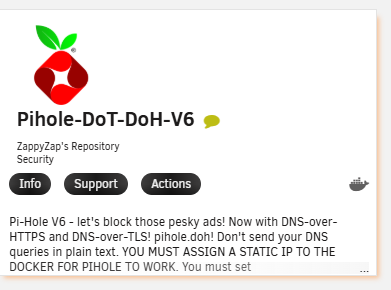
As upstream DNS resolvers, I am using Cloudflare. I am running the Pi-hole-DoT-DoH-V6 container, in case this is relevant.
I switched from the Pi-hole DoT-DoH-V6 image to the Pi-hole DoT-DoH image from the same developer. So far it’s been running well for about 24 hours. Let’s see how it looks tomorrow.
To analyse your issue, you could run some nslookups to specific DNS server IPs from within your Pi-hole container.
To determine your DoH server, you could use:
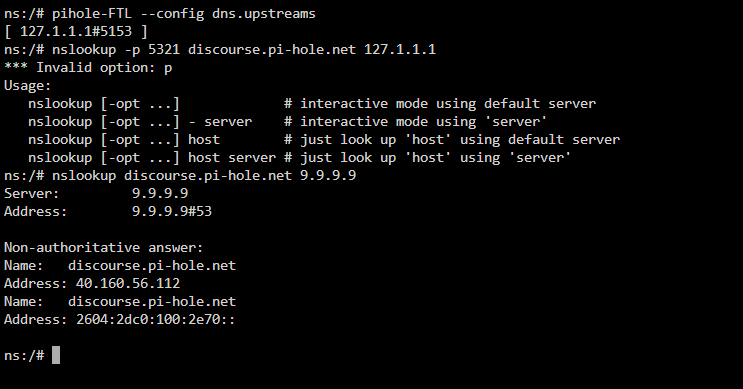
pihole-FTL --config dns.upstreams
I'd expect this to return something like [ 1.2.3.4#5321 ], which should match your DoH server IP and port.
Then run an nslookup to that DoH server:
nslookup -port=5321 discourse.pi-hole.net 1.2.3.4
where you substitute 5321 and 1.2.3.4 as appropriate, of course.
If that doesn't come back with a reply, run another nslookup to a public DNS server, e.g.
nslookup discourse.pi-hole.net 9.9.9.9
If that also fails, you may have a general connectivity issue to public IPs.
If it doesn't, that would suggest that your issue is specific to your DoH server.
the nslookup binary returns an error indicating that the -p option is not supported / recognized.
Additionally, the container has been running stable for the past 48 hours without any crashes or restarts. However, currently only three PCs are using Pi-hole for DNS filtering. The Pi-hole IP address is not yet configured as the DNS server in the DHCP settings of the Fritz!Box, so the deployment is not fully integrated into the network at this time.
Pi-hole DNS timeouts after 3 days – wrong interface binding (resolved after reinstall)
I was experiencing intermittent DNS timeouts when querying my Pi-hole at 192.168.178.2.
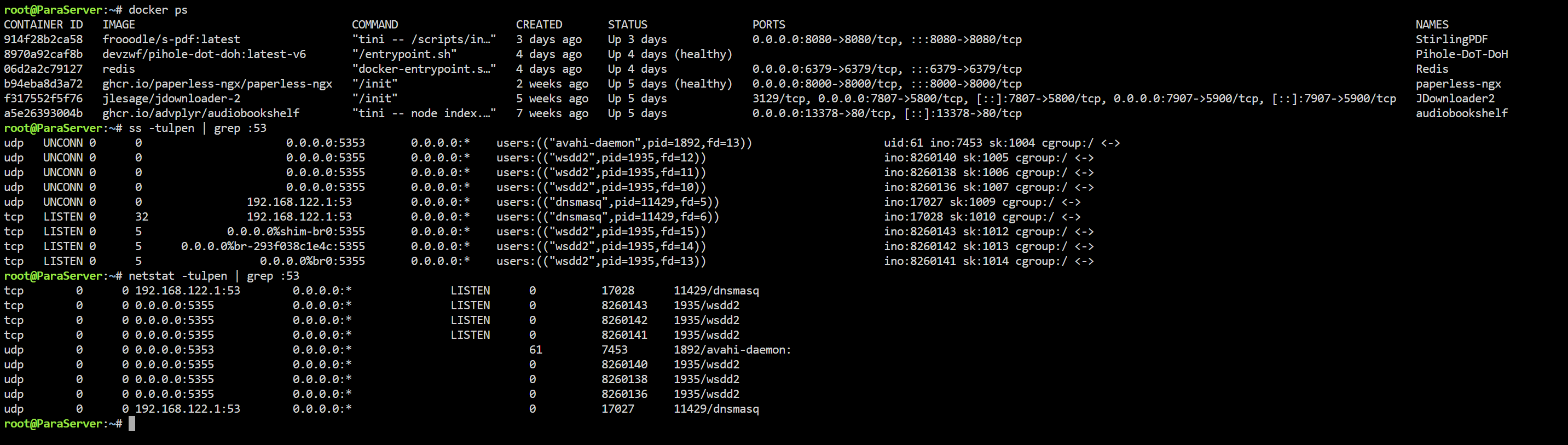
At one point, ss -tulpen | grep :53 showed that pihole-FTL (dnsmasq) was not listening on the LAN IP. Instead, it was bound to a different internal interface (192.168.122.1), which is not part of my LAN (192.168.178.0/24).
External queries to 192.168.178.2 are now working again, and blocking behaves as expected.
If anyone has insight into why FTL previously bound itself to the wrong interface (192.168.122.1 instead of 192.168.178.2), I would appreciate the explanation to prevent this in the future.
Stop using Docker Containers made by others and build them yourself like Docker was meant to be used by design
One of the reasons I don’t use Docker is because I don’t feel like doing that myself each time there is an update of my favorite software…
Another reason is that I don’t want to be part of this whole “New version of the old KaZaA Lite P2P Network” as I call it :
People just share and download images from eachother and 98% of them don’t even know what’s inside the Container that they just downloaded !! LOL!
Pihole's process would identify as pihole-FTL, so your screenshot shows that it was indeed dnsmasq binding that port, i.e. there really was a dnsmasq instance running on your machine. And when that is up, it may prevent other processes from binding port 53 (including pihole-FTL).
Since you are running your Pi-hole as a Docker container, I'd anyway expect docker to show up rather than pihole-FTL, unless you'd be running your container in host mode.