Hi , I looked through the documentation of the new REST api and did not see an endpoint to modify custom dns via the new REST api. is this supported but undocumented? Thank you.
It's the /config endpoint. And there dns.hosts
Thank you for confirming!
This works! I am running into issues using and could use your guidance.
I’m working on a PowerShell script to update custom DNS entries in Pi-hole v6 using the new REST API. I successfully authenticate with /api/auth and receive a valid sid and csrf token.
When I GET from /api/config/dns.hosts, I receive an empty array ([]) as expected.
However, when I try to PUT a new entry like this:
[
  {
    "name": "testguest.local",
    "address": "192.168.12.14",
    "comment": ""
  }
]
…to http://<my-pihole-ip>/api/config/dns.hosts using both the CSRF token in the X-CSRF-Token header and as a CSRF cookie, I get a 400 Bad Request.
Can you confirm that:
- The endpoint
/api/config/dns.hostsaccepts aPUTwith this exact payload structure?
- Is any additional header, content-type, or cookie required beyond what’s described in the v6 documentation?
Would really appreciate a working cURL example or JSON schema if available.
Thanks again for all the hard work — this API is awesome!
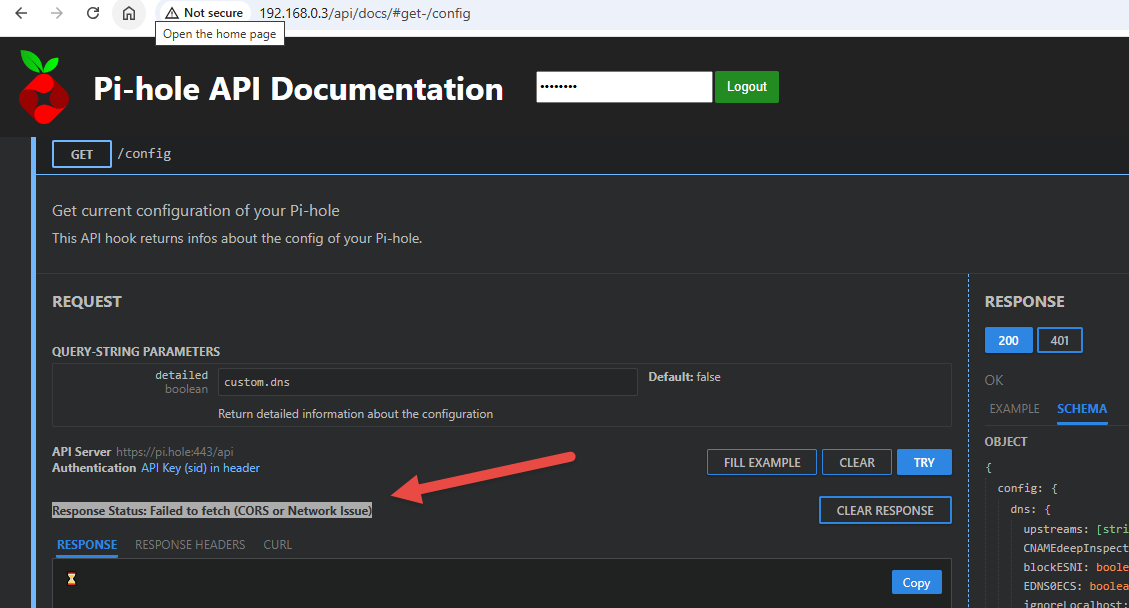
also, one of the reasons I'm having a tougher time figuring this out, is because I'm getting a strange CORS issue when attempting to play with the examples from the api docs
There is no "comment". Only the IP and domain.
The correct endpoint is /api/config/dns/hosts (no dots).
The /api/docs shows the format for PUT requests is: 
There is no payload using "PUT".
You just need to send a request using method "PUT", adding the IP and domain to the endpoint, separating them with a space (URL encoded), like this:
/api/config/dns/hosts/192.168.12.14%20testguest.local.
You can use the web interface code as a reference:
1 Like
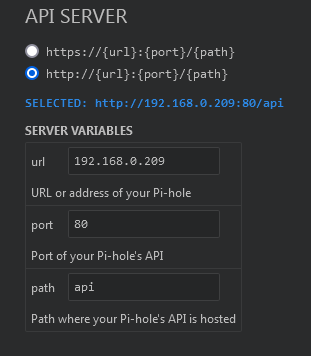
You are using the IP 192.168.0.3 to access the API documentation.
Did you change the API SERVER values to match your URL?
You are amazing thank you!!
for everyone else looking to do something similar , below is the powershell code that worked for me :
# Add-PiHole-DNS_SingleEntry.ps1

# Configuration
$PiHoleIP = "192.168.0.3"               # Replace with your Pi-hole IP
$PiHolePassword = "YOUR_PIHOLE_WEB_PASSWORD"  # Replace this -  Replace with your Pi-hole password
$IPAddress = "192.168.12.14"           # IP to add
$Hostname = "testguest.local"          # Hostname to add

# Construct the PUT URL with encoded entry
$EncodedEntry = [uri]::EscapeDataString("$IPAddress $Hostname")
$PutUri = "http://$PiHoleIP/api/config/dns/hosts/$EncodedEntry"

# Prepare authentication body
$AuthBody = @{ password = $PiHolePassword } | ConvertTo-Json -Compress

# Authenticate and get session info
try {
    $AuthResponse = Invoke-RestMethod -Uri "http://$PiHoleIP/api/auth" `
                                      -Method Post `
                                      -Headers @{ "Content-Type" = "application/json" } `
                                      -Body $AuthBody

    $SID = $AuthResponse.session.sid
    $CSRF = $AuthResponse.session.csrf

    if (-not $SID -or -not $CSRF) {
        Write-Error "Failed to retrieve SID or CSRF token."
        return
    }

    Write-Host "Auth successful. SID: $SID"
    Write-Host "CSRF Token: $CSRF"
}
catch {
    Write-Error "Authentication failed: $_"
    return
}

# Prepare headers
$Headers = @{
    "Content-Type" = "application/json"
    "X-CSRF-Token" = $CSRF
}
$Session = New-Object Microsoft.PowerShell.Commands.WebRequestSession
$Session.Cookies.Add((New-Object System.Net.Cookie("SID", $SID, "/", $PiHoleIP)))

# Debug info
Write-Host "`n--- PUT Request ---"
Write-Host "URL: $PutUri"
Write-Host "Headers:"
$Headers.GetEnumerator() | ForEach-Object { Write-Host "$($_.Key): $($_.Value)" }
Write-Host "Cookie: SID=$SID"
Write-Host "--- End ---`n"

# Attempt to PUT the DNS record
try {
    $PutResponse = Invoke-WebRequest -Uri $PutUri `
                                     -Method Put `
                                     -Headers $Headers `
                                     -WebSession $Session

    Write-Host "DNS entry added: $Hostname -> $IPAddress"
}
catch {
    $statusCode = $_.Exception.Response.StatusCode.value__
    $message = $_.Exception.Message
    Write-Error ("Failed to update DNS entry: {0}: {1}" -f $statusCode, $message)
}
This topic was automatically closed 21 days after the last reply. New replies are no longer allowed.