Conditional Forwarding Setup

So i am trying to configure conditional forwarding since my router does the DHCP (and I would prefer to keep it that way).

I have enabled the setting in DNS and added the following line…

true,192.168.0.0/24,192.168.0.1

0.1 is my router running DHCP and it only gives out the pihole address as DNS (I’ve put the pihole address in twice as primary and secondary because if i leave it blank then it does give its own IP as the secondary.

But no matter what I try, I cant get pihole to show hostnames instead of IP’s for the clients. Any ideas please?

Debug Token:

https://tricorder.pi-hole.net/6uLnL7mf/

Your debug log shows Pi-hole is correctly forwarding the queries to your router, but apparently the router is not replying with the expected names:

Dec 31 13:57:41 dnsmasq[2491]: forwarded 197.0.168.192.in-addr.arpa to 192.168.0.1
Dec 31 13:57:41 dnsmasq[2491]: reply 197.0.168.192.in-addr.arpa is NXDOMAIN

Ok thanks so does that mean the issue is the router just doesn’t support it?

The router I have is a TPLink Archer BE550.

I can't say if the router is the issue because I don't have a similar router to test.

What I can say is: Pi-hole correctly sent the query to the router, but the answer was NXDOMAIN (non existent domain).

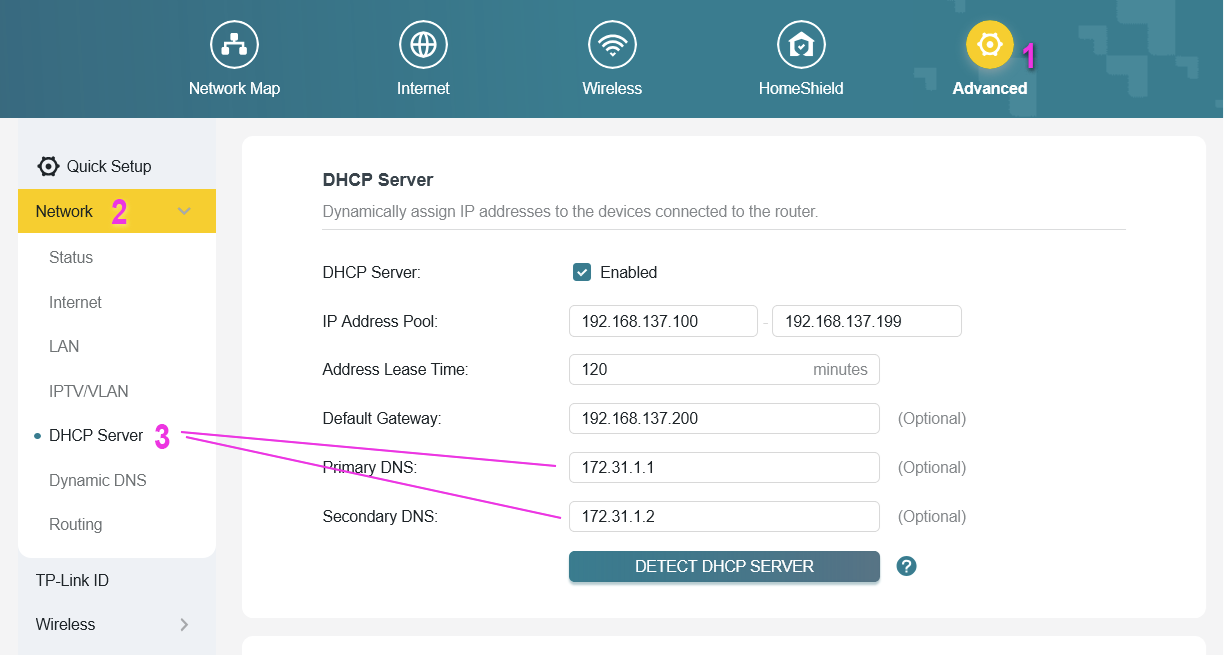
Reading your description apparently you configured the router correctly, but to make sure this is the correct page where you should add Pi-hole IP:

(I don't have an actual TP-Link router, but I used the TP-Link emulator. Your page may look different).

Yes this is exactly where I configured the router.

I’ve also done some googling and apparently my router doesn’t support conditional forwarding so maybe I’m stuck without it.

You can still use Settings > Local DNS Records to manually add hostnames for your devices.

Alternatively, you can disable your router's DHCP server and use Pi-hole as DHCP server.

Yeah don’t like the idea of manually adding entries. Will probably have to look at using the pi as dhcp.

Any downsides? I assumed the router would be a more reliable dhcp plus I’m not relying on 2 devices in my network as the pi being down would kill my network with no dhcp

You are correct, but the same is valid when you use the Pi as your DNS server.

If you kill the Pi, you will also kill the network without a DNS server.

Thanks for your help. I have enabled DHCP on the Pi now and will see how it goes.

Side note, how do i view my debugs? I ran in to another issue where the pi was possibly hanging as it wasn’t giving out IPs so i did a reboot and that resolved. But I have ran another debug with pihole -d command and have gotten a URL but how do I view this to translate any errors or issues?
https://tricorder.pi-hole.net/QpvuJEtC/

Every time you run pihole -d the debug log is saved in /var/log/pihole/pihole_debug.log.

Use less -R /var/log/pihole/pihole_debug.log to view the most recent log.

When you upload the log, the log is sent to Pi-hole server and, for security reasons, only team members can access the link.

Thankyou.

Another question, is it possible to manage the pi when not at home like managing the tplink with the tether app?

The recommended way to access Pi-hole when you are not not at home is using a VPN.

Check out below two flavors:

This topic was automatically closed 21 days after the last reply. New replies are no longer allowed.