I apologize for another tired access post. It's usually at this point that I just wipe the SD card and go again, trying to actually fix the problem this time. Most similar posts talk about the Lighttpd service, but this is a newer install that is apparently not using that service anymore.
I can't access the web interface, or SSH. I don't know how long it's been a problem. This is standard Raspberry Pi 4 running DietPi and Pi-Hole; both have all the updates. I have access to the OS via keyboard/mouse/hdmi. I have a static IP set up with my Spectrum router. The Pi-Hole was additionally configured as the DNS server in there, but I have no idea if it's doing anything anymore (secondary DNS is 1.1.1.1). Service says it's running in DietPi.
I can ping the IP, but cannot SSH. Console says connection refused.
Accessing the web interface results in a 'Unreachable' error.
Ugh, for some reason the web UI doesn't work in Chrome. Even in Incognito. Yes, the links are working.
As for the router, inside the router settings I am pointing it back to that to the Pi-Hole IP. Maybe I should change the Pi-Hole to use itself, but other devices are pointing to the gateway (like that) and then resolve with the Pi-Hole address.
You should configure it in DietPi at OS level and only use the Static DHCP Mapping based on the MAC Address as the backup in case anything weird happens !!
However it seems that the Router you mentioned (Spectrum Router) isn't exactly the most ideal companion for Pi-Hole setups if I remember correctly so maybe we should just trust the OS in these cases
There is no such thing as Primary/Secondary DNS Server so you can't use it as a backup that way if that's what you were talking about
Watch out for DNS Loops !!
Make sure that the Router is not the Forward DNS Server for your Pi-Hole
This is only needed if you want to use Pi-hole as DHCP server.
The issue here is happening only on Chrome. This is not related to the static IP.
The user is not using Pi-hole as DHCP server (confirmed by the debug log), so configuring a static lease on the router is perfectly acceptable.
I always use both and consider the configuration on OS level the Primary one
And especially when dealing with Routers provided by your ISP it's a good idea to do this to avoid losing your configuration just because the ISP did their firmware updates run while you were sleeping...
I now have a capable Netgear Modem and Router I need to set up. What would you propose I do differently this time assuming all the bells and whistles are present on the router?
You use both and this is fine. It's your personal preference and there is nothing wrong about that.
My answer above is a reminder that your suggestion to configure the static IP on the OS is not a fix for the issue discussed on this topic, since the user confirmed that the links using the IP are working.
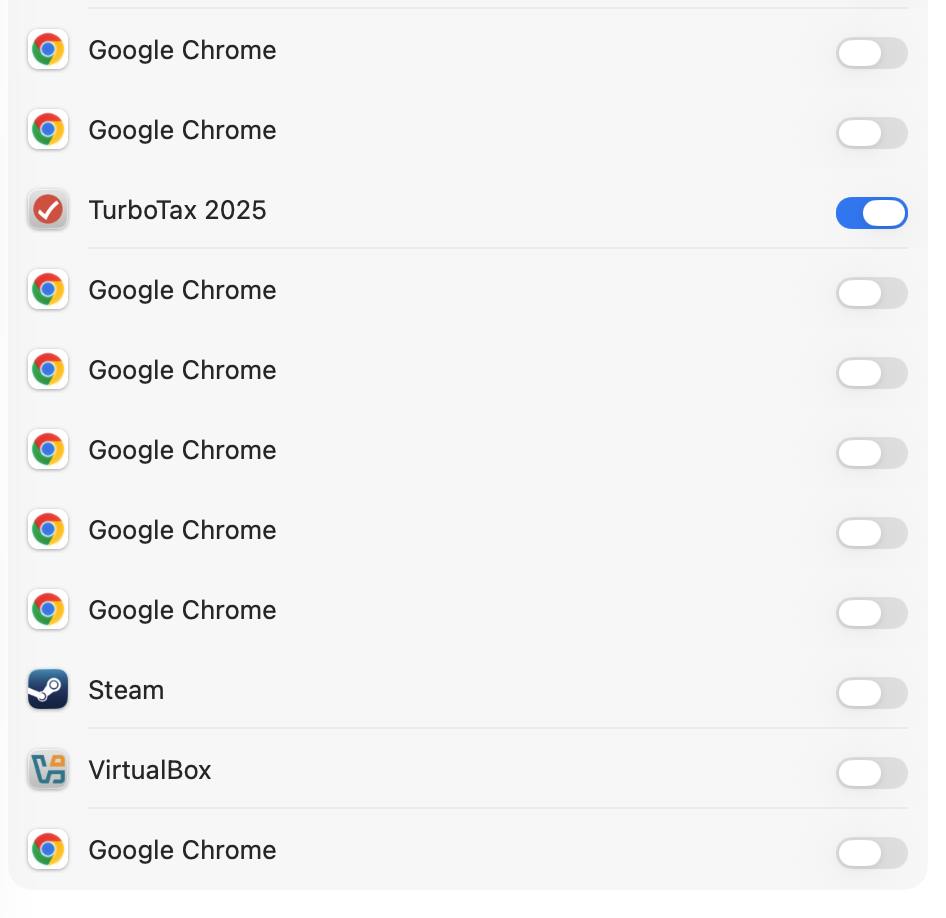
Very interesting! I knew macOS operates in a sandbox, and I instinctually do NOT allow apps to talk to other devices on the network. Why would you ever need that? Now I finally have a reason.
Wow. Chrome really wants to talk to other devices on the network...