box SFR avec boitier - ipV6

Bonjour,

J’adresse ce poste dans la section cocorico car je pense que ma configuration peut être mieux comprise de part les équipements fournis par nos fournisseurs internet.

J’ai la configuration suivante :

Tablette Android ————-|

PC linux ——–- —————- | Routeur SFR | —————– WAN

NAS QNAP <> ——|

Boitier TV SFR——————-|

J’ai installé la dernière version du pihole sur mon nas, avec une attribution d’adresse ipv4 statique.

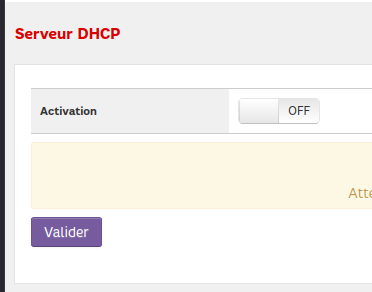
Comme le routeur sfr ne permet pas une configuration d’une ip pour service le DNS je l’ai désactivé, et activé sur le pihole.

Seulement voilà, j’ai constaté que le pihole était by-passé par tous les appareils mobile que j’ai et mes machines linux (exception du nas qui n’a pas d’adresse ipv6).

En veut pour preuve le retour de la commande resolvctl :

Current DNS Server: 2a02:8428:82d2:1402::1

DNS Servers: <pihole ipv4> 2a02:8428:82d2:1402::1

En me balandant dans les forums j’ai compris que le routeur s’annonçait comme DNS ipv6 et que des équipements préféraient basculer sur cet adressage là.

Je ne connais pas l’ipv6, ni pourquoi il est activé par défaut sur le routeur sfr. S’il est nécessaire pour la box tv, ou s’il permet des performances. Personnellement je pensais que c’était réservé aux équipements exposés publiquement pour répondre aux besoins du nombre d’adresses, et que les équipements LAN pouvaient rester en ipv4.

Donc j’ai ces stratégies :

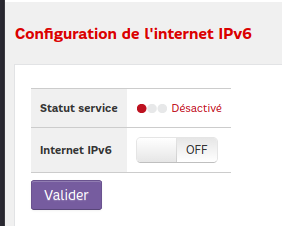
  1. désactiver l’ipv6 sur le routeur
  2. activer l’ipv6 sur le pihole
  3. prendre un routeur dédié.

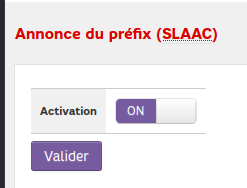
Je suis en train d’évaluer 1 (facile à faire), j’ai conservé le SLAAC car le routeur m’a affiché un warning si je le désactivais. Je fournirai un retour ici.

Pour 2 c’est un peu plus compliqué, le nas n’a pas d’adresse ipv6 (ca devrait se faire facilement) et le pihole non plus (moins facile, c’est du yaml docker compose avec des sections spécifique a qnap).

Pour 3 je n’ai vraiment pas envie d’en ajouter un juste pour ça.

J’ai vu que des sujets similaire dans le forum mais finalement pas de réponses sur les enjeux liés à l’ipv6. Peut-on éclairer ma lanterne ?
My apologies for replying in English - I'm trusting that the forum's automatic translation would be able to make this readable in French.

When it comes to your router advertising IPv6 DNS server addresses, the reply is always the same: You'd have to find a way to configure your router to stop advertising its own IPv6 as DNS server, or to advertise your Pi-hole host machine's IPv6.

You'd have to consult your router's documentation sources on further details for its IPv6 configuration options.

If your router doesn't support configuring IPv6 DNS, you could consider disabling IPv6 altogether, provided you'd not depend on IPv6 for reasons.

If your router doesn't support that either, your IPv6-capable clients will always be able to bypass Pi-hole via IPv6.
You could then try to mitigate this, by setting Pi-hole as the only upstream of your router, provided your router supports it.
But note that you won't be able to attribute DNS requests to original individual IPv6 clients in such a configuration.

Hello. I’m actually assing those path. I was actually asking for an experience feedback on specfically a laptop or mobile could be dependant on ipv6, and above all the provider media box which is a black blox for me, I have no way to configure it.

I can still try to contact the provider for support, but I’m expecting a generic answer.

Sounds like only trials and error will get me on the definitive path.

It would depend on your ISP whether that would be possible.
It may only work if they'd offer an IPv4 only or a true dual stack connection.
If they'd offer an IPv6 only or a DSLite connection, then you'd cut your Internet access by completely disabling IPv6.

If it works for you, that may be your safest option (at least until your ISP jumps on the IPv6 bandwagon as well).

I wouldn't bother with that option.
If you can't control your router's IPv6 DNS settings, enabling Pi-hole's IPv6 support won't help you - it would just add another router advertisement (RA) to the ones that your router would keep emitting, and clients tend to prefer the router's RAs.

All modern OSs are dual stack (i.e. they do support IPv4 and IPv6), and all default to preferring IPv6 over IPv4.
Quite a lot IoT equipment is IPv4 only, particularly older one, but more current products are going to support dual stack as well.

If your network is aware of any IPv6 addresses of additional DNS servers, your IPv6 capable clients will always be able to by-pass Pi-hole.

For a single laptop, you could consider to manually configure its DNS servers. The same may not be possible for TVs, phones or IoT devices, so those devices would make use of any of your network's DNS servers as propagated by your router.

If you can neither control what DNS server your router tells your clients to use, nor manually configure a client to use only your Pi-hole for DNS, your last option would be to find out if and how to change your router's upstream DNS servers, but…

If none of the above is possible, you'd need another router, to replace or bridge your existing one.

solution 1 - disable ip v6 on my router.

yes I can. I’ve just did. Since I can reverse it, I’m giving it a try.

For SLAAC I let it uned on because I got a warning.

I wanted to avoid configuring any equipment direclty.

Currently now on my laptop only pihole is lister, tv still works, and those famous articles full of ads my phone propose is being filtered.

I take the point that now ipv6 is a common feature. What I don’t understand then is why the ipv6 install doc does not include its settings in its scope ? Maybe it assumes that you have a router capable to configure DNS.