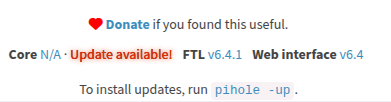
After upgrade to v6 (from v5) the Web (admin) interface shows N/A for Core Version

The issue I am facing:

Ran pihole -up to upgrade from v5 to v6 and everything went smooth, the only difference is that the admin page now needs to be accessed via HTTPS by default and terminal commands now require sudo privileges… both of which are ok.

When I checked the versions in the bottom of the admin interface, I notice that Core shows N/A and prompts for an update. Running phole -v returns the following:

Core version is v5.17.2 (Latest: v6.3)
Web version is v6.4 (Latest: v6.4)
FTL version is v6.4.1 (Latest: v6.4.1)

Looking through other posts, I saw a recommendation to run pihole -r to repair the upgrade, same result.

Additionally, I tried with sudo pihole updatechecker, which runs without issues but doesn’t solve the problem. After running this, I reloaded the admin interface and tried in an incognito browser window; both show Core N/A.

Lastly, when I check cat etc/pihole/versions, this is the output, which seems to be ok according to the hash of the latest release hash (master branch), yet the CORE_VERSION doesn’t look right.

CORE_VERSION=v5.17.2
CORE_BRANCH=master
CORE_HASH=5a23c9c3
GITHUB_CORE_VERSION=v6.3
GITHUB_CORE_HASH=5a23c9c3
WEB_VERSION=v6.4
WEB_BRANCH=master
WEB_HASH=cd0c392d
GITHUB_WEB_VERSION=v6.4
GITHUB_WEB_HASH=cd0c392d
FTL_VERSION=v6.4.1
FTL_BRANCH=master
FTL_HASH=8d1add8d
GITHUB_FTL_VERSION=v6.4.1
GITHUB_FTL_HASH=8d1add8d

Details about my system:

RaspberryPi

Running PiHole as a normal installation (no docker)

What I have changed since installing Pi-hole:

Nothing after the upgrade; prior version was working ok.

The only things I’ve tried are the commands I described above.

Note about HTTPS:

The web interface doesn't need to be accessed using HTTPS.
HTTPS is just another option.
You can access the web interface via HTTP without issues.

I think the confusion is caused by the suggestion added to the login page (Consider upgrading to HTTPS (end-to-end encryption)). This suggestion message was added during v6 development to alert users about the new option. The original message was even more alarming than the current one. Personally, I think this message is unnecessary, as many users simply choose HTTP, but the important thing is: this is just a suggestion.

Please upload a debug log and post just the token URL that is generated after the log is uploaded by running the following command from the Pi-hole host terminal:

sudo pihole -d

Here’s the token:

https://tricorder.pi-hole.net/oKT4U6Hj/

Oddly enough when trying to access via HTTP I was getting an unauthorized error. I tried HTTPS and it worked without issues, even though I was using regular HTTP with the prior version :man_shrugging:t2:

You are receiving "unauthorized" because this is not Pi-hole web server answering.
Your debug log shows nginx is using port 80 (http):

[✗] tcp:0.0.0.0:80 is in use by nginx

If you don't use nginx for other services, you can disable it, or uninstall it. Then restart Pi-hole.

If you want to keep nginx, you need to move one of the web servers to a different port:

2 Likes

Thank you. I know this is not the main issue, but I appreciate you taking the time to provide a solution to it.

Let me know if you need any additional information for the “Version N/A” that is showing on the web interface.

P.S. Happy New Year!

This is just a cosmetic issue. Nothing related to Pi-hole is broken.

Your Pi-hole is updated, as showed by the debug log:

*** [ DIAGNOSING ]: Core version
[✓] Version: v6.3
...

*** [ DIAGNOSING ]: Web version
[✓] Version: v6.4
...

*** [ DIAGNOSING ]: FTL version
[✓] Version: v6.4.1
...

The most strange part is:
the versions file was updated, but only the CORE_VERSION value is wrong.

All other values (including CORE_HASH) are correct:

-rw-r--r-- 1 pihole pihole 643 Dec 31 10:02 /etc/pihole/versions
   CORE_VERSION=v5.17.2
   CORE_BRANCH=master
   CORE_HASH=5a23c9c3
   GITHUB_CORE_VERSION=v6.3
   GITHUB_CORE_HASH=5a23c9c3
   WEB_VERSION=v6.4
   WEB_BRANCH=master
   WEB_HASH=cd0c392d
   GITHUB_WEB_VERSION=v6.4
   GITHUB_WEB_HASH=cd0c392d
   FTL_VERSION=v6.4.1
   FTL_BRANCH=master
   FTL_HASH=8d1add8d
   GITHUB_FTL_VERSION=v6.4.1
   GITHUB_FTL_HASH=8d1add8d

Also, the size of your versions file is 643 bytes, but the correct size should be around 300-360 bytes.

Maybe the file is corrupted.

What is the output of cat /etc/pihole/versions?

Hey, I am jumping here to say i had a similarish issue. I couldn’t connect to the web server even if my pihole was running as expected. I don’t know what caused this but I hadn’t made any changes to the configuration of my pihole. I cannot changed the port from 8080o to 8081o and it is working now. The 443 is still not accessible but I am not sure which port to use for https. I have the logs if you want to check them out.
Happy new year guys have a wonderful time!
It seems you have completely different issue. Please open a new topic and include a debug Token.

1 Like

See below.

$ cat /etc/pihole/versions
CORE_VERSION=v5.17.2
CORE_BRANCH=master
CORE_HASH=5a23c9c3
GITHUB_CORE_VERSION=v6.3
GITHUB_CORE_HASH=5a23c9c3
WEB_VERSION=v6.4
WEB_BRANCH=master
WEB_HASH=cd0c392d
GITHUB_WEB_VERSION=v6.4
GITHUB_WEB_HASH=cd0c392d
FTL_VERSION=v6.4.1
FTL_BRANCH=master
FTL_HASH=8d1add8d
GITHUB_FTL_VERSION=v6.4.1
GITHUB_FTL_HASH=8d1add8d

Maybe the file is corrupted.

Could be… should I leave it like that and see if the next update recreates/updates the file correctly? Or do you want me to try something?

Let's try to recreate the file.

Move the current file using this command: mv /etc/pihole/versions /etc/pihole/versions.old, then run sudo pihole updatechecker.

Does this fix the issue?

Recreating the file works and the interface now displays the correct version.

Thanks for your help!

P.S. It’s safe to delete the original file now, right?

Yes.

This topic was automatically closed 21 days after the last reply. New replies are no longer allowed.