Address shown in interface overview not assigned to eth0

Expected Behaviour:

Upgrading PiHole 5 to 6, via a container, should result in DNS resolution working as before with no system modifications made prior to the upgrade.

  • Photon OS 5
  • VM
  • Docker compose file or Docker run command
version: "3"

# More info at https://github.com/pi-hole/docker-pi-hole/ and https://docs.pi-hole.net/
services:
  pihole:
    container_name: pihole
    image: pihole/pihole:latest
    # For DHCP it is recommended to remove these ports and instead add: network_mode: "host"
    ports:
      - "192.168.1.33:53:53/tcp"
      - "192.168.1.33:53:53/udp"
      - "192.168.1.33:67:67/udp" # Only required if you are using Pi-hole as your DHCP server
      - "192.168.1.33:80:80/tcp"
      - "192.168.1.33:443:443/tcp"
    environment:
      TZ: 'America/Chicago'
      WEBPASSWORD: 'admin'
    # Volumes store your data between container upgrades
    volumes:
      - './etc-pihole:/etc/pihole'
      - './etc-dnsmasq.d:/etc/dnsmasq.d'
    #   https://github.com/pi-hole/docker-pi-hole#note-on-capabilities
    cap_add:
      - NET_ADMIN # Required if you are using Pi-hole as your DHCP server, else not needed
    restart: unless-stopped
  • Docker engine version 27.3.1

Actual Behaviour:

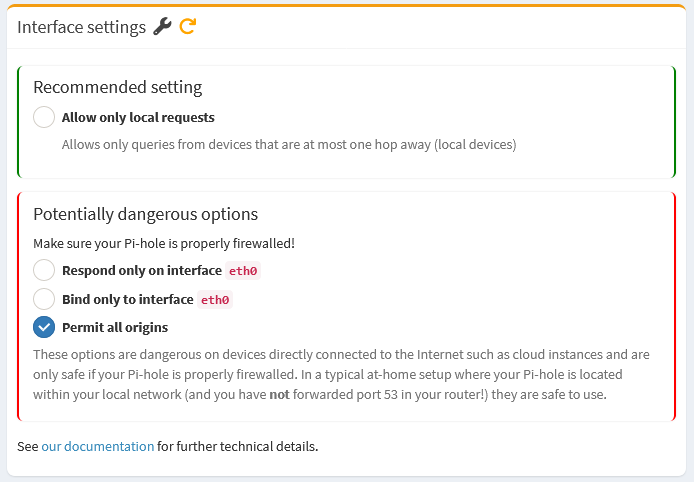
An upgrade from Pihole 5 to 6 (container form factor) results in the interface overview showing an IP assigned to the interface which is from another interface. (Assumedly) because of this, it was necessary to change the interface settings from the default of local to all in order to get DNS flowing properly again.

The debug output shown below indicates it's either the interfaces and/or routing table.

The current interfaces on this VM look like the below:

1: lo: <LOOPBACK,UP,LOWER_UP> mtu 65536 qdisc noqueue state UNKNOWN group default qlen 1000
    link/loopback 00:00:00:00:00:00 brd 00:00:00:00:00:00
    inet 127.0.0.1/8 scope host lo
       valid_lft forever preferred_lft forever
    inet6 ::1/128 scope host noprefixroute
       valid_lft forever preferred_lft forever
2: eth0: <BROADCAST,MULTICAST,UP,LOWER_UP> mtu 1500 qdisc fq_codel state UP group default qlen 1000
    link/ether 00:0c:29:08:08:4b brd ff:ff:ff:ff:ff:ff
    altname eno1
    altname enp11s0
    altname ens192
    inet 192.168.1.33/24 brd 192.168.1.255 scope global eth0
       valid_lft forever preferred_lft forever
    inet6 fe80::20c:29ff:fe08:84b/64 scope link
       valid_lft forever preferred_lft forever
3: docker0: <NO-CARRIER,BROADCAST,MULTICAST,UP> mtu 1500 qdisc noqueue state DOWN group default
    link/ether 02:42:59:04:66:3e brd ff:ff:ff:ff:ff:ff
    inet 172.17.0.1/16 brd 172.17.255.255 scope global docker0
       valid_lft forever preferred_lft forever
4: br-d4b7bbd7fe8a: <BROADCAST,MULTICAST,UP,LOWER_UP> mtu 1500 qdisc noqueue state UP group default
    link/ether 02:42:1d:77:aa:cd brd ff:ff:ff:ff:ff:ff
    inet 172.18.0.1/16 brd 172.18.255.255 scope global br-d4b7bbd7fe8a
       valid_lft forever preferred_lft forever
    inet6 fe80::42:1dff:fe77:aacd/64 scope link
       valid_lft forever preferred_lft forever
6: veth7708c02@if5: <BROADCAST,MULTICAST,UP,LOWER_UP> mtu 1500 qdisc noqueue master br-d4b7bbd7fe8a state UP group default
    link/ether 7e:34:cb:3a:d0:7a brd ff:ff:ff:ff:ff:ff link-netnsid 0
    inet6 fe80::7c34:cbff:fe3a:d07a/64 scope link
       valid_lft forever preferred_lft forever

Routing table as below.

Kernel IP routing table
Destination     Gateway         Genmask         Flags Metric Ref    Use Iface
default         _gateway        0.0.0.0         UG    0      0        0 eth0
172.17.0.0      0.0.0.0         255.255.0.0     U     0      0        0 docker0
172.18.0.0      0.0.0.0         255.255.0.0     U     0      0        0 br-d4b7bbd7fe8a
192.168.1.0     0.0.0.0         255.255.255.0   U     0      0        0 eth0

The desire is for Pihole to only respond to queries on eth0 which is the 192.168.1.0/24 network as this is how it was working prior to the upgrade.

I have spent a couple of hours searching and experimenting without much success. Thank you to any help offered!

Debug Token:

(Moderator edit: explicit debug log removed)
(For your own privacy and security, please do not post your full, unsanitised debug log.
We just ask for the token.
)

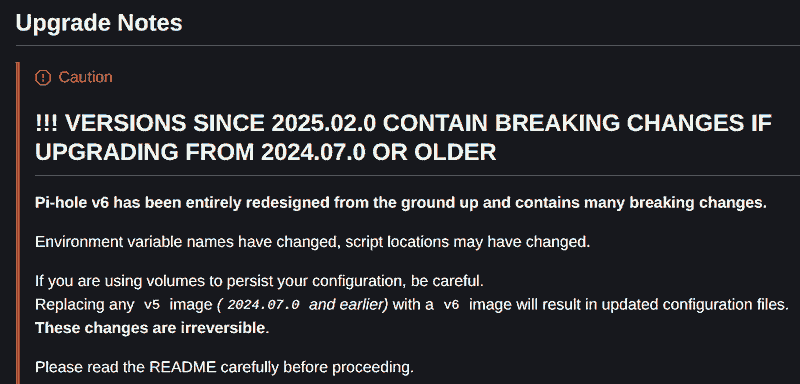
Chances are it won't, and there's an explicit warning about this:
pihole-docker-upgrade-warning

Please also have a read of Pi-hole's Docker notes on Upgrading from v5.x - Pi-hole documentation.

Are you referring to Settings | System » Primary IP addresses ?

This would be just a display issue, not affecting your Pi-hole's operation, see also Pi-hole selecting different primary ipv4 address - #4 by Bucking_Horn.

Thank you, sorry about the debug output. I thought that's what the post template was requesting.

I might have misspoke on the starting version. The image tag was from 2025 so maybe the version was 6.x and not 5.x?

dns.interface is already set to eth0 but Pihole is seeing the address on that interface as one belonging to another interface. I did go through the post you provided earlier but doesn't seem to help this situation. Maybe I'm missing something simple here....

Your environment variables are v5, which would make a v5 upgrade more likely.
Please go over the notes on upgrading from v5.x.

What's your situation?

As mentioned, this would be a UI glitch, and while there would be no way to improve that currently, it won't affect Pi-hole's operation.

Thanks for the continued help. The situation is, post upgrade, no DNS resolution was occurring and it required me changing the expert-mode UI option (Settings > DNS) from "Allow only local requests" to "Permit all origins" under the advanced interface settings. I have gone through the upgrade docs but don't see they apply in my case because I am not using a custom dnsmasq file nor am I setting any env vars in the Docker Compose file. It is only my assumption that the incorrect IP address being reported in Tools > Interfaces was related to the issue.

You are running Pi-hole inside a docker container.

You posted the VM interfaces, but your debug log shows a different set of interfaces inside the container:

*** [ DIAGNOSING ]: Network interfaces and addresses
   1: lo: <LOOPBACK,UP,LOWER_UP> mtu 65536 qdisc noqueue state UNKNOWN qlen 1000
       link/loopback 00:00:00:00:00:00 brd 00:00:00:00:00:00
       inet 127.0.0.1/8 scope host lo
          valid_lft forever preferred_lft forever
       inet6 ::1/128 scope host
          valid_lft forever preferred_lft forever
   5: eth0@if6: <BROADCAST,MULTICAST,UP,LOWER_UP,M-DOWN> mtu 1500 qdisc noqueue state UP
       link/ether 02:42:ac:12:00:02 brd ff:ff:ff:ff:ff:ff
       inet 172.18.0.2/16 brd 172.18.255.255 scope global eth0
          valid_lft forever preferred_lft forever

You are using bridge docker network. As you can see, there is no 192.168.1.33 inside the container.

This is expected.
As shown in the docker README file - Tips and Tricks, you need to set the Interface settings to "Permit all origins":

image

Hmm, the docker compose you've shared is using env vars:

Does that mean what you've shared it is not what you are actually using to start your Pi-hole container?

You also define:

As you state you are not using custom dnsmasq configuration files, there would be no use in mounting /etc/dnsmasq.d.
In that case, you could drop the respective line from your compose file.

Besides Pi-hole potentially showing misleading Primary IP addresses, I struggle to see what actual issue you are trying to resolve.

The docker compose you've shared explicitly maps specific IPs and ports into your Pi-hole container:

Regardless of Pi-hole's Interface settings, this would mean that Docker would only forward DNS requests directed at your host's 192.168.1.33 into your Pi-hole container.

Could you provide an example of a DNS request registering in Pi-hole from an IP range that you do not want to be processed by Pi-hole?

Looks like you are on vmware - a bare-metal install might be a better option for you.

rdwebdesign, ahh I had totally forgotten about that. I also did not see that line in the README. I think everything is WAI here so thank you all for your input!