Unable to install Pi-hole dependency package

Expected Behaviour:

Running pi-hole on Raspberry Pi Zero W (6.12.109+rpt-rpi-v8).

Actual Behaviour:

Running sudo pihole -up results in:

[✓] Building dependency package pihole-meta.deb
[✗] Installing Pi-hole dependency package
Error: Unable to install Pi-hole dependency package.

I have been running this setup for about a year now with no issue. usually a reboot will fix this issue, but I successfully ran sudo apt update and sudo apt upgrade and have rebooted but still get this error.

Debug Token:

[✓] Your debug token is: https://tricorder.pi-hole.net/c5Mrv7f0/
Above dependency package tries to install a bunch of packages from your distros APT software repository.
Whats output if you try to simulate installing a couple of those (curl & git) with below instead?

sudo apt install --simulate --no-install-recommends curl git

See also:

@deHakkelaar

The debug log shows "Debian 12":

*** [ DIAGNOSING ]: Operating system
[i] Distro: Debian
[i] Version: 12

@waltonnc

Try to run the installer again, using this command:

curl -sSL https://install.pi-hole.net | bash

This command will download and execute the new installer (used to update Pi-hole), which ignores non-fatal issues when installing the dependency package. Even if it fails, the new code will show more details about the error.

sudo apt install --simulate --no-install-recommends curl git
Reading package lists... Done
Building dependency tree... Done
Reading state information... Done
curl is already the newest version (7.88.1-10+deb12u15).
git is already the newest version (1:2.39.5-0+deb12u3).
0 upgraded, 0 newly installed, 0 to remove and 1 not upgraded.
sudo curl -sSL https://install.pi-hole.net | bash

[i] Root user check
[i] Script called with non-root privileges
The Pi-hole requires elevated privileges to install and run
Please check the installer for any concerns regarding this requirement
Make sure to download this script from a trusted source

[✓] Sudo utility check

[✓] Root user check


    .;;,.
    .ccccc:,.
     :cccclll:.      ..,,
      :ccccclll.   ;ooodc
       'ccll:;ll .oooodc
         .;cll.;;looo:.
             .. ','.
            .',,,,,,'.
          .',,,,,,,,,,.
        .',,,,,,,,,,,,....
      ....''',,,,,,,'.......
    .........  ....  .........
    ..........      ..........
    ..........      ..........
    .........  ....  .........
      ........,,,,,,,'......
        ....',,,,,,,,,,,,.
           .',,,,,,,,,'.
            .',,,,,,'.
              ...

[i] SELinux not detected
[✓] Building dependency package pihole-meta.deb
[✗] Installing Pi-hole dependency package
Error: Unable to install Pi-hole dependency package.

And what if you actually try to install them without the --simulate?

sudo apt install --no-install-recommends curl git

EDIT: The list of other dependency packages that Pi-hole tries to install below:

$ curl -sSL install.pi-hole.net
[..]
# Content of Pi-hole's meta package control file on APT based systems
[..]
Depends: awk,bash-completion,binutils,ca-certificates,cron|cron-daemon,curl,dialog,bind9-dnsutils|dnsutils,dns-root-data,git,grep,iproute2,iputils-ping,jq,libcap2,libcap2-bin,logrotate,lshw,procps,psmisc,sudo,unzip
sudo apt install --no-install-recommends curl git
Reading package lists... Done
Building dependency tree... Done
Reading state information... Done
curl is already the newest version (7.88.1-10+deb12u15).
git is already the newest version (1:2.39.5-0+deb12u3).
0 upgraded, 0 newly installed, 0 to remove and 1 not upgraded.

And what if you try the others?

"|" is an OR statement!

Oh and which package is that?

apt list --upgradable

apt list --upgradable
Listing... Done
rpi-eeprom/oldstable,oldstable 28.33-1 all \[upgradable from: 28.13-1\]
N: There is 1 additional version. Please use the '-a' switch to see it

Seems not related.

Interesting. I get the following error:

sudo apt install --no-install-recommends awk
Reading package lists... Done
Building dependency tree... Done
Reading state information... Done
Package awk is a virtual package provided by:
original-awk:armhf 2022-09-12-1
mawk:armhf 1.3.4.20200120-3.1
gawk:armhf 1:5.2.1-2
original-awk 2022-09-12-1
mawk 1.3.4.20200120-3.1
gawk 1:5.2.1-2
You should explicitly select one to install.

E: Package 'cron-daemon' has no installation candidate

Thats odd bc on my Pi:

$ sudo apt install --no-install-recommends awk
Reading package lists... Done
Building dependency tree... Done
Reading state information... Done
Package awk is a virtual package provided by:
  original-awk 2022-09-12-1
  mawk 1.3.4.20200120-3.1
  gawk 1:5.2.1-2
You should explicitly select one to install.

E: Package 'awk' has no installation candidate

Not sure where your cron-daemon package error comes from and how is related when trying to install awk:

$ apt show cron-daemon
Package: cron-daemon
State: not a real package (virtual)

Any other dependency packages with issues?

EDIT:

$ sudo apt install --simulate cron-daemon
Reading package lists... Done
Building dependency tree... Done
Reading state information... Done
Package cron-daemon is a virtual package provided by:
  systemd-cron 1.15.19-5
  cron 3.0pl1-162
  bcron 0.11-19
You should explicitly select one to install.

E: Package 'cron-daemon' has no installation candidate
$ apt policy systemd-cron cron bcron
systemd-cron:
  Installed: (none)
  Candidate: 1.15.19-5
  Version table:
     1.15.19-5 500
        500 http://raspbian.raspberrypi.com/raspbian bookworm/main armhf Packages
cron:
  Installed: 3.0pl1-162
  Candidate: 3.0pl1-162
  Version table:
 *** 3.0pl1-162 500
        500 http://raspbian.raspberrypi.com/raspbian bookworm/main armhf Packages
        100 /var/lib/dpkg/status
bcron:
  Installed: (none)
  Candidate: 0.11-19
  Version table:
     0.11-19 500
        500 http://raspbian.raspberrypi.com/raspbian bookworm/main armhf Packages

Dont mind awk!
Its most likely already installed on your Pi:

$ apt policy mawk
mawk:
  Installed: 1.3.4.20200120-3.1
  Candidate: 1.3.4.20200120-3.1
  Version table:
 *** 1.3.4.20200120-3.1 500
        500 http://raspbian.raspberrypi.com/raspbian bookworm/main armhf Packages
        100 /var/lib/dpkg/status
$ update-alternatives --list awk
/usr/bin/mawk

Just to confirm its not a Pi-OS Bookworm issue:

$ cat /proc/device-tree/model
Raspberry Pi Model B Rev 2
$ dpkg --print-architecture
armhf
$ hostnamectl
[..]
Operating System: Raspbian GNU/Linux 12 (bookworm)
$ sudo pihole updatePihole
  [✓] Building dependency package pihole-meta.deb
  [✓] Installing Pi-hole dependency package
[..]
  [i] Pi-hole Core:     update available
  [i] Web Interface:    update available
  [i] FTL:              update available
[..]
  [✓] Update complete!

Core version is v6.5 (Latest: v6.5)
Web version is v6.6.1 (Latest: v6.6.1)
FTL version is v6.8 (Latest: v6.8)
cat /proc/device-tree/model
Raspberry Pi Zero 2 W Rev 1.0
dpkg --print-architecture
arm64
hostnamectl
Static hostname: raspberrypi
Icon name: computer
Machine ID: XXXX
Boot ID: XXXX
Operating System: Debian GNU/Linux 12 (bookworm)
Kernel: Linux 6.12.109+rpt-rpi-v8
Architecture: arm64
sudo pihole updatePihole
\[✓\] Building dependency package pihole-meta.deb
\[✗\] Installing Pi-hole dependency package
Error: Unable to install Pi-hole dependency package.

Have you tried installing the others?

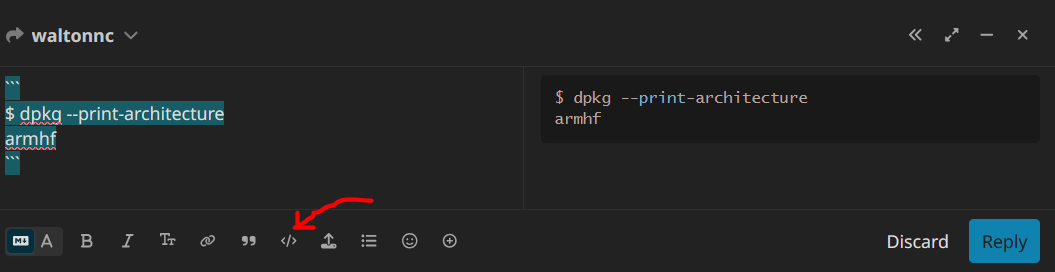
Ps. could you format your code output with the </> button before posting here pls?

Eg:

sorry! I will do that moving forward. When you say install the others, what do you mean?

I only saw you attempt to install awk curl & git, but none of the others:

Eg:

sudo apt install --simulate --no-install-recommends -y bash-completion binutils ca-certificates cron dialog bind9-dnsutils dns-root-data grep iproute2 iputils-ping jq libcap2 libcap2-bin logrotate lshw procps psmisc sudo unzip

 sudo apt install --simulate --no-install-recommends -y bash-completion binutils ca-certificates cron dialog bind9dnsutils dns-root-data grep iproute2 iputils-ping jq libcap2 libcap2-bin logrotate lshw procps psmisc sudo unzip
Reading package lists... Done
Building dependency tree... Done
Reading state information... Done
E: Unable to locate package bind9dnsutils