# Top Domain?
**URL:** https://discourse.pi-hole.net/t/top-domain/2619
**Category:** Help
**Created:** [April 15, 2017, 5:28pm UTC](https://discourse.pi-hole.net/t/top-domain/2619 "2017-04-15T17:28:51Z")
**Posts on this page:** 11
**Page:** 1
### Author:  [@LilSnoop40](https://discourse.pi-hole.net/u/LilSnoop40)
#### Post date: [April 15, 2017, 5:28pm UTC](https://discourse.pi-hole.net/t/top-domain/2619/1 "2017-04-15T17:28:52Z")
hello, i was looking at my pi-hole dashboard and i saw that www.netgear.com is my top domain at over 11000. is this normal? what does this mean
Thanks
---
### Author:  [@Master](https://discourse.pi-hole.net/u/Master)
#### Post date: [April 15, 2017, 6:00pm UTC](https://discourse.pi-hole.net/t/top-domain/2619/2 "2017-04-15T18:00:44Z")
oh thats not normal: any unknown device cannot cache the resolved domain.
You can look for the ip address wich requested the domain. Then look to wich device it belongs and tell us maybe the device model.
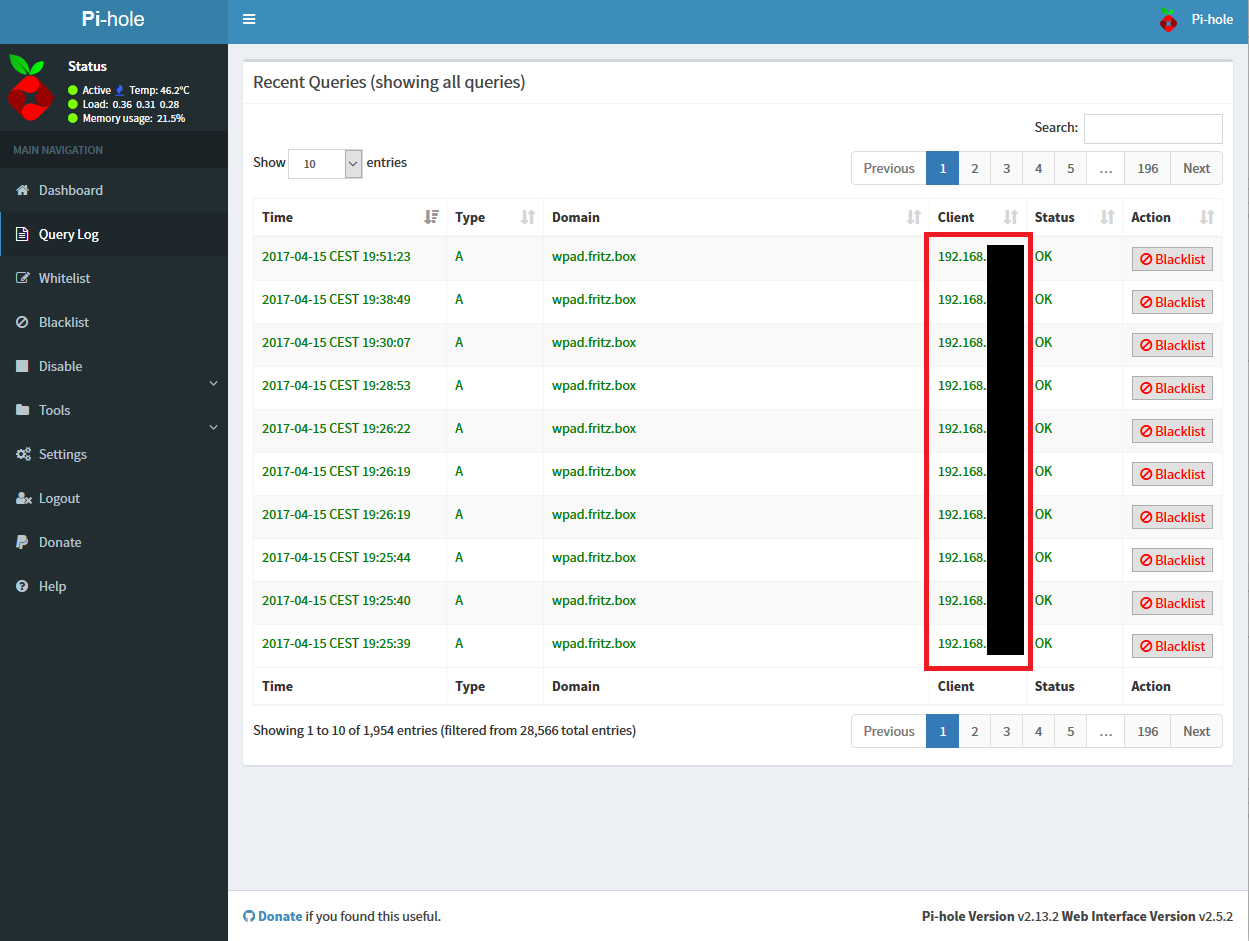
It isn't necessary dangerous but a bit annoying
---
### Author:  [@deHakkelaar](https://discourse.pi-hole.net/u/deHakkelaar)
#### Post date: [April 15, 2017, 8:40pm UTC](https://discourse.pi-hole.net/t/top-domain/2619/3 "2017-04-15T20:40:22Z")
Its normal for first time Pi-Hole users to be suspicious about anything in the logs 😉
Probably it is your router or WiFi-AP calling home checking amongst others for firmware updates.
---
### Author:  [@LilSnoop40](https://discourse.pi-hole.net/u/LilSnoop40)
#### Post date: [April 15, 2017, 10:14pm UTC](https://discourse.pi-hole.net/t/top-domain/2619/4 "2017-04-15T22:14:30Z")
this looks odd to me as well i have a bunch of devices on my network and its only showing the one.. what am i missing:

and when i click on "www.netgear.com" under domain i get this error 
think something isn't correct.
Thanks
---
### Author:  [@deHakkelaar](https://discourse.pi-hole.net/u/deHakkelaar)
#### Post date: [April 15, 2017, 10:28pm UTC](https://discourse.pi-hole.net/t/top-domain/2619/5 "2017-04-15T22:28:33Z")
Here is a useful one for when your logs have grown too large to be displayed on the web GUI:
`grep -e '^.*query.*www.netgear.com.*$' /var/log/pihole.log | awk '{print $8}' | sort | uniq -c | sort -n -r | head -10`
But I can already see Top client being your router as suspected 172.16.0.1
---
### Author:  [@deHakkelaar](https://discourse.pi-hole.net/u/deHakkelaar)
#### Post date: [April 15, 2017, 10:38pm UTC](https://discourse.pi-hole.net/t/top-domain/2619/6 "2017-04-15T22:38:09Z")
Try removing Pi-Hole to be the upstream DNS resolver for your router.
Eg. default your routers upstream DNS so it receives default DNS servers from your ISP.
Owh and you can see if worked if you keep an eye (tail) on the logs:
`tailf /var/log/pihole.log | grep -e '^.*query.*www.netgear.com.*$'`
---
### Author:  [@LilSnoop40](https://discourse.pi-hole.net/u/LilSnoop40)
#### Post date: [April 15, 2017, 11:14pm UTC](https://discourse.pi-hole.net/t/top-domain/2619/7 "2017-04-15T23:14:13Z")
sorry if i am not understanding you, i looked out my router and on this page here i had manually entered in my pi-hole dns, since you replied i let me ip configure it:

is this what you meant?
Thanks
---
### Author:  [@deHakkelaar](https://discourse.pi-hole.net/u/deHakkelaar)
#### Post date: [April 16, 2017, 2:41am UTC](https://discourse.pi-hole.net/t/top-domain/2619/8 "2017-04-16T02:41:51Z")
Thats correct.
If you check the Installation part on the main page, it only mentions that you have to change the DNS server setting on the DHCP service page of the router:
> **[Pi-hole – Network-wide Ad Blocking](https://pi-hole.net/)**
And if the router doesnt allow, you could use the DHCP service that comes with Pi-Hole (after you disabled the DHCP service on the router).
---
### Author:  [@jacob.salmela](https://discourse.pi-hole.net/u/jacob.salmela)
#### Post date: [April 16, 2017, 3:56am UTC](https://discourse.pi-hole.net/t/top-domain/2619/9 "2017-04-16T03:56:59Z")
> [@deHakkelaar](#):
>
> Probably it is your router or WiFi-AP calling home
Yes, this is probably the case...
[https://pi-hole.net/2017/02/22/what-really-happens-on-your-network-find-out-with-pi-hole/](https://pi-hole.net/2017/02/22/what-really-happens-on-your-network-find-out-with-pi-hole/)
> [@deHakkelaar](#):
>
> you have to change the DNS server setting on the DHCP service page of the router
If you happen to change the DNS server under WAN or Internet settings in the router and your then your router will show as the only client. When you set the DNS server under DHCP options, you are telling each of your individual clients to use Pi-hole as their DNS and should see entries for each device using Pi-hole.
---
### Author:  [@jpgpi250](https://discourse.pi-hole.net/u/jpgpi250)
#### Post date: [April 16, 2017, 9:59am UTC](https://discourse.pi-hole.net/t/top-domain/2619/10 "2017-04-16T09:59:26Z")
@ [Master](https://discourse.pi-hole.net/u/Master)
I was looking at your screenshot with all the requests to **wpad.fritz.box**.
I'm using pfsense as a router/firewall, and it's mandatory to define a domain (the default is localdomain, but you obviously used fritz.box). On my older router, a domain wasn't mandatory, so I never had these queries.
As soon as windows machines (and possibly others) receive a domain setting via DHCP, this behavior starts. You can find your domain setting, using **ipconfig /all** and look at the setting **Connection-specific DNS Suffix**
It would supprise me if yours wasn't reporting fritz.box
I have been looking for a solution for this, found it, here it is:
- First thing to do is to ensure **wpad** & **wpad.fritz.box** resolves to your raspberry pi. There are different methods to achieve this, I looked at [this topic](https://discourse.pi-hole.net/t/howto-using-pi-hole-as-lan-dns-server/533) to implement a solution.
Basically it comes down to creating a line that says:
```auto
192.168.x.xx raspberrypi.fritz.box wpad.fritz.box raspberrypi wpad
```
Replace the IP address with your pihole IP address and raspberrypi with your hostname.
Ensure both wpad and wpad.fritz.box can be solved on your pi, using **dig**.
Now create a file in **/var/www/html** called **wpad.dat** , containing the following:
```auto
function FindProxyForURL(url, host)
{
return "DIRECT";
}
```
This tells the browser (who is responsible for the dns query) that it should never use a proxy server (always DIRECT), so **don't do this if you are using a proxy server** (like squid)
This will NOT eliminate the entries in your log (or web interface), but it will ensure a valid answer is provided to the browser, thus eliminating timeouts.
You can monitor the succesfull retrieval of the file in /var/log/lighttpd/access.log, you will find something like this:
```auto
1492334155|wpad.fritz.box|GET /wpad.dat HTTP/1.1|200|56
```
---
### Author:  [@Master](https://discourse.pi-hole.net/u/Master)
#### Post date: [April 17, 2017, 3:32pm UTC](https://discourse.pi-hole.net/t/top-domain/2619/11 "2017-04-17T15:32:08Z")
Oh thank you for the answer,
I just created the Screenshot to help LilSnoop40.
I don't know what's "wpad" in my Network and it just popped up yesterday. Yeah my DNS-Suffix is fritz.box, defined by my FRITZ!Box, but i didn't activate "never forward non-FQDNs" and "never forward reverse lookups for private IP ranges" because my FRITZ!Box is the second DNS-Server (There is the DHCP and i don't want to set up every device like [here](https://discourse.pi-hole.net/t/howto-using-pi-hole-as-lan-dns-server/533)). And also i don't know, if the domain "wpad" could be resolved.
I really don't know what you mean with the solution wpad.dat etc. I had no timeout errors 🙂
Today the entry disappeared. But thanks for your efforts