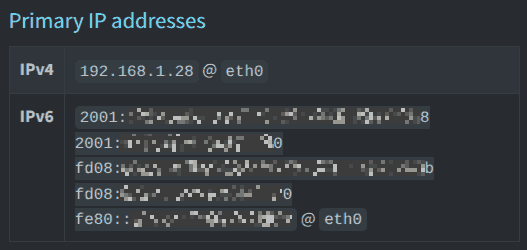
I have two devices running Pi-hole, and both devices aren't showing their IPv6 addresses under Settings > System, even though both devices have multiple IPv6 addresses.
Does anybody know why this is happening, and how to get the IPv6 addresses to be displayed?
Good one!
I don't have a IPv6 Prefix on my network, but I would at least expect the Link-Local address to be shown ?!
Currently it's this :
Primary IP addresses
IPv4 	192.168.1.2 @ eth0
IPv6 	N/A @ N/A
And because I have a couple of VLAN Interfaces maybe those could be shown there too ??
Ah, sarcasm.
I should have said that they used to be shown. I don't understand what changed.
Schrodingers-cat:
Ah, sarcasm.
Not at all : I fully agree with you
Sometimes stuff breaks when you don't expect it to break...
wd9895
October 26, 2026, 9:29am
6
What did you do?
2001 ...
fd28 ...
fd80 ...
Everything's there.
wd9895:
What did you do?
Upgrade the OS and Pi-hole. Disable and re-enable IPv6. Tweak Pi-hole config settings.
The devices have IPv6 addresses (Tools>Interfaces).
Unless someone can tell me what the criteria for an address to be displayed in Settings > System is, I can’t work out what's causing this behaviour.
wd9895
October 26, 2026, 3:34pm
8
Just post a debug report link.
I have configured my Pi-hole and Unbound on IPv4 and IPv6 strictly and see no hickups here caused by any updates.
That there should be IPv6 information shown there
I suspect the only IP's that will be displayed are the ones in the global scope (GUA's & ULA's):
ip -br -6 address show scope global
I dont have native IPv6 support upstream so above one lists nothing on my setup:
$ ip -br -6 address show scope global
$
On the admin GUI:
Primary IP addresses
IPv4 	10.0.0.4 @ eth0
IPv6 	N/A @ N/A
While it still has an auto configured IPv6 LLA (like most devices):
$ sudo pihole-FTL --config dns.interface
eth0
$ ip -br -6 address show eth0
eth0             UP             fe80::XXXX/64
Have you checked what types of IP's (GUA, ULA or LLA) are (auto)configured on the Pi-hole host for your particular interface?
All address types are shown, e.g.:
I can't recreate your observation on my Pi-holes - IPv6 addresses are shown as expected for GUA, ULA and LLA.
In your case, your log suggests you should see GUA and LLA addresses for your Pi-hole.
Not sure if it's related, but your debug log shows a lot of bad file descriptor messages:
*** [ DIAGNOSING ]: contents of /var/log/pihole

-rw-r----- 1 pihole pihole 31K Oct 27 15:20 /var/log/pihole/FTL.log
   -----head of FTL.log------
(…)
   2026-10-27 03:14:01.750 AEDT [3641M] WARNING: Cannot get exclusive lock for /etc/pihole/pihole.toml: Bad file descriptor
   2026-10-27 03:14:01.761 AEDT [3644M] WARNING: Cannot get exclusive lock for /etc/pihole/pihole.toml: Bad file descriptor
   2026-10-27 03:14:01.895 AEDT [3652M] WARNING: Cannot get exclusive lock for /etc/pihole/pihole.toml: Bad file descriptor
Would stopping and starting pihole-FTL.service clear that?pihole.toml?
To me it looks like some kind of logic is at work as mine does have an LLA:
$ ip -br -6 address show eth0
eth0             UP             fe80:XXXX/64
But doesnt show up in the webGUI:
Primary IP addresses
$ sudo pihole-FTL --config dns.interface
eth0
$ pihole version
Core version is v6.5 (Latest: v6.5)
Web version is v6.6.1 (Latest: v6.6.1)
FTL version is v6.8 (Latest: v6.8)
Thats on stock Pi-OS with no alterations!
<tr title="The machine uptime. For containers, this will match the host uptime">
<th scope="row">Uptime:</th>
<td><span id="sysinfo-uptime"></span></td>
</tr>
<tr>
<th scope="row">FTL:</th>
<td>PID <span id="sysinfo-pid-ftl">?</span>, last restart was on <span id="sysinfo-uptime-ftl"></span></td>
</tr>
</tbody>
</table>
<h4>Primary IP addresses</h4>
<table class="table table-striped table-bordered nowrap">
<tbody>
<tr>
<th scope="row">IPv4</th>
<td><code id="sysinfo-gw-v4-addr">?</code> @ <code id="sysinfo-gw-v4-iface">?</code></td>
</tr>
<tr>
<th scope="row">IPv6</th>
<td><code id="sysinfo-gw-v6-addr">?</code> @ <code id="sysinfo-gw-v6-iface">?</code></td>
</tr>
Oh and no LLA here either:
wd9895:
IPv4 192.168. ....
2001 ...
fd28 ...
fd80 ...
The LLA is also not listed on my second Pi-hole node with an older version:
$ pihole version
Core version is v6.4.2 (Latest: v6.5)
Web version is v6.5 (Latest: v6.6.1)
FTL version is v6.6.1 (Latest: v6.8)
$ sudo pihole-FTL --config dns.interface
eth0
$ ip -br -6 address show eth0
eth0             UP             fe80:XXXX/64
On the webGUI:
Primary IP addresses
Yes. Both have two GUAs, which are both deprecated, and one LL address (LL is the label used under Tools > Interfaces).
And, now the two GUAs and LL are now being displayed under Settings > System. I've no idea what changed.
It would still be nice to know what the criteria for displaying the IPv6 addresses under Settings > System is.
Yeah thats also where my LLA appears:
Address: inet6 fe80:XXXX / 64 (IPv6 link-local (LL))
$ ip -br -6 address show scope link
eth0             UP             fe80:XXXX/64
wd9895
October 27, 2026, 11:31am
18
wd9895:
IPv4 192.168. ....
2001 ...
fd28 ...
fd80 ...
Sorry for inconvinience, there was a typo. Local Link Address is available
IPv4 192.168. ....
2001 ...
fd28 ...
fe80 ...
nero355
October 27, 2026, 2:12pm
19
deHakkelaar:
To me it looks like some kind of logic is at work as mine does have an LLA:
$ ip -br -6 address show eth0
eth0             UP             fe80:XXXX/64
But doesnt show up in the webGUI:
Primary IP addresses
$ pihole version
Core version is v6.5 (Latest: v6.5)
Web version is v6.6.1 (Latest: v6.6.1)
FTL version is v6.8 (Latest: v6.8)
Thats on stock Pi-OS with no alterations!
+1 here
I am surprised by this because one of the totally AWESOME!!! things about Pi-Hole v6 is that it detects all your Interfaces after the installation and binds to all of them automatically so you don't have to mess around with manually created config files because you have some additional VLAN Interfaces running
Unlikely, as it's a network booting Pi. I believe that's an NFS issue. The DNS servers are rebooted daily to stop:
WARNING: dnsmasq: no address range available for DHCPv6 request via eth0
Nothing that I'm aware of.