# Running DNScrypt and DNSSEC
**URL:** https://discourse.pi-hole.net/t/running-dnscrypt-and-dnssec/1463
**Category:** Help
**Created:** [January 25, 2017, 11:39am UTC](https://discourse.pi-hole.net/t/running-dnscrypt-and-dnssec/1463 "2017-01-25T11:39:30Z")
**Posts on this page:** 9
**Page:** 1
### Author:  [@jpgpi250](https://discourse.pi-hole.net/u/jpgpi250)
#### Post date: [January 25, 2017, 11:39am UTC](https://discourse.pi-hole.net/t/running-dnscrypt-and-dnssec/1463/1 "2017-01-25T11:39:31Z")
``I noticed a lot op people are reading this article. Although this topic still contains some valid points, you're better of reading [this topic](https://discourse.pi-hole.net/t/the-truth-about-dnscrypt-proxy-and-dnssec/1694). It explains the steps I've taken to get a working combination of dnscrypt-proxy and DNSSEC, using a new version of dnsmasq. I've explained [here](https://discourse.pi-hole.net/t/setting-up-and-using-dnscrypt-loader/606/13) why I stopped using dnscrypt-loader (this was in fact the reason I couldn't update dnscrypt-proxy beyond version 1.9.1). This topic however still explains how to [upgrade dnscrypt-proxy](https://discourse.pi-hole.net/t/setting-up-and-using-dnscrypt-loader/606/5). ``
I've already installed [DNScrypt](https://discourse.pi-hole.net/t/setting-up-and-using-dnscrypt-loader/606), highest possible version 1.9.1
I noticed the [pull request](https://github.com/pi-hole/pi-hole/pull/1158) from [dschaper](https://discourse.pi-hole.net/users/danschaper/activity), and noticed DNSSEC will be supported in v.2.12. As this is easy to configure (just two lines in /etc/dnsmasq.d/01-pihole.conf and one line in /etc/pihole/setupVars.conf), I've tested the configuration.
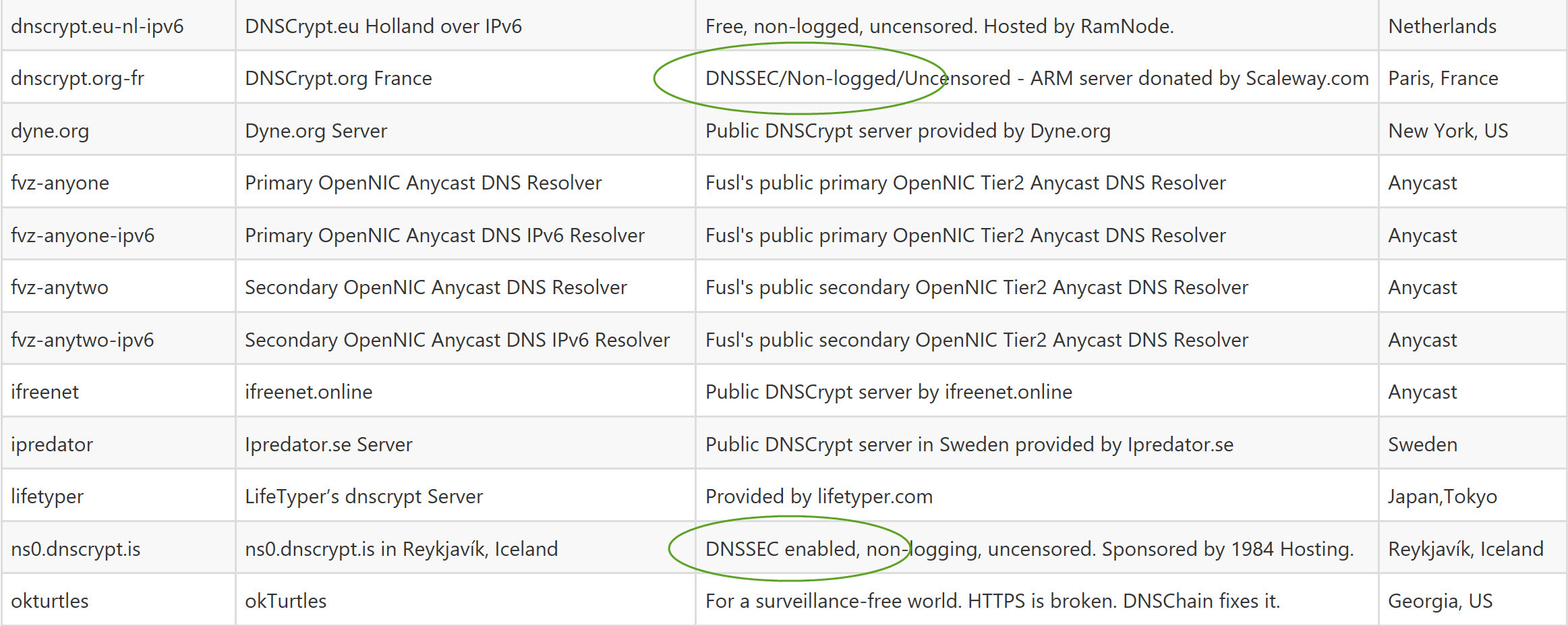
You need to select DNSSec enabled dnscrypt servers (using dnscrypt-loader), there are only 2 DNSSEC enabled, non-logging servers available (ref [this](https://github.com/jedisct1/dnscrypt-proxy/blob/master/dnscrypt-resolvers.csv) list).
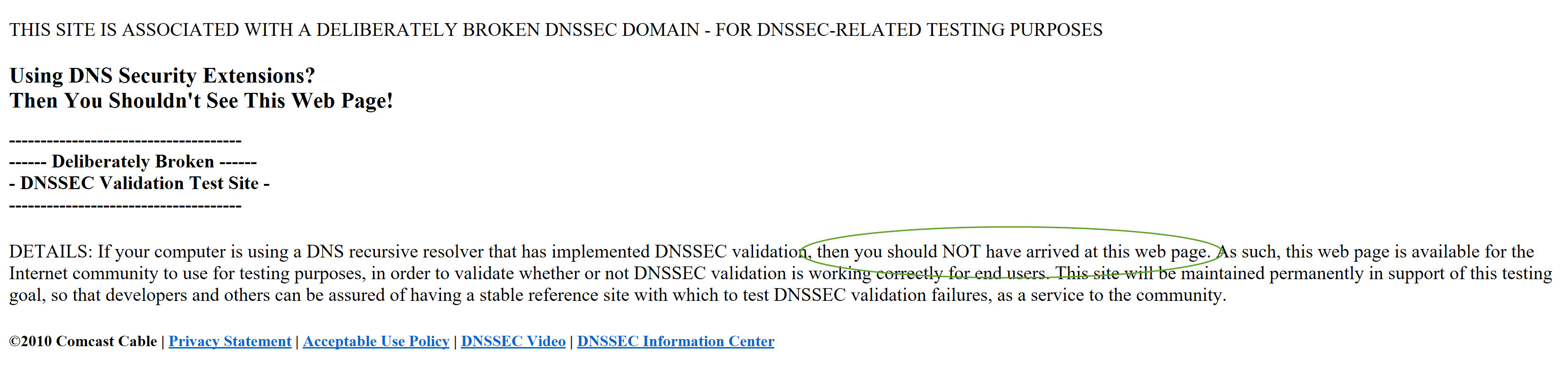
To verify the configuration is working, goto to [this](http://www.dnssec-failed.org/) page. If the page doesn't load, DNSSEC is working (you'll notice a message - validation result is BOGUS - in the pihole log). If the page does load, the setup is NOT working.
The question(s):
- What is the general advise, regarding the use of both DNScrypt and DNSSEC?
- Is using DNSSEC usefull, since there are almost no sites that have it implemented (use [this](http://dnssec-debugger.verisignlabs.com/) site to check the DNSSEC status of a domain)?
---
### Author:  [@DL6ER](https://discourse.pi-hole.net/u/DL6ER)
#### Post date: [January 25, 2017, 11:52am UTC](https://discourse.pi-hole.net/t/running-dnscrypt-and-dnssec/1463/2 "2017-01-25T11:52:42Z")
> [@jpgpi250](#):
>
> You need to select DNSSec enabled dnscrypt servers (using dnscrypt-loader), there are only 2 DNSSEC enabled, non-logging servers available (ref this list).
I don't know how you obtained the number, but I see many more servers in the very same list with the following filter: `DNScrypt` (all of them) + `dnssec == yes` + `no log == yes`. What am I missing here?
> [@jpgpi250](#):
>
> To verify the configuration is working, goto to this page. If the page doesn't load, DNSSEC is working (you'll notice a message - validation result is BOGUS - in the pihole log). If the page does load, the setup is NOT working.
This page does not load for me, although I don't have DNSSEC enabled. See this output in the log:
```auto
Jan 25 12:40:38 dnsmasq[19933]: query[A] www.dnssec-failed.org from my.ip.address.here
Jan 25 12:40:38 dnsmasq[19933]: forwarded www.dnssec-failed.org to my.primary.dns.server
Jan 25 12:40:38 dnsmasq[19933]: query[A] www.dnssec-failed.org from my.ip.address.here
Jan 25 12:40:38 dnsmasq[19933]: forwarded www.dnssec-failed.org to my.primary.dns.server
Jan 25 12:40:39 dnsmasq[19933]: query[A] www.dnssec-failed.org from my.ip.address.here
Jan 25 12:40:39 dnsmasq[19933]: forwarded www.dnssec-failed.org to my.primary.dns.server
Jan 25 12:40:39 dnsmasq[19933]: forwarded www.dnssec-failed.org to my.secondary.dns.server
Jan 25 12:40:39 dnsmasq[19933]: forwarded www.dnssec-failed.org to my.primary.dns.server
Jan 25 12:40:39 dnsmasq[19933]: forwarded www.dnssec-failed.org to my.secondary.dns.server
Jan 25 12:40:39 dnsmasq[19933]: forwarded www.dnssec-failed.org to my.primary.dns.server
Jan 25 12:40:39 dnsmasq[19933]: forwarded www.dnssec-failed.org to my.secondary.dns.server
Jan 25 12:40:39 dnsmasq[19933]: forwarded www.dnssec-failed.org to my.primary.dns.server
Jan 25 12:40:40 dnsmasq[19933]: query[A] www.dnssec-failed.org from my.ip.address.here
Jan 25 12:40:40 dnsmasq[19933]: forwarded www.dnssec-failed.org to my.primary.dns.server
Jan 25 12:40:40 dnsmasq[19933]: forwarded www.dnssec-failed.org to my.secondary.dns.server
Jan 25 12:40:40 dnsmasq[19933]: forwarded www.dnssec-failed.org to my.primary.dns.server
Jan 25 12:40:41 dnsmasq[19933]: query[A] www.dnssec-failed.org from my.ip.address.here
Jan 25 12:40:41 dnsmasq[19933]: forwarded www.dnssec-failed.org to my.primary.dns.server
Jan 25 12:40:42 dnsmasq[19933]: forwarded www.dnssec-failed.org to my.secondary.dns.server
Jan 25 12:40:42 dnsmasq[19933]: forwarded www.dnssec-failed.org to my.primary.dns.server
Jan 25 12:40:43 dnsmasq[19933]: query[A] www.dnssec-failed.org from my.ip.address.here
Jan 25 12:40:43 dnsmasq[19933]: forwarded www.dnssec-failed.org to my.primary.dns.server
Jan 25 12:40:43 dnsmasq[19933]: forwarded www.dnssec-failed.org to my.secondary.dns.server
Jan 25 12:40:43 dnsmasq[19933]: forwarded www.dnssec-failed.org to my.primary.dns.server
```
(no DNSSEC messages in the log)
To answer your questions (at leat the second one): Whether DNSSEC is worth the effort is a good question. You might want to read [this](https://www.iis.se/english/blog/is-dnssec-worth-the-effort/) article. There was a feature request for it and it was straightforward to implement it - that was my motivation for doing it in the first place.
---
### Author:  [@jpgpi250](https://discourse.pi-hole.net/u/jpgpi250)
#### Post date: [January 25, 2017, 12:16pm UTC](https://discourse.pi-hole.net/t/running-dnscrypt-and-dnssec/1463/3 "2017-01-25T12:16:03Z")
I used to work with dnscrypt.eu-nl & dnscrypt.eu-dk, as soon as I enabled DNSSEC, a DNSSEC configured site, such as [raspberrypi.org](https://www.raspberrypi.org/) doesn't load anymore. changing to the DNSSEC enabled servers, fixed the problem.
As indicated on the result (obtained using an openDNS server). DNSSEC works, if you don't get there
The results in pihole.log (DNSSEC enabled - no page loaded):
Jan 25 12:14:46 dnsmasq[16477]: query[A] **www.dnssec-failed.org** from 192.168.2.125
Jan 25 12:14:46 dnsmasq[16477]: forwarded www.dnssec-failed.org to 127.10.10.1
Jan 25 12:14:46 dnsmasq[16477]: query[A] www.dnssec-failed.org from 192.168.2.125
Jan 25 12:14:46 dnsmasq[16477]: forwarded www.dnssec-failed.org to 127.10.10.2
Jan 25 12:14:46 dnsmasq[16477]: forwarded www.dnssec-failed.org to 127.10.10.1
Jan 25 12:14:46 dnsmasq[16477]: validation result is **BOGUS**
---
### Author:  [@DL6ER](https://discourse.pi-hole.net/u/DL6ER)
#### Post date: [January 25, 2017, 12:19pm UTC](https://discourse.pi-hole.net/t/running-dnscrypt-and-dnssec/1463/4 "2017-01-25T12:19:27Z")
> [@jpgpi250](#):
>
> DNSSEC works, if you don't get there
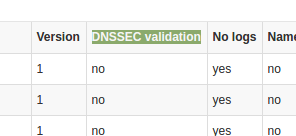
Okay, them I'm most likely not getting there for another reason... I cannot use DNSSEC enabled servers at my current location (have to take what I get, all other upstream DNS servers are blocked and I cannot change that).
I looked at this column:
---
### Author:  [@jpgpi250](https://discourse.pi-hole.net/u/jpgpi250)
#### Post date: [January 26, 2017, 9:25am UTC](https://discourse.pi-hole.net/t/running-dnscrypt-and-dnssec/1463/5 "2017-01-26T09:25:07Z")
I was looking at the pihole log, to figure out if DNSSEC was actually working and found the following entries:
`Jan 26 08:07:47 dnsmasq[16477]: reply cloudflare.com is BOGUS DNSKEY`
`Jan 26 08:07:47 dnsmasq[16477]: validation result is BOGUS`
google turned up [this](http://serverfault.com/questions/720293/dnsmasq-returns-false-bogus-result-for-dnssec-validation) alarming (to me) document, containing the exact same log entries and this explanation:
Dnsmasq has implemented ECDSA since 2.69, however it was broken and not fixed until 2.73
Unfortunately, a fully updated Raspbian Jessie Lite comes with version 2.72, thus **without** the fix (Fix broken DNSSEC validation of ECDSA signatures).
NOT quite sure if implementing DNSSEC is beneficial for pihole at this stage...
So I decided to jump in, after making a backup image of my SD card.
Found [this](http://stackoverflow.com/questions/25722914/how-can-i-get-dnsmasq-version-2-63-in-ubuntu-12-04-lts) document, on how to upgrade dnsmasq.
Unfortunately, this guide installs a new version of dnsmasq in /usr/local/sbin (the raspbian version is installed in /usr/sbin), the packages aren't compiled with the DNSSEC option.
Searching the debian packages, I found dnsmasq\_2.76-5\_all.deb [here](https://packages.debian.org/stretch/all/dnsmasq/download), not quite sure how to proceed...
---
### Author:  [@DL6ER](https://discourse.pi-hole.net/u/DL6ER)
#### Post date: [January 26, 2017, 11:24am UTC](https://discourse.pi-hole.net/t/running-dnscrypt-and-dnssec/1463/6 "2017-01-26T11:24:34Z")
Yeah, I'm also running a customized version of `dnsmasq` (modified with some fancy extra stuff for Pi-hole) at home which is also compiled from source and up-to-date with their `development` version. So you might have a good point there.
---
### Author:  [@jpgpi250](https://discourse.pi-hole.net/u/jpgpi250)
#### Post date: [January 28, 2017, 2:58pm UTC](https://discourse.pi-hole.net/t/running-dnscrypt-and-dnssec/1463/7 "2017-01-28T14:58:54Z")
`` You can still use this method to upgrade packages from stretch, however I found that dnsmasq version 2.76-5 also has a DNSSEC problem. There is a solution for this, you can read it [here](https://discourse.pi-hole.net/t/the-truth-about-dnscrypt-proxy-and-dnssec/1694). ``
I found a way to upgrade dnsmasq on raspbian jessie lite, already running pi-hole and dnscrypt-proxy.
**WARNING** : Don't do this if you're not willing to run anything else but the stable build!!!
before you start the upgrade, run sudo apt-get update && sudo apt-get -y upgrade
step 1: follow the instructions in [this](http://raspberrypi.stackexchange.com/questions/59435/how-to-use-stretch-testing-packages) document, replace the apt-get instruction with the following:
**sudo apt-get install --only-upgrade dnsmasq -t stretch**
select N to keep the original configuration file when asked!
step 2: as soon as the upgrade is completed, **remove the 4 files** you created and run **sudo apt-get update** again.
step 3: reboot your pi
You can verify dnsmasq has been upgraded by searching the pihole log ("started, version 2.") The latest entry (today) reads `dnsmasq[2149]: started, version 2.76 cachesize 10000` while the original entries are `dnsmasq[462]: started, version 2.72 cachesize 10000`
If you are installing fresh (new jessie image, pihole not yet installed), you're better of installing the upgraded dnsmasq before you install pihole. The apt-get instruction to use in this case:
**sudo apt-get install dnsmasq -t stretch**
remember to remove the 4 files and sudo apt-get update again!
You need to enable DNSSEC by editing /etc/dnsmasq.d/01-pihole.conf, the required entries can be found [here](https://github.com/pi-hole/pi-hole/pull/1158/files) (file advanced/Scripts/webpage.sh)
I'm still not convinced this is worth the effort, as hardly any domains seems to be DNSSEC enabled (check the pihole log)
---
### Author:  [@Tntdruid](https://discourse.pi-hole.net/u/Tntdruid)
#### Post date: [February 18, 2017, 1:59pm UTC](https://discourse.pi-hole.net/t/running-dnscrypt-and-dnssec/1463/8 "2017-02-18T13:59:27Z")
pi@raspberrypi:~ $ sudo apt-get install --only-upgrade dnsmasq -t stretch
Reading package lists... Done
E: The value 'stretch' is invalid for APT::Default-Release as such a release is not available in the sources
---
### Author:  [@jpgpi250](https://discourse.pi-hole.net/u/jpgpi250)
#### Post date: [February 18, 2017, 2:42pm UTC](https://discourse.pi-hole.net/t/running-dnscrypt-and-dnssec/1463/9 "2017-02-18T14:42:25Z")
You need to follow the instructions in the [document](http://raspberrypi.stackexchange.com/questions/59435/how-to-use-stretch-testing-packages), e.g.:
- create the 4 files
- run sudo apt-get update
- run sudo apt-get install --only-upgrade dnsmasq -t stretch
- remove the 4 files
- run sudo apt-get update
I just did this an hour ago to find/test the problem you were having with dnsmasq, so this still works.