# Raspi Pi-hole not working / blocking at all
**URL:** https://discourse.pi-hole.net/t/raspi-pi-hole-not-working-blocking-at-all/57968
**Category:** Help
**Created:** [September 17, 2022, 9:38am UTC](https://discourse.pi-hole.net/t/raspi-pi-hole-not-working-blocking-at-all/57968 "2022-09-17T09:38:25Z")
**Posts on this page:** 15
**Page:** 1
### Author:  [@janvier123](https://discourse.pi-hole.net/u/janvier123)
#### Post date: [September 17, 2022, 9:38am UTC](https://discourse.pi-hole.net/t/raspi-pi-hole-not-working-blocking-at-all/57968/1 "2022-09-17T09:38:25Z")
Hi,
Ive been playing with pihole for over 2 weeks now and i cannot get my raspberry pi 3 (V2) with pihole installed to do anything at all. Ive googled for days trying all the settings, but nothing works, the pages still load like nothing has happened. So i followed the following tutorial =\> [https://www.youtube.com/watch?v=FnFtWsZ8IP0](https://www.youtube.com/watch?v=FnFtWsZ8IP0)
Here is what ive tried:
- change DNS (IPv4) settings in windows (old GUI) to 192.168.0.99
- change DNS (IPv4) settings in windows (new GUI) to 192.168.0.99
- change DNS (IPv6) settings in windows (old GUI) to 192.168.0.99
- change DNS (IPv6) settings in windows (new GUI) to 192.168.0.99
- disabled IPv6
- CMD =\> ipconfig /release then /renew
- cleared browser cache / settings / cookies
- rebooting pc
- rebooting PI
- reboorting DNS resolver
- using different computer
- Audit log does nothing at all, on chrome and ff
- FTL.log does nothing at all, on chrome and ff
- Query log shows BLOCKED (gravity)
- adding to a group in pihole
- adding a known website to pihole for blocking
- using a mobile phone (android)
- blocking domain "9gag.com" (as a test site) with and without regex
- using different browser: FireFox and Chrome
- switched DNS upstream from google to open dns
- installed with and without UNBOUND
- nslookup seems to work, but doesnt
```auto
C:\Windows\system32>nslookup 9gag.com
Server: pi.hole
Address: 192.168.0.99
Name: 9gag.com.home
Addresses: ::
0.0.0.0
```
However, All these options / settings have been used, but the page still loads with ads.
Using a windows 10 LTSC 21H2
My pc is directly connected to the providers cable modem. There is NOTHING i can change, yea i know.
## Debug Token: [https://tricorder.pi-hole.net/SKWzOLo3/](https://tricorder.pi-hole.net/SKWzOLo3/)
_ **Debug log contents removed by moderator.** _
Any help would be appreciated!
Thx
---
### Author:  [@janvier123](https://discourse.pi-hole.net/u/janvier123)
#### Post date: [September 22, 2022, 4:45pm UTC](https://discourse.pi-hole.net/t/raspi-pi-hole-not-working-blocking-at-all/57968/2 "2022-09-22T16:45:12Z")
Really no one?
---
### Author:  [@jfb](https://discourse.pi-hole.net/u/jfb)
#### Post date: [September 22, 2022, 4:58pm UTC](https://discourse.pi-hole.net/t/raspi-pi-hole-not-working-blocking-at-all/57968/3 "2022-09-22T16:58:27Z")
Please generate a fresh debug log, and post the token URL only (not the complete log as you did previously).
---
### Author:  [@janvier123](https://discourse.pi-hole.net/u/janvier123)
#### Post date: [September 22, 2022, 5:10pm UTC](https://discourse.pi-hole.net/t/raspi-pi-hole-not-working-blocking-at-all/57968/4 "2022-09-22T17:10:07Z")
_ **Debug log removed by moderator** _
[✓] Your debug token is: [https://tricorder.pi-hole.net/cLIwQh1j/](https://tricorder.pi-hole.net/cLIwQh1j/)
---
### Author:  [@jfb](https://discourse.pi-hole.net/u/jfb)
#### Post date: [September 22, 2022, 5:19pm UTC](https://discourse.pi-hole.net/t/raspi-pi-hole-not-working-blocking-at-all/57968/5 "2022-09-22T17:19:33Z")
> [@jfb](#):
>
> generate a fresh debug log, and post the token URL only
Which part of this did you not understand? Posting your log publicly (twice) is not doing any good to protect your privacy.
These are the first three lines of a debug log:
> This process collects information from your Pi-hole, and optionally uploads it to a unique and random directory on tricorder.pi-hole.net.
>
> The intent of this script is to allow users to self-diagnose their installations. This is accomplished by running tests against our software and providing the user with links to FAQ articles when a problem is detected. Since we are a small team and Pi-hole has been growing steadily, it is our hope that this will help us spend more time on development.
>
> NOTE: All log files auto-delete after 48 hours and ONLY the Pi-hole developers can access your data via the given token. We have taken these extra steps to secure your data and will work to further reduce any personal information gathered.
---
### Author:  [@jfb](https://discourse.pi-hole.net/u/jfb)
#### Post date: [September 22, 2022, 5:26pm UTC](https://discourse.pi-hole.net/t/raspi-pi-hole-not-working-blocking-at-all/57968/6 "2022-09-22T17:26:56Z")
Your debug log shows that Pi-hole is working properly at the following IP:
```auto
*** [DIAGNOSING]: Name resolution (IPv4) using a random blocked domain and a known ad-serving domain
[✓] impost.dellvery-45812.xyz is 0.0.0.0 on lo (127.0.0.1)
[✓] impost.dellvery-45812.xyz is 0.0.0.0 on eth0 (192.168.0.99)
[✓] doubleclick.com is 216.58.214.14 via a remote, public DNS server (8.8.8.8)
```
Your DHCP server (appears to be your router) is not distributing the IP of Pi-hole as DNS server:
```auto
*** [DIAGNOSING]: Discovering active DHCP servers (takes 10 seconds)
Scanning all your interfaces for DHCP servers
Timeout: 10 seconds
WARN: Could not sendto() in send_dhcp_discover() (/__w/FTL/FTL/src/dhcp-discover.c:233): Network is unreachable
* Received 548 bytes from eth0:192.168.0.1
Offered IP address: 192.168.0.156
Server IP address: 192.168.0.1
Relay-agent IP address: N/A
BOOTP server: (empty)
BOOTP file: (empty)
DHCP options:
Message type: DHCPOFFER (2)
server-identifier: 192.168.0.1
lease-time: 3600 ( 1h )
netmask: 255.255.255.0
router: 192.168.0.1
dns-server: 195.130.131.2
dns-server: 195.130.130.2
domain-name: "home"
default-ttl: 64
ntp-server: 195.130.132.20
ntp-server: 195.130.132.18
--- end of options ---
DHCP packets received on interface wlan0: 0
DHCP packets received on interface lo: 0
DHCP packets received on interface eth0: 1
```
From a client that you believe should be connected to the Pi-Hole for DNS (the Windows machine), from the command prompt or terminal on that client (and not via ssh or Putty to the Pi), what is the output of
`nslookup pi.hole`
`nslookup flurry.com`
`nslookup flurry.com 192.168.0.99`
If these show Pi-hole is answering the queries, then you need to look at other settings on the Windows machine. Browser set to private or secure DNS (which would bypass Pi-hole). Avast or other similar software. Any active VPN sessions, etc.
> [@janvier123](#):
>
> - slookup seems to work, but doesnt
>
> ```auto
> C:\Windows\system32>nslookup 9gag.com
> Server: pi.hole
> Address: 192.168.0.99
>
> Name: 9gag.com.home
> Addresses: ::
> 0.0.0.0
>
> ```
This was the correct and expected answer. Pi-hole blocked the domain per your blacklist.
---
### Author:  [@janvier123](https://discourse.pi-hole.net/u/janvier123)
#### Post date: [September 22, 2022, 5:32pm UTC](https://discourse.pi-hole.net/t/raspi-pi-hole-not-working-blocking-at-all/57968/7 "2022-09-22T17:32:03Z")
Sorry jfb
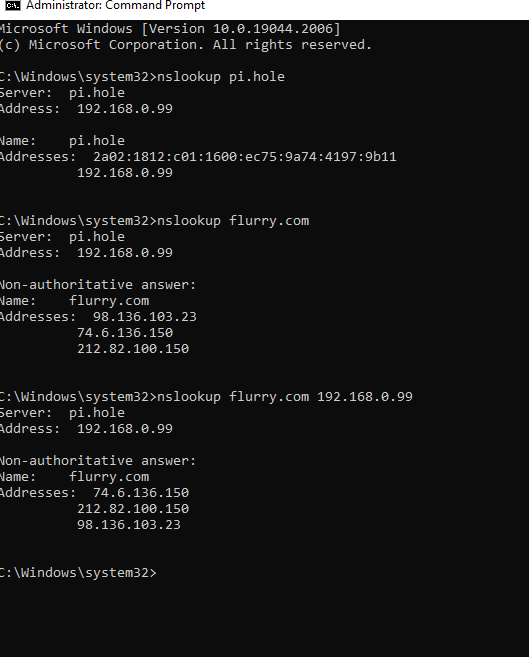
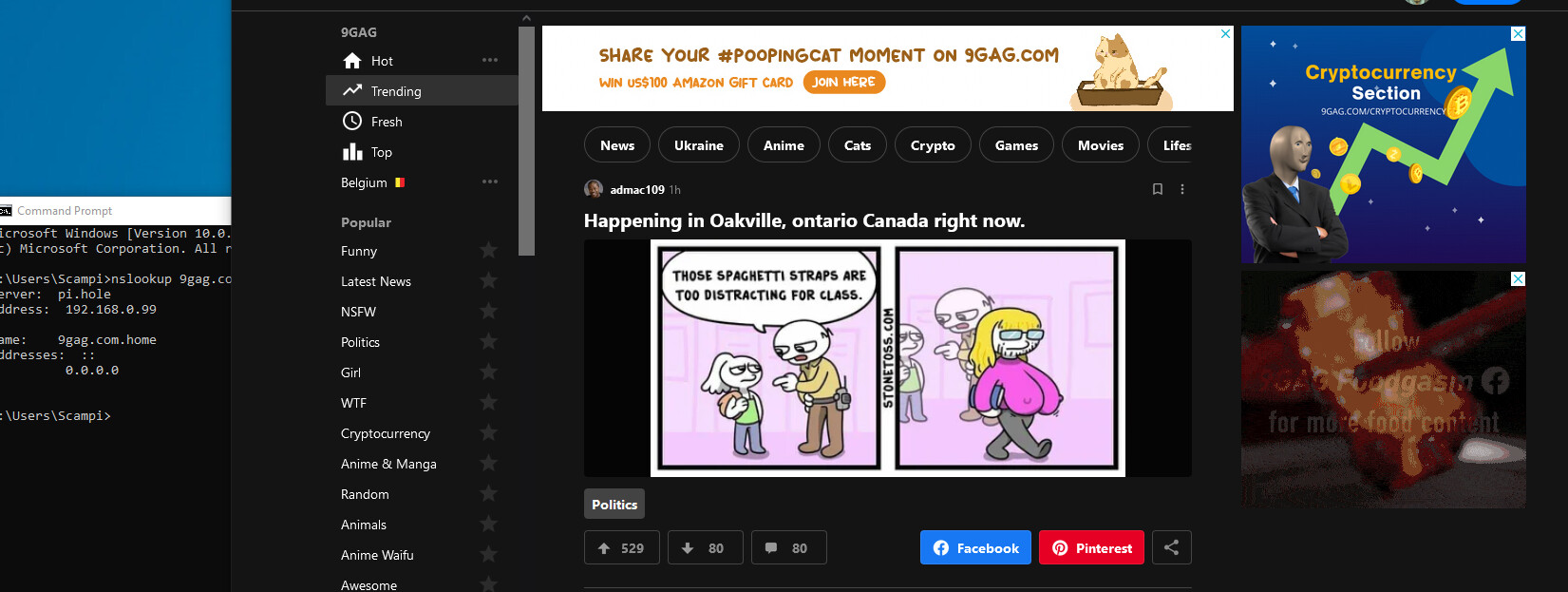
it all looks working, but CNN and other websites look exactly the same before and after pi-hole
and i cannot change anything on my router
---
### Author:  [@jfb](https://discourse.pi-hole.net/u/jfb)
#### Post date: [September 22, 2022, 5:34pm UTC](https://discourse.pi-hole.net/t/raspi-pi-hole-not-working-blocking-at-all/57968/8 "2022-09-22T17:34:44Z")
What is the output of the following commands from the Pi terminal
`sudo grep flurry.com /var/log/piholepihole.log`
`echo ">stats >quit" | nc localhost 4711`
---
### Author:  [@janvier123](https://discourse.pi-hole.net/u/janvier123)
#### Post date: [September 22, 2022, 5:35pm UTC](https://discourse.pi-hole.net/t/raspi-pi-hole-not-working-blocking-at-all/57968/9 "2022-09-22T17:35:59Z")
```auto
pi@pihole:~ $ sudo grep flurry.com /var/log/pihole.log
Sep 22 19:28:36 dnsmasq[15842]: query[A] flurry.com.home from 192.168.0.130
Sep 22 19:28:36 dnsmasq[15842]: forwarded flurry.com.home to 208.67.222.222
Sep 22 19:28:36 dnsmasq[15842]: reply flurry.com.home is NXDOMAIN
Sep 22 19:28:36 dnsmasq[15842]: query[AAAA] flurry.com.home from 192.168.0.130
Sep 22 19:28:36 dnsmasq[15842]: cached flurry.com.home is NXDOMAIN
Sep 22 19:28:42 dnsmasq[15842]: query[A] flurry.com.home from 192.168.0.130
Sep 22 19:28:42 dnsmasq[15842]: cached flurry.com.home is NXDOMAIN
Sep 22 19:28:42 dnsmasq[15842]: query[AAAA] flurry.com.home from 192.168.0.130
Sep 22 19:28:42 dnsmasq[15842]: cached flurry.com.home is NXDOMAIN
```
```auto
pi@pihole:~ $ echo ">stats >quit" | nc localhost 4711
domains_being_blocked 140907
dns_queries_today 411
ads_blocked_today 325
ads_percentage_today 79.075424
unique_domains 67
queries_forwarded 30
queries_cached 56
clients_ever_seen 6
unique_clients 6
dns_queries_all_types 411
reply_UNKNOWN 2
reply_NODATA 9
reply_NXDOMAIN 65
reply_CNAME 167
reply_IP 163
reply_DOMAIN 0
reply_RRNAME 5
reply_SERVFAIL 0
reply_REFUSED 0
reply_NOTIMP 0
reply_OTHER 0
reply_DNSSEC 0
reply_NONE 0
reply_BLOB 0
dns_queries_all_replies 411
privacy_level 0
status enabled
```
---
### Author:  [@jfb](https://discourse.pi-hole.net/u/jfb)
#### Post date: [September 22, 2022, 5:38pm UTC](https://discourse.pi-hole.net/t/raspi-pi-hole-not-working-blocking-at-all/57968/10 "2022-09-22T17:38:35Z")
> [@janvier123](#):
>
> ```auto
> pi@pihole:~ $ sudo grep flurry.com /var/log/pihole.log
> Sep 22 19:28:36 dnsmasq[15842]: query[A] flurry.com.home from 192.168.0.130
> Sep 22 19:28:36 dnsmasq[15842]: forwarded flurry.com.home to 208.67.222.222
> Sep 22 19:28:36 dnsmasq[15842]: reply flurry.com.home is NXDOMAIN
>
> ```
These log entries don't match what the client reported:
The Windows PC appears to adding your LAN domain name to the request. Instead of flurry.com that you typed, the log shows flurry.com.home.
I assume the PC is at IP 130?
---
### Author:  [@jfb](https://discourse.pi-hole.net/u/jfb)
#### Post date: [September 22, 2022, 5:39pm UTC](https://discourse.pi-hole.net/t/raspi-pi-hole-not-working-blocking-at-all/57968/11 "2022-09-22T17:39:41Z")
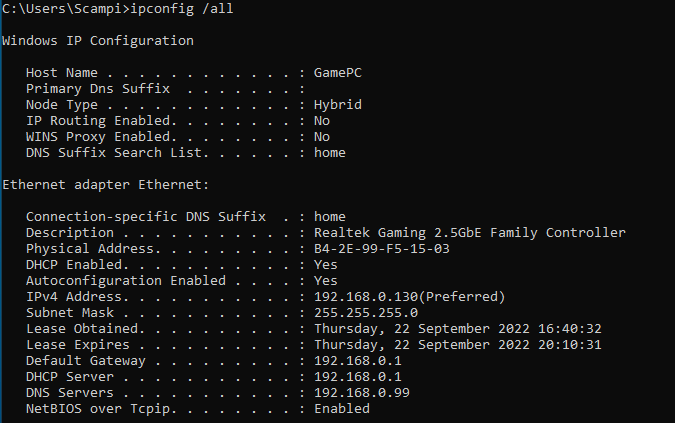
From the PC command prompt, what is the output of `ipconfig /all`
---
### Author:  [@janvier123](https://discourse.pi-hole.net/u/janvier123)
#### Post date: [September 22, 2022, 5:40pm UTC](https://discourse.pi-hole.net/t/raspi-pi-hole-not-working-blocking-at-all/57968/12 "2022-09-22T17:40:37Z")
Yes it is
---
### Author:  [@jfb](https://discourse.pi-hole.net/u/jfb)
#### Post date: [September 22, 2022, 7:30pm UTC](https://discourse.pi-hole.net/t/raspi-pi-hole-not-working-blocking-at-all/57968/16 "2022-09-22T19:30:04Z")
Check your PC - that appears to be where the problem lies. Any anti-virus packages employing features like AVG Secure DNS or AVAST Real-Site?
---
### Author:  [@janvier123](https://discourse.pi-hole.net/u/janvier123)
#### Post date: [September 22, 2022, 7:37pm UTC](https://discourse.pi-hole.net/t/raspi-pi-hole-not-working-blocking-at-all/57968/17 "2022-09-22T19:37:54Z")
Yes thats totaly worked for me ! Thx!!!! and thank you for your time!
I use AVG Internet Security (paid) and it seems that this setting was the issue
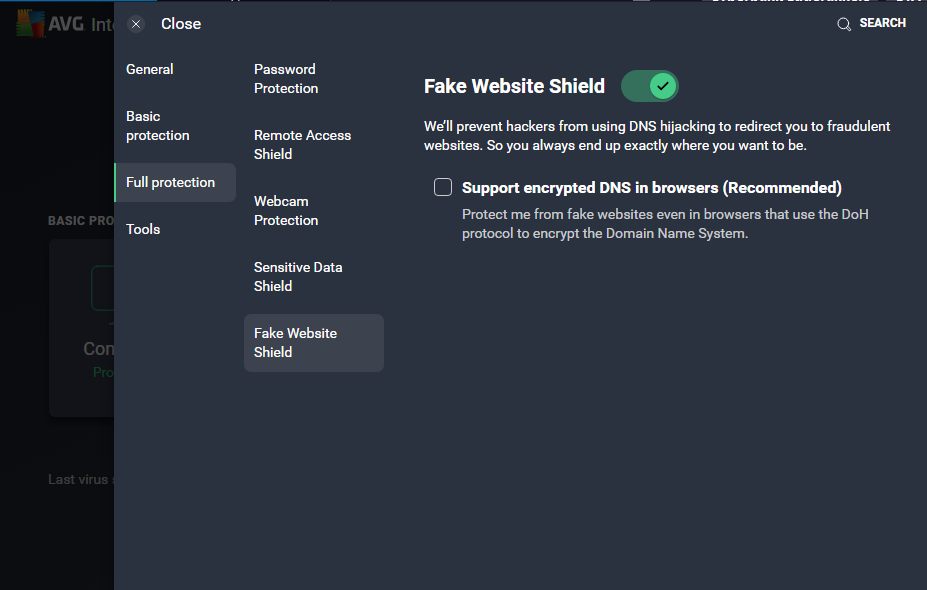
Fake Website Shield must be turned OFF
9gag shows as "cant connect to server"
---
### Author:  [@system](https://discourse.pi-hole.net/u/system)
#### Post date: [October 13, 2022, 7:47pm UTC](https://discourse.pi-hole.net/t/raspi-pi-hole-not-working-blocking-at-all/57968/19 "2022-10-13T19:47:24Z")
This topic was automatically closed 21 days after the last reply. New replies are no longer allowed.