# PiHole with OpenVPN the easy way — use PiVPN
**URL:** https://discourse.pi-hole.net/t/pihole-with-openvpn-the-easy-way-use-pivpn/7912
**Category:** Community How-to's
**Created:** [March 11, 2018, 10:09pm UTC](https://discourse.pi-hole.net/t/pihole-with-openvpn-the-easy-way-use-pivpn/7912 "2018-03-11T22:09:28Z")
**Posts on this page:** 16
**Page:** 1
### Author:  [@FutureTense](https://discourse.pi-hole.net/u/FutureTense)
#### Post date: [March 11, 2018, 10:09pm UTC](https://discourse.pi-hole.net/t/pihole-with-openvpn-the-easy-way-use-pivpn/7912/1 "2018-03-11T22:09:28Z")
I’ve setup PiHole and OpenVPN several times on devices like RaspberryPI and Odroid64. OpenVPN is usually the tricker part to get right. What I’ve found that works best is to first install PiHole, then use [PiVPN](http://www.pivpn.io) to setup OpenVPN. It is by far the easiest way to install OpenVPN. After you’ve installed it, however you will need to make one modification:
Open **/etc/openvpn/server.conf** and add the following line (substitute the IP of your PiHole device):
> push "dhcp-option DNS 172.16.0.75"
And then comment out (using #) every other **push “dhcp-option”** line.
This will force OpenVPN to use **only** PiHole as your DNS server.
If you want to create static entries for machines in your network (this is very helpful for windows machines) modify **/etc/hosts** and add your entries there:
> 172.16.0.6 MyMachine
In order to make sure your hard-wired DNS entries respond appropriately for both inside the network, and via an OpenVPN connection, go to PiHole settings and on the DNS tab make sure that under **Interface listening behavior** you select the radio button **listen on all interfaces** and uncheck all entries on **Advanced DNS Settings**
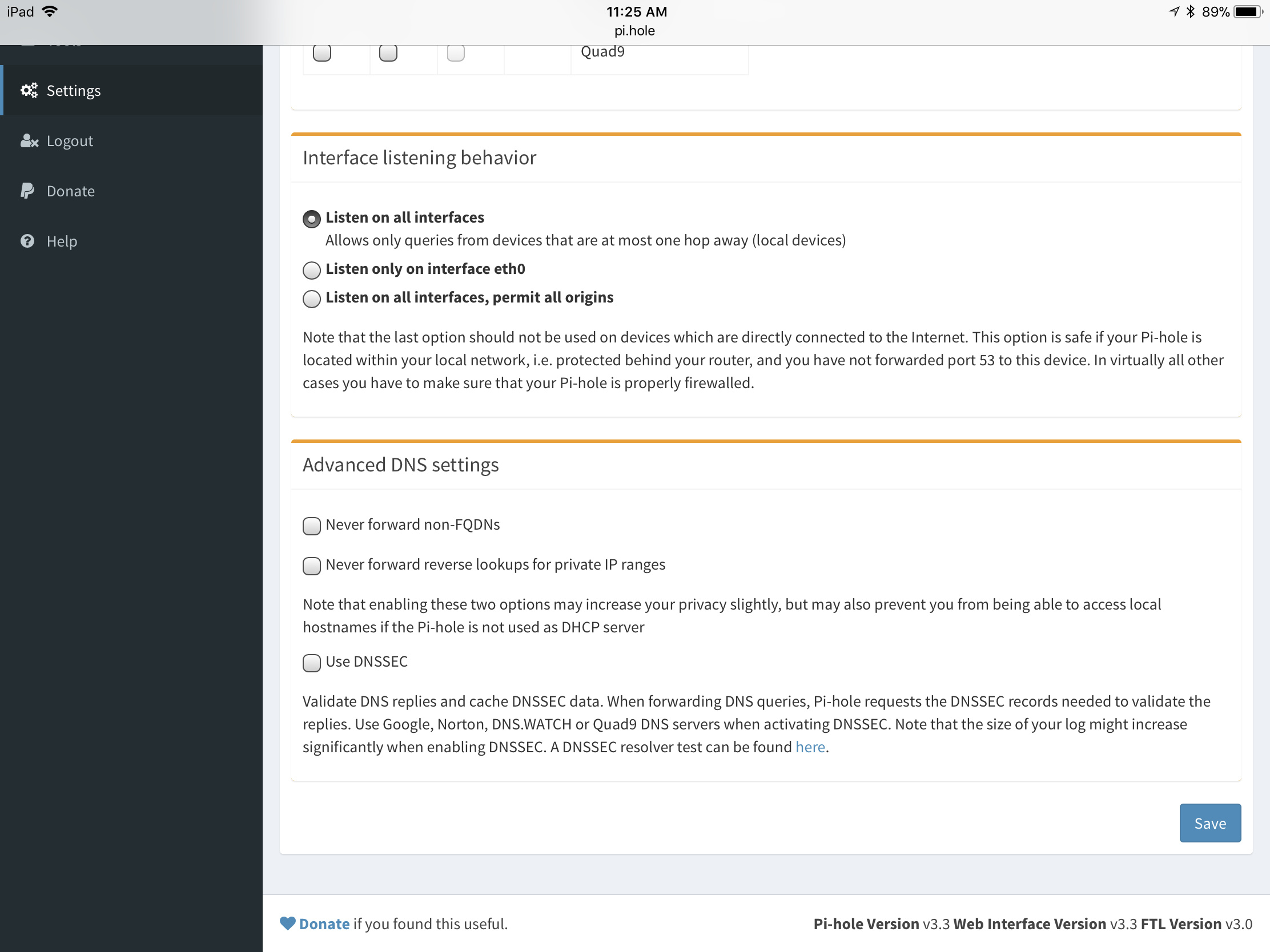
Now go to your router and change your DNS settings so that it points to **only** your PiHole server. Every client that connects from inside your network, or the OpenVPN tunnel will now use PiHole for DNS queries which allows you to use these DNS entires. Additionally even your OpenVPN clients will now have the benefit of PiHole blocking ads.
---
### Author:  [@Mcat12](https://discourse.pi-hole.net/u/Mcat12)
#### Post date: [December 9, 2018, 9:15pm UTC](https://discourse.pi-hole.net/t/pihole-with-openvpn-the-easy-way-use-pivpn/7912/2 "2018-12-09T21:15:53Z")
13 posts were split to a new topic: [Unable to resolve external domains through VPN Cloudflared](https://discourse.pi-hole.net/t/unable-to-resolve-external-domains-through-vpn-cloudflared/14992)
---
### Author:  [@bucefalo2](https://discourse.pi-hole.net/u/bucefalo2)
#### Post date: [August 19, 2020, 7:53am UTC](https://discourse.pi-hole.net/t/pihole-with-openvpn-the-easy-way-use-pivpn/7912/3 "2020-08-19T07:53:21Z")
this is really what I wanted to do.. I'll try it later today, thank you
---
### Author:  [@zwu](https://discourse.pi-hole.net/u/zwu)
#### Post date: [November 16, 2020, 11:54pm UTC](https://discourse.pi-hole.net/t/pihole-with-openvpn-the-easy-way-use-pivpn/7912/4 "2020-11-16T23:54:12Z")
I installed Pi-hole, then PiVPN. Both followed the default settings. And changed \*\* **/etc/openvpn/server.conf** file as you suggested.
Now I could connect Pi-hole from another machine, but my OpenVPN cannot be connected.
Any suggestions?
---
### Author:  [@HvdW](https://discourse.pi-hole.net/u/HvdW)
#### Post date: [November 17, 2020, 12:02am UTC](https://discourse.pi-hole.net/t/pihole-with-openvpn-the-easy-way-use-pivpn/7912/5 "2020-11-17T00:02:48Z")
The easy way nowadays is PiHole and the PiVPN with WireGuard option.
OpenVpn is so 2019.
---
### Author:  [@zwu](https://discourse.pi-hole.net/u/zwu)
#### Post date: [November 17, 2020, 3:06am UTC](https://discourse.pi-hole.net/t/pihole-with-openvpn-the-easy-way-use-pivpn/7912/6 "2020-11-17T03:06:27Z")
Hi there,
I set up PiVPN with the WireGuard option now.
Seems I could not connect to the Internet when the VPN was connected.
Any tips on setting it up?
Best regards,
---
### Author:  [@HvdW](https://discourse.pi-hole.net/u/HvdW)
#### Post date: [November 17, 2020, 10:38am UTC](https://discourse.pi-hole.net/t/pihole-with-openvpn-the-easy-way-use-pivpn/7912/7 "2020-11-17T10:38:36Z")
Did you portforward port 51820 to your RPI?
First make an instance VPN if that does not exist in your router, else adapt that instance
Protocol UDP start port 51820, end port 51820
Then create a new item that points to your RPI IP.
Make it use the VPN instance you just created.
It's a 2 stage setup on most routers.
Let PiVPN be on IPv4 only on your router as well
For troubleshooting switch off IPtables or UFW because it can obstruct.
---
### Author:  [@zwu](https://discourse.pi-hole.net/u/zwu)
#### Post date: [December 25, 2020, 11:44pm UTC](https://discourse.pi-hole.net/t/pihole-with-openvpn-the-easy-way-use-pivpn/7912/9 "2020-12-25T23:44:57Z")
Is there a way to set up an instance VPN on the university eduroam network?
Merry Christmas.
---
### Author:  [@zwu](https://discourse.pi-hole.net/u/zwu)
#### Post date: [December 25, 2020, 11:57pm UTC](https://discourse.pi-hole.net/t/pihole-with-openvpn-the-easy-way-use-pivpn/7912/11 "2020-12-25T23:57:23Z")
Ahhh, seems right now I could only connect wireguard VPN when I use the school network hhh
---
### Author:  [@smilorel](https://discourse.pi-hole.net/u/smilorel)
#### Post date: [March 14, 2021, 10:15am UTC](https://discourse.pi-hole.net/t/pihole-with-openvpn-the-easy-way-use-pivpn/7912/13 "2021-03-14T10:15:08Z")
Hi All,
I'm trying to install OpenVPN and PiHole on my Raspberry Pi 4. I read a lot of tutorials but I never reach to a good functioning. I mean, after installation step, I have my OpenVPN which works well on my Raspberry (I don't see my Public IP address). On my Windows computer (after setting of the DNS Address) I can see my Pi Hole console which works fine (ads are blocked!) but I see my public IP address.
Is there an explanation ? Could someone tell me what I'm missing ?
P.S : I tried this tutorial : [Raspberry Pi 4 with Pi-Hole, OpenVPN and DNSCrypt (itchy.nl)](https://www.itchy.nl/raspberry-pi-4-with-openvpn-pihole-dnscrypt/)
Many thanks.
Smilorel
---
### Author:  [@zwu](https://discourse.pi-hole.net/u/zwu)
#### Post date: [July 31, 2021, 8:26pm UTC](https://discourse.pi-hole.net/t/pihole-with-openvpn-the-easy-way-use-pivpn/7912/14 "2021-07-31T20:26:53Z")
Hi HvdW,
It has external IP, start port, and end port.
Also a local IP, start port, and end port.
What should I fill in these?
Best,
---
### Author:  [@HvdW](https://discourse.pi-hole.net/u/HvdW)
#### Post date: [August 1, 2021, 8:51am UTC](https://discourse.pi-hole.net/t/pihole-with-openvpn-the-easy-way-use-pivpn/7912/15 "2021-08-01T08:51:23Z")
All equal to the port you have chosen.
IP the IP from your RPI.
---
### Author:  [@DJ-BrianC](https://discourse.pi-hole.net/u/DJ-BrianC)
#### Post date: [August 9, 2021, 1:04am UTC](https://discourse.pi-hole.net/t/pihole-with-openvpn-the-easy-way-use-pivpn/7912/16 "2021-08-09T01:04:05Z")
I don't understand why you would do this raspberry pi is so underpowered.
---
### Author:  [@jfb](https://discourse.pi-hole.net/u/jfb)
#### Post date: [August 9, 2021, 4:23am UTC](https://discourse.pi-hole.net/t/pihole-with-openvpn-the-easy-way-use-pivpn/7912/17 "2021-08-09T04:23:33Z")
> [@DJ-BrianC](#):
>
> raspberry pi is so underpowered.
A Pi 4 can easily handle this.
---
### Author:  [@zwu](https://discourse.pi-hole.net/u/zwu)
#### Post date: [August 12, 2021, 2:24pm UTC](https://discourse.pi-hole.net/t/pihole-with-openvpn-the-easy-way-use-pivpn/7912/18 "2021-08-12T14:24:42Z")
Hey HvdW,
I reconfigured PiVPN, chose WireGuard, for the port forward part. Should I fill in the public IP or the 192.168... address?
Also, my pihole failed to work after PiVPN was installed every time. Here is the debug log for pihole: [https://tricorder.pi-hole.net/yUGdz6lW/](https://tricorder.pi-hole.net/yUGdz6lW/)
After restartdns, the pihole part works well. Though still, the wireguard does not work.
# Here is the PiVPN debug log: pi@raspberrypi:~ $ pivpn -d ::: Generating Debug Output :::: PiVPN debug ::::
# :::: Latest commit :::: Branch: master Commit: 027f257931d1f169e254def5d1552d55810fefda Author: 4s3ti Date: Thu Aug 5 15:12:33 2021 +0200 Summary: Latest Changes update.
# :::: Installation settings :::: PLAT=Raspbian OSCN=buster USING\_UFW=0 IPv4dev=eth0 IPv4addr=192.168.0.12/24 IPv4gw=192.168.0.1 install\_user=pi install\_home=/home/pi VPN=wireguard pivpnPORT=51820 pivpnDNS1=10.6.0.1 pivpnDNS2= pivpnHOST=REDACTED INPUT\_CHAIN\_EDITED=0 FORWARD\_CHAIN\_EDITED=0 pivpnPROTO=udp pivpnMTU=1420 pivpnDEV=wg0 pivpnNET=10.6.0.0 subnetClass=24 ALLOWED\_IPS="0.0.0.0/0, ::0/0" UNATTUPG=1 INSTALLED\_PACKAGES=(iptables-persistent)
:::: Server configuration shown below ::::
[Interface]
PrivateKey = server\_priv
Address = 10.6.0.1/24
MTU = 1420
ListenPort = 51820
### begin mbp
[Peer]
PublicKey = mbp\_pub
PresharedKey = mbp\_psk
AllowedIPs = 10.6.0.2/32
### end mbp
=============================================
:::: Client configuration shown below ::::
[Interface]
PrivateKey = mbp\_priv
Address = 10.6.0.2/24
MTU = 1420
DNS = 10.6.0.1
# [Peer] PublicKey = server\_pub PresharedKey = mbp\_psk Endpoint = REDACTED:51820 AllowedIPs = 0.0.0.0/0, ::0/0
:::: Recursive list of files in ::::
::::[4m/etc/wireguard shown below ::::
/etc/wireguard:
configs
keys
wg0.conf
/etc/wireguard/configs:
clients.txt
mbp.conf
# /etc/wireguard/keys: mbp\_priv mbp\_psk mbp\_pub server\_priv server\_pub
# :::: Self check :::: :: [OK] IP forwarding is enabled :: [OK] Iptables MASQUERADE rule set :: [OK] WireGuard is running :: [OK] WireGuard is enabled (it will automatically start on reboot) :: [OK] WireGuard is listening on port 51820/udp
# :::: Having trouble connecting? Take a look at the FAQ: :::: [https://docs.pivpn.io/faq](https://docs.pivpn.io/faq)
# :::: WARNING: This script should have automatically masked sensitive :::: :::: information, however, still make sure that PrivateKey, PublicKey :::: :::: and PresharedKey are masked before reporting an issue. An example key :::: :::: that you should NOT see in this log looks like this: :::: :::: YIAoJVsdIeyvXfGGDDadHh6AxsMRymZTnnzZoAb9cxRe ::::
:::: Debug complete ::::
:::
::: Debug output completed above.
::: Copy saved to /tmp/debug.log
:::
Best,
zwu
---
### Author:  [@HvdW](https://discourse.pi-hole.net/u/HvdW)
#### Post date: [August 12, 2021, 7:53pm UTC](https://discourse.pi-hole.net/t/pihole-with-openvpn-the-easy-way-use-pivpn/7912/19 "2021-08-12T19:53:17Z")
The 192
However it will all be filled in auto by the setup.
Just confirm IP internal, external and suggested port.
On your router forward UDP suggested port from external to the 192 internal.
Ask again if you cannot find it.
Often YouTube is a great resource.
Regards.