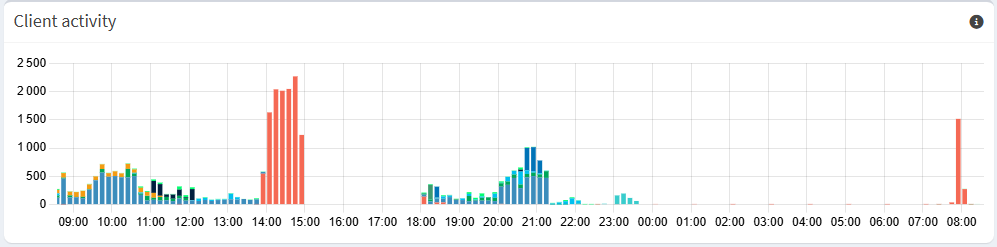
Around 2pm, the whole connection in the house went down (I was not there so I don’t know what happened) so we had to disconnect the pi-hole and only then we could access the web interface for the ISP’s box (through ipv6 I guess because every device had lost its ipv4 adress) and reenable its dhcp. Then everything worked without pi-hole until I came back. (and powered the rapsberry on again and disabled the IPS’s dhcp)
(I then installed unbound so it might have changed how the error works but I’m new to this)
This time around 00:30, it lost its connection again, which did not come back for the whole night. You could access some websites but only the one that were already visited. The spike for requests happened (I think) when I removed the ethernet connection.
Debug Token:
I have the logs but no tokens. (and only for the 2nd time it broke) (srry for this)
I set a static IP to the raspberry through the ISP. But because after the error it had lost its ip I used the following commands (in addition to the ISP's settings) and it worked.
sudo nmcli con mod "Wired connection 1" ipv4.addresses 192.168.1.200/24
sudo nmcli con mod "Wired connection 1" ipv4.gateway 192.168.1.254
sudo nmcli con mod "Wired connection 1" ipv4.dns "127.0.0.1#5335"
sudo nmcli con mod "Wired connection 1" ipv4.method manual
I don't know if this lasts after updates.
And since then no error (without ipv6 dhcp).
Maybe this comes from the ipv6 (I had ipv6 dhcp enabled without using a static ipv6 so I'll try to give it one, it should help)
When you run pihole -d the log is created. In the end of the process, you will be asked to upload the log.
If you answer Y the log will be uploaded to Pi-hole server.
Only team members will have access to your log (not even you will access it) and it will be deleted after 48h.
On the other hand, if you upload your log to Pastebin, your log will be public. Even with a password, any one reading this topic will be able to see the contents of your log. Not sure how long it will be available, but probably a lot more than 48h.
We recommend to upload the log answering Y, to increase privacy.
Quick update : everything works now and there have been no errors for more than a week
The ipv6 address never changes and nothing breaks.
Just noting that after updating I lost all of my settings (for example DHCP was disabled) and I had to rewrite the custom DNS server address etc. in the web interface.
I don't think this is normal but for now I just won't update anything.