# Pi-hole not working properly
**URL:** https://discourse.pi-hole.net/t/pi-hole-not-working-properly/26828
**Category:** Help
**Created:** [January 11, 2020, 2:17pm UTC](https://discourse.pi-hole.net/t/pi-hole-not-working-properly/26828 "2020-01-11T14:17:40Z")
**Posts on this page:** 20
**Page:** 2
### Author:  [@Bucking\_Horn](https://discourse.pi-hole.net/u/Bucking_Horn)
#### Post date: [January 12, 2020, 3:11pm UTC](https://discourse.pi-hole.net/t/pi-hole-not-working-properly/26828/21 "2020-01-12T15:11:18Z")
> [@Zythoxic](#):
>
> I have my Raspberry connected via WLAN.
Let's verify Pi-hole is configured for using its WLAN interface:
```auto
grep "interface" --include=\*.conf -rn /etc/dnsmasq.d/
```
---
### Author:  [@Zythoxic](https://discourse.pi-hole.net/u/Zythoxic)
#### Post date: [January 12, 2020, 3:11pm UTC](https://discourse.pi-hole.net/t/pi-hole-not-working-properly/26828/22 "2020-01-12T15:11:58Z")
> [@Bucking\_Horn](#):
>
> grep "interface" --include=\*.conf -rn /etc/dnsmasq.d/
```auto
pi@raspberrypi:~ $ grep "interface" --include=\*.conf -rn /etc/dnsmasq.d/
/etc/dnsmasq.d/01-pihole.conf:50:interface=wlan0
```
---
### Author:  [@Bucking\_Horn](https://discourse.pi-hole.net/u/Bucking_Horn)
#### Post date: [January 12, 2020, 3:17pm UTC](https://discourse.pi-hole.net/t/pi-hole-not-working-properly/26828/23 "2020-01-12T15:17:05Z")
Good, let's check ports next:
```auto
sudo netstat -tulpn | grep :53
```
---
### Author:  [@Zythoxic](https://discourse.pi-hole.net/u/Zythoxic)
#### Post date: [January 12, 2020, 3:19pm UTC](https://discourse.pi-hole.net/t/pi-hole-not-working-properly/26828/24 "2020-01-12T15:19:16Z")
```auto
pi@raspberrypi:~ $ sudo netstat -tulpn | grep :53
tcp 0 0 0.0.0.0:53 0.0.0.0:* LISTEN 5772/pihole-FTL
tcp6 0 0 :::53 :::* LISTEN 5772/pihole-FTL
udp 0 0 0.0.0.0:5353 0.0.0.0:* 518/avahi-daemon: r
udp 0 0 0.0.0.0:53 0.0.0.0:* 5772/pihole-FTL
udp6 0 0 :::5353 :::* 518/avahi-daemon: r
udp6 0 0 :::53 :::* 5772/pihole-FTL
```
---
### Author:  [@Bucking\_Horn](https://discourse.pi-hole.net/u/Bucking_Horn)
#### Post date: [January 12, 2020, 3:35pm UTC](https://discourse.pi-hole.net/t/pi-hole-not-working-properly/26828/25 "2020-01-12T15:35:32Z")
I summarize what we have established so far:
Your Pi-hole is up and running at `192.168.178.46`, it is correctly configured to listen on its wlan0 interface and showing no signs of port conflicts.
Your FB is set to distribute `192.168.178.46` as _local_ DNS server to its DHCP clients via **Heimnetz| Netzwerk | Netzwerkeinstellungen | IPv4-Adressen**
Your FB is also configured set to use its default ISP-provided DNS servers as _upstream_ DNS servers via **Internet | Zugangsdaten | DNS-Server**. Specifically, Pi-hole is **not** set anywhere under this settings.
Or isn't it? I am not entirely sure, based on your previous posts.
---
### Author:  [@Zythoxic](https://discourse.pi-hole.net/u/Zythoxic)
#### Post date: [January 12, 2020, 3:38pm UTC](https://discourse.pi-hole.net/t/pi-hole-not-working-properly/26828/26 "2020-01-12T15:38:43Z")
For the last one, i tried the default, the 1.1.1.1 / 1.0.0.1 and the 192.168.178.46. Right now it's set to the Pi Hole IP (192.168.178.46)
---
### Author:  [@Bucking\_Horn](https://discourse.pi-hole.net/u/Bucking_Horn)
#### Post date: [January 12, 2020, 3:43pm UTC](https://discourse.pi-hole.net/t/pi-hole-not-working-properly/26828/27 "2020-01-12T15:43:19Z")
If by _last one_ you are referring to the FB upstream DNS servers:
That might create a DNS loop, having FB and Pi-hole forwarding to each other request after request...
Remove Pi-hole from **Internet | Zugangsdaten | DNS-Server** for a test.
---
### Author:  [@Zythoxic](https://discourse.pi-hole.net/u/Zythoxic)
#### Post date: [January 12, 2020, 3:45pm UTC](https://discourse.pi-hole.net/t/pi-hole-not-working-properly/26828/28 "2020-01-12T15:45:48Z")
Okay so it's just supposed to use the default ISP? I've done that now. And it should work like this?
---
### Author:  [@Bucking\_Horn](https://discourse.pi-hole.net/u/Bucking_Horn)
#### Post date: [January 12, 2020, 3:49pm UTC](https://discourse.pi-hole.net/t/pi-hole-not-working-properly/26828/29 "2020-01-12T15:49:25Z")
Yes, if you configured your FB accordingly.
Note your clients may still stick to their known old settings, so have them disconnect or reconnect, either by switching WLAN on and off, switch them on and off entirely or (on Windows machines) force lease renewal by `ipconfig /renew`.
---
### Author:  [@Zythoxic](https://discourse.pi-hole.net/u/Zythoxic)
#### Post date: [January 12, 2020, 4:01pm UTC](https://discourse.pi-hole.net/t/pi-hole-not-working-properly/26828/30 "2020-01-12T16:01:41Z")
So, i tried both restarting my router and using ipconfig /renew.
My Internet on my PC (which is connected via LAN) stopped working again. On my phone it was still working fine through WLAN though. But ads were still not being blocked... Now i've set the Local DNS Server under **Heimnetz| Netzwerk | Netzwerkeinstellungen | IPv4-Adressen** back to the standard router address, and my PC Internet is working fine again, still not blocking ads though..
---
### Author:  [@Bucking\_Horn](https://discourse.pi-hole.net/u/Bucking_Horn)
#### Post date: [January 12, 2020, 4:15pm UTC](https://discourse.pi-hole.net/t/pi-hole-not-working-properly/26828/31 "2020-01-12T16:15:31Z")
> [@Zythoxic](#):
>
> My Internet on my PC (which is connected via LAN) stopped working again. On my phone it was still working fine through WLAN though.
This would hint at an issue with your PC.
Your working phone shows that the configuration is - well, working.
Anything special about your PC?
Firewall, Antivirus disagreeing with new DNS servers?
What happens if you manually configure just your PC to use Pi-hole as its DNS server?
---
### Author:  [@Zythoxic](https://discourse.pi-hole.net/u/Zythoxic)
#### Post date: [January 12, 2020, 4:18pm UTC](https://discourse.pi-hole.net/t/pi-hole-not-working-properly/26828/32 "2020-01-12T16:18:25Z")
But even if it's working on my phone, it doesn't seem to be blocking ads when I check on my Chrome app.
Just tried turning off the Windows Firewall, no changes. I don't use an Anti Virus. And manually configuring the PC to use the Pi Hole as DNS Server, still the same as before. No Internet connection available.
---
### Author:  [@Bucking\_Horn](https://discourse.pi-hole.net/u/Bucking_Horn)
#### Post date: [January 12, 2020, 4:54pm UTC](https://discourse.pi-hole.net/t/pi-hole-not-working-properly/26828/33 "2020-01-12T16:54:05Z")
> [@Zythoxic](#):
>
> My Internet on my PC (which is connected via LAN) stopped working again.
How does the Internet manifest itself as not working on your PC?
Where exactly do you get that information from?
What would `nslookup` return for `www.google.com` and `flurry.com` ?
---
### Author:  [@Zythoxic](https://discourse.pi-hole.net/u/Zythoxic)
#### Post date: [January 12, 2020, 4:54pm UTC](https://discourse.pi-hole.net/t/pi-hole-not-working-properly/26828/34 "2020-01-12T16:54:49Z")
If I try to open any website (YouTube, Google etc.) it loads for about 5 seconds and then tells me the page doesn't exist. (Opening in MS Edge)
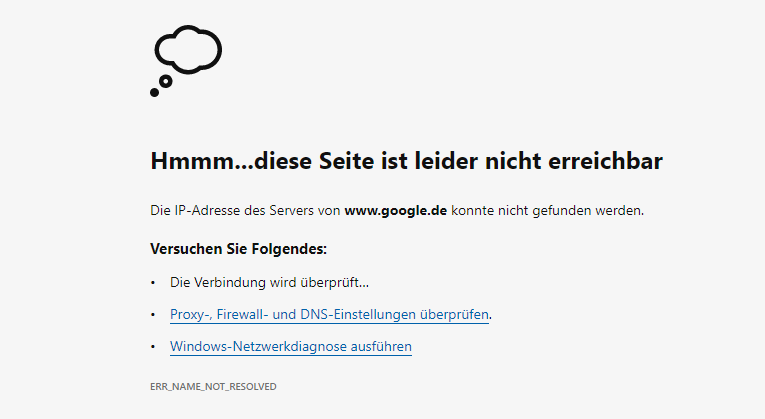
And the nslookup will return timeouts.
```auto
DNS request timed out.
timeout was 2 seconds.
Server: UnKnown
Address: 192.168.178.46
DNS request timed out.
timeout was 2 seconds.
DNS request timed out.
timeout was 2 seconds.
DNS request timed out.
timeout was 2 seconds.
DNS request timed out.
timeout was 2 seconds.
*** Zeitüberschreitung bei Anforderung an UnKnown.
```
---
### Author:  [@Bucking\_Horn](https://discourse.pi-hole.net/u/Bucking_Horn)
#### Post date: [January 12, 2020, 5:07pm UTC](https://discourse.pi-hole.net/t/pi-hole-not-working-properly/26828/35 "2020-01-12T17:07:49Z")
That's strange... name resolution is indeed failing on your PC.
From your PC with Pi-hole set as manual DNS, what does the following command yield ?
```auto
nslookup www.google.com 8.8.8.8
```
---
### Author:  [@Zythoxic](https://discourse.pi-hole.net/u/Zythoxic)
#### Post date: [January 12, 2020, 5:08pm UTC](https://discourse.pi-hole.net/t/pi-hole-not-working-properly/26828/36 "2020-01-12T17:08:32Z")
```auto
Server: dns.google
Address: 8.8.8.8
Nicht autorisierende Antwort:
Name: www.google.com
Addresses: 2a00:1450:4005:800::2004
216.58.213.228
```
---
### Author:  [@Bucking\_Horn](https://discourse.pi-hole.net/u/Bucking_Horn)
#### Post date: [January 12, 2020, 5:24pm UTC](https://discourse.pi-hole.net/t/pi-hole-not-working-properly/26828/37 "2020-01-12T17:24:55Z")
So directly asking a public name server (`8.8.8.8`) works from your PC.
Let's check whether requests from your PC reach Pi-hole:
On your Pi-hole machine, and assuming that your PC still resides at `.30`, run
```auto
tail -f /var/log/pihole.log | grep 192.168.178.30
```
Then, from your Windows PC at `.30`, run a ~~normal~~ nslookup **forced via Pi-hole** :
```auto
nslookup www.google.com 192.168.178.46
```
You should see that request showing up on your Pi-hole machine.
(You can terminate tail by pressing ``)
---
### Author:  [@Zythoxic](https://discourse.pi-hole.net/u/Zythoxic)
#### Post date: [January 12, 2020, 5:28pm UTC](https://discourse.pi-hole.net/t/pi-hole-not-working-properly/26828/38 "2020-01-12T17:28:26Z")
> [@Bucking\_Horn](#):
>
> nslookup www.google.com
The request doesn't show up on my Raspberry Pi. But my PC still resides at .30.
---
### Author:  [@Zythoxic](https://discourse.pi-hole.net/u/Zythoxic)
#### Post date: [January 12, 2020, 6:09pm UTC](https://discourse.pi-hole.net/t/pi-hole-not-working-properly/26828/39 "2020-01-12T18:09:18Z")
(Using the edited command)
Getting the same output as if I was using the Pi Hole as DNS. Time outs, and no requests shown on the Raspberry
---
### Author:  [@jfb](https://discourse.pi-hole.net/u/jfb)
#### Post date: [January 12, 2020, 6:09pm UTC](https://discourse.pi-hole.net/t/pi-hole-not-working-properly/26828/40 "2020-01-12T18:09:24Z")
Please generate a new debug log, upload it when prompted and post the token.
[Previous page](https://discourse.pi-hole.net/t/pi-hole-not-working-properly/26828.md?page=1)
[Next page](https://discourse.pi-hole.net/t/pi-hole-not-working-properly/26828.md?page=3)